

Learn what ERP systems are, how they work, and why companies eventually need them as they grow.
Any growing business eventually reaches a point where spreadsheets can no longer keep up with planning, control, reporting, and analytics. At that stage, operating without an ERP system becomes increasingly difficult.
ERP systems centralize and structure critical business data, helping organizations maintain efficient processes — even as they scale. Most business leaders have heard the term ERP, but not everyone fully understands the value these systems can bring. Let’s take a closer look.
Question 1: What Is an ERP System?
An ERP (Enterprise Resource Planning) system is essentially a single system in which a company manages its core operations — finance, sales, logistics, human resources management, and so on.
When a company is small, teams typically make do with spreadsheets or separate tools. But as the company grows, this system begins to fail. Different departments store their own data, often in different systems, and maintaining synchronization becomes increasingly difficult. Finance may see one set of numbers, while sales is working with another.
ERP brings all of this together. Instead of juggling data from multiple systems, you have everything in one place, with teams working off the same information. It won’t fix broken processes by itself, but it does make the business easier to run and removes a lot of guesswork.
Question 2: Why Are ERP Systems Important for Businesses?
Today, ERP systems are no longer something “nice to have”— for many companies, they’ve become a necessity. When a business starts thinking seriously about how it uses its resources, spreadsheets and disconnected tools just don’t cut it anymore.
ERP helps bring order to all of this. It allows companies to allocate people and budgets more deliberately and build processes that actually work without constantly overspending or sacrificing quality.
This is especially noticeable in planning. Take purchasing, for example. Instead of relying on gut feeling or outdated numbers, teams can see what’s actually in stock, check supplier offers, and plan ahead with a bit more confidence.
It also changes how teams work with each other. When everyone has access to the same up-to-date data, there’s less back-and-forth and fewer misunderstandings. People simply have more context and can coordinate without constant alignment meetings.
And maybe just as important — ERP helps make sense of all the data that’s already there. Instead of digging through scattered numbers, you get a clearer view of what’s going on, and it becomes easier to spot patterns or catch issues early.
Question 3: What Are the Key Functions of an ERP System?
ERP systems do a lot, but in practice, they just make running a business less chaotic by taking over routine tasks, keeping data in order, and making everyday work easier to handle.
Monitoring
ERP gives you a way to see what’s going on across the company — finance, logistics, HR, and other teams — all in one place. You don’t have to chase updates or piece things together manually.
Integration
One of the biggest changes is that systems stop living separately. ERP connects different parts of the IT landscape, so data flows between them instead of getting stuck in silos.
Automation
A lot of repetitive work can be handled by the system. This takes some pressure off teams and lets people focus on tasks that actually require attention and judgment.
Planning
Planning becomes more grounded in real data. Whether it’s production, sales, or budgets, ERP helps structure these processes and makes forecasting a bit less of a guessing game.
Data management
With an ERP system, data is all in one place, so employees don’t have to dig through multiple systems just to find the information they need.
Question 4: What Are the Benefits of Implementing an ERP System?
Different ERP systems come with different features, and companies adopt them for their own reasons. Still, there are a few benefits that almost always come up in practice.
Higher productivity
A lot of the routine work gets handled automatically, and processes stop feeling so chaotic. Teams spend less time on manual tasks and can simply get more done without needing extra resources.
More reliable data
Instead of having data scattered across different systems, everything is pulled into one place. This makes it easier to trust the numbers and base decisions on something consistent.
Faster reporting
Reports no longer take days to compile. Since data is updated automatically, you can get a clear picture of what’s going on much faster, often in real time.
Lower risk
With better visibility into processes, it’s easier to spot issues early, stay compliant, and avoid costly mistakes.
Flexibility
ERP systems make it easier to adjust processes as the business changes. You can tweak workflows, add new functionality, or scale operations without having to rebuild everything from scratch.
A couple of real examples of how ERP works in practice.
Migration to SAP S/4HANA for Eurasia GroupClientEurasia Group Kazakhstan, an official John Deere dealer in Kazakhstan and Kyrgyzstan, with over 20 years on the market. Challenges
Results after SAP S/4HANA implementation
|
SAP S/4HANA implementation for an automotive parts manufacturerClientA large company producing and distributing automotive spare parts Goals
Results
|
Question 5: What Components Does an ERP System Include?
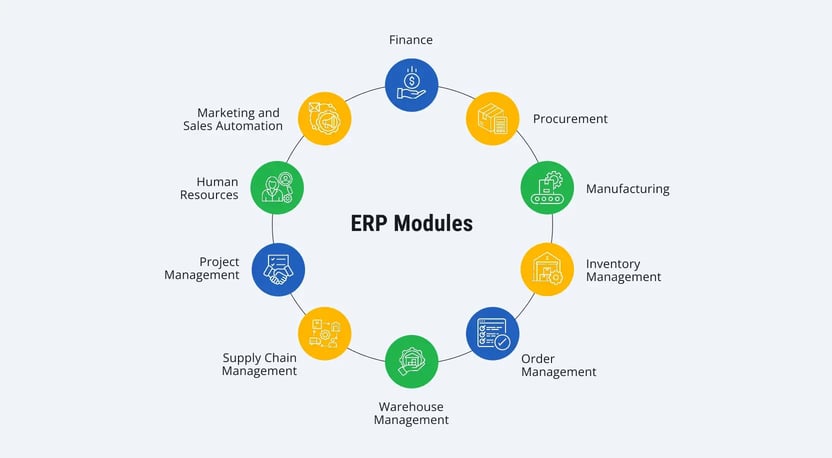
ERP systems are usually built from modules — each one covers a specific area of the business, like finance, procurement, production, or HR. Companies can use only what they need, but most systems include a similar core set.
Finance
This is the backbone of any ERP. It handles things like the general ledger, transactions, reconciliations, and reporting, basically everything related to the company’s finances.
Procurement
Helps manage purchasing, whether it’s raw materials or finished goods. It also takes care of things like requests for quotes and purchase orders, making the whole process more predictable and less error-prone.
Manufacturing
Supports production planning and coordination, helping companies keep output aligned with actual demand instead of over- or underproducing.
Inventory management
Gives a real-time view of stock levels and helps track key inventory metrics, so you’re not guessing what’s available.
Order management
Tracks customer orders as they come in, helps prioritize them, and keeps things moving through delivery, reducing the risk of delays.
Warehouse management
Covers day-to-day warehouse operations — receiving, picking, packing, and shipping — and helps improve the efficiency of these processes.
Supply chain management
Makes sure materials and products are where they’re needed, when they’re needed.
Project management
Useful for planning and tracking projects: time, resources, progress. It also makes collaboration easier and simplifies things like billing.
Human resources (HR)
Stores employee data and helps track things like time off, performance, and workforce trends across the company.
Marketing automation
Supports marketing activities across digital channels and helps tailor communication. In practice, it’s used to generate leads, support sales, and keep customers engaged.
Question 6: What Types of ERP Systems Are There?
There are four main ways companies set up ERP systems. Which one they choose usually comes down to how much control they want, how fast they plan to grow, and how their IT is set up today.
On-premises ERP
This is the traditional approach, where the system is hosted on the company’s own servers. It gives you full control but also means you’re responsible for keeping everything up and running.
Cloud ERP
Here, the system runs on a provider’s servers and is accessed via the internet (typically as SaaS). The vendor handles maintenance and security. This is the most common option today; it’s quicker to launch, easier to scale, and doesn’t require heavy upfront investment.
Two-tier ERP
This setup usually comes into play when a company is undergoing major changes, such as expanding, merging with another business, or acquiring new units. The main ERP stays at headquarters, while smaller or more specialized systems are used by subsidiaries, often in the cloud. It’s a way to move forward step by step without trying to change everything at once.
Hybrid ERP
A mix of on-premises and cloud. Companies decide which parts of the system run where, depending on their needs. It’s a flexible approach, especially for those not ready to move everything to the cloud at once.
Question 7: Who Are the Leading ERP Vendors?
There's no single best ERP system — it all depends on the company, its size, and the complexity of its processes. However, there are several vendors that most companies ultimately consider.
SAP S/4HANA
SAP is usually the first name that comes up, especially for large companies. SAP S/4HANA is built around separate modules — finance, sales, production, procurement, and HR that all connect with each other:
- FI (Financial Accounting) for managing financial processes
- CO (Controlling) for cost control and profitability management
- SD (Sales and Distribution) for managing sales and distribution
- MM (Materials Management) for managing material flows
- PP (Production Planning) for planning and managing production processes
- HR (Human Resources) for personnel management
These SAP modules easily integrate with each other, providing a comprehensive approach to managing all aspects of a business. This makes SAP one of the most sought-after ERP systems for organizations across various industries, guaranteeing flexibility, scalability, and support for innovation.
Oracle ERP Cloud
Oracle is another big player, mostly in the cloud space. It’s often chosen by large organizations, especially if they’re already using Oracle products. Strong in finance and analytics.
Microsoft Dynamics 365
Dynamics is a more approachable option for many companies. It fits well if you’re already in the Microsoft ecosystem and don’t want something too heavy. Common choice for small and mid-sized businesses.
Infor CloudSuite
Infor typically focuses on specific industries, such as manufacturing or healthcare, rather than trying to be universal. Therefore, it's often a better fit for companies seeking something more closely aligned with how they actually operate.
Epicor Kinetic
Epicor Kinetic is mostly known in manufacturing and distribution. It’s less universal, but it works well if production and logistics are at the center of the business.
Sage Business Cloud Enterprise Management
Sage Business Cloud Enterprise Management is a common choice for mid-sized businesses that don’t want anything overly complicated. It handles the basics and is fairly easy to use.
Question 8: How Much Does ERP Implementation Cost?
There’s no set price for ERP — it really comes down to the company and what they’re trying to achieve. The size of the business, the system you go with (SAP, Oracle, Dynamics, and so on), how much you need to customize, and how many people will use it — all of that affects the cost.
Here are the main things that usually drive the budget:
Licensing and software
Cloud ERP is typically subscription-based — you pay for what you use, and there’s no need to invest in infrastructure. On-premises systems work differently: you usually pay for licenses upfront, and for large companies, this can be a high cost.
Customization and integration
Almost no one uses ERP out of the box. The system needs to be adjusted to fit existing processes and connected with other tools. The more specific the requirements, the more time and money it takes.
Training
People need time to get used to the system. Training is often underestimated, but it’s a real part of the budget.
Support and maintenance
ERP isn’t a one-time project. There are ongoing costs — updates, support, and system maintenance. Typically, this can be around 15–20% of the license or subscription cost per year.
Hidden costs
There are always a few things that don’t show up at first. Data migration, for example, can be more complex than expected. And during implementation, some processes may slow down or pause, which also has a cost.
Question 9: What Does the ERP Implementation Process Look Like?
Usually, it all starts with trying to understand how the company actually works today. Where processes break, where people rely on manual work, and what needs fixing. From there, the team outlines what they want from the system and roughly plans how to get there.
Then comes the setup. The system is adjusted to fit the business, not the other way around. It also needs to be connected to whatever tools are already in place. At the same time, data is moved over from old systems, and this part is often messier than expected.
After that, everything gets tested. Not just “does it run,” but “does it actually work for real tasks?" Issues usually show up here, and that’s normal.
Before launch, people need time to get used to the system. Some training, some trial and error — it’s part of the process.
The go-live itself can be gradual or all at once. Either way, the first period is usually about watching closely, fixing things quickly, and helping teams adjust.
And even after that, things don’t just stop. Once people start using the system every day, it becomes clear what needs to be improved or simplified.
Conclusion
Implementing an ERP system is a serious undertaking, but sooner or later, most growing companies reach this point. When processes become too complex and disparate, a system is needed to bring everything together and help keep things under control.
A well-chosen ERP doesn’t just automate routine work. It gives you reliable data and a clearer view of what’s happening across the business, which makes day-to-day decisions a lot easier.
If you’re considering ERP, it makes sense to step back and figure out what your business actually needs and where you want to go next. Getting this right early on can save you a lot of headaches down the line.
At LeverX, we can support you at every stage — from reviewing your current processes to implementing and running the system.


.webp)