Confused by HRIS, HRMS, and HCM? Learn the differences, compare capabilities, and find the right HR system for your organization.
Organizations researching HR software often encounter a surprising problem: similar platforms are frequently described using completely different terms.
One provider positions its solution as a Human Resource Information System (HRIS). Another calls a nearly identical platform a Human Resource Management System (HRMS). A third presents similar capabilities as part of a broader Human Capital Management (HCM) suite.
This creates challenges during software selection. HR leaders evaluating new software are often comparing similar capabilities presented in very different ways. The terminology may vary, but the real question remains the same: what functionality does the platform actually provide?
It is hard to spot the difference between an HRIS, HRMS, and HCM in today's software market. However, understanding what each category used to mean gives you a much better baseline when evaluating different platforms.
Why HRIS, HRMS, and HCM Are Often Confused
The confusion is largely a byproduct of software consolidation. Tools that once lived in separate silos are now integrated into single platforms. As a result, today's entry-level HR systems often come standard with workforce management, hiring, and data capabilities that used to be reserved for high-end enterprise suites.
The reason is partly historical. As HR software expanded beyond employee accounting and payroll to include recruiting, performance management, training, and workforce planning, terminology also evolved. New categories emerged, but the boundaries between them were never clearly established across the industry.
Today, the distinction is even less obvious. Many cloud-based platforms include functionality that would have belonged to several categories just a decade ago. A solution marketed as an HRIS may include recruiting and performance management tools, while an HCM platform may offer the same core HR capabilities that organizations once associated exclusively with HRIS software.
|
Term |
Originally associated with |
Typical focus |
|
HRIS |
Human resource information systems |
Employee records, payroll, benefits, and compliance |
|
HRMS |
HR management systems |
HRIS functionality plus workforce management and performance management |
|
HCM |
Strategic workforce platforms |
Talent management, workforce planning, analytics, and employee development |
Because of this, a vendor’s product label rarely tells the whole story. It is far more practical to evaluate the actual features of a platform, especially since two nearly identical systems can be marketed under completely different names.
What Is HRIS
An HRIS is the digital central hub for core employee information. Instead of scattering employee details across endless spreadsheets and paper files, it keeps all your workforce data securely in one place.
At its core, an HRIS takes the headache out of daily admin work. It smoothly handles the essentials — from managing employee profiles and supporting payroll to tracking benefits, compliance, and time-off requests. By bringing all these moving parts into one central hub, it eliminates tedious paperwork, prevents messy data errors, and makes running your day-to-day HR operations a breeze.
Common HRIS focus areas
|
HRIS focus area |
Examples |
|
Employee data |
Personnel records, employment history, organizational information |
|
Payroll |
Compensation administration, payroll processing support |
|
Benefits |
Enrollment management, benefits tracking |
|
Compliance |
Documentation, regulatory reporting, and audit support |
|
Time management |
Leave requests, absence tracking, vacation balances |
Benefits of HRIS
For teams drowning in paperwork, an HRIS is an instant lifesaver. It gathers all your employee info into one place and automates the boring, repetitive tasks. This doesn't just help your HR team work faster — it also protects you from the inevitable typos and slip-ups of manual data entry.
- Centralizes employee information in a single system
- Reduces administrative workload
- Improves data accuracy and consistency
- Supports compliance and reporting requirements
- Creates a reliable foundation for HR operations
All of these benefits make an HRIS incredibly valuable for companies that want to set up consistent routines and finally have one reliable place for all their team's data.
Limitations of HRIS
While an HRIS gives you a strong foundation for daily admin, its focus is usually limited to the operational side of things. As your company grows, your needs change. To really support talent development, strategic workforce planning, and a great company culture, you'll eventually need tools that look at the bigger picture.
- Limited support for talent management initiatives
- Basic workforce planning capabilities
- Fewer tools for employee development and performance management
- May require additional solutions as organizational needs become more complex
A traditional human resources information system (HRIS) is great for handling basic, everyday tasks. But if you're trying to hire top talent, expand your team, rethink your performance appraisal system, or plan for the future of your company, you'll need a more powerful system.
How HRMS Expands on HRIS
An HRMS includes all the basics of an HRIS but adds features to help manage your actual workforce. On top of standard payroll, benefits, compliance, and employee records, it handles recruiting, performance reviews, training, and scheduling. It covers both the paperwork and the people strategy in one system.
As organizations grow, HR responsibilities usually expand as well. Keeping employee data accurate is only part of the job. Managing the employee journey requires hiring, training, evaluating, and retaining great people. An HRMS brings all of these talent-focused activities together with standard HR administration inside a single system.
Common HRMS capabilities
|
HRMS capability |
Examples |
|
Workforce management |
Employee scheduling, attendance tracking, shift management |
|
Performance management |
Goal setting, performance reviews, and feedback processes |
|
Recruiting support |
Candidate tracking, job postings, hiring workflows |
|
Training administration |
Learning programs, certification tracking, skills development |
|
Core HR administration |
Employee records, payroll, benefits, compliance |
Benefits of HRMS
An HRMS connects daily admin tasks with workforce management tools, meaning there is no longer a need to bounce between multiple systems to take care of the team.
Key benefits include:
- Managing recruiting, onboarding, performance reviews, and training within a single platform
- Keeping employee information connected across different HR processes
- Reducing duplicate data entry and manual administrative work
- Providing managers with easier access to performance and workforce information
- Supporting more structured employee development and performance management programs
- Simplifying workforce scheduling, attendance tracking, and related administrative tasks
Limitations of HRMS
Even though an HRMS handles more than an HRIS, it lacks the advanced muscle of a complete HCM platform. Strategic planning, succession tracking, predictive analytics, and enterprise talent strategies are usually left out. As companies grow, open new locations, or prioritize advanced workforce development, they often outgrow an HRMS and need a platform with a much broader strategic focus.
Typical HRMS use cases
An HRMS is built for companies in the growth phase — too big for basic HR tools, but not ready for a complex enterprise platform. It strikes a practical balance between daily efficiency and team management. If you need to bring structure to your hiring, employee development, and performance reviews without overcomplicating things, this is your sweet spot.
What Sets HCM Apart
HCM takes HR beyond administration. Alongside payroll, benefits, and workforce management, it brings together recruiting, employee development, succession planning, workforce analytics, and long-term workforce planning.
The difference is not just in the number of features. HCM is built to help organizations understand where their workforce is today and where it needs to be in the future.
Common HCM capabilities
|
HCM capability |
Examples |
|
Talent acquisition |
Recruiting, candidate relationship management, and onboarding |
|
Learning and development |
Training programs, certifications, skills development |
|
Performance and goals |
Performance reviews, goal management, and continuous feedback |
|
Succession planning |
Leadership development, succession pipelines |
|
Workforce analytics |
Workforce reporting, talent analytics, predictive insights |
|
Strategic workforce planning |
Skills planning, workforce forecasting, organizational planning |
|
Employee experience management |
Engagement surveys, feedback programs, employee journeys |
Why organizations adopt HCM platforms
An HCM brings together the processes that shape the employee experience throughout the organization. Instead of managing recruiting, onboarding, learning, performance reviews, and career development in separate systems, companies can handle them within a single platform.
This approach simplifies process standardization and gives leadership much better visibility into team development. Ultimately, the value of an HCM platform extends far beyond basic data administration; it is designed to help employees develop new capabilities and advance within the company.
Why enterprises prefer HCM
Managing a workforce is very different when a company operates across multiple offices, countries, or business units. Processes that work well for a smaller organization often become harder to manage as headcount grows and regulatory requirements increase. HCM platforms help bring consistency to recruiting, employee development, performance management, and reporting, while giving leaders a clearer view of the workforce across the organization.
For this reason, HCM platforms are often chosen by organizations that need:
- Global workforce management capabilities
- Support for large and growing workforces
- Consistent talent management processes across regions
- Advanced workforce analytics and reporting
- Strategic workforce planning tools
- A scalable platform that can support long-term business growth
As workforce planning becomes more closely tied to business strategy, an HCM platform helps keep the HR team and company leadership on the exact same page. It makes it easy to see the big picture, so everyday hiring and training choices actually back up the company's long-term goals.
HRIS vs. HRMS vs. HCM: A Side-by-Side Comparison
The industry treats these names like synonyms today, but they actually represent a step-by-step ladder of features. An HRIS handles the bare minimum — basic profiles and administration. An HRMS layer on the daily operational stuff, like time tracking. Then you have HCM, which covers everything else, specifically talent retention, employee training, and corporate planning.
The terminology becomes even more confusing when vendors use different labels for products with similar capabilities. SAP is a good example. Evaluating SAP Human Capital Management (SAP HCM) against SAP SuccessFactors gets confusing fast because the marketplace throws all these terms at you at once. It makes it incredibly difficult to see where a basic HRIS stops and a full-scale HCM actually begins.
The table below highlights the areas where these categories typically differ.
|
Feature |
HRIS |
HRMS |
HCM |
|
Employee records |
✓ |
✓ |
✓ |
|
Payroll support |
✓ |
✓ |
✓ |
|
Benefits administration |
✓ |
✓ |
✓ |
|
Workforce management |
— |
✓ |
✓ |
|
Performance management |
— |
✓ |
✓ |
|
Recruiting |
Limited |
✓ |
✓ |
|
Learning management |
Limited |
Limited |
✓ |
|
Workforce planning |
— |
Limited |
✓ |
|
Advanced analytics |
— |
Limited |
✓ |
|
Strategic talent management |
— |
— |
✓ |
|
Typical enterprise fit |
Low |
Medium |
High |
It's entirely a question of scope. If your only goal is handling administrative necessities like tax compliance, benefits enrollment, and basic employee profiles, a simple setup works fine. The jump to a broader system happens the second you need the platform to actively drive things like talent acquisition, performance tracking, and corporate forecasting.
Most HR platforms today don't fit neatly into boxes; they usually pack all these features into one system. But keeping the categories separate still makes sense. It gives companies a simple way to talk about what they need the software to do, from managing day-to-day tasks to handling big-picture hiring and training.

How Cloud Technology Has Changed HR Software
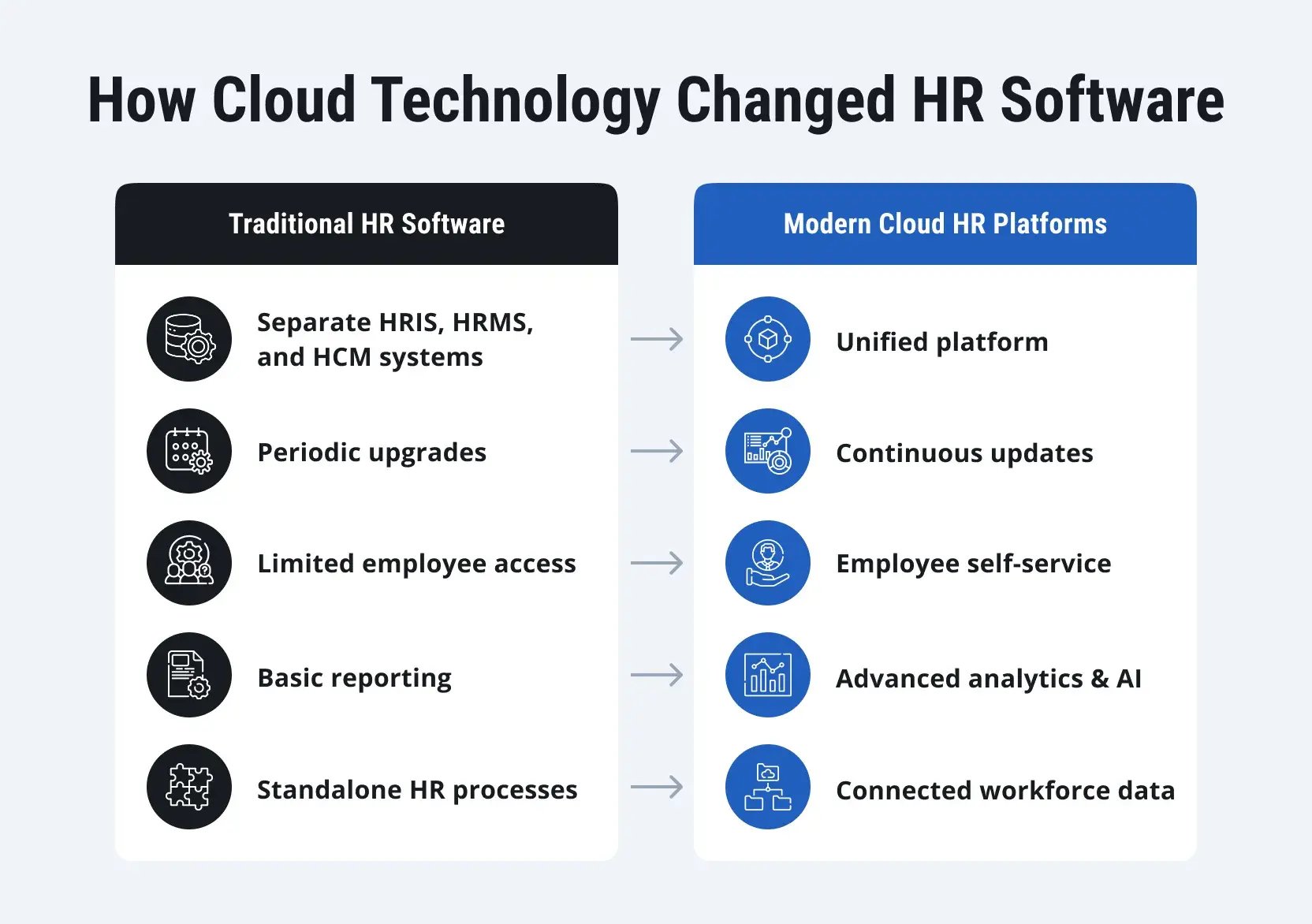
Historically, HRIS, HRMS, and HCM were tied to completely different software products. Nearly every HR function required a separate vendor. The real turning point was the transition to the cloud. The shift to the SaaS model removed the technical barriers of legacy infrastructure, forcing these disparate tools to merge into the universal systems we use today.
From separate systems to unified platforms
HR teams used to juggle entirely different tools for baseline administration and talent management. Centralizing these functions in the cloud solved that fragmentation. It simplified how employee records are handled and removed the administrative burden of constantly moving data between disconnected platforms.
Continuous innovation instead of periodic upgrades
It used to be that just getting a basic tax update or a security patch meant launching a massive IT project. Companies would literally run outdated HR software for years just to avoid the headache of a major upgrade. The cloud fixed that. Now, updates just happen in the background while you sleep, so you get the new features without the downtime.
Self-service and smarter workforce insights
Modern HR platforms give employees and managers direct access to many everyday HR tasks. Instead of relying on HR teams for routine requests, users can update personal information, request time off, complete approvals, access documents, and manage benefits through web and mobile applications.
This shift does more than improve convenience. Because information is entered and updated directly by the people using the system, organizations often have access to more accurate and up-to-date workforce data.
HR reporting isn't just about pulling old spreadsheets anymore. Most systems now use live dashboards that show you what's happening right this second. If a manager needs to look at turnover trends or check on a team's training progress, the data is just there. They don't have to wait weeks for HR to manually build a report.
Why the labels matter less today
This shift is why software labels have lost their meaning for buyers. Instead, companies are looking directly at performance, ensuring the tool can handle day-to-day workflows today while accommodating future organizational growth.
Why Integration With ERP and Finance Systems Matters
HR teams don't make workforce decisions in a vacuum. Every hiring plan, salary increase, bonus program, or expansion initiative has a cost attached to it. The challenge is that HR and finance teams have traditionally worked in different systems, often relying on spreadsheets and manual reports to connect workforce plans with budgets.
This way of working falls apart as a company grows. A hiring plan might look great to HR, but the finance team still needs to know exactly how those new salaries impact the budget and bottom line. When the two departments aren't looking at the same numbers, even a simple question can turn into days of back-and-forth emails.
When HR and finance work with different data
Disconnected systems often create gaps between workforce planning and financial planning.
For example:
- HR may be planning new hires while finance is working from an outdated headcount forecast.
- A department may have approval to recruit, but not enough budget to support the planned growth.
- Workforce costs may be spread across multiple reports, making them difficult to track accurately.
- Global organizations may struggle to consolidate workforce and financial data across regions.
None of these problems is caused by poor planning. They are often the result of teams working with different information.
Why integration changes the picture
When HR and finance systems are connected, workforce plans and financial plans become part of the same conversation.
Instead of manually combining reports from different systems, organizations can:
- Compare hiring plans against available budgets
- Track workforce costs in real time
- Forecast the financial impact of workforce growth
- Consolidate workforce and financial reporting
- Improve planning across departments and business units
This creates a more reliable foundation for both HR and finance teams.
The growing importance of workforce data
For many organizations, workforce costs represent one of the largest areas of spending. Salaries, benefits, bonuses, contractors, recruiting costs, and training investments all affect financial performance, making workforce data an important part of business planning.
When HR and finance systems operate separately, it can be difficult to build accurate forecasts, track labor costs, or understand the financial impact of hiring decisions. Integration helps eliminate these blind spots by giving both teams access to the same information.
The value of integration extends beyond HR management. When HR and financial data are combined, organizations can evaluate hiring plans, payroll costs, budget forecasts, and resource allocation decisions using a single source of truth. This gives businesses much better visibility and makes it a lot easier to make informed decisions.
When To Choose HRIS, HRMS, or HCM
Choosing the right software isn't really about company size — it’s about how complicated the hiring, scheduling, and long-term planning actually are. While there is no official rule for when to upgrade to a more powerful system, certain signs usually make it obvious when a company has outgrown its basic setup.
When HRIS is usually enough
Organizations with straightforward HR requirements often find that an HRIS covers everything they need. These systems are primarily designed to support day-to-day HR administration and maintain accurate employee records.
An HRIS may be sufficient if you:
- Need a centralized system for employee data
- Primarily focus on payroll, benefits, and compliance management
- Have relatively simple HR processes
- Are not yet investing heavily in talent management or workforce planning
- Need a cost-effective foundation for HR operations
When organizations typically move to HRMS
As workforces grow, HR responsibilities often expand beyond administration. Recruiting, employee development, performance management, and workforce scheduling become more structured and require dedicated tools.
An HRMS is often considered when organizations:
- Need to support a growing workforce
- Want to formalize recruiting and onboarding processes
- Require performance management and employee development capabilities
- Need workforce scheduling or attendance management tools
- Want to manage a broader range of HR activities within a single platform
When HCM becomes a more suitable option
Organizations with complex workforce requirements often need more than administrative and workforce management functionality. Long-term workforce planning, talent development, succession management, and analytics become increasingly important.
HCM is often the preferred approach when organizations:
- Operate across multiple countries or regions
- Need advanced workforce analytics and reporting
- Have formal talent management and succession planning programs
- Require integration with ERP and finance systems
- View workforce planning as part of a broader business strategy
- Need a platform that can support long-term growth and organizational change
Decision matrix
|
Business need |
Recommended solution |
|
Core HR administration |
HRIS |
|
HR administration and workforce management |
HRMS |
|
End-to-end talent management and workforce planning |
HCM |
The categories themselves are becoming less important as modern cloud platforms continue to evolve. Even so, understanding the differences can help organizations focus on the capabilities they need today while planning for future growth.
How SAP SuccessFactors Fits Into the HCM Category
Comparing HRIS, HRMS, and HCM proves only one thing: the old categories are no longer relevant. Most major platforms now do a little bit of everything.
SAP SuccessFactors handles the core administrative work, like employee records, while also packing in advanced tools for recruiting, continuous learning, and data analytics. It covers the whole spectrum.
Key SAP SuccessFactors modules
|
Area |
Module |
|
Core HR |
|
|
Recruiting |
|
|
Learning |
|
|
Performance |
|
|
Analytics |
Workforce Analytics |
SuccessFactors deserves the HCM label because it handles global tasks alongside core databases. Rather than simply tracking employee profiles, the platform directly integrates with recruiting, onboarding, talent development, and performance tracking processes.
SuccessFactors is built to link up with SAP's main business software. For organizations currently running SAP HCM, understanding how SAP SuccessFactors compares to traditional SAP HR solutions is often an important part of the evaluation process.
The difference is not limited to functionality. Traditional SAP HCM was designed primarily as an on-premises solution, with organizations managing their own infrastructure, upgrades, and customizations. SAP SuccessFactors follows a cloud-based subscription model, providing regular updates and new capabilities without the large upgrade projects typically associated with legacy HR systems.
Not every organization moves entirely to the cloud at once. Many companies adopt a hybrid approach, continuing to run certain processes such as payroll or time management in SAP HCM while using SAP SuccessFactors for recruiting, learning, performance management, and employee experience capabilities.
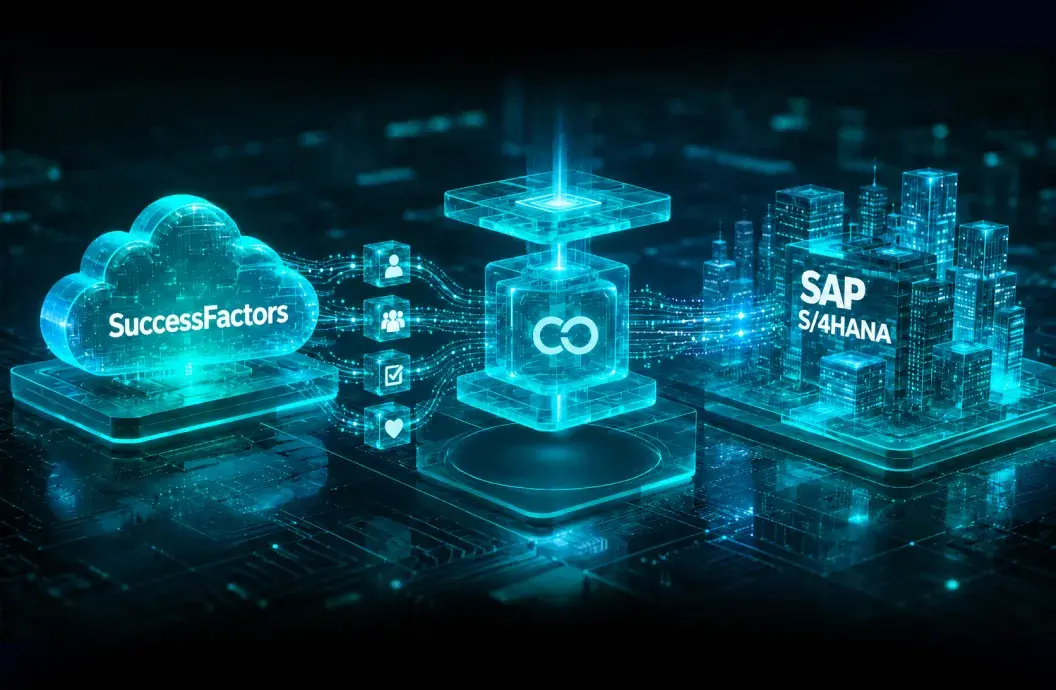
If an organization runs on SAP ERP or S/4HANA, it can connect its people data directly to its financial numbers. Instead of HR and finance working in separate bubbles, the whole company can plan out budgets and staffing together.
Organizations with complex integration requirements often use SAP Business Technology Platform (BTP) to connect SAP SuccessFactors with other business applications and build custom extensions without modifying the standard solution.
SuccessFactors is a perfect example of how much HR tech has grown. It shows that choosing a platform today isn't just about tracking paperwork — it's about finding a tool that supports long-term business growth. What was once delivered through separate HRIS, HRMS, and talent management systems is now available within a single HCM platform.

Conclusion
By the time most organizations start looking for new HR software, they usually have a good reason. Maybe employee data is spread across multiple systems. Maybe reporting takes too much manual effort. Or maybe existing tools no longer support the way the business operates.
When you reach this point, the marketing labels don't really matter. Instead of trying to find a vendor that fits a specific acronym, look closely at where your current workflows are breaking down and think about what you will actually need as the business grows.
Ultimately, you do not need a perfect software category. You just need a system that cuts out the busywork and makes things easier for your people.