Read how we compare SAP SuccessFactors and SAP HCM, explore key differences and benefits, and get guidance on choosing the right HR solution.
SAP has two major HR platforms that often end up on the same shortlist: SAP Human Capital Management (SAP HCM) and SAP SuccessFactors. Both sit in the same ecosystem, both can support enterprise-scale HR operations, and both are used by large organizations in the U.S. and globally. But they’re built on different ideas: one is a classic on-premises HR suite, the other is a cloud-first SaaS platform designed for faster change and a more modern employee experience.
That difference matters more than most teams expect. It impacts everything from how often you get new features and how integrations are handled to what your IT team owns day to day. It's also not a debate between cloud solutions and on-premises systems, as factors such as payroll processing, regulatory compliance, reporting, talent management processes, and long-term costs all play a role in the decision-making process.
In this article, we’ll break down the real-world differences between SAP HCM vs. SAP SuccessFactors, where each solution is strongest, and how to choose based on your HR and IT priorities. We’ll also cover common hybrid setups and what a practical migration path can look like if you’re planning to modernize step by step.
Two HR Systems, One SAP Ecosystem
SAP HCM and SAP SuccessFactors can both support enterprise HR at scale and connect to the wider SAP landscape. But they’re built on different models, and that shows up fast once you get into architecture, operations, and roadmap planning.
SAP HCM
SAP HCM is SAP’s traditional on-premises HR system, typically deployed and run in your own infrastructure. It’s been the standard for years in companies that want tight control over HR processes and system management.
Teams usually choose SAP HCM when they care most about:
- Control over infrastructure and change windows
- Deep configuration/customization
- Stable long-running HR and payroll operations
- Clear internal ownership (IT/Basis-heavy model)
SAP HCM still needs solid technical support, but the operating model is shifting. Newer options like SAP HCM for SAP S/4HANA (H4S4) can run in managed or private cloud setups, so infrastructure ownership can move away from fully self-managed on-premises while you keep the established HR and payroll code line.
SuccessFactors
SAP SuccessFactors is SAP’s cloud SaaS HR suite. It’s built for faster innovation cycles, broader talent capabilities, and a more modern employee-facing experience, with SAP handling cloud operations and regular releases.
It’s typically a better fit when the priorities look like:
- Cloud-first strategy and standardization
- Faster access to new functionality (regular releases)
- Strong talent management and UX
- Easier global scaling without expanding infrastructure
Why companies compare them now
This comparison isn’t just “cloud vs. on-premises.” It comes up because HR and IT are being pushed in the same direction at once:
- Digital transformation: modern UX, self-service, better analytics
- Cloud-first initiatives: fewer upgrades, less infrastructure overhead, more predictable maintenance
- Workforce expectations: hiring, onboarding, learning, and performance processes need to be smoother and more consistent
You’re also working against a real support timeline. SAP’s published maintenance strategy states that mainstream maintenance for SAP Business Suite 7 (including SAP ERP 6.0 / ECC) runs through December 31, 2027, with an extended maintenance option available through 2030 for an additional fee (often referenced as a 2% premium on the maintenance base).
There’s a practical layer you can’t ignore: HR compliance. Payroll accuracy, audit readiness, and reporting requirements (including ACA-related processes) influence platform decisions as much as architecture does. And if you’re approaching 2027 without a clear path, the risk isn’t theoretical — it shows up in how confidently you can plan for ongoing regulatory and payroll updates.

Deployment Models: On-Premises vs. Cloud
Before you compare features like payroll, time management, or talent tools, it’s worth stepping back and looking at how these platforms are delivered. The deployment model affects almost everything: how often you get updates, what your IT team owns, how security is managed, and how easily employees can access HR services day to day.
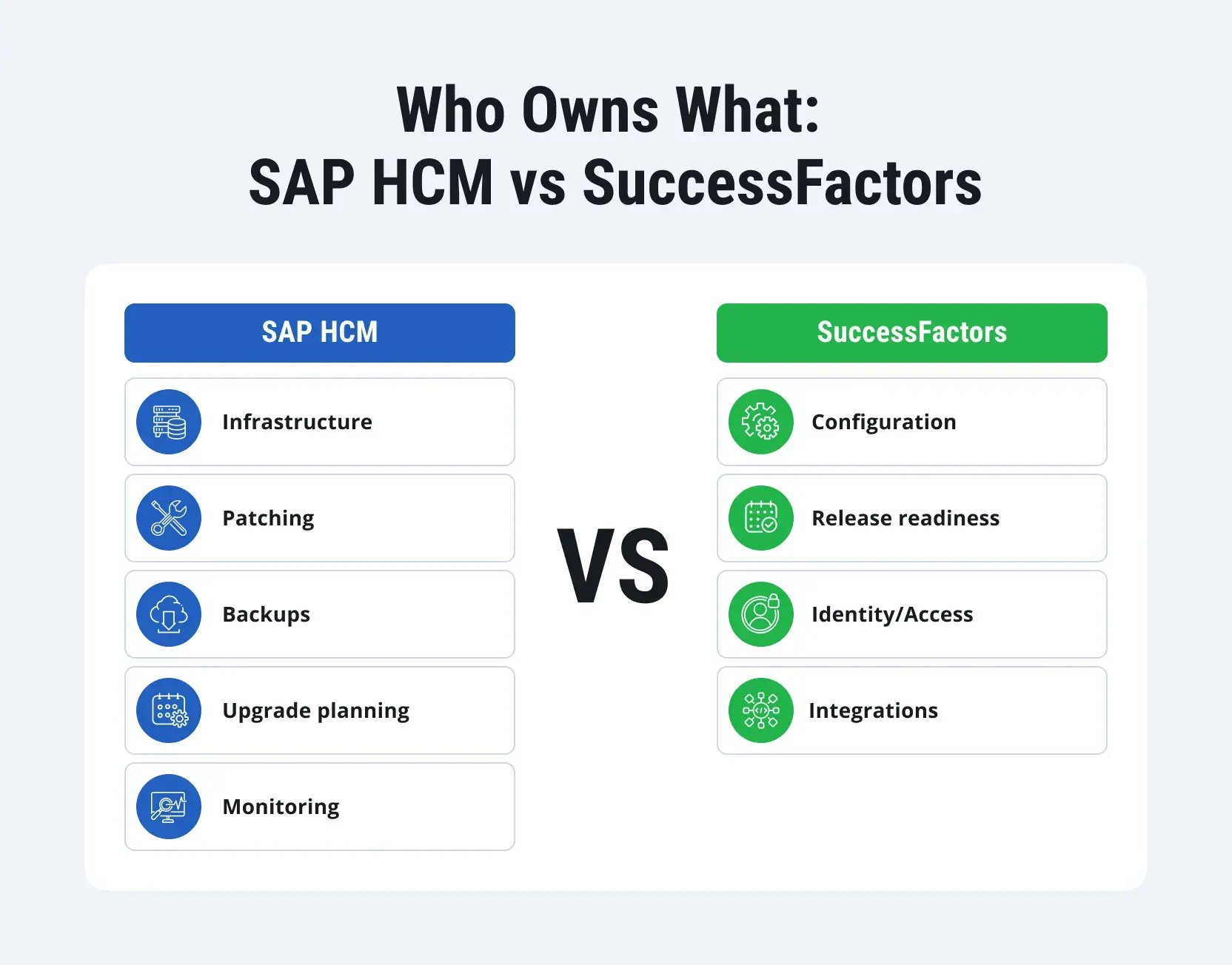
Here’s the clearest way to break down SAP HCM and SAP SuccessFactors from an infrastructure and operating model perspective:
|
Area |
SAP HCM |
SAP SuccessFactors |
|
Delivery model |
On-premises (or customer-managed hosting) |
Cloud SaaS hosted and operated by SAP |
|
Architecture |
Installed in your system landscape, you control environments, transports, and downtime windows |
Multi-tenant cloud platform; accessed via web; SAP runs the underlying platform |
|
Updates & releases |
Customer-driven: patches/upgrades happen on your schedule |
SAP-driven: regular releases (twice-yearly), delivered automatically |
|
Maintenance effort |
Higher: infrastructure, Basis, monitoring, upgrades, performance tuning |
Lower on infrastructure: focus shifts to configuration, governance, release/change management |
|
IT ownership |
Heavy internal ownership (Basis + infrastructure + security hardening + DR) |
Reduced infrastructure burden; IT still owns identity, access controls, integrations, and governance |
|
Accessibility |
Depends on deployment, network/VPN, and how you expose services |
Always-on access by design; generally smoother access for distributed teams |
|
Mobility & UX |
Can be strong, but often depends on additional layers/tools |
Modern cloud UX and mobile-friendly patterns are typically stronger out of the box |
|
Cybersecurity responsibility |
Mostly on you: infrastructure security, patching, network controls, OS/DB hardening |
Shared: SAP secures the platform; customer secures identities, roles, access policies, and data handling |
|
Data residency control |
Maximum control (data stays where your landscape is hosted) |
Depends on SAP hosting regions and your tenant setup; governance must align with SAP’s model |
|
Backups and disaster recovery |
Customer responsibility (planning + execution + recovery testing) |
SAP handles core availability/DR; customer still plans continuity for integrations/data exports |
After you look at it this way, the trade-off becomes pretty straightforward: SAP HCM gives you more control, but also more operational responsibility. SuccessFactors gives you speed and simplicity, but you have to align with SAP’s cloud release rhythm and governance model.
Core HR and Payroll Capabilities
Once you put the deployment question aside, it comes down to something very practical: will this system run HR reliably? For most companies, that means handling the basics consistently — employee data, payroll, time, benefits, and the reporting you need for audits and compliance. SAP HCM and SAP SuccessFactors can both cover that ground, but they don’t do it the same way. And those differences start to matter the moment you’re working with tight payroll schedules, audit trails, and deadlines that don’t move.
Below is a practical breakdown of how the two platforms compare across core HR and payroll-critical capabilities.
|
Area |
SAP HCM |
SAP SuccessFactors |
|
Personnel Administration (PA) |
Strong, mature core HR foundation for employee master data, HR actions, and administrative processes |
Strong Employee Central foundation for core HR, designed for cloud workflows and self-service |
|
Organizational Management (OM) |
Deep OM capabilities for structures, positions, relationships, and enterprise org modeling |
Supports org structures, positions, and job frameworks, typically more standardized and cloud-friendly |
|
Payroll processing |
Traditional strength: built-in payroll engine, tightly integrated with HR master data |
Payroll is typically delivered via Employee Central Payroll (primary cloud path) or Managed Payroll for customers moving their on-premises payroll engine to the cloud |
|
HR compliance |
Strong fit for organizations that need strict control, stable payroll cycles, and detailed auditability |
Strong for standardized compliance processes, but payroll compliance coverage depends on the payroll approach and integrations |
|
Time and Attendance |
Mature time management capabilities; strong for complex rules and long-running setups |
Supports time management scenarios, typically aligned to cloud experience and standardized rules |
|
Benefits administration |
Often handled in the same HR landscape with established processes and integrations |
Commonly supported through configuration + integrations (varies based on the broader HR ecosystem) |
|
Centralized HR data |
HR master data typically lives in the on-premises HR core and drives downstream payroll/time processes |
HR master data typically lives in the cloud HR core and connects to payroll/time/finance through integrations |
|
Reporting and compliance flexibility |
Very flexible, especially for companies with custom reporting needs and legacy compliance workflows |
Strong reporting options, but more dependent on standard models and cloud reporting approaches |
For payroll-heavy organizations, support timelines are part of the core HR decision, not an IT footnote. SAP’s published maintenance strategy states that mainstream maintenance for SAP Business Suite 7 core applications runs through the end of 2027, followed by optional extended maintenance through the end of 2030 (at additional cost). That matters because payroll compliance depends on timely updates, especially when legal and regulatory requirements change.
If you plan to stay on your current SAP HCM setup for the long term, SAP HCM for SAP S/4HANA (H4S4) can be a solid continuity path. It lets you keep the SAP HCM code line you already run, while moving it onto the SAP S/4HANA platform and its maintenance horizon through 2040. For payroll-heavy organizations, this can be a practical way to protect established payroll and time processes while extending the system’s support life.
What this means in real projects
SAP HCM is often chosen when payroll is the anchor.
If your HR landscape is built around long-established payroll processes, complex time rules, and heavily audited reporting, SAP HCM tends to feel safer because everything is tightly integrated in a single on-premises environment. It’s also easier to keep full control over payroll timing, patches, and validation cycles — something teams care about when reporting and compliance deadlines are non-negotiable.
SuccessFactors is often chosen when core HR modernization is the priority.
SuccessFactors (especially Employee Central) is built for cloud-first HR operations: standardized workflows, self-service, and a more modern experience for managers and employees. It can absolutely support compliance-driven HR work, but payroll and some benefits/time scenarios may require a more deliberate architecture, depending on what you run today and what you plan to keep.
Practical considerations to call out early
- Where your system of record lives matters
If SAP HCM remains the master for HR data, SuccessFactors may sit on top for specific functions. If SuccessFactors becomes the master, you’ll need a clean integration strategy for payroll, time, and downstream reporting. - Reporting requirements aren’t just nice-to-haves
Organizations often need consistent reporting for payroll audits, workforce planning, and regulatory processes. SAP HCM tends to offer more freedom for custom reporting, while SuccessFactors pushes you toward more standardized cloud reporting patterns (which can be a benefit unless you rely on highly tailored legacy reports).
Talent Management and Employee Experience (Where SuccessFactors Usually Wins)
Core HR and payroll are about keeping the lights on. Talent management is where companies want to actually move forward: hire faster, onboard people without friction, run performance cycles that don’t feel painful, and give employees development paths they’ll use. That’s usually where SAP SuccessFactors has the edge over SAP HCM, especially if you’re trying to modernize HR without propping up an older core system with a bunch of custom add-ons.
SAP HCM can support parts of this area, but SuccessFactors was built for it, module by module, with cloud-native workflows and a much more employee-facing design.
Recruiting and onboarding
If you’ve ever had a great hiring process and then a messy onboarding experience, this is what SuccessFactors tries to fix, making the transition clean and predictable.
SuccessFactors is often stronger here because it supports:
- Structured hiring workflows (approvals, interviews, offers)
- Onboarding checklists and task orchestration across teams
- Better visibility for HR, hiring managers, and new hires
- Smoother handoff from recruiting into core HR
In SAP HCM environments, recruiting and onboarding can be handled, but it’s common to see more dependency on older processes or third-party tools, especially when teams want a more modern candidate experience.
Performance management
Performance processes are one of the first places where employees feel the difference between a system that’s technically working and one that’s actually usable.
SAP SuccessFactors Performance & Goals is designed for:
- Goal setting and alignment
- Continuous feedback and check-ins
- Structured review cycles (annual, semi-annual, project-based)
- Calibration support for managers
The big advantage here is consistency: performance cycles can be standardized across the business while still allowing role-based flexibility.
Learning management
Learning is another area where SuccessFactors tends to be the default choice in SAP-centric HR landscapes.
SAP SuccessFactors Learning supports:
- Structured learning assignments and compliance training
- Certifications and tracking
- Blended learning paths (formal + self-paced)
- Reporting for mandatory training completion
For many organizations, this often ties directly into compliance expectations, especially in regulated industries where training completion must be tracked clearly by employee, course, and date.
Succession and career development
When HR teams talk about retention and workforce planning, they usually mean two things:
- Identifying future leaders
- Giving employees a reason to stay
SAP SuccessFactors Succession & Development helps with:
- Succession planning for key roles
- Talent pools and readiness tracking
- Development plans linked to skills and goals
- Career paths that feel less like a spreadsheet and more like an actual system
This is where SuccessFactors can support long-term workforce strategy instead of just HR administration.
Employee experience tools and analytics
SuccessFactors is also more mature in experience-driven HR, making HR processes easier to navigate and measure. Depending on the setup, organizations use SuccessFactors to improve:
- Employee self-service adoption
- Manager effectiveness (approvals, feedback, team visibility)
- HR process consistency across regions/business units
- Talent insights and trend analysis (attrition, performance distribution, learning impact)
The practical win: you’re not just running HR processes, you can actually see what’s working and what’s not.
From a talent perspective, SuccessFactors is usually the stronger choice because it was designed around modern hiring, learning, and performance workflows.
Integration and Ecosystem Compatibility
In real-world corporate environments, a human resources management system does not function as a standalone system. It interacts with finance, security, analytics, procurement, and identity management. It is this integration that makes the platform suitable for enterprise-wide use. When companies compare SAP HCM and SAP SuccessFactors, the question of integration usually boils down to two points: how seamlessly employee data moves throughout the entire SAP system and how much effort is required to maintain the consistency of all data over time.
SAP S/4HANA integration: how HR connects to ERP
Both platforms can integrate with SAP ECC and SAP S/4HANA, but the patterns are different.
SAP HCM is often tightly connected to classic ERP landscapes, especially in organizations that have been running SAP on-premises for years. Integration can feel native because the systems were designed around the same era of SAP architecture, and many companies already have stable interfaces built for payroll, finance posting, and time-related processes.
SuccessFactors can integrate with SAP S/4HANA, too, but since it’s a cloud-to-ERP setup, it usually takes a bit more upfront planning. The upside is you’re not forced to keep HR in the same on-premises landscape as ERP. You can move HR forward in the cloud and still keep S/4HANA stable without turning the whole thing into one massive, all-at-once redesign.
For customers moving to S/4HANA, the common direction looks like this:
- Keep core ERP processes in S/4HANA
- Modernize HR in the cloud with SuccessFactors (especially for talent and employee experience)
- Connect the two with a stable integration layer, instead of building point-to-point fixes
Third-party tool integration: the reality in most companies
Even SAP-first organizations rarely run 100% SAP across HR. It’s common to integrate with:
- Workforce analytics platforms
- Recruiting and assessment tools
- Identity providers and access governance tools
- Learning content providers
- Benefits and payroll-related services (depending on the HR model)
SuccessFactors tends to fit more naturally into this mixed ecosystem because cloud HR environments are usually designed to connect with multiple external services. SAP HCM can absolutely integrate with third-party tools too, but the integration approach often depends on legacy interfaces and internal development patterns.
Integration technologies: APIs, OData, and SAP Integration Suite
From a technical standpoint, integrations can be handled in different ways depending on your landscape maturity and long-term goals.
For SAP HCM, integrations often rely on established on-premises patterns and internal middleware, especially in environments with long-running HR operations.
For SAP SuccessFactors, integrations commonly lean on cloud-friendly technologies, including:
- APIs for application-level connectivity
- OData services for structured data access and exchange
- SAP Integration Suite (part of SAP BTP) for building and managing integration flows across cloud and on-premises systems
This is where cloud HR becomes less about the HR application itself and more about having a solid integration layer that can scale as the business changes.
Data consistency and master data governance
Integration is not just moving data. It’s deciding which system owns it. In many organizations, the biggest long-term risk is unclear master data ownership:
- Where is the system of record for employee data?
- Who owns org structures and job frameworks?
- How do changes get approved and synchronized?
- What happens when two systems disagree?
In the case of SAP HCM, core HR data is often stored in a local system and used in subsequent processes such as payroll and time tracking. In the case of SuccessFactors, core HR data is typically located in a cloud-based system (Employee Central) and must remain synchronized with ERP, payroll, and reporting systems through integration.
In either case, master data management must be purposeful, especially if you want to obtain accurate reporting and minimize data reconciliation issues.
Why SAP BTP tools matter for SuccessFactors integration
Integration with SuccessFactors becomes much easier to manage when considered as part of a broader SAP cloud architecture. SAP Business Technology Platform (SAP BTP) tools, especially SAP Integration Suite, help reduce the need for individual point-to-point interfaces and provide a more controlled way to manage integration logic, monitoring, and changes.
This is of great importance in real-world projects, as integrations are rarely static. They evolve with each implementation, organizational change, acquisition, and reporting requirement.
Scalability, Maintenance, and Total Cost of Ownership (TCO)
This is usually where things get more grounded. Features matter, but the focus quickly shifts to what it’s going to take to roll the system out, support it long term, and manage the total cost over the next 3–5 years. SAP HCM and SAP SuccessFactors can both handle enterprise scale, but the effort behind them can look very different depending on your current IT landscape and where you want HR and IT to go next.
Implementation complexity: what it typically looks like
Implementation effort depends heavily on scope, but the pattern is fairly consistent.
SAP HCM projects often involve more technical groundwork because you’re dealing with an on-premises landscape: environments, transports, Basis work, security, and (in many cases) legacy customizations that need to be assessed and preserved. If payroll and time rules are complex, that adds real time and testing effort.
SuccessFactors often moves faster at the start because you’re not spending weeks on infrastructure and system setup. Infrastructure setup is lighter, but timelines still depend heavily on integrations, data readiness, and process standardization. The heavy lifting shifts to the process side instead — configuring the system, setting up role-based permissions, building workflows, and getting integrations right. It can still be a big project, especially in large enterprises, but it’s a different kind of work than a classic on-premises implementation.
Quick comparison chart: effort and where the work goes
|
Area |
SAP HCM |
SAP SuccessFactors |
|
Early project ramp-up |
Slower (landscape + technical prep) |
Faster (less infrastructure setup) |
|
Complexity drivers |
Customization, payroll/time, upgrades, and landscape management |
Process standardization, security roles, integrations, and release management |
|
Testing load |
Often heavier (custom logic + upgrade cycles) |
Still significant (integration + quarterly release readiness) |
Maintenance: internal vs. managed updates
Maintenance is where the long-term cost difference shows up.
With SAP HCM, your team controls update timing, but you also own the operational workload: patching, performance tuning, security hardening, backups, and upgrade planning. If you’ve got a strong SAP Basis organization, this may be fine or even preferred.
With SuccessFactors, SAP manages the core platform and delivers regular releases (typically quarterly). That reduces infrastructure work, but you still need an internal rhythm for reviewing what’s changing, testing critical workflows, and coordinating with HR on adoption. In simple terms:
- SAP HCM: fewer surprises, more internal work
- SuccessFactors: more frequent change, less infrastructure ownership
Support models: SAP + partner ecosystem
Both solutions rely heavily on a mix of SAP support and partner delivery. What changes is the shape of support needs.
- SAP HCM support often leans into technical operations: Basis, upgrades, performance, custom code, and integration troubleshooting.
- SuccessFactors support tends to focus more on configuration, release impact assessment, integration monitoring, and process optimization.
For large enterprises, ongoing support is rarely limited to SAP systems alone. Most organizations utilize partner services for at least a portion of their operating model, especially during upgrades, new system implementations, or global expansion.
Cost breakdown: license vs. subscription, and the hidden line items
Cost is one of the most misunderstood parts of this comparison because people look at licensing and stop there.
SAP HCM costs typically include:
- Licensing (depending on your agreements)
- Infrastructure (servers, storage, environments, monitoring tools)
- Internal IT labor
- Upgrades and long-term maintenance projects
SuccessFactors costs typically include:
- Subscription licensing (ongoing)
- Less infrastructure spend
- Integration and governance effort (often the biggest long-term cost driver)
- Change management around quarterly releases
Here’s the practical takeaway: HCM tends to have higher operational overhead, while SuccessFactors tends to make costs more predictable but not always lower. A lot depends on how much integration and process change you take on.
Scalability: growing user base and global expansion
Both platforms can scale, but they scale differently.
SAP HCM scales well when you already have a mature on-premises SAP operating model. But scaling often means scaling infrastructure and operational capacity — more environments, more monitoring, more upgrade planning, more governance.
SuccessFactors scales more naturally for organizations that are expanding headcount, adding countries, or rolling out standardized HR processes across business units. Cloud delivery simplifies access and reduces the need to scale infrastructure in parallel with the workforce.
For global expansion, SuccessFactors is often easier to roll out consistently as long as the organization is ready to align processes across locations and put real effort into integration planning.
Which to Choose: SAP HCM or SAP SuccessFactors?
In practice, the choice is rarely about which product is better. It’s about fit. Some companies need maximum control over payroll and tightly governed change cycles. Others need faster innovation, better talent tools, and a more modern employee experience. Many end up in the middle with a hybrid approach, especially during a phased move to the cloud.
Here’s a quick table to make the differences easy to spot, followed by practical guidance on when each option tends to be the better fit.
|
Feature |
SAP HCM |
SAP SuccessFactors |
|
Deployment |
On-premises (customer-managed) |
Cloud SaaS (SAP-managed) |
|
Payroll |
Built-in, mature payroll engine |
Cloud payroll options and integrations |
|
Talent management |
More limited compared to the cloud suite |
Advanced modules across recruiting, learning, performance, succession |
|
Updates |
Customer-driven (you control timing) |
Regular releases (typically quarterly) |
|
Integration approach |
Classic on-premises interfaces and middleware patterns |
APIs, OData, and cloud connectors (often via SAP Integration Suite) |
|
User experience |
More traditional UI patterns |
Modern, mobile-friendly UX |
When SAP HCM is usually the better fit
Using SAP HCM is advisable in cases where the stability of core human resources management and payroll processes is a top priority, and the organization has experience working with a sophisticated local SAP system.
It’s often a strong choice if you have:
- Complex payroll/time rules and a heavy focus on auditability and control
- Strict governance around change windows (fewer releases, more controlled upgrades)
- An established internal IT operating model, including SAP Basis support
- A large installed base and custom processes that would be costly to redesign quickly
This is especially common in organizations where payroll is the anchor system and HR transformation is happening slowly or in phases.
When SuccessFactors is usually the better fit
SuccessFactors is often the better match for companies that want to modernize HR faster and align with a cloud-first IT strategy.
It’s usually the right call if you want:
- Modern talent capabilities (recruiting, onboarding, learning, performance, succession) without building custom add-ons
- A more consistent, employee-friendly experience across devices
- Predictable platform maintenance with SAP managing the infrastructure
- Easier scaling for growth, new regions, and standardized HR operations across business units
For many organizations, this is less about replacing everything overnight and more about moving the HR experience forward while integrations keep core processes stable.
The common middle ground: hybrid approach
A lot of enterprises don’t choose one or the other as a clean switch. A typical path looks like:
- Keep SAP HCM in place for payroll (and sometimes time) in the short term
- Roll out SuccessFactors for talent and employee experience
- Move toward a more cloud-driven model over time as processes are standardized and integrations mature
This approach reduces risk, keeps payroll operations stable, and delivers visible improvements for both employees and managers.
Conclusion
In practice, SAP HCM and SAP SuccessFactors solve different problems.
If your HR is built on ensuring payroll stability, complex timekeeping rules, and strict control over changes, then SAP HCM remains virtually unrivaled. It’s predictable, it’s deeply integrated in many long-running SAP landscapes, and it lets you decide when updates happen. For many companies, that level of control matters because payroll and compliance operate on fixed deadlines.
SuccessFactors usually wins when the business is pushing for modern HR delivery—better recruiting and onboarding, learning people actually use, performance cycles that don’t feel like an annual headache, and a more consistent experience for employees and managers. It also tends to scale more smoothly because it pushes organizations toward standardized processes and a consistent operating model. SAP HCM can scale, too, but it typically gets there through deeper configuration and customization.
And the truth is, many companies don’t pick one and walk away from the other. A hybrid setup is pretty common. Companies keep SAP HCM in place where it’s already reliable, often for payroll, and bring in SuccessFactors where it makes the biggest difference, like talent and the employee experience. What makes that work isn’t the module list as much as the fundamentals: being clear about which system owns what data, setting up solid integrations, and putting governance in place so the numbers don’t drift as the organization changes.
If you need a practical next step, start by making a list of things that absolutely cannot be compromised: typically, this includes payroll processing, timekeeping, and reporting in accordance with legal requirements. Then, identify the areas where you want to move faster. This is usually enough to choose the right direction.



-min-2.jpg)