A practical guide to SAP HCM to SAP SuccessFactors migration, covering target architecture, data, payroll, integrations, rollout, testing, and long-term HR planning.
If your HR landscape still depends on SAP ERP HCM, the migration question usually appears in pieces rather than as one clean project. Payroll may be stable and heavily localized. Time management may rely on years of configuration. Employee data may feed SAP S/4HANA, identity systems, benefits providers, reporting tools, and local applications. Custom ABAP developments may still solve a current business problem, while others reflect decisions made years ago.
That leaves CIOs and HR leaders with a series of practical choices. Which processes should move to SAP SuccessFactors Employee Central? Which payroll or time capabilities need to remain in SAP ERP HCM for another phase? Which interfaces need to change once the source of employee data changes? And which custom developments still deserve a place in the future landscape?
SAP's published maintenance dates give those discussions a firmer timetable. According to SAP's maintenance strategy, SAP ERP 6.0 systems running EHP6, EHP7, or EHP8 remain under mainstream maintenance through the end of 2027, with optional extended maintenance available through the end of 2030. Earlier SAP ERP 6.0 releases, including EHP1 through EHP5, have already moved to customer-specific maintenance. For companies preparing an SAP S/4HANA transformation in parallel, the timing also affects how they allocate shared specialists, testing capacity, integration work, and periods of major business changes.
The target can take several forms. SAP SuccessFactors Employee Central may take over core employee and organizational data while SAP ERP HCM continues to support payroll, time management, or selected custom processes. Some organizations may move a broader HR scope to SAP SuccessFactors within one program. SAP Human Capital Management for SAP S/4HANA (SAP HCM for SAP S/4HANA) can remain in scope when selected HR processes still need to run in an SAP S/4HANA-based environment.
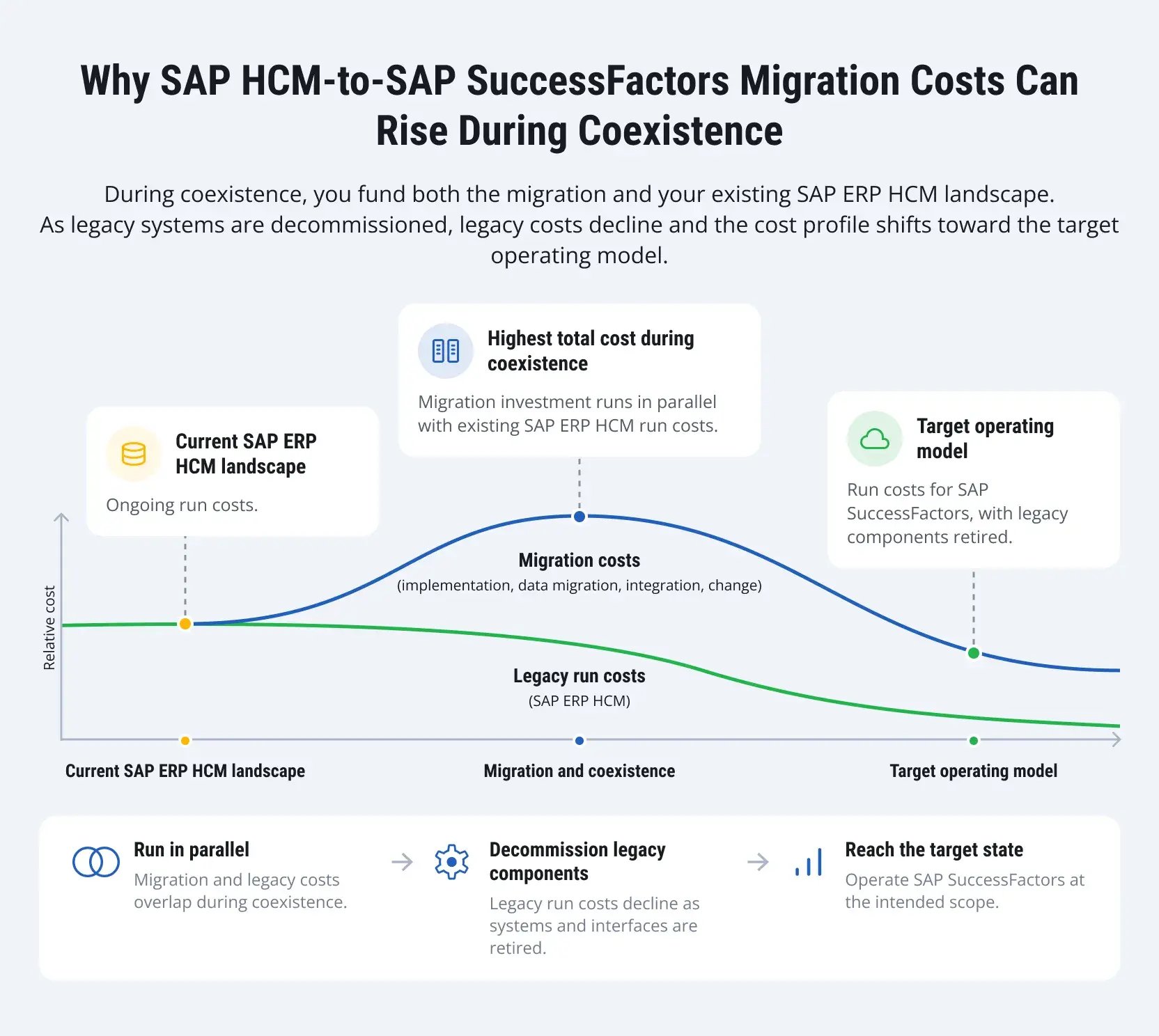
An SAP HCM to SuccessFactors migration can then proceed in stages. SAP SuccessFactors Employee Central may take over employee and organizational data first, while payroll, time management, or certain country processes continue in SAP ERP HCM. During this period, the two environments may still exchange data, and countries may follow different timelines. SAP ERP HCM components can be retired as the processes and interfaces that depend on them are moved or removed.

Why SAP ERP HCM Customers Are Reassessing Their HR Roadmaps
An SAP ERP HCM environment that has been running for many years usually carries the history of the organization with it. Acquisitions introduce new structures. Country rollouts add local rules. Payroll and time requirements accumulate. Interfaces multiply as new applications enter the landscape. Custom infotypes, ABAP programs, workflows, and reports often remain long after the original business context has changed. That history needs to be examined before it becomes a migration scope. Some components still support statutory, payroll, or operational requirements. Others may now have a standard SAP SuccessFactors equivalent, or the business process behind them may no longer exist.
SAP continues to develop SAP SuccessFactors HCM, including SAP SuccessFactors Employee Central, talent solutions, workforce analytics, and AI capabilities. For SAP ERP HCM customers planning a move, the Customer Evolution Program for HCM provides migration tools, architecture guidance, services, and support for hybrid scenarios.
Companies coordinating an SAP HR transformation with an SAP S/4HANA program also have shared dependencies to manage. Employee and organizational information can affect finance, identity management, cost allocation, reporting, security, and downstream applications, so HR architecture decisions cannot always be made in isolation.
Assessing Your Current SAP ERP HCM Landscape Before Migration
A system inventory can tell you which infotypes, interfaces, reports, enhancements, and payroll rules exist. It cannot tell you why the business still needs them. That part requires HR, IT, payroll, security, finance, and local process owners. A custom field may feed a statutory report in one country. An interface that looks obsolete may still supply a local benefits provider. Another enhancement may simply preserve a workflow that users stopped following years ago.
SAP Readiness Check for SAP SuccessFactors solutions can add system evidence to those discussions. It analyzes information from the productive SAP ERP HCM environment, including employee and organizational data, process results, custom code, enhancements, interfaces, and other relevant HCM data.
The assessment should answer questions such as these:
|
Area |
Questions to resolve |
|
HR processes |
Which processes run in SAP ERP HCM today? Which already use SAP SuccessFactors or third-party applications? |
|
Employee and organizational data |
Where do employee, position, organizational, job, and cost-center records originate? |
|
Payroll |
Which countries use SAP Payroll, external providers, or other payroll platforms? |
|
Time management |
Which schedules, time-evaluation rules, overtime rules, absences, premiums, and clock integrations affect downstream processes? |
|
Custom development |
Which custom infotypes, ABAP programs, reports, workflows, forms, and enhancements remain active? |
|
Integrations |
Which systems consume or supply HR data, including finance, IAM, benefits, banks, government platforms, and local services? |
|
Historical data |
Which records require operational, audit, regulatory, analytical, or employee-service access after cutover? |
|
Localization |
Which country differences originate from legislation, collective agreements, payroll requirements, or company policy? |
|
Security |
How should the current authorization concept translate into SAP SuccessFactors roles and permissions? |
|
Reporting |
Which operational, statutory, historical, and management reports depend on the existing SAP ERP HCM environment? |
Scope work can consume a meaningful share of the migration effort. SAP's current InfoPorter guidance for SAP ERP HCM migration states that defining the migration scope can take 30-40% of the time planned for the complete migration project. Employee populations, Organizational Management data, field mappings, and value mappings all enter the discussion at this point.
By the end of the assessment, teams should know more than what exists in the source system. They need a dependency map, a list of processes that require redesign, and an initial view of what can leave the landscape. Data quality also needs attention at this stage. Duplicate employee records, obsolete codes, inconsistent organizational structures, and local naming conventions become harder to resolve once mapping and migration cycles have already started.
Defining the Target HR Architecture
Once the current landscape has been mapped, the next question concerns ownership. Where will employee data be maintained? Which system will supply payroll? Where will time records originate? What happens to local processes that remain outside SAP SuccessFactors? Those decisions need to come before detailed rollout planning because they determine replication direction, integration responsibilities, and the systems that will continue to operate together.
Several SAP SuccessFactors deployment patterns can support the transition. SAP Human Capital Management for SAP S/4HANA provides a separate route for organizations that plan to retain selected HR processes on an SAP S/4HANA-based landscape.
SAP SuccessFactors-led cloud landscape
SAP SuccessFactors Employee Central provides the core HR layer, while other SAP SuccessFactors solutions can cover recruiting, onboarding, learning, performance, compensation, analytics, and related processes. Payroll may move to SAP SuccessFactors Employee Central Payroll or follow another selected payroll model. Companies looking to reduce their long-term dependence on SAP ERP HCM may choose this direction, although the pace of that transition still depends on payroll, time, integration, and localization requirements.
Core Hybrid HCM
With Core Hybrid HCM, SAP SuccessFactors Employee Central takes ownership of core employee data while selected processes continue in the retained SAP HR environment. SAP documents scenarios where payroll, time management, or custom HR processes remain in SAP ERP HCM, and employee data maintained in SAP SuccessFactors Employee Central replicates back to support them. More details are available in SAP's Core Hybrid integration guidance.
For an organization with complex payroll or time requirements, this can separate two substantial changes. Core HR can move first while the company determines the long-term path for payroll, time management and other processes retained in SAP ERP HCM. The arrangement also creates an ongoing operational dependency. Employee data, organizational assignments, identifiers, mappings, replication errors, and monitoring all need clear ownership after go-live.
Side-by-side HCM
Side-by-Side HCM supports scenarios where SAP ERP HCM and SAP SuccessFactors Employee Central remain systems of record for employees in different countries during the transition. In SAP’s standard model, the workforce is divided by employee country assignment, so teams need to define which countries are mastered in each system and how transfers between them will be handled. This approach can support a gradual country-by-country rollout when all countries cannot move on the same schedule.
Separate transition option: SAP HCM for SAP S/4HANA
Outside these SAP SuccessFactors deployment patterns, some organizations may retain selected HR processes within SAP HCM for SAP S/4HANA, while other areas move to SAP SuccessFactors. Payroll, time management, existing custom processes, and the wider ERP transformation can all influence that decision. Whichever architecture the company chooses, each important data domain needs a clearly assigned source. Employee master data, organizational structures, payroll results, time records, positions, identities, and financial assignments may follow different paths through the landscape.

Choosing the Right Migration and Rollout Strategy
Architecture and rollout answer different questions. A company may choose Core Hybrid HCM and still move countries in waves. Another may use the same architecture and switch the defined population in one coordinated cutover. Greenfield process design concerns the future process itself rather than the number of rollout waves. Keeping those decisions separate helps avoid a migration strategy built from labels that describe different things.
Single-wave rollout
A single-wave rollout moves the defined population or process scope through one coordinated cutover. This can work when the organization already follows a relatively common HR model, local variation remains manageable, source data has reached the required quality, and business teams can support testing, training, and cutover at the same time.
Coexistence may last for a shorter period, although the workload around final reconciliation and go-live becomes concentrated. Integration testing, data validation, user preparation, and cutover all have to converge within the same window.
Phased rollout
A phased SAP SuccessFactors migration divides the scope by geography, business unit, employee population, process, or module. The first wave can reveal issues in the common design before the next group enters detailed implementation. Country sequencing can also reflect payroll calendars, time requirements, local regulations, existing provider contracts, and the availability of business experts.
LeverX has used this model in complex SAP SuccessFactors programs. Our Girteka HR transformation case began with an SAP SuccessFactors implementation covering 3,000 personnel in Lithuania and planned expansion into additional European locations. The time management scope also included a mass-input solution designed to support further scaling across 13,000 drivers.
That experience also shows why a country alone may be a poor indicator of complexity. Different employee groups inside the same organization can depend on very different time rules and operational processes.
Greenfield process design
Greenfield process design starts with the process the company wants to run in the future and the SAP SuccessFactors capabilities available to support it. The existing SAP HCM design then becomes an input to the assessment rather than a template for the new environment. This approach reduces the likelihood of carrying old data structures and workflows into SAP SuccessFactors simply because users already know them.
What to Migrate, Retain, Archive, or Retire
Companies that migrate SAP HCM to SuccessFactors do not need to carry the entire source landscape into the target environment. Employee records, historical data, custom fields, reports, and integrations should receive treatment based on future use. Technical objects accumulated over the years of SAP HCM operation need the same review.
|
Treatment |
Typical examples |
|
Migrate |
Active employee data, required organizational structures, current employment information, and records needed by target processes |
|
Retain |
Data/processes intentionally remaining in SAP ERP HCM or another source during coexistence |
|
Archive |
Historical records needed for audit, legal, payroll-reference, or reporting access, but no longer used operationally |
|
Retire |
Obsolete fields, duplicate reports, unused programs, redundant interfaces, and processes with no future requirement |
Data selected for migration may still require cleansing, mapping, and transformation before it can be loaded into SAP SuccessFactors Employee Central. These activities describe how data moves; they do not represent a separate destination for the data.
SAP provides InfoPorter for supported migration scenarios from SAP ERP HCM to SAP SuccessFactors Employee Central. The tool supports employee and organizational data migration as well as the mapping required to establish SAP SuccessFactors Employee Central as the system of record for the migrated scope.
Mapping still requires business decisions. A source value may no longer belong in the target model, or several country-specific codes may need harmonization before they can map to a shared structure.
Historical records deserve a separate policy during an SAP HCM migration. Payroll history, old organizational assignments, former employee records, and compliance data can have very different retention and access requirements. Loading all available history into the operational system can increase migration and validation work without helping current HR processes. The more useful question concerns future access: who needs each category of information, for which purpose, and where should it remain available after cutover? Custom developments should be assessed separately from data because their future treatment depends on the underlying business requirement and target architecture.
Payroll Strategy: A Decision That Often Depends on Time Management
Few parts of the HR landscape tolerate migration errors as poorly as payroll. A problem can reach employees, finance, statutory reporting, and HR operations in the same pay cycle. The target payroll model needs an early decision, although payroll does not always have to move at the same time as core HR.
Move payroll to SAP SuccessFactors Employee Central Payroll
SAP SuccessFactors Employee Central Payroll requires SAP SuccessFactors Employee Central as the system of record. HR events are managed in SAP SuccessFactors Employee Central, with payroll-relevant data replicated or maintained for payroll processing. Companies already using SAP ERP HCM Payroll can carry forward applicable payroll knowledge and configuration. The move still requires a detailed review of custom rules, interfaces, payroll history, country requirements, operational responsibilities, and testing.
Retain SAP ERP HCM Payroll during a Core Hybrid phase
SAP SuccessFactors Employee Central can take over core employee data while payroll continues in the existing SAP landscape. SAP provides packaged integration for this model, including replication of employee master data and organizational assignments into retained SAP HR processes. A company can use this approach to move core HR first and address payroll later rather than asking the same business teams to absorb both changes together.
That choice creates a dependency on reliable replication. SAP SuccessFactors Employee Central supplies the relevant upstream data, while payroll relies on that information reaching the retained environment accurately and on time.
Continue with another payroll model
Many multinational organizations already operate more than one payroll model. Some countries may retain SAP ERP HCM Payroll or payroll within SAP HCM for SAP S/4HANA, while other countries continue with external or local providers. Localization, statutory interfaces, payroll calendars, retroactive calculations, finance integration, provider contracts, and local transformation capacity all influence the decision.
Assess payroll and time together
Payroll design can become difficult when time management enters the picture. Work schedules, absences, overtime, premiums, shifts, clock data, and time evaluation may all feed payroll calculations, particularly in operational workforces.
In a Core Hybrid landscape, time management can follow different paths. Some organizations may continue running Time Management in SAP ERP HCM. In another supported scenario, SAP SuccessFactors Employee Central manages time data and sends payroll-relevant time information to SAP ERP HCM for payroll processing. For this specific replication setup, SAP SuccessFactors Employee Central must serve as the system of record for time management.
SAP limits the replication scope to supported time data, so this setup does not cover every SAP ERP HCM Time Management use case. A global organization may therefore reach different payroll and time decisions by country while keeping SAP SuccessFactors Employee Central as the shared core HR source.
Integration and Replication Across the HR Landscape
Moving the source of employee data changes more than the HR application itself. Downstream systems may currently receive employee and organizational information from SAP ERP HCM. When SAP SuccessFactors Employee Central takes over that role, each existing interface needs another look. Some consumers may connect directly to SAP SuccessFactors Employee Central. Others may continue to receive replicated information through a retained SAP system.
Hybrid landscapes add another direction of travel because retained processes may still require data from SAP SuccessFactors Employee Central in SAP HCM or SAP S/4HANA. For each important data object, the integration design should identify the source, receiver, direction of transfer, mapping rules, monitoring method, reconciliation process, and operational owner. Employee identifiers deserve particular attention because payroll, IAM, finance, external providers, and custom applications may depend on keys created originally in SAP HCM.
The same review needs to include systems outside the immediate SAP HR landscape, such as payroll providers, social insurance systems, directory services, finance applications, and SAP S/4HANA.
Common SAP HCM to SAP SuccessFactors Migration Challenges
Most migration problems do not stay neatly inside one workstream. Data decisions reach payroll. Local requirements affect the global template. A technically successful interface can still leave a business transaction incomplete.
Data model differences
SAP ERP HCM and SAP SuccessFactors Employee Central organize HR information differently. A direct one-to-one mapping can preserve legacy design choices that the future process no longer needs. Teams should establish the SAP SuccessFactors Employee Central model first and then build transformation rules around it.
Inconsistent HR data
Duplicate employee records, obsolete codes, incomplete fields, conflicting dates, and local naming conventions can slow every migration cycle. Tools can identify many of these problems. HR and local business owners still have to decide which value should survive. Without clear ownership, the same records can return from one test cycle to the next without resolution.
Customization debt
A heavily customized SAP ERP HCM environment can make it difficult to distinguish current requirements from historical technical decisions. If every existing development enters the migration scope by default, the target environment can inherit complexity that no longer serves the business.
Integration dependencies
A hire may trigger payroll, identity provisioning, benefits, cost allocation, equipment provisioning, and reporting. A transfer can change managers, permissions, cost centers, and payroll attributes. These dependencies become difficult to control when interface teams validate their own connections without seeing the complete employee transaction.
Global and local requirements
Country requests can come from very different sources: legislation, collective agreements, payroll rules, internal policy, or established local practice. Treating every request as equally mandatory can create unnecessary deviations in the global template. Ignoring local differences can remove functionality that a country genuinely needs.
Historical data expectations
Historical data questions often arrive late because current HR processes receive most of the attention during design. Audit, payroll, legal, and reporting teams may still need access to information that falls outside the migration scope. Discovering that close to cutover can force changes to the archive, retention, or migration design.
User adoption
SAP SuccessFactors can shift work between HR administrators, managers, and employees. Managers may receive new approval or self-service responsibilities. Employees may maintain more of their own information. HR teams may spend less time entering transactions and more time reviewing exceptions. Training works better when it reflects those new responsibilities and real transactions rather than a tour of application screens.
Cutover coordination
Cutover brings activities together that different teams may have managed separately for months: source-system freezes, final extracts, delta changes, interface switching, user provisioning, payroll calendars, and employee communications. If ownership or sequencing remains unclear, a transaction can end up missing from both environments or processed in the wrong one.
Best Practices for SAP HCM to SAP SuccessFactors Migration
By the first full migration cycle, several decisions that are difficult to reverse have already been made. The target data model may be established. Interfaces may already depend on it. Country teams may have approved local deviations. For that reason, some of the most useful migration controls need to appear well before the final data load.
Design migration and replication as one chain in hybrid landscapes
In a Core Hybrid deployment, loading employee data into SAP SuccessFactors Employee Central covers only part of the transition. SAP Best Practices defines separate scenarios for data migration, employee-data replication, and time-data replication, with dedicated configuration and test content for each.
Cutover connects those scenarios. SAP states that the employee key mapping table should be populated before replication from SAP SuccessFactors Employee Central back to SAP ERP HCM begins. The full transmission start date (FTSD) also needs an appropriate setting for the move into replication. SAP documents additional handling for employees already present in SAP ERP HCM before SAP SuccessFactors Employee Central assumes the system-of-record role.
Personnel numbers, effective dates, event mappings, ownership rules, and replication logic should consequently enter the migration design early. Leaving them to the integration team near go-live tends to move reconciliation problems into the busiest part of the program.
Keep a register of every approved deviation
Global templates need room for legislation, collective agreements, payroll requirements, and real operating differences between countries. The harder part involves separating those requirements from practices that have survived mainly because they already exist. In LeverX implementation work, we recommend classifying local requests as mandatory, business-specific, or optional and keeping a register of approved deviations from standard SAP SuccessFactors functionality. That record gives later rollout teams the reason behind an exception and prevents the same design argument from reopening country by country.
One SAP customer example provides useful context. When BLS implemented SAP SuccessFactors HCM, the company set a goal of adopting at least 80% of its processes through the standard solution, with limited adjustments where required. SAP describes the BLS approach in its customer story. The 80% figure belongs to that customer rather than serving as a general benchmark. The broader lesson concerns traceability: every departure from the common model should have a business reason, an owner, and a known maintenance consequence.
Reconcile the data that drives business outcomes
Matching record counts does not tell you whether the migrated data will support the business process correctly. An employee record can arrive with the wrong organizational assignment. Compensation can map to the wrong value. A time-related field may pass a basic validation and still cause a payroll problem later.
LeverX practitioners recommend at least one complete mock migration before cutover, together with field-level reconciliation for business-sensitive employee, organizational, time, compensation, and payroll data. Testing should then follow actual employee events, such as a hire, transfer, salary change, absence, or termination, through the downstream applications that depend on them.
Decide where custom requirements should live
A standard-first approach still leaves legitimate requirements that SAP SuccessFactors may not cover in exactly the form the business needs. The architectural decision then concerns where that requirement should live. Depending on the use case, configuration, integration, or a side-by-side extension on SAP Business Technology Platform may provide the appropriate route.
LeverX used this model in a separate SAP Business Technology Platform side-by-side extension project for Girteka when the company needed mass HR operations beyond its existing SAP SuccessFactors functionality. The custom application ran alongside SAP SuccessFactors and used SAP Integration Suite, SAP SuccessFactors OData API, SAP Cloud Identity Services, and other SAP Business Technology Platform services. A surviving custom requirement still needs an architectural home. It does not automatically need a replica of the SAP ERP HCM implementation that handled it before.
Treat cutover as a change in data authority
Cutover changes where new HR transactions belong. Once SAP SuccessFactors Employee Central takes over as the system of record for the migrated scope, the company needs clear rules for what can still be entered in SAP ERP HCM and which changes must originate in SAP SuccessFactors Employee Central.
A realistic rehearsal should cover data migration, integrations, payroll validation, where applicable, user provisioning, communications, and escalation procedures. It also needs to account for transactions already in progress. A future hire may already have been approved. A transfer may have an effective date just after go-live. A termination or compensation change may still be pending. Each type of transaction needs a rule for the period around the switch.
Give every retained component a defined role and review point
Some SAP ERP HCM components may remain because the target architecture deliberately keeps them. Others stay only until a later rollout or replacement becomes available. Those cases need different treatment. A transitional component should have a documented retirement dependency. A component intended to remain longer term needs an owner, support model, integration responsibilities, and a review point. This prevents temporary coexistence from continuing indefinitely while still allowing a deliberate hybrid architecture where the business needs one.
Building a Long-Term HR Transformation Roadmap
A list of modules tells leadership what the company plans to implement. It provides much less information about when SAP ERP HCM can give up a process, when payroll can depend on the new data source, or when a legacy interface can disappear. For a migration roadmap, those dependencies matter as much as the implementation sequence.
Start with the data authority you want to establish
For each employee population, define when SAP SuccessFactors Employee Central should take ownership of employee and organizational data. Tie that point to the integrations and retained processes that consume the same information. The roadmap can then show when a country or employee group changes its source system instead of tracking only module go-live dates.
Set entry and exit criteria for each rollout wave
A country should not enter a rollout wave simply because its calendar slot has arrived. The required data, localization decisions, payroll, and time dependencies, integrations, security design, and business resources need to be ready. At the other end of the wave, migrated-data reconciliation, critical integrations, business approval, support readiness, and any required payroll validation should determine whether the population can move forward. This gives later waves a concrete set of conditions inherited from earlier experience.
Use cross-system validation as a roadmap gate
Before another population enters production, confirm that the transactions it depends on work across the relevant systems and that somebody owns monitoring and support after go-live. For Core Hybrid programs, this includes the employee, payroll, and time data flows used by that population. If SAP S/4HANA participates in the landscape, the same readiness decision should cover the required organizational and financial data exchanges.
Track planned decommissioning alongside new capabilities
When the company plans to retire a component, its replacement dependency should appear on the same roadmap. A legacy interface can disappear after its consumers move to another source. Historical reporting may remain available until archive access has been implemented. A payroll-related integration may continue until that country adopts a different payroll model. Placing these dependencies next to new capabilities keeps decommissioning connected to the migration work that makes it possible.
Define the post-go-live operating model
SAP SuccessFactors continues to evolve through SAP-delivered releases. Once the implementation team leaves, someone still needs to review those releases, approve configuration changes, manage permissions, monitor integrations, investigate replication failures, and coordinate regression testing.
LeverX implementation guidance also recommends defining service levels before launch and tracking operational indicators such as payroll defects, integration failures, data corrections, support demand, and self-service adoption during the first productive cycles. Once these responsibilities move into everyday HR and IT operations, later SAP SuccessFactors releases, modules, analytics, and extensions can follow an established decision process.
Our Expertise in SAP HCM to SAP SuccessFactors Migration
By the time a company starts planning this move, SAP ERP HCM usually connects to far more than HR. Employee and organizational data may already feed payroll, SAP S/4HANA, identity management, reporting, banks, benefits providers, government platforms, and local applications. A decision made in SAP SuccessFactors Employee Central can affect several of those connections at once.
LeverX works with these dependencies from the early assessment onward. Our SAP SuccessFactors consulting services include target architecture, data migration, integration, configuration, testing, rollout, and support. For companies coming from SAP ERP HCM, the work often starts with a more basic question: what still depends on the current system, and what has to change before SAP SuccessFactors Employee Central can take ownership of the relevant HR data?
That question becomes especially relevant in phased and hybrid programs. Payroll may stay in SAP ERP HCM for one country while another uses a different model. Time management may require separate treatment for shift-based employees. An interface that looks minor during discovery may still provide data to finance or a local statutory process. Our teams bring these dependencies into the same migration discussions so that decisions made around data, payroll, integrations, and rollout still work when the first population goes live.
Our work with Girteka reflects this kind of environment. The program has involved core HR processes, time management requirements, enterprise integrations, and rollout across multiple locations, with additional functionality introduced as the SAP SuccessFactors landscape developed.
Conclusion: Build the Target HR Model Before Moving the Data
The hardest migration decisions often appear before any data moves. A company first needs to know where employee data will be maintained, what will happen to payroll and time management, which interfaces will still depend on SAP ERP HCM, and how long the two environments may need to operate together. For some organizations, SAP SuccessFactors Employee Central can assume a broad scope relatively quickly. Others will keep payroll, time management, or country-specific processes in SAP ERP HCM for longer. Those choices affect much more than the migration schedule. They influence integration design, testing, support responsibilities, cutover planning, and the date when individual legacy components can finally leave the landscape.
A useful SAP HCM to SAP SuccessFactors roadmap makes those dependencies visible early. LeverX helps companies work through them before implementation decisions become expensive to revisit, then carries the agreed model through migration, integration, rollout, cutover, and productive operations.