Learn how SAP EWM supports inventory, fulfillment, automation, labor, and complex warehouse operations, from core capabilities to implementation.
Today, warehouse management involves many more moving parts than even a few years ago. Demand is rapidly changing, order fulfillment times are constantly shrinking, and growing volumes of goods must be efficiently moved across multiple sales and distribution channels. Automation adds another layer; robots, conveyors, and automated storage systems now work side by side with warehouse teams and their workflows. Accurate inventory management and delivery processing remain crucial, but it's only one part of a much more complex supply chain logistics challenge.
This is where SAP Extended Warehouse Management (SAP EWM) comes in. It plans, executes, and controls warehouse and logistics processes from start to finish, from goods receipt to shipment. As SAP's advanced warehouse management system, EWM also helps companies coordinate personnel, equipment, inventory, and automation in increasingly complex warehouse environments.
However, choosing EWM is more than just comparing a feature list. Companies need to consider how this extended warehouse management solution will fit into their SAP infrastructure, which deployment option — embedded or decentralized — is more appropriate, and how it will integrate with transportation and automation systems.
This guide examines SAP EWM from both operational and implementation perspectives. We'll explore its key capabilities, deployment options, SAP EWM integration examples, industry use cases, and business benefits. We'll also cover the key stages and aspects of SAP EWM implementation, so you can better understand the solution's purpose and what's required for its effective operation.
What Is SAP Extended Warehouse Management?
SAP EWM is an advanced warehouse management system designed to control and coordinate the movement of goods within a warehouse. It covers the entire cycle — receiving, putaway, internal inventory movements, replenishment, picking, packing, preparation for shipping, loading, and shipping. Furthermore, EWM provides companies with tools for managing warehouse resources, handling units, storage locations, personnel, and automated loading and unloading equipment.
SAP EWM is part of SAP's broader supply chain portfolio and works closely with SAP S/4HANA and other SAP solutions. This connection links what happens on the warehouse floor with the business processes that trigger and depend on those activities. A purchase order can result in an inbound delivery and subsequent receiving and putaway activities, for example, while a customer order can drive picking, packing, staging, and goods issue.
This connection is important because EWM manages inventory at the fulfillment stage, where the inventory is actually located, how it is stored and processed, and what warehouse tasks still need to be completed. S/4HANA, in turn, handles the broader business context: purchasing, sales, production, and materials management. The two systems exchange information, so physical warehouse activity remains consistent with business operations.
It's this level of control that makes SAP EWM relevant when warehouse management extends beyond basic receiving, storage, and shipping. High transaction volumes, complex storage structures, multiple picking and replenishment strategies, automation, and production supply — all require more sophisticated warehouse management methods than basic systems can handle. EWM can support individual distribution centers as well as multi-site warehouse environments, depending on the selected architecture.
The deployment options for SAP EWM: embedded vs. decentralized
SAP EWM can be deployed in two main ways: embedded in SAP S/4HANA or as decentralized EWM based on SAP S/4HANA. Both provide advanced warehouse management capabilities, but they differ in how EWM is positioned within the system landscape.
Neither model is inherently the better choice. The decision depends on warehouse complexity, transaction volumes, integration requirements, existing architecture, performance expectations, availability requirements, and the degree of independence required for warehouse operations.
|
Embedded SAP EWM |
Decentralized SAP EWM |
|
|
Architecture |
Runs within the SAP S/4HANA system used for ERP processes |
Runs on a separate SAP S/4HANA system dedicated to EWM |
|
Integration |
Close integration with SAP S/4HANA processes within the same system landscape enhances the power of SAP EWM for optimizing operations |
Runs separately and integrates with a remote enterprise management system, such as SAP S/4HANA or SAP ERP |
|
Typical environment |
Organizations that want advanced EWM closely integrated with ERP processes in the same SAP S/4HANA system |
Organizations that require warehouse execution to run in a dedicated system, for example, because of operational independence, availability, performance, or system landscape requirements |
|
Key considerations |
Simpler system landscape, fewer integration boundaries, and close integration with SAP S/4HANA processes |
Greater separation from the ERP system and independent warehouse execution, balanced against additional system landscape and integration complexity |
%20(1).webp)
How Does SAP EWM Improve Warehouse and Supply Chain Efficiency?
There may be enough inventory in the warehouse to fulfill an order, but the shipping deadline may still be missed. The product may be in the wrong location. There may be a delay in replenishing inventory, or the necessary equipment may be unavailable, or picking and replenishment may compete for access to the same aisles and equipment. As operations become more complex, these dependencies quickly accumulate.
More orders, SKUs, and fulfillment models
Order volumes continue to grow, product ranges are expanding, and customers want faster delivery. Add to this multi-channel commerce, and a single warehouse must simultaneously handle multiple order profiles, distribution channels, and service requirements within a single building.
One warehouse may need to handle several flows at once:
- Pallet shipments to distributors
- Case picking for stores
- Individual E-commerce orders
- Different priorities and delivery deadlines across each channel
Managing these flows becomes increasingly difficult when inventory, tasks, and resources are handled separately.
Limited visibility across warehouse operations
Many warehouses still rely on manual operations and disparate systems. Inventory discrepancies force employees to search for items they think are in stock, and without real-time tracking, it's difficult to identify bottlenecks and delays in tasks before they impact shipping schedules.
The problem extends beyond the warehouse itself. When warehouse and transportation processes are poorly synchronized, orders may be ready too early, too late, or at the wrong staging area for the planned shipment.
Labor and productivity constraints
Replacing experienced warehouse employees can be difficult, and unstable workloads make staffing and task allocation challenging.
Adding more people does not solve inefficient travel paths, poorly sequenced work, delayed replenishment, or unbalanced workloads; instead, optimizing warehouse processes through yard management can be more effective. Productivity increasingly depends on how effectively the warehouse directs the resources already available.
More automation to coordinate
More automated equipment on the floor means more to keep in sync. Every automated move still has to answer to inventory counts, task priorities, and whatever exception just came up — and when that connection breaks down, the automation doesn't speed things up. It just relocates the bottleneck.
From inventory tracking to real-time execution
These factors have changed what companies need from a modern warehouse management system. Simply recording receipts, inventory movements, and shipments is no longer sufficient in a high-performance warehouse environment. A modern system must coordinate inventory, orders, personnel, equipment, and the physical movement of goods in real time as operations are carried out.
With these elements connected, warehouse teams gain a clearer view of current operations and can adjust priorities, allocate resources, and address disruptions before they affect fulfillment.
What are the Key Features of SAP EWM?
Numerous processes occur between the arrival of goods at the warehouse and the dispatch of an order. Goods are placed in the warehouse, moved, restocked, picked, packaged, and prepared for shipment — often several of these processes occur simultaneously. SAP EWM coordinates this process by consolidating data on inventory, warehouse operations, employees, resources, and automated equipment in a single system.
|
Capability |
What SAP EWM provides |
Why it matters |
|
Inbound processing |
Receiving, unloading, goods receipt, deconsolidation, putaway, handling units, and processes related to quality management |
Helps move incoming goods through the warehouse while maintaining control over stock and warehouse tasks |
|
Outbound processing |
Order processing, wave management, picking, packing, staging, loading, and goods issue |
Coordinates fulfillment activities across different order volumes, priorities, and shipping requirements |
|
Inventory and storage management |
Bin-level stock visibility, stock types, handling units, physical inventory, stock movements, and replenishment |
Provides detailed information about where goods are stored, their status, and how they move within the warehouse |
|
Slotting and rearrangement |
Determination of suitable storage locations and rearrangement as storage requirements change |
Helps position products according to their characteristics and warehouse requirements |
|
Labor and resource management |
Warehouse resources, work assignment, workload visibility, labor management, and productivity monitoring |
Helps managers coordinate available resources with warehouse workloads and track operational performance |
|
Yard and dock processes |
Vehicles, transportation units, doors, staging areas, and loading and unloading activities |
Helps coordinate the movement of goods between transportation and warehouse operations |
|
Warehouse automation and material flow |
Integration with automated material handling systems and equipment |
Coordinates automated physical movements with warehouse tasks and stock movements |
|
Warehouse monitoring |
Visibility into warehouse tasks, stock, resources, workloads, exceptions, bottlenecks, and performance |
Gives warehouse teams a current view of operations so they can identify issues and respond to changing conditions |
The result is a more connected warehouse environment in which inventory, tasks, resources, and equipment can be coordinated as goods move through the facility. Teams gain greater day-to-day control and greater flexibility to adjust in the event of sudden changes in volumes, priorities, or conditions.
How SAP EWM Works Within the SAP Ecosystem: Integrated Warehouse Operations
A warehouse doesn't operate in isolation. Many warehouse activities are driven or influenced by purchasing, customer orders, production requirements, transportation plans, and inventory decisions elsewhere in the business. SAP EWM connects warehouse management with these processes, sharing the information necessary to ensure the physical flow of goods is aligned with the broader supply chain.
SAP EWM and SAP S/4HANA
The connection between SAP EWM and SAP S/4HANA links warehouse activities to the business processes behind them. Purchasing can trigger inbound deliveries and receiving activities. Sales and delivery processes create demand for picking, packing, staging, and goods issue. Production may require components to be supplied to the shop floor and finished products to be received back into the warehouse.
Inventory and material movements recorded during warehouse execution are reflected in the relevant SAP S/4HANA processes. This keeps the physical movement of goods connected with procurement, sales, production, inventory management, and the business transactions that depend on them.
With embedded EWM, warehouse management functionality runs within the SAP S/4HANA system and is closely integrated with relevant ERP processes in the same system.
SAP EWM and SAP Transportation Management
Warehouse and transportation processes meet at a critical point: goods have to be ready when the vehicle is ready to move them. SAP Transportation Management (SAP TM) and SAP EWM address different parts of this flow while sharing information needed to coordinate execution.
SAP TM focuses on transportation planning and execution, while SAP EWM manages core warehouse processes such as picking, packing, staging, loading, and goods movements.
For modern SAP S/4HANA scenarios, Advanced Shipping and Receiving (ASR) provides an integrated process for connecting SAP TM and SAP EWM. It uses a harmonized data model and is based on the SAP TM freight order, allowing transportation and warehouse activities to be coordinated without relying on EWM transportation units or vehicles in the ASR process.
Their integration helps align transportation requirements with warehouse execution. Planned freight orders can influence when goods need to be picked, staged, and loaded, while warehouse execution updates provide visibility into the progress of transportation-related activities. This coordination is particularly important when dock capacity, warehouse workloads, and transportation schedules need to stay aligned.
The key change versus the current version is that ASR becomes the main integration concept, while we avoid implying that IDoc/TU-based integration is obsolete or unavailable. SAP still documents those integration patterns separately.

SAP EWM and SAP Business Network
Warehouse execution also depends on what happens outside the company's own facilities. Suppliers, carriers, logistics providers, and other trading partners all contribute information that can affect the movement of goods.
SAP Business Network supports collaboration and information exchange between companies and their external partners. Combined with SAP EWM and other SAP supply chain management solutions, this enhanced connectivity can help organizations coordinate warehouse operations with logistics processes across the supply chain, rather than managing them as separate events.
SAP EWM and SAP Integrated Business Planning
SAP Integrated Business Planning (SAP IBP) and SAP EWM operate at different levels of the supply chain. SAP IBP supports planning across areas such as demand, supply, and inventory. SAP EWM focuses on executing the warehouse processes required to move and handle physical goods.
SAP IBP supports broader supply chain planning, while SAP EWM focuses primarily on planning and executing warehouse operations. Together with other SAP solutions, the two help connect longer-term and tactical supply chain decisions with day-to-day operations.
SAP EWM and SAP Business Technology Platform
SAP EWM rarely has to connect with just one system. Warehouse processes may depend on SAP applications, third-party logistics platforms, custom tools, and external services. SAP Business Technology Platform (SAP BTP) helps connect these pieces and gives companies room to extend EWM without adding every customization to the core system.
For example, teams can use SAP Integration Suite to connect EWM with other applications or build side-by-side extensions for specific warehouse needs. This could be a custom app for warehouse employees, an integration with an external logistics provider, an automated workflow, or an analytics solution that combines warehouse data with information from other parts of the business.
This approach becomes especially relevant for organizations following SAP's Clean Core principles. Instead of heavily modifying the underlying SAP applications, companies can implement selected extensions and integrations side by side on SAP BTP, making the EWM landscape easier to maintain and evolve.
SAP EWM and warehouse automation
SAP EWM can integrate with warehouse automation either directly through its Material Flow System (MFS) or through an external warehouse control system or automation subsystem, depending on the architecture.
MFS is integrated into SAP EWM and can communicate with one or more programmable logic controllers (PLCs). It breaks warehouse tasks into smaller movement steps and exchanges telegrams with the relevant PLCs, allowing EWM to control automated material movements without an additional warehouse control layer.
An external control system may be more appropriate when warehouse control or optimization logic is handled outside EWM, particularly in more complex automation environments. In these scenarios, EWM and the external system divide responsibilities and exchange the warehouse task and execution information needed to coordinate physical movements.
SAP EWM vs. SAP Warehouse Management (SAP WM)
For years, SAP WM has handled basic warehouse operations. SAP EWM goes even further, designed for more complex, high-performance, and automated warehouse environments.
|
Area |
SAP WM |
SAP EWM |
|
Warehouse process complexity |
Supports standard warehouse processes |
Handles complex, high-volume warehouse operations |
|
Automation support |
Limited compared with EWM |
Supports advanced automation scenarios, including MFS |
|
Labor/resource management |
Basic capabilities |
Advanced resource and labor management |
|
Advanced fulfillment |
Standard picking and putaway |
Waves, advanced picking, replenishment, staging, and other complex flows |
|
Monitoring |
Basic operational visibility |
Centralized monitoring of tasks, resources, stock, and exceptions |
|
SAP S/4HANA strategy |
LE-WM compatibility-scope usage rights have ended for standard SAP S/4HANA on-premises deployments; Stock Room Management remains available for selected warehouse processes |
SAP's advanced warehouse management solution for SAP S/4HANA environments |
For simpler warehouse processes in SAP S/4HANA, Stock Room Management provides a path for using selected capabilities derived from classic WM. For standard SAP S/4HANA on-premises deployments, compatibility-scope usage rights for LE-WM ended after 2025. SAP EWM is the more appropriate option when operations require greater process depth, automation, scalability, or control.
When does moving to SAP EWM make sense?
There is no single trigger for moving to SAP EWM. For some companies, the decision comes as part of an SAP S/4HANA transformation. For others, it is driven by a new distribution center, an automation project, higher order volumes, or warehouse processes that have simply outgrown the existing setup.
SAP EWM can also make sense when different sites operate in different ways, and the company wants to establish a more consistent approach to warehouse management. In practice, the decision comes down to what the warehouse needs today and where it is heading next, from process complexity and volumes to automation plans and the wider system landscape.
SAP EWM Use Cases Across Industries
The value of SAP EWM looks different depending on what moves through the warehouse and what needs to happen before it leaves. A manufacturer may be focused on keeping production supplied with the right components. A retailer has to replenish stores while managing thousands of SKUs. An E-commerce operation faces a different problem altogether: processing large numbers of individual orders within tight fulfillment windows.
SAP EWM can be configured around these different warehouse processes rather than forcing every operation into the same model.
|
Industry |
Common warehouse management challenges |
How SAP EWM is used |
|
Manufacturing |
Keeping production supplied without creating excess stock at the line |
Coordinates production supply, staging, replenishment, goods movements, and inventory visibility |
|
Retail |
Managing large SKU portfolios and frequent replenishment |
Supports picking, replenishment, store distribution, and high-volume goods movements |
|
E-commerce |
Processing large numbers of orders within short fulfillment windows |
Coordinates wave management, picking, packing, staging, and automated fulfillment processes |
|
Wholesale and distribution |
Managing complex inbound and outbound flows across broad product ranges |
Supports receiving, putaway, storage, replenishment, picking, and outbound processing |
|
Automotive |
Coordinating complex material flows with production requirements |
Supports production supply, staging, handling units, and integration with automated material handling |
|
Life sciences |
Maintaining controlled, traceable warehouse processes |
Supports batch-related processes, stock visibility, handling units, and structured goods movements |
|
Logistics service providers |
Running different warehouse processes for multiple customers |
Supports flexible warehouse structures and execution processes for different operational requirements |
These examples also show why the business case for EWM cannot be reduced to warehouse size alone. What matters is the work the warehouse has to perform: the number and variety of processes, fulfillment requirements, material flows, automation, transaction volumes, and connections with production or transportation. A smaller operation with demanding processes may have a stronger need for advanced warehouse management than a much larger facility with relatively straightforward flows.
Advantages of SAP EWM for Business
The value companies get from SAP EWM depends on the problems they are trying to solve. Some need better control over inventory. Others need to process more orders without continually adding labor or warehouse space. In both cases, improvements come from having a better handle on what is happening across the warehouse and how work gets done.
Greater inventory accuracy and visibility
Inventory accounting is only useful when it reflects what's actually in the warehouse. SAP EWM tracks inventory at a detailed level, including storage locations, handling units, movements, and associated warehouse tasks. Teams can see where items are located, what has happened to them, and what should happen next.
This level of detail also helps in case of problems. If the expected quantity is missing from a bin or a handling unit is in the wrong location, employees have more information to trace the movement and identify the source of the discrepancy.
Faster order fulfillment
An order can spend a surprising amount of time waiting between warehouse activities. Picking may depend on replenishment, packing cannot start until the right goods arrive, and completed orders still need to reach the staging area in time for loading.
SAP EWM coordinates these activities around fulfillment requirements. Wave management, picking, packing, staging, and automated processes can all be planned and executed with order priorities and shipping deadlines in mind. This helps keep work moving and reduces delays between individual steps.
Higher warehouse productivity
More work does not always require more people. How tasks are assigned, how much employees travel, and whether equipment is available at the right time all affect how much a warehouse can process during a shift.
SAP EWM helps organize work around available resources and gives managers visibility into current workloads. When one area starts falling behind, or another has spare capacity, teams have the information they need to adjust before the imbalance affects the rest of the operation.
Better use of warehouse space
Two warehouses with the same square footage can use that space very differently. Frequently picked products that are stored too far from picking areas create unnecessary travel, while poor storage decisions can leave capacity unused or create additional replenishment work.
SAP EWM supports slotting, storage strategies, and rearrangement to help place products according to their characteristics and warehouse requirements. As demand and inventory profiles change, storage decisions can change with them.
Lower operational costs
There is rarely one feature that suddenly makes a warehouse cheaper to run. Savings tend to come from removing inefficiencies throughout the operation: fewer manual steps, fewer errors to correct, better use of labor and equipment, and more orders processed with the resources already available.
Automation can contribute to these gains where there is a sound business case, particularly by reducing repetitive manual work and increasing throughput.
More scalable warehouse operations
Processes that work at one volume may start breaking down when orders double, a new sales channel is added, or another distribution center comes online. Manual workarounds become harder to maintain, and differences between sites become more expensive to manage.
SAP EWM gives companies a common foundation for warehouse execution while leaving room for site-specific requirements. That makes it easier to introduce new facilities, handle higher volumes, add automation, or support new fulfillment models without rebuilding the operating model every time the business changes.
What an SAP EWM Implementation Involves
Implementing SAP EWM is as much a warehouse project as it is an IT project. The system has to reflect how goods actually move through the facility, including the decisions, exceptions, and dependencies that come with day-to-day operations. That requires more than configuring EWM and connecting a few interfaces.
A typical implementation of SAP modules moves through several stages.
1. Assess warehouse processes
Start with the warehouse as it operates today. The project team maps inbound and outbound flows, storage types, product movements, warehouse layout, volumes, equipment, and known bottlenecks.
Talking to the people who run these processes every day is particularly valuable. A workflow that looks straightforward on paper may rely on manual decisions and workarounds that are invisible in system documentation.
This is also the time to challenge the status quo. Carrying every existing process into EWM can mean carrying its problems with it. The assessment should separate requirements that are genuinely necessary from practices that exist simply because the current system works that way. Otherwise, manual workarounds, unnecessary steps, and outdated rules may become embedded in the new environment.
2. Design the solution and architecture
The next step is to translate operational requirements into a system design. The team defines the EWM deployment model, process architecture, integration design, automation architecture, and required extensions.
Custom development needs particular attention. Some warehouse requirements genuinely call for an extension. Others can be covered with standard EWM functionality once the underlying process is reconsidered. Making that distinction early can prevent unnecessary custom code from increasing testing and maintenance effort or making future system changes more complex.
By the end of this stage, the team should have a design detailed enough to configure, integrate, and test.
3. Configure and extend SAP EWM
Once the design is approved, it takes shape in the EWM configuration. This includes warehouse structures, storage types and sections, activity areas, warehouse process types, putaway and stock removal strategies, replenishment, waves, and other process-specific settings.
Configuration should follow the warehouse design rather than become an exercise in switching on every available function. Each setting needs to support a defined operational requirement.
Where standard functionality does not cover a defined requirement, EWM can be extended accordingly to meet the needs of an automated storage and retrieval system.
4. Build and validate integrations
An interface working technically does not necessarily mean the integrated process will work on the warehouse floor. The project team also needs to define when information is exchanged, in what sequence transactions occur, how errors are handled, and what happens when a process is interrupted.
Recovery scenarios deserve particular attention:
- What happens if a message arrives late or twice?
- Can warehouse work continue if another system is temporarily unavailable?
- How should the process recover when an automated movement stops halfway through?
These questions become critical when a system transaction triggers a physical action. Integration, therefore, needs to be designed around actual warehouse scenarios, including failures and exceptions, rather than successful message exchange alone. Poorly understood dependencies can turn a technical integration issue into an operational one, delaying warehouse tasks, stopping automated movements, or leaving employees without a clear recovery path.
5. Prepare and migrate the data
Poor data can turn into a warehouse problem almost immediately. Products, bins, packaging information, storage-related attributes, and other required data need to be reviewed before migration. Missing values, duplicates, outdated records, and inconsistent data should be addressed before they reach the new environment.
Then comes validation. A successful technical upload does not prove that the data is ready for operations. Incorrect storage attributes, for example, can affect putaway or replenishment as soon as the warehouse starts processing real stock.
6. Test real warehouse scenarios
Testing individual transactions is necessary, but a warehouse does not operate one transaction at a time.
Teams need to test complete flows: receiving through putaway, replenishment through picking, and picking through packing and loading. Interfaces and automated equipment should be tested as part of these flows rather than in isolation.
Testing may include functional, integration, end-to-end, automation, performance, volume, and user acceptance scenarios. Exceptions deserve just as much attention as the standard path. Short quantities, unavailable stock, blocked bins, equipment failures, and interface errors are all situations employees may face after go-live.
The question is not simply whether EWM works under ideal conditions. If exceptions and recovery scenarios are left out of testing, the first real test may come after go-live, when failures are more disruptive and expensive to resolve.
7. Prepare warehouse teams
For employees, a new EWM environment can change the working day in very practical ways. Tasks may arrive differently. Confirmations may change. Familiar manual decisions may become system-driven, while new exception procedures may require employees to make decisions they did not make before.
Warehouse employees and supervisors should be involved in design and validation, not just training. Their input can reveal operational gaps while changes are still relatively easy to make, rather than after key design decisions have been finalized.
Training should follow real roles and real warehouse scenarios. Pickers, receiving teams, supervisors, and support staff do not need the same knowledge. Each group needs practice with the transactions, devices, decisions, and exceptions they will handle once the system is live.
Updated procedures, hands-on practice, and organizational change management help turn system readiness into operational readiness.
8. Plan cutover, go-live, and stabilization
Warehouse cutover has a physical side that cannot be ignored. Goods may still be arriving and leaving while the project team prepares to switch systems. Inventory has to be accounted for, open deliveries and warehouse tasks need to be handled correctly, and everyone involved needs to know exactly when the new process takes over.
Once SAP EWM goes live, stability comes first. Project and warehouse teams closely watch transactions, interfaces, equipment, and process execution while real orders move through the new environment.
Stabilization resources, responsibilities, and escalation procedures should therefore be defined before go-live rather than organized in response to production issues.
The stabilization period continues until critical processes, integrations, and equipment are operating reliably under live conditions, and responsibility can transition from the project team to regular support.
Across all these stages, SAP EWM implementation should be treated as more than a software installation. It changes how warehouse operations are designed and executed, which makes early collaboration across process, data, technology, and warehouse teams essential for identifying gaps before they become more difficult and expensive to address.
How to Get More Value From SAP EWM
Launch isn't the finish line, but the beginning of the tuning process. Give the system a few weeks of real-world orders, and patterns will emerge: a process that always drags on, an exception that keeps recurring, an element of the initial design that simply no longer fits the actual state of the space.
That makes optimization an ongoing part of working with EWM.
Use warehouse data to find the next improvement
Operational KPIs can highlight areas where attention is needed, but averages alone are rarely sufficient. Teams should also pay attention to recurring exceptions, task delays, inventory replenishment issues, overload, and other patterns that impact daily operations.
Some problems require a system change. Others point to the process itself. Regular reviews help distinguish between the two and focus improvement efforts where they will have an operational impact on supply chain execution.
Revisit slotting and replenishment
Product mixes and demand patterns change. Storage decisions that made sense when EWM went live may become inefficient a year later.
Reviewing slotting and replenishment rules can help keep fast-moving products in appropriate locations, reduce unnecessary travel, and prevent avoidable shortages in picking areas. These rules are most useful when they evolve with the warehouse rather than remain unchanged after implementation.
Standardize where it makes sense
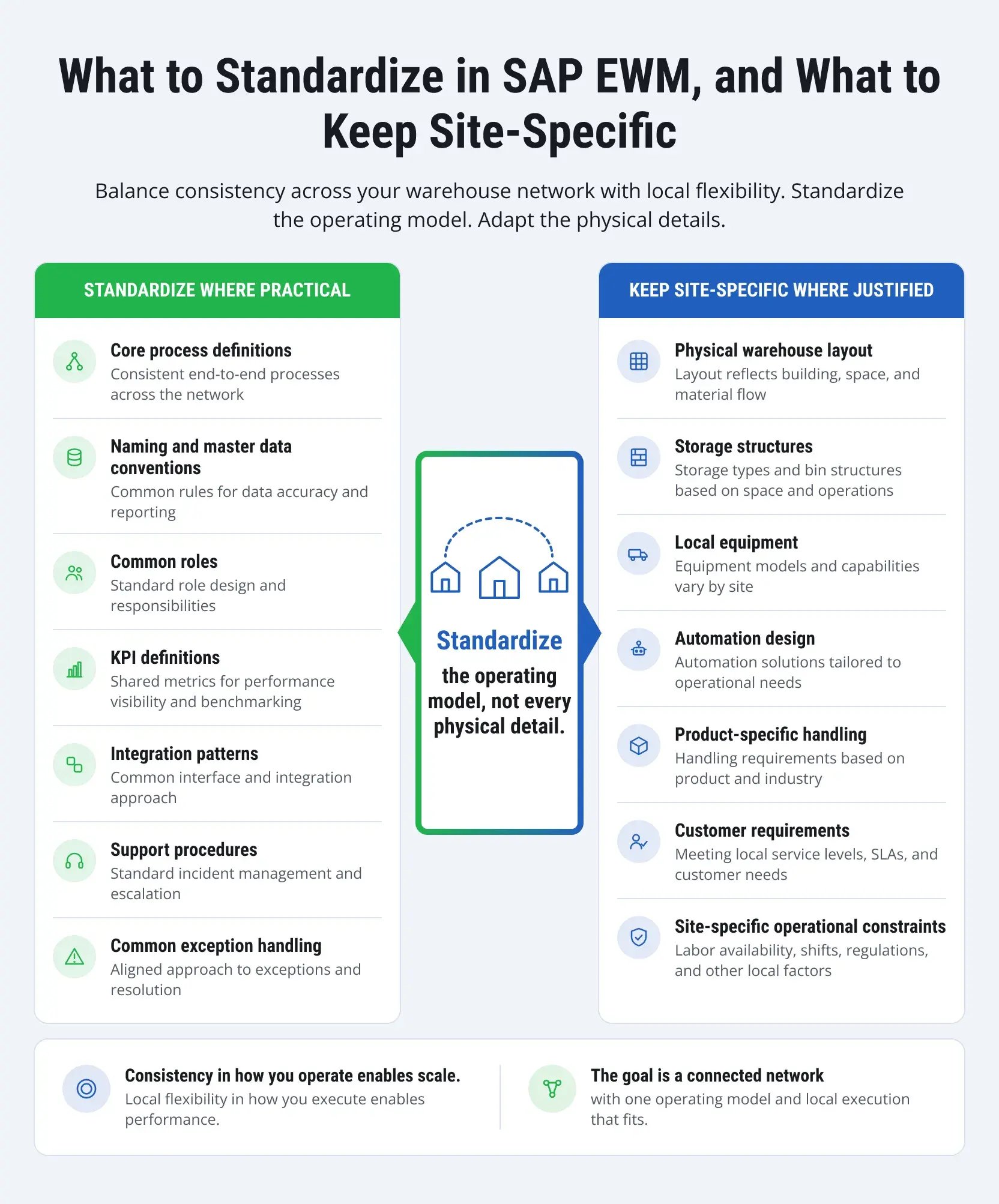
For companies managing multiple warehouses, SAP EWM can provide a unified operating model across all sites. Core processes, master data management agreements, roles, KPIs, integration templates, support procedures, and exception handling can often be standardized to simplify management, training, reporting, support, and future implementations.
At the same time, physical layouts, storage structures, equipment, automation, product handling, and other operational requirements may need to remain site-specific. The goal is not to make every warehouse identical, but to standardize what benefits from consistency while preserving local flexibility where it is operationally justified.
Keep integrations and custom development under review
The surrounding system landscape rarely stays unchanged. New applications are introduced, interfaces evolve, and custom developments accumulate over time.
Periodic reviews can uncover integrations that need improvement and extensions that are no longer necessary. They can also identify custom logic that could now be handled with standard functionality or a cleaner extension approach. This helps keep the EWM environment manageable as the wider SAP landscape evolves.
Automate where the business case holds up
More automation is not automatically better. The right question is whether automation can solve a specific constraint, such as repetitive manual work, limited throughput, long travel distances, or difficulty staffing certain activities.
As volumes and processes change, new opportunities for automation may emerge in areas where it did not make sense during the original implementation. These opportunities should be evaluated against operational requirements, expected benefits, and implementation costs.
Use support insights to drive improvement
Support tickets provide a fairly good picture of how EWM operates. When the same problem reoccurs, it usually points to something else — a training gap, an inconvenient process, or a systemic issue that requires real attention in the context of traditional warehouse operations.
New employees join, roles shift, processes evolve — ongoing support is what lets a company keep up with all of it and spot where things could run better. SAP Application Management Services (AMS) covers that ground: monitoring, maintenance, user support, and optimization as warehouse needs keep changing.
LeverX's Expertise in SAP EWM
Our expertise proves that warehouse projects rarely stay within EWM alone. ERP processes feed the warehouse, transportation affects staging and loading, and automation brings physical equipment into the system landscape. LeverX works across these connections, bringing proven SAP expertise together with an understanding of how warehouses operate on the floor.
SAP EWM implementation
Our teams handle greenfield implementations, warehouse conversions, and rollouts across multiple locations. We start with the actual operation: how goods arrive, where they go, how orders are fulfilled, what equipment is involved, and where current processes slow down in the digital supply chain. From there, we design and configure EWM, build the required integrations, test real warehouse scenarios, and prepare the system for go-live.
SAP S/4HANA and SAP EWM
When EWM is part of an SAP S/4HANA transformation, warehouse decisions cannot be made separately from the rest of the program. Purchasing, production, sales, deliveries, and inventory all have touchpoints with warehouse execution.
LeverX works on both sides of that connection. This includes EWM architecture and integration as well as the data and process changes required to move warehouse operations into the new SAP S/4HANA landscape.
Connecting SAP EWM and SAP TM
The handoff between the warehouse and transportation is one of those areas where small gaps can cause very practical problems: freight arrives, but the dock is not ready, or a shipment is scheduled while picking is still underway.
We integrate SAP EWM and SAP TM so that warehouse work and transportation execution share the information they need, particularly around staging, loading, shipment readiness, and related logistics processes.
Bringing automation into the EWM landscape to increase warehouse efficiency
LeverX designs and implements integrations between SAP EWM and warehouse automation systems, accounting for both normal execution and exception scenarios. Our teams define how EWM interacts with automated equipment, how warehouse tasks translate into physical movements, and how processes should respond to equipment failures, interruptions, and other operational exceptions.
Conclusion
For many companies, the warehouse has become a point where nearly every part of the supply chain meets. Inventory has to match demand, orders have to be ready for transportation, people and equipment need to work around the same priorities, and automation has to respond to what is happening in the system and on the floor.
SAP EWM gives companies the tools to manage that complexity, but the technology is only part of the equation. The decisions made around architecture, process design, integrations, data, automation, and testing will shape how well the system performs in daily operations. So will the people using it.
A successful EWM project should ultimately simplify warehouse management, even if the operation itself becomes more complex. This means fewer gaps between processes, better control over changing conditions, and a foundation that can evolve with new volumes, spaces, technologies, and order fulfillment requirements.
You need the right SAP partners to help you successfully complete this task! Talk to LeverX's SAP consultants about your warehouse processes, SAP landscape, and what you need EWM to accomplish.