

In this article, you'll learn the real benefits and challenges of SAP integration, the Clean Core principle, and practical steps to build a stable integration strategy.
How to Integrate SAP Ariba with SAP ERP and SAP S/4HANA
AI receives most of the attention in boardroom discussions. Yet predictive models and automation rely on one condition: consistent, reliable data across systems. Without structured integration, advanced analytics operate on fragmented inputs.
SAP landscapes are rarely simple. Many organizations run SAP S/4HANA alongside legacy SAP ERP, third-party logistics platforms, CRM systems, and industry-specific tools. Integration determines whether these systems exchange structured, validated data in real time or through batch files and manual uploads. The difference affects reporting accuracy, compliance exposure, and operational speed.
In this article, we will talk about the verified benefits of SAP integration, the constraints and trade-offs it introduces, the Clean Core principle, and practical steps to design an architecture that supports long-term stability. Keep reading.
What Changes When You Integrate SAP Systems?
SAP integration is often reduced to “data exchange.” In practice, it determines how reliably core processes run across finance, supply chains, sales, procurement, and HR.
When SAP systems operate in isolation, each department can complete its own tasks, but this introduces friction between systems. Manual reconciliation increases. Reports conflict. Process cycle times expand.
Integration resolves these gaps at the process, data, and governance levels.
Below are ten specific outcomes enterprises pursue when building a unified SAP landscape.
Automated document flow across business processes
When Sales, Materials Management, and Finance in SAP S/4HANA are connected through standard configuration, one transaction triggers the next. A sales order creates a delivery. Goods issue posts inventory movement. Billing generates accounting entries automatically. Users do not re-enter the same data in multiple modules. This reduces posting errors and prevents document mismatches.
Aligned reporting across departments
Integrated systems use synchronized master data and consistent posting logic. Customer, vendor, and material records follow the same structure across modules. Financial and operational reports are generated from the same dataset. This reduces manual reconciliation before management reporting and shortens the month-end close.
Elimination of spreadsheet-based data transfers
In disconnected environments, teams export data to spreadsheets and upload it into other systems. Standard interfaces, such as IDocs and OData services, transfer documents directly between systems. This removes duplicate data entry and lowers the probability of manual mistakes.
Immediate inventory and order status updates
When warehouse, procurement, and sales processes are connected, inventory changes automatically update across the system landscape as soon as goods movements are posted. Availability checks reflect current stock levels, and order processing teams see accurate delivery status without requesting manual confirmations.
Controlled master data replication
Integration allows structured distribution of master data using predefined rules. When a new business partner or material is created, it can be replicated automatically to connected systems. Validation rules ensure required fields are completed before distribution. This limits duplicate records and inconsistent attributes.
Traceable interface monitoring and error handling
SAP Integration Suite and application logs record message flows and processing statuses. If a document fails validation, the error can be traced to a specific interface or configuration issue. Support teams can correct the root cause without searching across systems. This supports audit requirements and internal controls.
Reliable input for embedded analytics and AI capabilities
Analytics functions in SAP S/4HANA and tools such as SAP Joule rely on consistent transactional data. Integration ensures that sales, procurement, and financial postings follow unified structures. Predictive forecasting and automated insights depend on this consistency; without structured integration, analytical outputs reflect incomplete datasets.
Structured connectivity with third-party applications
Enterprises often operate CRM systems, logistics platforms, and industry-specific tools outside SAP. Integration defines secure communication through APIs and middleware instead of file-based transfers. This reduces dependency on undocumented custom scripts and improves system stability.
Reduced upgrade disruption through standard interfaces
Custom point-to-point connections increase regression risk during SAP upgrades. Using released APIs and standard integration patterns limits the impact of version changes. Testing scope becomes more predictable because interfaces follow documented contracts.
Clear process ownership and control points
Integrated processes require defined responsibility for data validation and interface monitoring. Each step in the document chain is traceable. This clarifies accountability between departments and strengthens compliance with financial and operational control policies.

Why SAP Integration Projects Fail: A Practical Assessment
The expected gains from SAP integration are operationally valid. However, they depend on disciplined architecture, structured governance, and realistic planning. Integration introduces technical dependencies between systems. Once connected, systems no longer operate independently. A design weakness in one area can affect finance postings, order fulfillment, or reporting accuracy.
Below are the most frequent structural problems that increase cost, delay delivery, or create instability after go-live.
Custom code that does not survive system changes
Many SAP ECC landscapes contain custom ABAP reports, user exits, and direct table updates. Some interfaces read or write database tables instead of using released APIs or IDocs. This works in a static environment. It becomes a liability during SAP S/4HANA conversion or support package upgrades.
When the data model changes, custom integrations must be analyzed and adapted line by line. Simplification items in SAP S/4HANA require redesign of dependent logic (e.g, changes in finance tables). Each modification increases the testing scope. The effort is predictable only after a detailed code assessment.
Data model mismatch between SAP and external systems
SAP enforces structured master data and strict field validation. External systems often allow optional fields, free-text attributes, or alternative identifiers. Aligning these structures requires detailed mapping at the field level.
For example, units of measure must match ISO codes. Tax determination logic must align with local compliance rules, and currency precision must be consistent across systems. If even one mandatory field is missing during transfer, the target system rejects the document. These issues are rarely visible during high-level design, but they appear during integration testing.
Distributed middleware landscape
Large enterprises frequently operate more than one integration platform. For example, SAP Integration Suite may coexist with MuleSoft or Dell Boomi due to historical procurement decisions. However, each platform requires separate monitoring, patching, security configuration, and developer expertise.
When an interface fails, teams must first determine which platform processed the message. Root cause analysis becomes slower. Licensing costs also accumulate because each environment requires development, quality, and production tenants. The technical footprint grows without adding business value.
Real-time expectations without performance engineering
Stakeholders often expect immediate data visibility across regions and systems. In practice, message processing depends on network throughput, message broker capacity, and backend processing time. High-volume scenarios, such as E-commerce order intake or warehouse scanning, can generate thousands of messages per minute.
If message queues are not sized correctly, latency increases. If synchronous APIs are overused, user-facing transactions may slow down. Performance testing must simulate realistic production volumes. Without it, real-time design remains theoretical.
Master data quality that cannot support automation
Integration assumes that master data is complete and accurate. In many landscapes, vendor records contain duplicate entries, material master data may use inconsistent units of measure, and customer hierarchies may be outdated.
Once integration is activated, these inconsistencies propagate automatically. Incorrect master data leads to failed postings or incorrect financial reporting. Cleaning master data after integration is more complex because errors already exist in multiple systems.
No dedicated interface monitoring process
Technical monitoring tools record message status. However, tools do not define responsibility. If failed messages are not reviewed daily, business documents remain stuck in error status. Orders may not proceed to delivery, and invoices may not be posted to finance.
Thus, a formal process is required. It must define monitoring frequency, escalation paths, and correction procedures. Without it, integration reliability declines over time.
Security architecture designed after go-live
System-to-system communication requires technical users, certificates, and secure channels. If security design is postponed, projects often assign broad authorizations to avoid delays. This creates audit exposure.
On the other hand, overly restrictive roles can block legitimate postings. For example, an interface user without proper company code authorization cannot post accounting documents. Security design must be defined during architecture planning, not after production deployment.
Excessive point-to-point connections
Direct connections between systems appear simple during initial implementation. Over time, each new system requires multiple additional links. The number of interfaces increases exponentially.
For example, five systems connected directly to each other can require up to ten individual connections. Adding a sixth system increases the number further. Centralized middleware reduces this complexity. Without architectural control, maintenance effort grows with every new project.
Underestimated end-to-end testing scope
Testing isolated message transfer is insufficient. Integration must be validated across complete process chains. A sales order test must confirm correct pricing, delivery creation, goods issue, billing, and accounting impact.
Volume testing is equally important. Interfaces that work with 50 test records may fail with 50,000 production records. Database locks, timeouts, and memory limits appear only under load. Skipping structured integration and performance testing shifts risk to production.
Absence of a long-term integration architecture
Some organizations implement integrations reactively when new applications are introduced. There is no documented target architecture. Naming conventions differ. Error handling standards vary. Documentation is incomplete.
Over several years, the landscape becomes difficult to analyze. When transformation programs such as SAP S/4HANA migration begin, integration dependencies are unclear. This increases assessment effort and project risk.
How to Integrate SAP Without Breaking the Core
Integration solves fragmentation. However, poor integration creates a different problem: a modified ERP core that becomes difficult to upgrade.
SAP’s current architectural guidance centers on a Clean Core approach. The principle is simple. Keep SAP S/4HANA as close to standard as possible, and move custom logic and integrations outside the core system. This reduces regression risk during upgrades, simplifying long-term maintenance.
Understanding this principle is critical before expanding integrations across finance, logistics, procurement, or external platforms.
What “Clean Core” means in practical terms
In SAP S/4HANA, the core includes standard business processes, data models, and upgrade-managed objects. Modifying these objects directly through classic ABAP enhancements, implicit modifications, or table changes increases dependency on specific releases.
Each modification must be tested and potentially rewritten during upgrades. Over time, this creates accumulated remediation effort.
A Clean Core approach limits direct changes inside S/4HANA. Enhancements use released APIs, in-app extensibility options, or side-by-side applications hosted outside the core system.
In-app extensibility vs. side-by-side extensions
SAP allows controlled in-app extensibility. This includes key user fields, business logic extensions through released enhancement points, and CDS view extensions. These options are upgrade-stable when used within SAP’s published framework.
However, complex custom processes often exceed in-app capabilities. In these cases, side-by-side extensions are more appropriate. Side-by-side means building additional logic on platforms such as SAP Business Technology Platform and connecting through APIs or events.
This keeps heavy custom code outside S/4HANA while preserving standard upgrade paths.
The role of SAP Integration Suite
SAP Integration Suite, running on SAP Business Technology Platform, provides tools for API management, event-based integration, and process orchestration.
Instead of embedding custom interface logic directly in S/4HANA, integration flows can be managed within the Integration Suite. APIs expose controlled data access. Event Mesh enables asynchronous communication. Monitoring tools centralize error handling.
This separation reduces the need for direct modifications in the ERP core. Integration logic becomes configurable and easier to adapt when systems change.
Avoiding upgrade disruption
S/4HANA cloud environments follow frequent release cycles. Even on-premise deployments require periodic feature pack updates.
If integrations rely on unreleased tables or direct database access, upgrades can break interfaces. If they rely on released APIs and event frameworks, compatibility risk decreases.
Because a Clean Core strategy requires architectural discipline, integration teams must verify that all extensions use supported interfaces. Governance processes must block direct modifications that bypass SAP’s release contract.
Managing technical debt before it accumulates
Technical debt in SAP landscapes often originates from urgent project timelines. Custom code is developed to meet immediate requirements. Documentation is incomplete and interface ownership becomes unclear.
A Clean Core approach introduces formal design reviews before development. It requires a catalog of integrations, API usage tracking, and periodic code assessment using SAP tools such as the Custom Code Migration app.
This does not eliminate customization. It controls where and how customization occurs.
Clean Core and third-party integration
Third-party platforms remain common in analytics, logistics, HR, and E-commerce. The integration question is not whether to connect them, but how.
Direct modifications inside S/4HANA to accommodate external system logic increase long-term complexity. Using APIs, middleware orchestration, and external extensions isolates third-party dependencies.
When a third-party application changes, adjustments occur at the integration layer rather than inside core ERP logic.
Governance is as important as architecture
Clean Core is not enforced by tools alone. It requires governance.
Architecture boards must define which extension methods are allowed. Development teams must follow API-first principles. Change management processes must review integration impacts before approval.
Without governance, even modern platforms accumulate unmanaged custom logic.
The strategic outcome
A Clean Core landscape does not eliminate integration complexity. It contains it.
Core ERP processes remain stable and upgrade-ready. Extensions remain adaptable. Integration logic becomes transparent and monitored.
For enterprises planning multi-year SAP roadmaps, this distinction determines whether integration remains manageable or becomes a recurring remediation project during every upgrade cycle.
The next section outlines a practical roadmap for implementing SAP integration in 2026 under these architectural constraints.
Key Questions Leaders Ask Before Committing to SAP Integration
At this point, the structural benefits and risks are clear. Most executive teams move from “why integrate” to “under what conditions should we proceed”.
Below are questions frequently raised by CIOs, IT directors, and enterprise architects when planning integration projects.
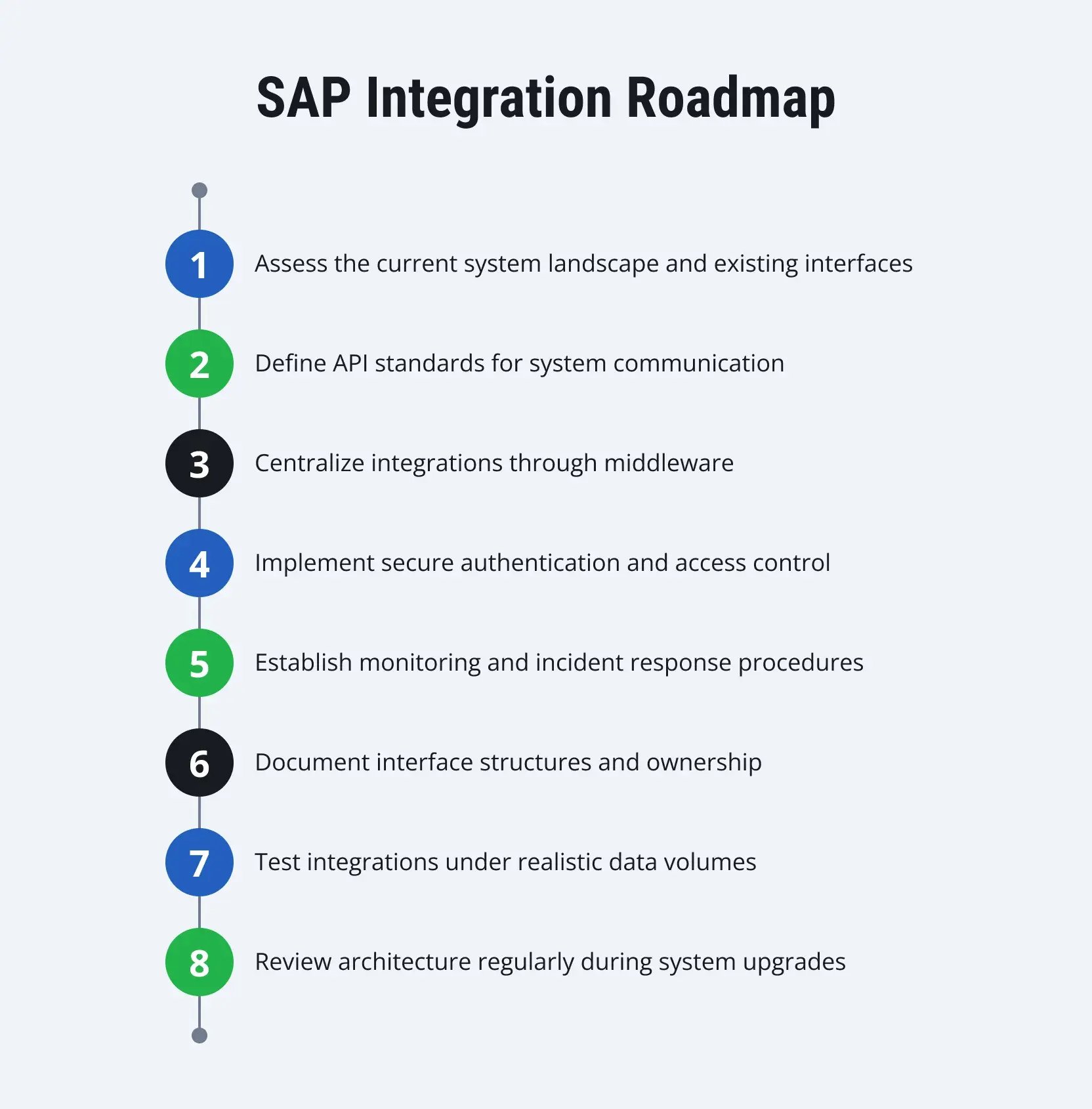
What Should an SAP Integration Strategy Look Like in 2026?
The previous section addressed common operational questions. The next step is execution. SAP integration requires a structured plan that defines technologies, security controls, and governance processes before development begins.
Organizations that operate complex SAP landscapes usually formalize these rules early. Clear standards reduce the number of incompatible interfaces and prevent uncontrolled custom development. They also simplify upgrades because the architecture remains consistent across projects.
The following practices help structure integration work in modern SAP environments.
Step 1. Adopt an API-based communication model
SAP S/4HANA exposes many business objects through released APIs. These APIs are available through protocols such as OData and REST. Each API defines how external systems read or write data in SAP.
For example, a sales application can create a sales order in SAP through the Sales Order API, instead of inserting data through custom database logic. The API validates the structure of the request and returns a response message with the document number or an error code.
This approach reduces dependency on internal database tables. SAP may change internal data structures during system upgrades. Released APIs remain stable because they follow documented contracts.
Older integration methods remain in use in some environments (e.g., flat file transfers over FTP). However, they provide limited validation and monitoring capabilities. API communication provides clearer status tracking and structured error responses.
Step 2. Centralize system communication through middleware
As the number of connected applications grows, direct system-to-system interfaces become difficult to maintain. Each additional connection introduces another communication path and another monitoring point.
Middleware platforms address this issue by acting as an intermediary communication layer. In SAP-centered environments, this role is often performed by SAP Integration Suite running on SAP Business Technology Platform.
The middleware receives messages from one system, transforms the data format when necessary, and forwards the message to the destination system. It also records message status and processing logs. This structure simplifies monitoring because integration activity is visible in a single platform.
A centralized integration layer also reduces the number of direct connections between systems.
Step 3. Define security and identity management standards
Each integration interface requires authentication and authorization rules. Technical users often handle system-to-system communication. These users must have narrowly defined permissions.
Organizations commonly use certificate-based authentication or OAuth tokens for API communication. Network communication should run through encrypted protocols such as HTTPS.
Identity management also includes credential rotation and audit logging. These controls help detect unauthorized access and support compliance reviews. Security design becomes particularly important when SAP systems operate across both on-premise infrastructure and cloud platforms.
Step 4. Establish monitoring and operational ownership
Integration reliability depends on operational discipline. Interfaces must be monitored continuously. Message failures must be investigated quickly.
Integration platforms usually provide message dashboards that show successful and failed transactions. Operations teams review these logs and identify the cause of failures. Typical issues include incorrect data formats, missing master data, or network interruptions.
Clear ownership is necessary. Each interface should have a responsible team that monitors status and resolves incidents.
Step 5. Align integration architecture with business processes
Integration interfaces represent business processes in technical form. A sales order may start in a CRM system, pass through SAP S/4HANA, and continue to a warehouse system. Each step must occur in the correct sequence.
Integration planning should therefore occur during business process design. Data structures, transaction timing, and validation rules must match across all connected systems.
When process design and integration architecture are defined together, document flows remain consistent across the system landscape.
One More Important Step: Work with an Experienced SAP Integration Partner
Even with clear architecture and a roadmap, SAP integration requires careful execution. Large system landscapes include many applications, data structures, and legacy interfaces. Each connection must follow stable technical standards and security rules. Without experienced guidance, integration projects often create fragile interfaces that break during upgrades or process changes.
LeverX supports companies that run complex SAP environments. Our teams analyze the existing system landscape, identify integration risks, and design architectures based on released SAP interfaces such as APIs, IDocs, and event-based communication.
We implement integrations through platforms such as SAP Integration Suite and configure monitoring, authentication, and operational controls from the start. This approach helps maintain stable interfaces and supports the Clean Core principle.
If you are planning new integrations or reviewing an existing landscape, a structured technical discussion can clarify the next steps. Contact us to schedule a consultation. Our team will review your current architecture and outline practical options for building a reliable SAP integration framework.
Seeing the Difference: The Integration Reality Matrix
After establishing architecture, governance, and collaboration practices, it is useful to compare how integration approaches differ in practice. The choices made in logic placement, connectivity, data handling, and monitoring have direct operational and financial consequences.
The Integration Reality Matrix below contrasts legacy integration methods with a modern SAP BTP-driven approach. It highlights not only the technical changes but also the measurable business impact of adopting a structured, Clean Core–aligned integration strategy.
SAP Integration Reality Matrix
|
Factor |
Legacy integration (the old way) |
Modern SAP BTP integration |
Business impact |
|
Logic placement |
Embedded inside the ERP (Z-code) |
Side-by-side extensions on SAP BTP |
Preserves core ERP stability and simplifies upgrades |
|
Connectivity |
Point-to-point (spaghetti interfaces) |
Hub-and-spoke architecture via Integration Suite |
Reduces maintenance effort by ~40% and lowers error risk |
|
Data format |
IDocs / flat files |
OData / JSON / APIs |
Supports near real-time data access and AI–ready processes |
|
Visibility |
Manual monitoring and logs |
Unified observability with dashboards and automated alerts |
Faster issue detection and resolution; improved operational transparency |
This comparison shows how design decisions affect cost, upgrade risk, data readiness, and operational efficiency. LeverX approaches integration with these principles in mind. We help enterprises move away from tightly coupled, high-maintenance connections toward modular, API-based architectures that are traceable and upgrade-safe.
Next step: Explore how your integration landscape can evolve with a structured approach. Contact LeverX to assess your systems, define critical interfaces, and plan a phased migration to a modern, BTP-driven integration model.




.jpg)