Discover when it makes sense to move from SAP BusinessObjects to SAP Analytics Cloud and how to build a practical analytics modernization roadmap.
Enterprise analytics requirements look completely different from what they did a decade ago. Standard report delivery no longer cuts it. Today, companies need platforms that connect daily operational planning, real-time decision-making, predictive projections, and data sharing across business units. As cloud strategies mature and SAP environments modernize, leadership teams must evaluate whether legacy SAP BusinessObjects setups can still carry their long-term growth plans.
Modernizing an SAP BusinessObjects environment rarely requires scrapping every existing dashboard on day one. For most enterprises, the immediate goal is shaping a forward-looking analytics strategy — one that links legacy reporting assets to modern cloud tools without causing operational friction or downtime.
SAP Analytics Cloud (SAC) is SAP's strategic analytics solution for BI, planning, and augmented analytics within the SAP Business Data Cloud ecosystem. Navigating this transition effectively requires viewing SAC not as a simple swap, but as an upgrade that expands upon existing SAP BusinessObjects investments.
This guide breaks down the core structural differences between SAP BusinessObjects and SAP Analytics Cloud, outlines when a cloud transition yields real ROI, reviews tested migration models, and details the tangible business benefits of adopting SAP’s modern analytics architecture.
Why Organizations Are Reassessing SAP BusinessObjects
SAP BusinessObjects supported corporate reporting for decades. Its Universe semantic layer, scheduled publication features, and structured distribution models maintain daily operations across manufacturing plants, financial institutions, and public sector agencies. Operations teams still depend on these fixed report templates for core daily activities.
As business processes evolved, analytics requirements changed as well. Business leaders ask for real-time dashboards, mobile access, direct data queries, and automated statistical projections. They want these options without opening IT ticket queues for simple layout adjustments. Simultaneously, IT leaders move core databases to cloud-hosted environments, introducing new parameters for software scaling, API connections, and update intervals.
Key operational shifts prompt current architecture reviews:
- Transition toward cloud-hosted infrastructure
- Rise in direct data requests from sales, marketing, and supply chain teams
- Leadership requirements for real-time operational metrics
- Extension of budget modeling past the finance departments
- Testing of predictive algorithms and automated data processing
- System refreshes tied to SAP S/4HANA migrations
Running local servers typically creates fixed operational overhead. IT staff spend working hours handling server hardware replacements, database performance tuning, manual patch applications, and security audits. When finance directors review three-year maintenance budgets, they evaluate if legacy server setups offer sufficient agility for new line-of-business projects.
SAP BusinessObjects still fills specific technical roles. Compliance officers rely on its strict layout controls to generate financial disclosures, tax filings, and legal documentation. Data values stay identical across millions of generated pages. Because of this reliability, most modernizations follow a dual-track path. Many companies maintain their proven SAP BusinessObjects setup for statutory reporting while adding cloud platforms to handle ad-hoc data requests and team forecasting.
Executive teams treat analytics upgrades as an operational audit. The primary goal centers on speeding up how factual data reaches managers who make purchasing, hiring, and production decisions.
System Comparison: SAP BusinessObjects vs. SAP Analytics Cloud
|
Evaluation criteria |
SAP BusinessObjects |
SAP Analytics Cloud |
|
Primary scope |
Controlled corporate reporting and static business intelligence |
Operational planning, live analytics, and statistical forecasting |
|
Hosting model |
On-premises servers or dedicated private cloud setups |
Managed SaaS environment |
|
Output format |
Fixed-layout documentation and pixel-precise forms |
Interactive dashboards, visual cards, and scenario models |
|
Budgeting and planning |
Requires separate planning applications, such as SAP BPC or SAP BW-IP |
Built-in financial planning engines |
|
Machine learning |
Basic add-ons requiring manual configuration |
Built-in AI-powered insights and predictive analytics |
|
Target user group |
SQL developers, report authors, and database admins |
Department heads, financial analysts, and executives |
|
Role in IT strategy |
Core operational reporting engine |
Main analytics platform for modern SAP deployments |
Both products belong to the SAP catalog, yet each handles distinct daily tasks. Examining their internal mechanics helps prevent mistaking a platform migration for a simple software swap.
SAP BusinessObjects originated as a centralized document engine. It translates SQL queries through the Universe semantic layer, scheduling batch runs that dispatch thousands of PDFs to internal teams. Accounting units and logistics managers use these static outputs for audit logs, tax forms, and supply manifests, where layout formatting must remain fixed.
SAP Analytics Cloud uses an entirely different setup. Built as a multi-tenant cloud application, it combines live database queries, team budgeting tools, and automated trend lines inside a single browser interface. Financial planners build rolling forecasts directly in the application without requesting custom script changes from database administrators.
Their underlying architectures connect to corporate infrastructure in different ways. SAP BusinessObjects runs on local hardware or private virtual servers, pulling records directly from SAP Business Warehouse instances. SAP Analytics Cloud links to both on-premises databases and external cloud storage through live web connections, receiving regular SAP-managed updates.
Engineering teams often operate both applications in parallel during long-term cloud projects. SAP BusinessObjects keeps delivering regulated tax documents and daily operational printouts. Concurrently, SAP Analytics Cloud handles executive tracking, department budget assemblies, and rapid visual data queries. Running a dual-track framework keeps routine compliance tasks intact while staff shift their daily workflows to cloud interfaces.
Adopting a cloud platform changes daily administrative tasks. It reshapes how financial controllers adjust quarterly spending figures and how field operations teams verify daily inventory counts.
When It Makes Sense to Migrate From SAP BusinessObjects
Determining when to transition away from SAP BusinessObjects varies across enterprises. The timeline hinges on internal business priorities, current analytics setup, and ongoing software projects. For many companies, updating their reporting setup connects directly to larger cloud transitions, SAP S/4HANA rollouts, or database upgrades.
Moving core applications to cloud infrastructure often prompts an evaluation of legacy reporting nodes. Running a standalone on-premises reporting server alongside cloud-hosted software adds extra maintenance tasks for IT teams. Centralizing reporting within a cloud framework can reduce routine server maintenance while giving teams direct access to new platform updates.
Shifting operational requirements also drive these reviews. While static operational reports cover routine compliance needs, business managers increasingly request interactive dashboards, ad-hoc queries, and live visibility into core operational numbers. Modern analytics suites cater specifically to these interactive workflows.
System upkeep costs present another clear trigger point. Large-scale SAP BusinessObjects installations require dedicated budget lines for physical hardware maintenance, OS patches, version upgrades, and administrative troubleshooting across distributed network environments.
Companies often schedule analytics migrations alongside specific enterprise IT initiatives:
- SAP S/4HANA implementations
- SAP Business Warehouse upgrades
- SAP Business Data Cloud deployments
- General cloud migration programs
- Master data management projects
Operational expansion can also strain legacy reporting setups. Larger user pools, expanding database sizes, new compliance standards, and requests for cross-departmental data tracking frequently push existing systems past their practical limits.
Even so, migrating rarely means replacing every SAP BusinessObjects document immediately. Many organizations start by moving high-impact items — such as executive dashboards, financial budget models, or sales tracking tools — while keeping their core SAP BusinessObjects setup active for routine paperwork. This staged transition limits operational risk and lets teams show progress without disrupting day-to-day administrative tasks.
Assessing Your Existing SAP BusinessObjects Landscape
Before mapping out a migration plan, teams need an accurate inventory of their current analytics environment. A thorough audit clarifies which assets warrant an upgrade, which can remain as they are, and which can be retired altogether.
A standard SAP BusinessObjects setup typically spans Web Intelligence, Crystal Reports, Analysis for Office, and the Universe semantic layer. Each element requires individual evaluation during planning. Mapping out how different departments use these tools establishes project scope, clarifies labor estimates, and highlights high-impact modernization targets.
Cataloging the report portfolio serves as an ideal starting point. Over years of continuous operation, most SAP BusinessObjects environments accumulate thousands of documents that vary widely in utility and usage frequency. Auditing these assets separates actively queried reports and mission-critical workflows from duplicate pages and obsolete files.
The Universe semantic layer requires similar scrutiny. Engineers need to inspect existing data models, calculation logic, and metadata schemas to determine whether they still reflect current operational rules or require structural updates during the move.
Connecting systems also form a crucial audit category. Legacy SAP BusinessObjects deployments routinely pull data from a wide variety of enterprise repositories:
- SAP S/4HANA
- SAP Business Warehouse (SAP BW)
- SAP HANA
- SAP ERP
- SQL Server
- Oracle Database
- Snowflake
- Enterprise data warehouses
Tracing these data flows reveals how systems interact today, pointing to ways teams can streamline data pipelines in the future architecture.
Analyzing end-user groups is just as vital. Executives, financial controllers, plant managers, and data analysts interact with reporting tools in distinct ways. Understanding these specific usage patterns ensures that new tools support daily operational needs without creating friction.
Finally, the assessment must cover background operations. This includes reviewing security roles, user permissions, automated publication runs, report bursting configurations, custom SDK scripts, and scheduled distribution lists. Because these automated tasks often deliver time-sensitive operational data across the company, documenting their dependencies prevents unexpected downtime during the transition.
In practice, a detailed pre-migration review frequently uncovers massive opportunities to declutter. A large percentage of legacy reports in enterprise environments are either redundant or completely unused. Purging these unneeded files before migration cuts project scope, accelerates implementation timelines, and keeps engineering focused on the dashboards that drive actual commercial value.
Migration Paths: Rebuild, Modernize, or Hybrid Approach
Moving from SAP BusinessObjects to SAC involves no fixed formula. Choosing a migration strategy comes down to commercial goals, technical complexity, reporting needs, and the overarching direction of an enterprise's software architecture. Because an abrupt, all-at-once cutover carries substantial operational risk, many organizations opt for a phased rollout that pairs new cloud capabilities with baseline business stability.
One option involves a selective rebuild. Technical teams construct high-priority dashboards and visual models from scratch inside SAP Analytics Cloud, bypassing the tedious task of recreating legacy SAP BusinessObjects files layout-for-layout. Development hours center on building modern analytical features rather than replicating legacy templates. Companies undergoing core ERP updates or restructuring internal workflows routinely choose this path.
Progressive modernization offers another practical path forward. Teams migrate specific reporting use cases to the cloud in planned stages based on immediate business value. Executive views, operational budgeting, performance summaries, and exploratory tools move first. Meanwhile, high-volume operational documents remain active on BusinessObjects until a clear commercial rationale justifies their transfer.
A substantial portion of enterprise deployments end up operating both environments side by side. SAP BusinessObjects continues handling structured compliance paperwork, financial filings, and scheduled print runs where layout controls must remain fixed. Simultaneously, SAP Analytics Cloud powers real-time visual cards, collaborative financial planning, ad-hoc queries, and predictive modeling. This dual-track setup prevents day-to-day operational friction while giving departments space to adapt to new interfaces.
Upgrading an analytics environment extends far beyond shifting files from one portal to another. Sustained performance across the enterprise depends on several parallel activities:
- Redesigning underlying data models where performance bottlenecks exist
- Simplifying or retiring outdated reports
- Improving data quality and governance
- Aligning security and authorization models
- Standardizing key performance indicators across business functions
- Preparing users for new analytical workflows
Focusing a modernization effort on tangible operational outcomes creates an analytics setup capable of supporting both current requirements and future expansion. A staged roadmap also gives project teams time to refine technical parameters as each phase concludes, lowering implementation risks and driving user adoption across business units.
Challenges Organizations Face During Migration
Upgrading from SAP BusinessObjects to SAP Analytics Cloud goes way beyond replacing software. Taking analytics cloud-native forces systems architects to re-examine daily output routines, data models, access levels, and user habits. Finding technical bottlenecks before writing code keeps project timelines realistic while avoiding emergency fixes later.
Report bloat creates instant drag. Corporate SAP BusinessObjects setups gather thousands of old files over the years of constant use. A small fraction supports daily business, but huge volumes sit forgotten or duplicate active reports. Rebuilding every legacy document blindly swells project budgets, burns developer hours, and stalls progress.
Semantic layer technical debt presents a massive hurdle. Universes store years of piled-on business rules, hardcoded formulas, and legacy variables. Copying these complex structures line-for-line into a fresh portal rarely helps anyone. Technical leads should decide whether legacy universes still reflect daily operations or if a total schema overhaul makes more sense.
Shaky data governance always surfaces during cutovers. Mismatched master records, conflicting metric definitions, and zero data ownership wreck trust in analytical outputs. Smart project teams treat this transition as an ideal window to fix bad data pipelines, unify corporate metrics, and enforce tight system rules.
User habits take deliberate effort to break. Teams used to static PDF printouts hit a sharp learning curve when handed live dashboards, direct queries, and collaborative planning sheets. Technical delivery needs hands-on training, transparent internal messaging, and active change management so staff actually embrace the new tools.
Operating twin environments brings real administrative headaches during transition phases. Running legacy servers alongside SaaS apps maintains daily output, but requires tight control. Teams need explicit guidelines on which system holds primary authority for specific tasks to stop data discrepancies from spreading.
Underlying integration chains add execution risk. Reports rely on web connections across SAP databases, third-party storage, batch schedules, security groups, and automated feed exports. Mapping these dependencies early prevents unexpected downtime and keeps operational workflows running smoothly.
Handling these structural realities during initial scoping prevents constant firefighting later, cutting project risk while building a dependable analytics foundation.
Business Benefits of SAP Analytics Cloud
While technical cleanup or cloud migration strategies often jumpstart this transition, the deepest value lies in changing how operational data guides commercial decisions. SAP Analytics Cloud moves past fixed document creation, combining real-time analytics, corporate planning, and machine learning models within a single cloud software environment.
Rapid access to data stands out as an immediate advantage. Interactive visual displays let managers investigate line-item details, slice across dimensions, and monitor performance indicators without opening tickets for IT developers. Operational leads can react to shifting supply bottlenecks or sudden market changes as they unfold.
The platform breaks down the old boundary separating budgeting activities from routine reporting. Instead of juggling quarterly projections, department expenses, and performance reviews in isolated spreadsheets, staff conduct planning workflows directly against live financial and operational databases. This unified setup connects finance, sales, and logistics teams during rolling budget cycles.
Built-in artificial intelligence provides an extra layer of operational guidance. Native functions like Smart Insights, Smart Discovery, natural language processing, and predictive trend modeling help analysts spot anomalies, explain financial variances, and highlight cost savings buried inside dense tables.
SAP continuously expands machine learning functionality across its software ecosystem, notably through Joule, its generative AI copilot. Working alongside predictive tools and automated pattern recognition, these AI capabilities allow non-technical staff to query complex data sets using plain phrases, uncovering relevant trends without needing a statistical background.
Self-service capabilities give business units the freedom to answer routine operational queries on their own. At the same time, central system controls keep metric definitions consistent and audit trails reliable across all departments.
Cloud hosting brings tangible operational benefits. With SAP developers handling the underlying platform infrastructure, organizations receive continuous software enhancements without executing long, expensive upgrade projects. Fresh capabilities roll out through routine updates, lowering hardware maintenance demands while letting teams activate new tools when ready.
Connection options tie the corporate ecosystem together. SAP Analytics Cloud links directly to core enterprise data platforms — including SAP S/4HANA, SAP Business Warehouse, SAP Datasphere, and SAP Business Data Cloud — while supporting connections to non-SAP database systems. Broad connectivity keeps departments from building isolated data silos.
Adopting SAP Analytics Cloud establishes an adaptable foundation for corporate reporting, operational budgeting, and automated decision support that grows alongside changing organizational needs.
Specific gains from an analytics modernization project typically include:
- Lower IT labor hours spent fixing legacy reports
- Accelerated access to daily operational metrics
- Better coordination between budgeting and reporting teams
- Uniform metric definitions and enforcement of data rules
- Reduced hardware and server administration costs
- Flexible architecture ready for future AI and predictive tools
.webp)
How SAP Analytics Cloud Fits Into SAP's Modern Data Strategy
SAP Analytics Cloud sits within a much broader software ecosystem. Evaluating it in isolation misses the point. IT leaders get far better results viewing the software as one piece of an integrated stack alongside SAP Business Data Cloud, SAP Datasphere, and SAP S/4HANA.
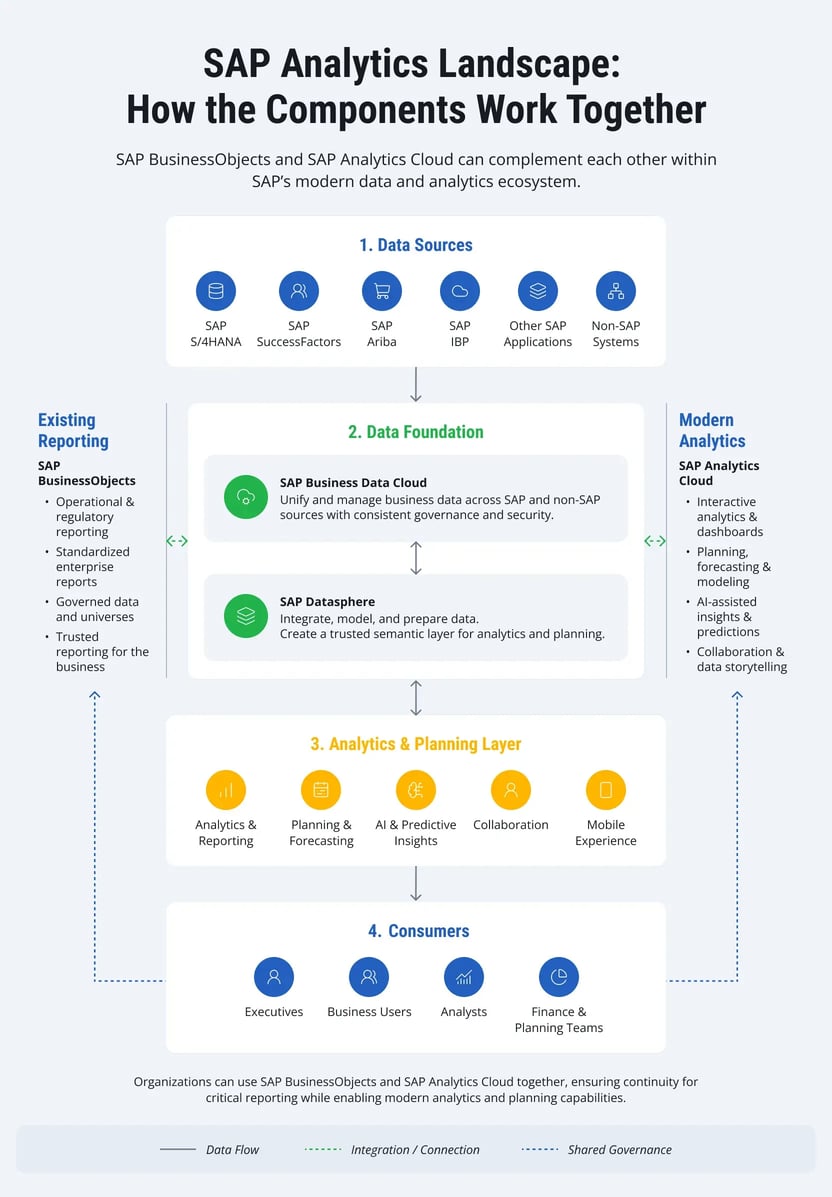
Core operational tools drive day-to-day business. Systems like SAP S/4HANA, SAP SuccessFactors, SAP Ariba, and SAP Integrated Business Planning for Supply Chain generate heavy volumes of transactional records every minute. Most IT setups pipe non-SAP databases into this same mix to complete their operational picture.
Legacy data warehouses also need a clear path forward. Organizations running SAP BW installations do not have to scrap years of work during an upgrade. Tools like SAP BW Bridge give engineering teams a way to port over custom logic and existing data models, creating a bridge toward SAP Datasphere and SAP Business Data Cloud without breaking current reporting setups.
SAP Business Data Cloud provides a governed data foundation across SAP and non-SAP systems. Bringing together capabilities such as SAP Datasphere, it prepares trusted business data for analytics, planning, and AI-driven applications while preserving business context.

Inside this setup, SAP Datasphere handles pipeline connections, semantic mapping, system virtualization, and database management. It pulls data out of varied source applications, enforces uniform metric definitions, and builds reusable data models that supply analytics across departments.
SAP Analytics Cloud sits right at the user consumption layer. This is where analysts, executives, and financial planners interact directly with live dashboards, operational budgets, statistical forecasts, and AI-driven insights. Instead of wrestling with data cleanup or system piping, managers focus on analyzing clean business facts.
This stacked approach creates a clear, logical architecture:
- Transactional applications: Generate daily operational and financial records.
- SAP Business Data Cloud: Establishes a governed enterprise data foundation.
- SAP Datasphere: Cleans, maps, and prepares raw inputs for company-wide use.
- SAP Analytics Cloud: Renders visual displays, handles budgets, and runs AI-driven scenario modeling.
This modular structure allows for a sensible step-by-step transition. On-premises SAP BusinessObjects servers can keep pumping out heavy operational print runs while teams deploy modern analytical tools through SAP Analytics Cloud. As business goals shift, companies can expand their cloud footprint without threatening mission-critical reporting schedules.
Matching an analytics update to SAP’s broader software roadmap gives an enterprise an environment capable of handling today's operational demands while remaining completely open to future AI tools, deep planning models, and broad system integration.
Our Approach to SAP Analytics Modernization
Upgrading legacy reporting systems usually fails when companies treat the project as a simple software swap. Real modernization requires aligning software configuration with daily operations, internal access policies, and team habits. That alignment prevents business disruptions while technical teams restructure the underlying reporting environment.
LeverX works directly with enterprise teams to evaluate legacy SAP BusinessObjects landscapes, construct realistic upgrade schedules, and deploy SAP Analytics Cloud. Our teams tailor migration paths to match immediate commercial goals and enterprise IT roadmaps, whether an organization needs interactive leadership dashboards, multi-department financial forecasting, or a complete cloud platform.
Core implementation services
SAP BusinessObjects landscape evaluation
Our technical leads audit legacy BI environments to track actual report consumption, universe configurations, database connections, and back-end scripts. Isolating abandoned files from mission-critical output establishes a tight, manageable project boundary.
Architecture strategy and blueprinting
Enterprise reporting demands differ across industries. We determine whether an organization achieves better results by rebuilding high-value assets from scratch, deploying modern features in planned phases, or maintaining a temporary side-by-side setup with SAP BusinessObjects and SAP Analytics Cloud.
SAP Analytics Cloud deployment
Consultants configure SAP Analytics Cloud to handle ad-hoc data exploration, operational budgeting, and corporate reporting. Connecting the platform directly to SAP and non-SAP data repositories while mirroring existing security permissions ensures administrative compliance from day one.
Dashboard redesign and content optimization
Instead of cloning legacy report layouts line for line, technical teams restructure reporting assets around dynamic filtering, visual data stories, and mobile access. This shift allows operational managers to query live data directly without asking IT staff for customized PDF exports.
Data integration and pipeline engineering
We connect SAP Analytics Cloud to SAP Business Data Cloud, SAP Datasphere, SAP S/4HANA, and SAP BW repositories. Building scalable data pipelines eliminates isolated information silos and keeps metric definitions uniform across separate business units.
User enablement and system support
Software investments deliver return only when internal teams use the new interfaces effectively. We conduct hands-on training sessions, document administrative policies, manage technical knowledge transfer, and provide post-cutover support to ensure smooth operational transitions.
Combining years of SAP implementation experience with analytics engineering enables LeverX to execute system migrations efficiently, reducing project delivery risks while establishing a stable environment for future data initiatives.
Building a Roadmap for SAP BusinessObjects Modernization
Failing to phase an enterprise analytics overhaul is one of the quickest ways to stall project momentum. Most engineering teams get better outcomes by setting up a staged rollout, delivering visible wins early on without pushing daily operations into chaos.
The initial work centers on taking stock of what is actually running. Systems leads audit every active report, visual display, universe schema, input connection, user group, and export script. Sorting essential workflows from obsolete data stores keeps project scope realistic and prevents developers from spending weeks migrating dead code.
With the current landscape documented, attention shifts to defining the future architecture. Engineering decisions need to lay out exactly how SAP Analytics Cloud shares data with SAP Business Data Cloud, SAP Datasphere, SAP S/4HANA, SAP BW, and third-party environments. Establishing data access controls and governance policies at this stage keeps operational metrics consistent as the overall system expands.
Rather than shifting all analytics workflows over at once, high-value deployment targets come first. Executive dashboards, operational budgets, management summaries, and high-impact analytics applications get built in early sprints. Delivering quick technical wins builds confidence across departments, proves out software functionality, and gives teams hands-on experience before broader implementation begins.
As more business units move onto SAP Analytics Cloud, technical teams get natural opportunities to refine analytical views, optimize underlying database logic, unify corporate metrics, and phase out outdated legacy assets. Keeping communication channels open and offering practical staff training prevents departmental friction during these cutovers.
Looking at analytics modernization as an ongoing program — rather than a static, one-time project — yields much better technical longevity. As SAP releases upgrades across SAP Analytics Cloud, SAP Business Data Cloud, and the rest of its analytics catalog, organizations can adopt fresh features without tearing down their existing software framework.
Structuring the project around concrete business needs keeps progress steady while keeping operational risks low. Concentrating on commercial results over pure technical migration produces an environment ready to handle future expansion, evolving business demands, and incoming predictive AI workloads.

%20(1).webp)