













SAP Engineering Control Center (ECTR)
LeverX helps you implement and extend SAP Engineering Control Center (ECTR) to connect supported CAD applications with SAP systems. Keep engineering files, product structures, and technical documents linked to SAP data so teams across engineering, manufacturing, and procurement can work from consistent information.
LeverX combines SAP expertise with engineering and product lifecycle management (PLM) experience. From SAP ECTR implementation to CAD integration and workflow automation, LeverX helps connect engineering activities with the SAP processes that support your business.
How LeverX can help:
- SAP ECTR consulting and implementation - Plan, configure, and extend your ECTR environment.
- CAD integration with SAP - Connect supported CAD applications with SAP data and processes.
- Engineering data and document management - Keep drawings, metadata, and technical documents linked to SAP records.
- Product structures and BOMs - Connect engineering structures with SAP material records and bills of material.
- Engineering change and release management - Support controlled updates, approvals, and product changes.
- SAP PLM and SAP S/4HANA integration - Connect engineering workflows with your enterprise systems.
- Process automation with LeverX IPS - Automate selected workflows between CAD, SAP, and related business processes.
CONTACT US
If you are looking for an SAP Global Strategic Supplier or Technology Partner for your business, fill out the form below, and we will contact you at short notice.
Bridge the Gap Between Engineering and Enterprise With SAP ECTR
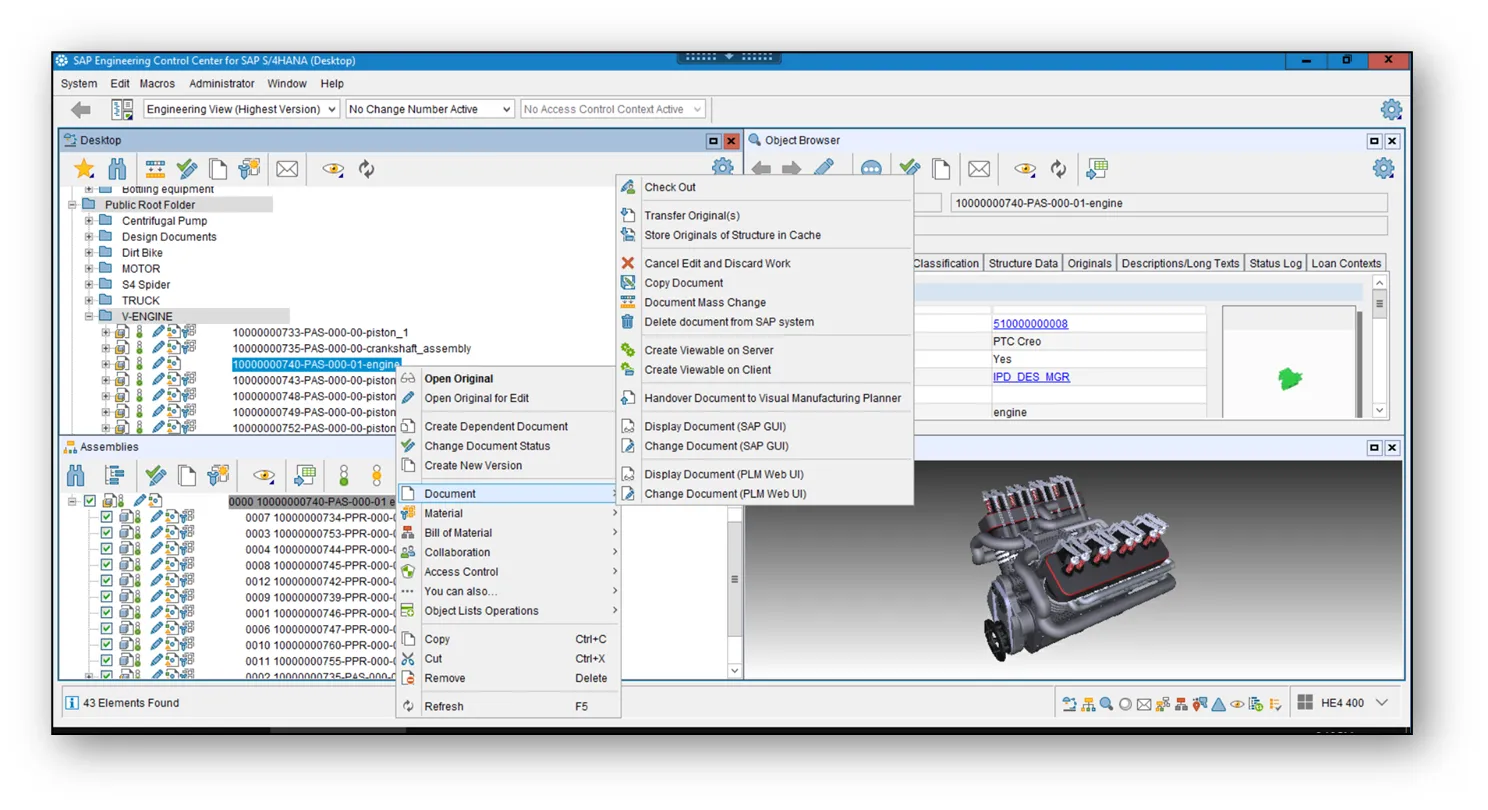
Engineering data needs to stay connected throughout the product lifecycle. SAP ECTR integrates supported CAD authoring tools with SAP, helping engineers access relevant enterprise information and maintain links between design data and business records.
Depending on your configuration, this can include CAD models, drawings, metadata, documents, material master records, and bills of material (BOMs). The information can then support downstream processes in manufacturing, procurement, quality, and service.
With SAP ECTR and LeverX, you can:
- Access relevant SAP data and functions from supported CAD environments.
- Create and update SAP materials, documents, and BOMs through configured engineering workflows.
- Keep product structures and technical documents connected to SAP records.
- Coordinate engineering changes and release processes across teams.
- Connect design activities with manufacturing, procurement, and quality processes.
- Automate selected CAD-to-SAP workflows using LeverX Integrated Process Solution (IPS), where applicable.
SAP ECTR Services
SAP ECTR Consulting
SAP ECTR Implementation

SAP ECTR Integration

SAP ECTR Configuration and Customization

SAP ECTR Support

SAP ECTR Application Management

Supported CAD Integrations With SAP ECTR
Major MCAD integrations available:
- NX
- SOLIDWORKS
- Solid Edge
- Creo
- Inventor
- AutoCAD
- CATIA

Major ECAD integrations available:
- Altium
- Siemens EDA (formerly Mentor)
- Cadence Allegro
- Cadence OrCAD
- Zuken
- EPLAN
- SOLIDWORKS Electrical
- AutoCAD Electrical
The Strategic Benefits of CAD-to-SAP ECTR Integration
Integration of all processes into a single supply chain using SAP ECTR opens up space for:
Time and budget savings
Resource savings
Streamlined production processes

Core Functions and Capabilities of SAP ECTR
Import and manage 2D/3D CAD files
SAP ECTR enables seamless import of engineering files directly into SAP DMS, including 2D drawings and 3D models from leading CAD systems.
- Supports native formats from MCAD and ECAD tools
- Ensures centralized storage and version traceability
Where SAP ECTR Is Used
SAP Engineering Control Center plays a critical role in integrating engineering data across all phases of the product lifecycle. Here's how different teams and processes benefit from ECTR:
Engineering
Sync 2D/3D CAD data directly into SAP to create and maintain BOMs, materials, and technical documents. This reduces manual handovers and ensures that design data is always connected to enterprise records.
Production handover
Transfer detailed 3D models, assemblies, and work instructions from engineering to the shop floor. This ensures that production teams receive up-to-date and accurate data, reducing errors, delays, and rework.
Visualization
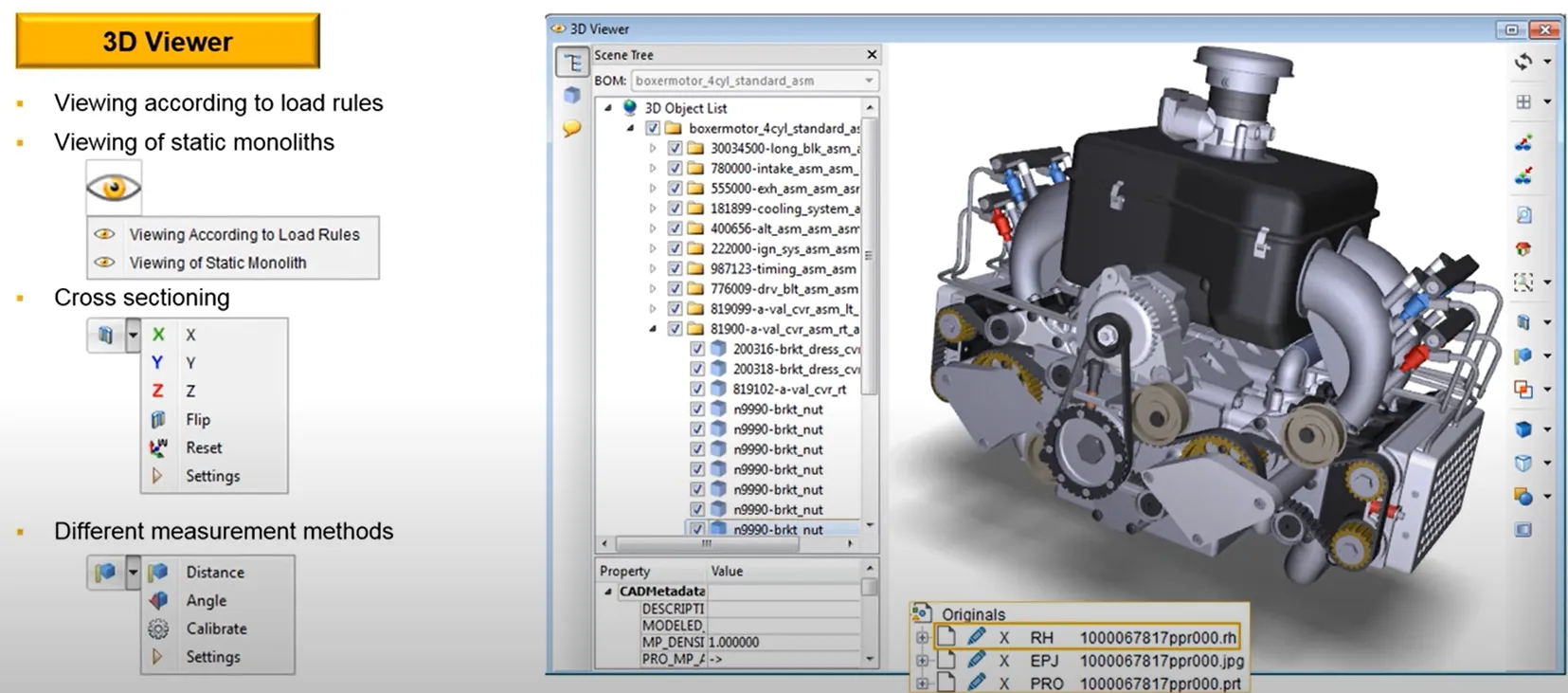
Leverage SAP Visual Enterprise integration to generate visual BOMs (vBOMs), exploded views, and 3D-based work instructions. ECTR helps bridge the gap between engineering and manufacturing through intuitive, visual data consumption.
Change management
Manage design revisions and engineering changes using SAP Engineering Change Records and SAP Enterprise Product Engineering. Track modifications, approvals, and impacts across the entire product structure with full auditability.
RELATED CASE STUDIES
SAP ECTR and CAD Integration for a Consumer Goods Manufacturer
LeverX connected SOLIDWORKS with SAP ECTR to streamline engineering data management, product visualization, and change processes.

SAP ECTR for an Equipment Manufacturer
LeverX connected engineering data across facilities using SAP ECTR and SAP PLM, helping improve collaboration and operational efficiency by 25–35%.

SAP ECTR Implementation for a Global Telecom Company
LeverX introduced SAP ECTR and automated engineering change processes across documents, BOMs, materials, and production data.
Leverage the Power of SAP Engineering Control Center With a Trusted Vendor
Proven track record
Industry experts
SAP partnership
Quality and security
Investment in innovation
Flexibility
Industries We Serve
Implementation Roadmap
- Current processes evaluation: Assess existing business processes and identify the organization's needs.
- Defining technical requirements: Create a detailed specification of the functional and technical needs of the new system.
Discover
- Setting goals and objectives: Establish and agree on the goals to be achieved throughout the project.
- Assembling the project team: Appoint team members and define their roles and responsibilities.
- Project plan development: Create a comprehensive plan that outlines project phases, timelines, resources, and key performance indicators.
- Budget determination: Estimate and approve the budget.
- Specifications preparation: Develop the technical and functional specifications for the development team.
Prepare
- Ensuring business requirements are met: Check that SAP ECTR aligns with business requirements and project objectives.
- Data validation: Verify the accuracy and compliance of the data.
Explore
- Data migration: Transfer data from existing systems to the new one.
- System configuration: Set up the solution according to requirements and specifications.
- Customization: Develop additional features and modules, if the standard solution does not meet all needs.
- Integrations: Configure SAP ECTR to work with other IT systems and applications.
Realize
- Testing: Perform functional, integration, regression, and load testing to ensure that all works correctly.
- User training: Organize sessions to help users become familiar with the new system.
Deploy
- System readiness check: Verify that the system is ready for operational use.
- Launch: Officially transition to active use of SAP ECTR.
- Ongoing support: Continuously monitor solution performance to identify and resolve any issues.
Run
FAQ
What is SAP Engineering Control Center (ECTR)?
SAP ECTR is SAP’s standard solution for integrating CAD systems with the broader SAP environment. It connects engineering data directly to:
- SAP Document Management System
(DMS) - BOMs
- Material masters
- Technical and production documents
- Manufacturing-related SAP objects, such as work orders and routings
ECTR is a critical link between product design and enterprise operations, ensuring engineering data flows seamlessly into key business processes.
How does SAP ECTR differ from a CAD vendor's standard Product Data Management system?
While a standalone Product Data Management (PDM) system is excellent for managing CAD file versions and engineering workflows, its primary limitation is its separation from the enterprise. SAP ECTR’s key advantage is its direct integration into the SAP digital core. When an engineer releases a design in ECTR, it can automatically create and update SAP objects like Material Masters and BOMs, making that data instantly available to procurement, manufacturing, and quality teams without manual data transfer or reconciliation.
Can SAP ECTR integrate mechanical (MCAD) and electrical (ECAD) data for the same product?
How is SAP ECTR licensed?
Does SAP ECTR only manage CAD files, or can it also handle other engineering documents?
While its primary function is CAD integration, SAP ECTR is built on the SAP DMS. This means it can manage any file related to the engineering process. You can link non-CAD documents, such as simulation results (FEA/CFD), technical specifications (PDFs, Word documents), test reports, and project plans, directly to the relevant CAD models or material masters, creating a complete and auditable technical data package for your products.
How does SAP ECTR handle performance when working with large and complex CAD assemblies?
Contact Us
What happens next?
-
1
An expert will reach out to you to discuss your specific needs and requirements.
-
2
We'll sign an NDA to ensure any sensitive information is kept secure and confidential.
-
3
We'll work with you to prepare a customized proposal based on the project's scope, timeline, and budget.
years of expertise
projects
professionals
Contact Us