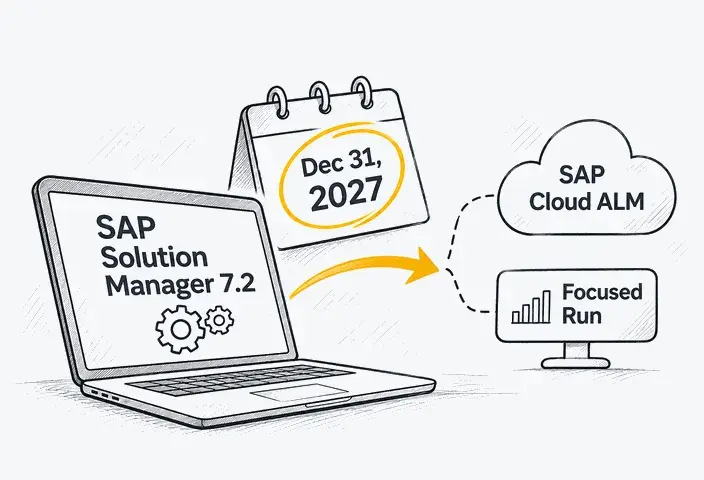
Replacing SAP MRS can affect maintenance orders, project assignments, resource availability, and ERP integrations. Explore the options and learn which dependencies to assess before choosing a new scheduling solution.
SAP Multiresource Scheduling (SAP MRS) helps companies assign employees, equipment, and other resources to maintenance, service, and project activities. The maintenance timelines discussed in this article apply to two distinct add-on products: SAP MRS 10.0 for SAP ECC and SAP Multiresource Scheduling option for SAP S/4HANA (release 1.0). These should not be confused with SAP S/4HANA Asset Management for Resource Scheduling (RSH), which is a separate scheduling solution.
In many installations, scheduling also depends on employee qualifications, availability checks, custom planning rules, and data from connected SAP applications. Replacing MRS may therefore require integration changes, supported extensions, or adjustments to how work is assigned.
The SAP MRS end-of-maintenance timeline makes this decision particularly relevant for companies planning an SAP S/4HANA upgrade. Before selecting another scheduling solution, they need to establish whether the installed MRS version will remain compatible with the target ERP release and how existing planning processes may be affected. That assessment depends on the installed MRS version, connected systems, and scheduling functions currently in use.
Short answer: According to SAP's Release Availability Documentation, mainstream maintenance for SAP MRS 10.0 on SAP ECC (SAP ERP 6.0 EhP7/EhP8) ends on December 31, 2027, with optional extended maintenance available until December 31, 2030 in specified cases. For SAP Multiresource Scheduling, an option for SAP S/4HANA (release 1.0), an SAP product expert confirmed that mainstream maintenance continues until December 31, 2030 for supported SAP S/4HANA releases through 2023. Companies evaluating a replacement can consider SAP S/4HANA Asset Management for Resource Scheduling (RSH) or SAP Field Service and Asset Management (FSA) for maintenance and service processes. Project staffing may require a different solution.
SAP MRS Maintenance Status and Roadmap
For SAP MRS 10.0 on SAP ECC, mainstream maintenance ends in 2027, while SAP MRS for SAP S/4HANA 1.0 reaches this milestone in 2030 for supported SAP S/4HANA releases through 2023. The timeline below shows the exact dates alongside the relevant ERP maintenance deadlines. These dates follow published SAP product guidance, and customers should verify their installed versions and contractual entitlements.
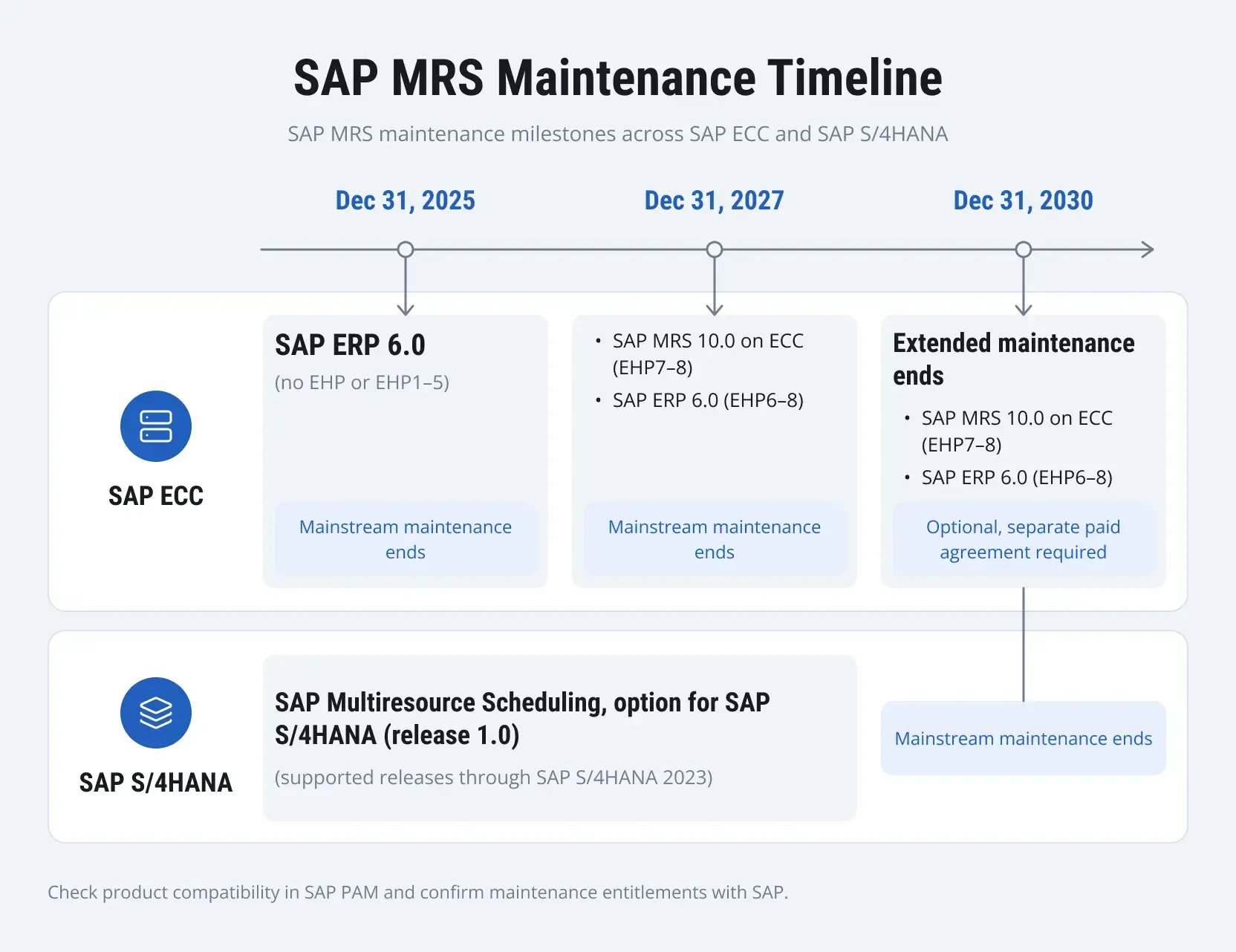
The maintenance dates shown in the timeline depend on the installed product and ERP release. Earlier SAP MRS versions may follow different schedules, and an older SAP ERP Enhancement Package may already be outside mainstream maintenance even if MRS itself has a later deadline. SAP's ERP 6.0 maintenance guidance explains the release-specific conditions, while the Product Availability Matrix (PAM) provides information for checking product compatibility. Eligibility for optional extended maintenance also depends on the applicable SAP agreement.
The expression SAP MRS end of life frequently appears in discussions about these deadlines, although SAP distinguishes several maintenance categories. Mainstream maintenance covers the standard services defined for the product. Optional extended maintenance continues specified services under a separate arrangement, while customer-specific maintenance may follow with more limited coverage.
The product's development status also deserves attention. In a response regarding SAP MRS and SAP Field Service Management, an SAP product expert explained that MRS would continue to receive corrections for existing customers, with no further functional development planned. Companies can use the remaining maintenance period to evaluate their options, but they should not base future requirements on expected MRS enhancements.
What does the SAP MRS end of support mean for existing customers?
An existing MRS installation can continue running after mainstream maintenance ends. The main concern involves the support available under the customer's agreement, including services for incidents and corrections, as well as compatibility with future ERP releases. A scheduling process may continue working in the current environment while becoming difficult to maintain or upgrade as the surrounding SAP systems change.
Consider a manufacturer planning an SAP S/4HANA upgrade while continuing to use MRS for maintenance scheduling. If its MRS component is incompatible with the target release, the company will need to address scheduling before integration testing and cutover. Another organization may be able to postpone replacement because it plans to retain its current ERP version. That decision still depends on the maintenance arrangements covering both systems and the operational requirements they support.
What Are the Alternatives to SAP MRS?
Existing SAP MRS customers can evaluate SAP S/4HANA Asset Management for Resource Scheduling (RSH) for in-plant maintenance and SAP Field Service and Asset Management (FSA, formerly SAP Field Service Management) for field service and asset maintenance. The suitability of each solution depends on its current capabilities, roadmap, and integration requirements.
Neither solution covers every MRS use case, so companies need to compare their existing scheduling requirements with the capabilities available in each product. Organizations using MRS for project staffing should also evaluate SAP Project and Resource Management separately.
SAP S/4HANA Asset Management for Resource Scheduling (RSH)
SAP S/4HANA Asset Management for Resource Scheduling (RSH) supports maintenance planning within the SAP Enterprise Asset Management environment under scope item Maintenance Resource Scheduling (43R). The Resource Scheduling for Maintenance Planners app (F2227) provides an overview of maintenance workload and work center utilization, with access to related scheduling applications. RSH also supports individual employee assignments. Its People Gantt feature, documented in SAP S/4HANA 2023, allows planners to assign employees to maintenance operations and check their availability within work center teams. For public-sector organizations, the available resource scheduling capabilities should also be checked against the relevant SAP S/4HANA Public Sector solution scope.
Consider a manufacturer using MRS to allocate maintenance work among internal teams. If the existing requirements mainly concern maintenance orders, work center capacity, and individual assignments, the available RSH functions may be sufficient. The evaluation becomes more complicated when the current implementation relies on additional resource types, custom scheduling rules, or functions outside RSH's supported scope. Licensing and future product development also affect the decision, since RSH requires a separate license and SAP has announced limits to its roadmap.
In June 2026, an SAP product expert clarified the RSH roadmap, citing guidance from SAP product management. RSH will receive no further roadmap updates after SAP S/4HANA 2025 FPS01. However, the solution remains covered by mainstream maintenance according to the underlying SAP S/4HANA system. SAP also outlined plans for licensing and migration offerings to FSA once sufficient functional parity is reached. The provisional target is the second half of 2027, although this is not a confirmed delivery date.
For companies considering a new RSH implementation, the limited roadmap makes the current functional scope particularly important. Requirements that RSH cannot meet today should be addressed during solution selection rather than left dependent on future enhancements. Companies should also consider whether their scheduling needs are likely to change over the expected lifetime of the implementation. If those plans depend on capabilities outside RSH's confirmed scope, FSA deserves a closer evaluation before the company commits to RSH.
SAP Field Service and Asset Management (FSA)
SAP renamed and expanded SAP Field Service Management (FSM) to SAP Field Service and Asset Management (FSA) with the 2605 release in 2026. Older comparisons of SAP MRS vs. SAP FSM consequently refer to the product's previous name and scope.
SAP's broader direction for FSA involves closer coordination of field service and asset maintenance through planning, scheduling, mobile execution, and AI-assisted capabilities. However, the product's expanding scope does not establish FSA as a direct replacement for every MRS implementation. Companies should evaluate the functions already available in their target FSA release and subscription separately from enhancements that SAP has announced for future releases.
Take a utility company responsible for repairs across several service regions. An urgent request comes in while available technicians already have assignments, so the dispatcher needs to find someone with the required qualifications and determine how the new job will affect existing commitments. Travel requirements, working hours, and technician availability can all influence the decision. FSA provides functionality for managing such scheduling tasks, including the adjustments required when work priorities change during the day.
FSA also supports internal asset maintenance, although scheduling priorities may differ from those in field service operations. A manufacturing plant, for example, may focus on maintenance team capacity and workload distribution across internal work centers. SAP continues to expand FSA's asset maintenance capabilities, including improvements to capacity planning described in the 2608 release. These changes cover absence handling, daily workload visibility, and workload distribution across work centers or regions.
For existing MRS customers, the choice of FSA also depends on licensing. According to SAP's Feature Scope Description, the base features include workload and capacity planning, dispatching, tool reservations, and automated scheduling using SAP's standard policies. Creating and using custom scheduling policies in a production environment requires the SAP Field Service Management supplemental service license.
The SAP Field Service and Asset Management, optimization option combines FSA base features with supplemental-services usage rights. However, SAP explicitly states that this option is unavailable to customers using the Proaxia Connector. Organizations integrating FSA with SAP ECC through the Proaxia Connector should therefore confirm which scheduling capabilities and licensing options are available for their scenario.
Mobile execution is provided through SAP Field Service and Asset Management, mobile, with capabilities commercialized as part of SAP Mobile Execution and Dynamic Forms. AI-assisted services may also require SAP AI Units. Before selecting FSA, companies should check the relevant subscriptions and entitlements alongside the functions available in their intended production release. Features described in SAP's roadmap should be assessed separately from those already available.
SAP FSA operates in the cloud and can exchange information with supported ERP environments. In the documented SAP S/4HANA Plant Maintenance integration, maintenance orders are replicated to FSA as service calls. Their operations become activities, while assigned components are represented as reserved materials. Following the required approvals in the Time and Material Journal, recorded labor can be transferred to SAP S/4HANA as maintenance confirmations, and consumed materials can generate goods movement documents.
The integration also has specific technical requirements. In this scenario, SAP S/4HANA sends outbound information directly to FSA, while inbound communication from FSA to SAP S/4HANA uses integration flows in SAP Cloud Integration. Other ERP versions or configurations may require different connectors and integration arrangements. Service calls and activities can also be created within FSA's Planning and Dispatching application, depending on the configuration, although work originating in ERP generally reaches the scheduling solution through the established integration.
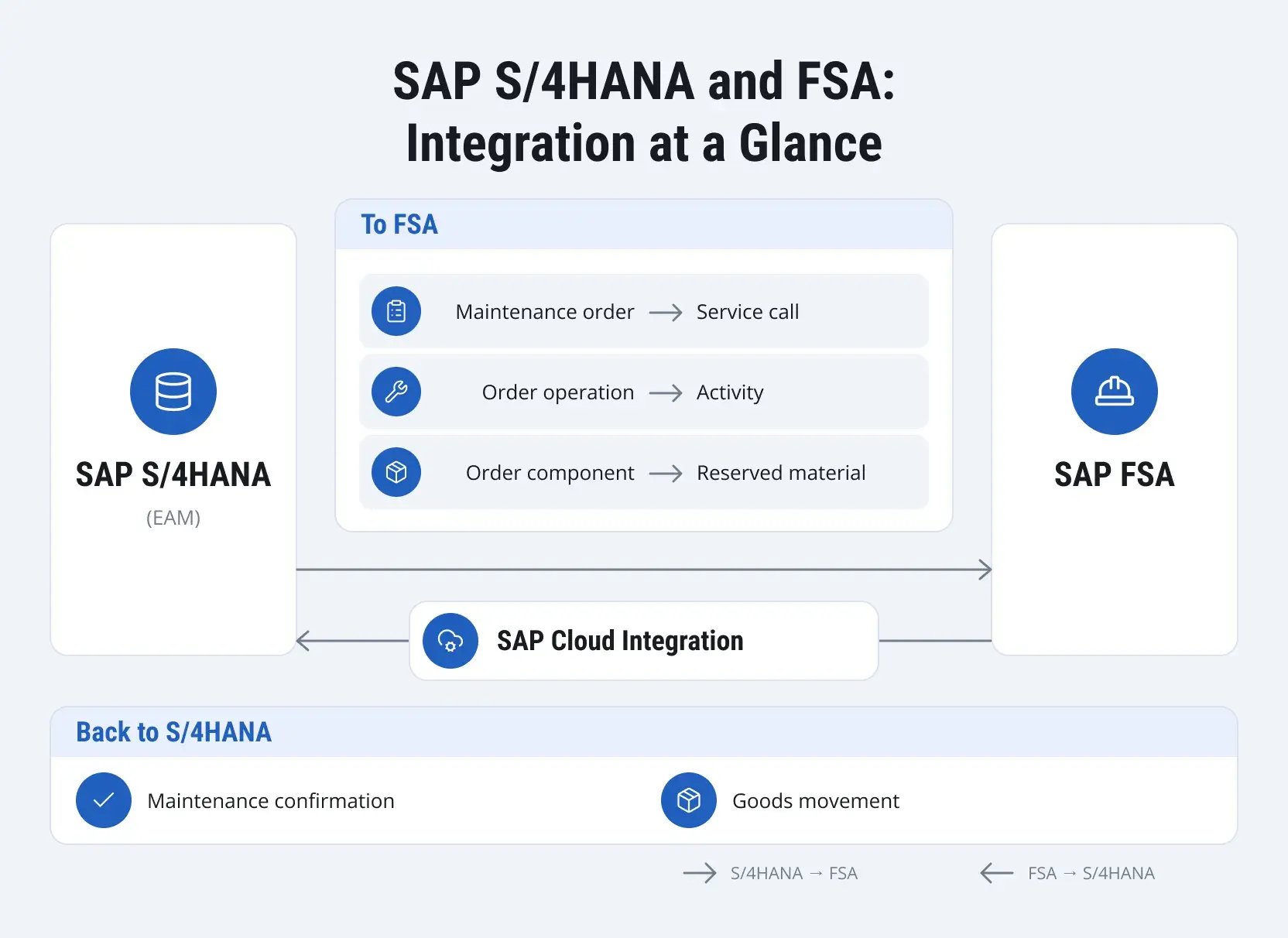
Simplified integration scenario for SAP S/4HANA Plant Maintenance and SAP FSA. Actual integration flows depend on the system release and configuration.
What about project resource staffing?
Companies using SAP MRS to assign specialists to projects have another option to investigate: SAP Project and Resource Management. According to SAP's Resource Management documentation, the solution supports resource requests, employee matching based on skills and availability, and resource utilization monitoring. These functions may suit organizations that need to staff several projects while managing competing requests for specialists.
SAP also documents project staffing integration between SAP Project and Resource Management and SAP Cloud ERP (SAP S/4HANA Cloud Public Edition), enabled through scope item Resource Management for Projects (6JO). This integration supports resource requests from applicable project scenarios and allows project staffing activities to be managed through the resource management application.
Organizations using SAP ECC, classic SAP Project System, or heavily customized project planning processes face a different technical situation. The documented Public Edition integration does not establish compatibility with those environments or guarantee that all existing MRS scheduling functions can be reproduced. Before selecting SAP Project and Resource Management, the company needs to check its supported project types, existing integrations, and assignment requirements against the functions available in the target environment.
SAP MRS vs. SAP RSH vs. SAP FSA
The following comparison focuses on maintenance and field service scheduling. Companies using MRS for project staffing will need to assess SAP Project and Resource Management separately, since its functions and supported integration scenarios address different requirements.
|
Criterion |
SAP MRS |
SAP RSH |
SAP FSA |
|
Typical use |
Multi-resource scheduling for maintenance, service, and projects |
Maintenance scheduling in SAP S/4HANA Asset Management |
Asset maintenance and field service planning, dispatching, and execution |
|
Work entering the plan |
Demands derived from supported source applications |
SAP S/4HANA maintenance orders and operations |
Service calls and activities created in FSA or received from connected ERP systems, depending on the scenario |
|
Resource types |
Personnel, teams, and tools or equipment in supported scenarios |
Work centers and individual employees in supported maintenance scenarios |
Technicians, crews, and tools available for reservation |
|
Planning capabilities |
Graphical assignment, availability and qualification checks, and configurable automation |
Work center capacity planning, schedules, and people assignments |
Workload and capacity planning, technician and crew dispatch, standard scheduling policies, and tool reservations |
|
Architecture |
SAP component connected to demand source systems |
Functionality within the SAP S/4HANA environment |
Cloud solution connected to supported ERP systems |
|
Licensing |
Depends on the installed product and agreement |
Separate RSH license |
Cloud subscriptions and feature-specific entitlements |
|
Product direction |
Corrections for supported versions; no further functional development planned |
Supported, with no further roadmap updates planned after the stated release |
Ongoing development of asset maintenance and field service capabilities |
Some maintenance activities require a qualified technician and a calibrated tool to be available at the same time. FSA supports tool reservations within its Planning and Dispatching application, although ERP-managed reservations are not currently enabled in the standard tool settings.
SAP also documents tool assignment and usage integration between SAP Cloud ERP Private (formerly SAP S/4HANA Cloud Private Edition) and FSA in supported service scenarios. Companies should verify which capabilities are available for their target release and business process, particularly where tool availability must be coordinated with ERP. Material consumption follows a separate process.
How to Choose the Right SAP MRS Alternative
Choosing an SAP MRS alternative starts with understanding which processes the current system supports. The scenarios below can help narrow down the options before examining individual scheduling requirements and integration dependencies.
|
Current scenario |
Alternative to evaluate |
Key limitation |
|
Temporary retention of SAP MRS |
Retain the existing supported MRS version |
Maintenance coverage and compatibility with the target ERP release must be verified. |
|
In-plant maintenance scheduling |
SAP S/4HANA Asset Management for Resource Scheduling (RSH) |
Existing MRS planning rules and settings do not transfer automatically. |
|
Field service and technician dispatch |
SAP Field Service and Asset Management (FSA) |
ERP integration options and licensing entitlements depend on the scenario. |
|
Project resource staffing |
SAP Project and Resource Management |
Supported project types and integrations must be checked; the documented 6JO scenario applies to SAP Cloud ERP. |
|
Mixed maintenance, field service, and project staffing |
A combination of solutions, depending on requirements |
Shared resource availability and assignment ownership require coordination across systems. |
Map the work that MRS schedules today
Before comparing product features, identify the processes that generate scheduling demand. SAP's MRS application documentation describes supported sources including Plant Maintenance, Customer Service, Project System, SAP CRM, and project management applications. For each process, document where the work originates, which resources can be assigned, how priorities are determined, and where the assignment result is recorded.
The assessment becomes more complicated when several departments share the same MRS resource pool. For example, a maintenance team and a project department may both rely on the same electrician or specialized equipment. If their scheduling processes move to separate applications, each system could show the resource as available unless existing assignments and availability changes are shared. This creates a risk of overlapping bookings, conflicting priorities, and delays when one department needs a resource already committed elsewhere.
Before selecting the replacement solutions, companies need to establish where availability information will be maintained, which system will control confirmed assignments, and how changes will reach other planning applications. Absences, cancellations, and rescheduled work should be considered alongside new bookings. The assessment should also identify who will resolve conflicts when two departments request the same resource and how planners will see those conflicts before confirming an assignment.
Separate essential requirements from familiar features
An MRS implementation may have been customized over several years. Planners could rely on specific selection rules, qualification checks, availability data from SAP HCM, or reports developed for their department. Some functions may already be covered by standard capabilities in a replacement product, while others could require configuration, supported extensions, or changes to the planning process.
“When reviewing an SAP MRS implementation, I'd ask dispatchers to show me which assignments they regularly change by hand. Are they correcting outdated qualification data, dealing with unreliable availability information, or handling priorities that the scheduling rules don't capture? These recurring exceptions can reveal requirements that aren't obvious from the system configuration alone.”
Yauheni Sarachynski, SAP EAM & Service Transformation Expert at LeverX
Suppose a company requires supervisor approval whenever maintenance work is reassigned between teams. The proposed replacement would need to support the approval procedure or allow the company to introduce an acceptable alternative. Any change also affects how planners handle exceptions and who has the authority to approve a reassignment.
A fit-gap assessment can record the existing requirement, the available function in the proposed solution, and any configuration or development needed to address the difference. Where a requirement cannot be met, the responsible business owner needs to approve the proposed process change before implementation begins. This prevents unresolved planning requirements from being discovered only after the new application has been configured.
Align the decision with the SAP S/4HANA roadmap
The timing of an SAP S/4HANA migration can influence the choice of scheduling solution. A company remaining on SAP ECC may introduce FSA first, provided the required integration scenarios are supported. Another organization might coordinate both projects to avoid developing temporary interfaces that would soon need modification. The appropriate sequence depends on the installed ERP version, the planned migration date, and the scheduling processes affected by each project.
Retaining SAP MRS for SAP S/4HANA may also be feasible when the relevant product version remains supported and compatible with the target ERP release. This can provide additional time to assess alternatives, although future SAP S/4HANA upgrades may limit how long the arrangement remains viable.
Combining an ERP migration with a scheduling replacement brings more changes into the same testing and cutover period. Maintenance orders, assignments, and data exchanges between applications may all require validation before the new environment can support daily operations. If both projects involve changes to the same interfaces, their schedules and acceptance criteria need to be coordinated to avoid conflicting requirements or repeated integration work.
Evaluate the total transition effort
A software subscription represents only part of the transition cost. Companies may also need to pay for integration development, new configuration, data preparation, testing, user training, and temporary operation of two scheduling environments. The amount of work can vary considerably between alternatives, even where the products appear to cover similar scheduling requirements.
For example, an application that covers most planning requirements through standard functionality may need fewer extensions, while another option could offer more advanced scheduling features but require additional ERP integration work. These differences should be reflected in the cost comparison alongside the effort needed to resolve functional gaps and maintain the new environment after go-live.
The resulting assessment should include the proposed architecture, estimated costs, expected implementation schedule, and requirements that still need a business decision. Recording these details also helps clarify which assumptions must be validated before the company commits to a particular replacement.

How to Plan an SAP MRS Transition
Replacing SAP MRS with RSH, FSA, or SAP Project and Resource Management requires a new implementation rather than a direct upgrade. These products have different architectures and data models, so there is no automated, like-for-like migration of MRS configuration, custom scheduling rules, and assignments. Companies must first determine which application will handle each existing scheduling use case and conduct a fit-gap assessment of the current configuration and actual planning practices. Retaining or converting a compatible MRS add-on during an SAP S/4HANA transition is a separate scenario.
Business processes may change alongside the software. Planners might need new procedures for assigning work, resolving scheduling conflicts, or recording completed activities. Those changes affect training, testing, and the responsibilities of employees who will use the replacement system. They should be included when defining the project scope and acceptance criteria, particularly if the company plans to introduce the new scheduling application during an ERP migration.
1. Inventory the existing landscape
Start with the installed MRS components, support packages, custom developments, and connected applications. The technical team needs to identify which interfaces exchange scheduling information and whether other SAP processes depend on them. Existing documentation may provide a starting point, but the actual configuration and active interfaces need to be checked against it.
For example, some MRS environments use queued Remote Function Calls (qRFC) to exchange scheduling demands with source applications or transfer employee availability information from SAP HCM. SAP's qRFC integration documentation describes its use in multisystem configurations, including supported PM/CS and SAP CRM scenarios. Transactions SMQ1 and SMQ2 can help specialists inspect the relevant queues.
During the inventory, check whether each interface serves MRS exclusively or is shared with another application. Removing a scheduling component could otherwise interrupt data exchanges that still support maintenance, service, or HR processes. Interfaces identified as shared dependencies will need separate treatment during the transition, even if the MRS-specific functions are scheduled for retirement.
2. Design the target data and integration flow
Once the existing interfaces have been identified, map the business objects used by the current and proposed scheduling applications. Determine where scheduling updates originate, which system controls each record, and how maintenance confirmations and material consumption will return to ERP. The mappings may differ considerably depending on whether the company selects RSH or FSA.
RSH works directly with maintenance orders in SAP S/4HANA. FSA exchanges information through supported ERP integration scenarios, introducing different data structures and synchronization requirements. These differences influence which system can change an assignment, how updates are transferred, and where errors must be monitored.
Error handling deserves particular attention. An update may fail, arrive after a newer change, or conflict with information already stored in another application. The integration design needs procedures for detecting these situations, recovering failed messages, and reconciling inconsistent records. Ownership of these tasks should be agreed upon before interface development begins, since technical recovery may require a decision from the maintenance or service team.
3. Test disruptions, not only routine assignments
Successful creation of an assignment does not confirm that every scheduling process works correctly. Include tests involving changes after dispatch, particularly where maintenance orders are updated in SAP S/4HANA while their operations have already been assigned in another application. Such tests can reveal problems with synchronization, scheduling statuses, or conflicting updates that would remain unnoticed during basic assignment testing.
For instance, an operation may be rescheduled, or its requirements may change after a technician receives the assignment. The test should establish how the scheduling solution processes the update, whether the existing assignment remains valid, and what information returns to ERP. Approved labor hours, maintenance confirmations, and consumed materials also need to be checked, since their transfer involves processes that occur after the initial scheduling decision.
Maintenance planners and dispatchers should validate the scheduling behavior, while SAP integration specialists check the technical exchanges. The people responsible for maintenance and service processes can then confirm whether the new procedures meet operational requirements. Where an issue involves several systems or departments, the test results should identify who will investigate and resolve it during production operations.
4. Agree on cutover and handover responsibilities
Before go-live, determine which open assignments will be completed in MRS and which need to be recreated or reconciled in the replacement application. The project team should review their current statuses, identify work extending beyond the cutover date, and agree on how each affected assignment will be handled. If both systems operate temporarily, planners need clear rules defining which application controls each assignment. Otherwise, the same resource could be booked twice, or changes made in one system might never reach the other.
“An assignment still marked as open in MRS doesn't always mean the work hasn't started. A technician may already be working on a maintenance operation while the confirmation is still pending in ERP. Before recreating that assignment in the new scheduling system, I'd check its actual execution status with the responsible team. Otherwise, there's a risk of dispatching work that's already underway.”
Yauheni Sarachynski, SAP EAM & Service Transformation Expert at LeverX
Historical scheduling data requires a separate decision. Companies may need to retain completed assignments, scheduling changes, and related records for reporting, audits, or operational investigations, even when these records are not transferred to the new application. The team should determine which information must remain accessible, where it will be stored, and how authorized employees can retrieve it after MRS is retired. The retention approach must also meet applicable legal and company requirements.
Before handing over the new scheduling environment, define acceptance criteria, user permissions, interface monitoring procedures, and responsibility for unresolved incidents. Ask the operational support team to work through a representative scheduling or integration issue using the agreed documentation and system access. If resolving the issue still depends on the legacy MRS environment, that dependency needs to be addressed before the old application is decommissioned.
How LeverX Can Help
Replacing SAP MRS requires a clear understanding of the existing scheduling processes, configuration, and ERP integrations. LeverX has practical experience working with these dependencies. In one engagement, the company was brought in after an SAP MRS implementation by another contractor failed to deliver the expected planning results. An audit revealed the need for additional configuration adjustments, including changes to the system landscape and integrations with SAP HCM and SAP ERP Plant Maintenance.
This experience is relevant to companies considering a transition from SAP MRS to another scheduling solution. LeverX can help assess existing resource assignment rules, identify functional gaps, evaluate alternatives, and plan the necessary integrations. Our SAP Multiresource Scheduling expertise can also support decisions about which processes to retain, adapt, or redesign as part of a broader SAP S/4HANA migration.
FAQ
Conclusion
SAP MRS maintenance deadlines provide a reason to review the current scheduling environment, but an upcoming ERP upgrade may make the decision more urgent. Before choosing a replacement, companies need to understand how scheduling works in practice, including the exceptions, custom rules, and integrations that standard product comparisons may overlook.
The assessment should give business and technical teams enough information to choose a suitable solution and agree on a realistic transition plan. Testing critical scheduling scenarios, confirming integration compatibility, and preparing operational support in advance will help reduce disruption when the existing MRS environment is retired.