Understand SAP Solution Manager 7.2 support changes after 2027, evaluate ALM alternatives, and identify the next steps for your SAP landscape.
Mainstream maintenance for SAP Solution Manager 7.2 ends on December 31, 2027. However, the system will not stop working on January 1, 2028. Organizations can continue using it, although maintenance coverage will depend on their support arrangements and the functions involved. SAP offers extended maintenance for selected capabilities under specific conditions, while other functions fall under customer-specific maintenance.
The bigger question is what happens to the processes built around Solution Manager. Change management, testing, monitoring, and integrations may all require different approaches. Before moving to SAP Cloud ALM, adopting complementary tools, or retaining Solution Manager temporarily, organizations need to understand their existing dependencies and determine which capabilities must remain operational.
When Does SAP Solution Manager 7.2 Maintenance End?
SAP Solution Manager 7.2 follows the maintenance strategy of SAP Business Suite 7. However, the coverage available after 2027 depends on the customer's maintenance agreement and the functions being used.
|
Period |
Maintenance type |
Coverage and eligibility |
|
Through December 31, 2027 |
Mainstream maintenance |
Standard maintenance under applicable SAP agreements |
|
January 1, 2028 – December 31, 2030 |
Optional extended maintenance |
Selected Solution Manager functions for customers who opt for SAP Business Suite 7 extended maintenance |
|
January 1, 2028 – December 31, 2030 |
Customer-specific maintenance |
All Solution Manager functions for customers who do not opt for extended maintenance; functions outside extended maintenance coverage for customers who do |
|
From January 1, 2031 |
Customer-specific maintenance |
All Solution Manager functions under customer-specific maintenance, subject to the applicable support restrictions and contractual entitlements |
Optional extended maintenance for SAP Business Suite 7 comes with an additional cost: SAP applies a premium of two percentage points to the existing maintenance basis for core SAP Business Suite 7 applications. Customers who select this option also receive extended maintenance for eligible SAP Solution Manager 7.2 functions without a separate Solution Manager fee, as confirmed in SAP's official maintenance information.
Extended maintenance covers seven areas: requirements management, project management, process management, test suite, change control management, IT service management (ITSM), and landscape management.
By contrast, five SAP Solution Manager applications will move to customer-specific maintenance on January 1, 2028, even for customers eligible for extended maintenance: Custom Code Management, Data Volume Management, Application Operations, Business Process Operations, and SAP Engagement and Service Delivery. SAP identifies these exclusions in its official support documentation.
Customer-specific maintenance does not provide the same level of service as mainstream or extended maintenance. Its restrictions are documented in SAP Notes 52505 and 305372, while SAP Note 3255311 details the scope of extended maintenance.
Maintenance entitlement and software usage rights are also separate matters. As SAP explains in its ALM FAQs, customers with on-premises maintenance agreements retain perpetual Solution Manager usage rights. However, organizations moving to cloud-only agreements must verify whether those rights remain available under their contractual arrangements.
SAP recommends completing the transition to SAP Cloud ALM before the end of 2027, although this is not a mandatory software shutdown date.
What Are the Risks of Continuing to Use SAP Solution Manager After 2027?
Continuing to use SAP Solution Manager after mainstream maintenance ends does not necessarily mean immediate operational problems. But maintaining existing application lifecycle management (ALM) processes may become more difficult, depending on which functions remain covered by extended maintenance.
Security and maintenance
Under customer-specific maintenance, SAP no longer delivers new Support Packages or guarantees certain technological updates. Security corrections also become more limited. According to SAP's security guidance, releases entering customer-specific maintenance are generally considered for high-priority security corrections during the first 12 months, subject to specific conditions outlined in SAP Note 3053725. Organizations may therefore need additional controls to address vulnerabilities that cannot be corrected through standard updates.
Incident resolution
SAP continues to accept support requests and provide solutions for known problems. However, previously undocumented issues may require paid consulting, and standard service-level commitments for response times and corrective measures no longer apply under customer-specific maintenance. This can complicate troubleshooting for heavily customized ALM workflows.
Compatibility and integrations
Changes to connected applications, operating systems, or databases can create compatibility problems when Solution Manager no longer receives the necessary technological updates. Under customer-specific maintenance, SAP also does not support new interfaces. For example, a company using Business Process Monitoring to detect delayed order processing could encounter difficulties if an interface change disrupts its existing alerts. Restoring reliable monitoring may require additional development or troubleshooting.
Organizations using SAP Solution Manager for SAP EarlyWatch Alert reporting should also review their setup. SAP recommends sending EarlyWatch Alert data directly from managed systems to SAP or through SAP Focused Run, rather than using SAP Solution Manager as the sending system.
Operating costs and expertise
Maintaining older configurations can increase reliance on specialized SAP administrators, particularly when organizations operate legacy and newer ALM tools simultaneously. Additional testing, manual adjustments, and external support may also increase operating expenses.
These risks are not uniform. Eligible functions under extended maintenance retain broader coverage, while the actual exposure depends on each organization's configuration, integrations, and support arrangements.
How Dependent Is Your SAP Landscape on Solution Manager?
The complexity of replacing SAP Solution Manager depends less on the number of connected systems than on how deeply its capabilities are embedded in daily operations. A relatively small SAP landscape with customized workflows may require more effort to transition than a larger environment using only standard monitoring functions.
Which critical processes rely on Solution Manager?
- Change and service management. Organizations using Change Request Management (ChaRM) and IT Service Management (ITSM) may depend on Solution Manager for approvals, change tracking, and incident workflows. For example, if ChaRM governs production changes, replacing it may require redesigning approval sequences, maintaining audit trails, and preserving connections to external ticketing systems.
- Testing and process documentation. SAP Test Suite and Solution Documentation can contain test cases, process structures, and records that teams rely on during releases and system changes. Organizations need to identify which information remains relevant, who uses it, and whether relationships between documented processes and test assets must be preserved.
- Application and system operations. Technical monitoring, Business Process Monitoring, and job monitoring may support different operational teams. Dependencies extend beyond the monitoring functions themselves to alert thresholds, notification rules, escalation procedures, and the people responsible for responding to events.
What makes a Solution Manager transition more complex?
Standard functionality is only part of the assessment. Custom workflows, third-party integrations, specialized reports, and historical records may introduce dependencies that are not immediately visible. Organizational arrangements also matter: a process shared by SAP Basis, development, and service management teams may involve multiple owners and approval requirements.
SAP Readiness Check for SAP Cloud ALM helps organizations analyze their existing Solution Manager usage, assess the availability of corresponding capabilities, and identify potential transition blockers. However, automated findings should be supplemented with an assessment of custom integrations and business-specific requirements. The result should be a documented inventory of critical dependencies, process owners, and information that must remain accessible.
What Are the Alternatives to SAP Solution Manager?
SAP offers several application lifecycle management (ALM) solutions, but none provides a complete functional replacement for SAP Solution Manager. The most suitable approach depends on which capabilities an organization needs to retain and whether a single platform can support them.
SAP Cloud ALM for application lifecycle management
SAP positions SAP Cloud ALM as its strategic ALM platform. It supports implementation activities, including requirements management, testing, and deployment, alongside operational capabilities such as health and integration monitoring.
SAP Cloud ALM supports cloud, on-premises, and hybrid landscapes, although the available capabilities vary by system and scenario. It is not a direct replacement for every Solution Manager function. For example, SAP Cloud ALM provides change enablement and deployment management capabilities, but IT Service Management (ITSM) is outside its functional scope. Organizations relying on ChaRM should separately assess whether their existing approval workflows, transport management processes, and audit requirements can be supported by SAP Cloud ALM or require complementary tools.
SAP Focused Run for advanced monitoring requirements
SAP Focused Run serves organizations with large, complex landscapes or demanding technical monitoring requirements. Its capabilities include high-volume system monitoring, integration monitoring, user experience monitoring, and operational analytics.
Focused Run can complement SAP Cloud ALM when more extensive monitoring of on-premises systems or detailed technical analysis is required. However, it is primarily an operations platform, not a replacement for Solution Manager's change management, ITSM, or testing capabilities.
Complementary ALM and ITSM tools
Organizations with established service management platforms or specialized workflows may benefit from combining SAP Cloud ALM with third-party tools.
For example, SAP Cloud ALM can provide technical alerts while an integrated ITSM platform manages ticket assignment, escalation, and resolution. This approach allows organizations to retain enterprise-wide service management processes without attempting to reproduce every Solution Manager function in one application.
The main architectural options are:
|
Target approach |
When to consider it |
|
SAP Cloud ALM |
Standardized ALM requirements supported by the platform |
|
SAP Cloud ALM + SAP Focused Run |
Advanced monitoring requirements, particularly in complex on-premises landscapes |
|
SAP Cloud ALM + complementary tools |
Specialized ITSM, change management, or integration requirements |
|
Temporary Solution Manager retention |
Critical dependencies that cannot be replaced within the initial transition window |
Licensing also affects the decision. According to SAP's usage rights documentation, SAP Cloud ALM entitlement is included with qualifying SAP support agreements and cloud subscriptions. SAP Focused Run requires a separate license. Organizations should also account for third-party licensing, integration, and ongoing operating costs when comparing options.
How to Plan Your SAP Solution Manager Transition Before the End of 2027
A transition plan should turn the selected ALM architecture into a sequence of activities with clear responsibilities and measurable outcomes. The goal is to establish a working environment before retiring existing Solution Manager capabilities, rather than simply meeting a calendar deadline.
Confirm the inventory and readiness baseline
Start by validating the Solution Manager inventory and reviewing the SAP Readiness Check findings identified during the dependency assessment. Identify any unresolved dependencies that could affect the transition scope or schedule before making target architecture decisions.
Define the target architecture and transition scope
Using the verified assessment findings, assign each ALM process to SAP Cloud ALM, a complementary tool, or retirement. Define the integration design, delivery responsibilities, and boundaries of the initial rollout.
Instead of introducing every capability simultaneously, select a manageable scope, such as monitoring for one business-critical landscape or test management for a specific release stream. The expected outcome is an approved target architecture, an integration map, and a prioritized transition backlog with clear acceptance criteria.
Pilot critical processes and prepare data transfer
Configure the initial scenario and test it against real operational requirements. Verify user access, workflow execution, integration behavior, and information exchange between connected systems before expanding the rollout.
Historical content requires separate planning. Selective Data Transfer supports transferring selected solution documentation and test content, but not the entire Solution Manager database. Available transfer capabilities vary by data type and should be verified before defining the migration scope.
Some content requires a different approach. For example, SAP does not plan to support the transfer of ChaRM change-control data. Instead, it recommends closing open change cycles in Solution Manager before activating deployment management in SAP Cloud ALM. Records that must remain accessible for business or compliance purposes also need an appropriate retention arrangement.
Validate operational readiness before retiring Solution Manager
Where practical, run the existing and target environments in parallel for an agreed period, with clear ownership of each process. This does not imply automatic data synchronization between platforms.
Process owners should validate critical workflows, monitoring alerts, integrations, and access to required records. Support teams also need updated operating procedures and training before assuming responsibility for the new environment.
“A monitoring tool can be up and running while the support process behind it is still broken. Before retiring as a Solution Manager, I would trace a single real alert through ticket creation, ownership, escalation, and closure. That exposes gaps a feature checklist won't catch.”
Dzmitry Miadzvedz, SAP Basis Consultant, LeverX
Cutover should proceed only when acceptance criteria are met, outstanding issues have been addressed, and fallback procedures are documented.
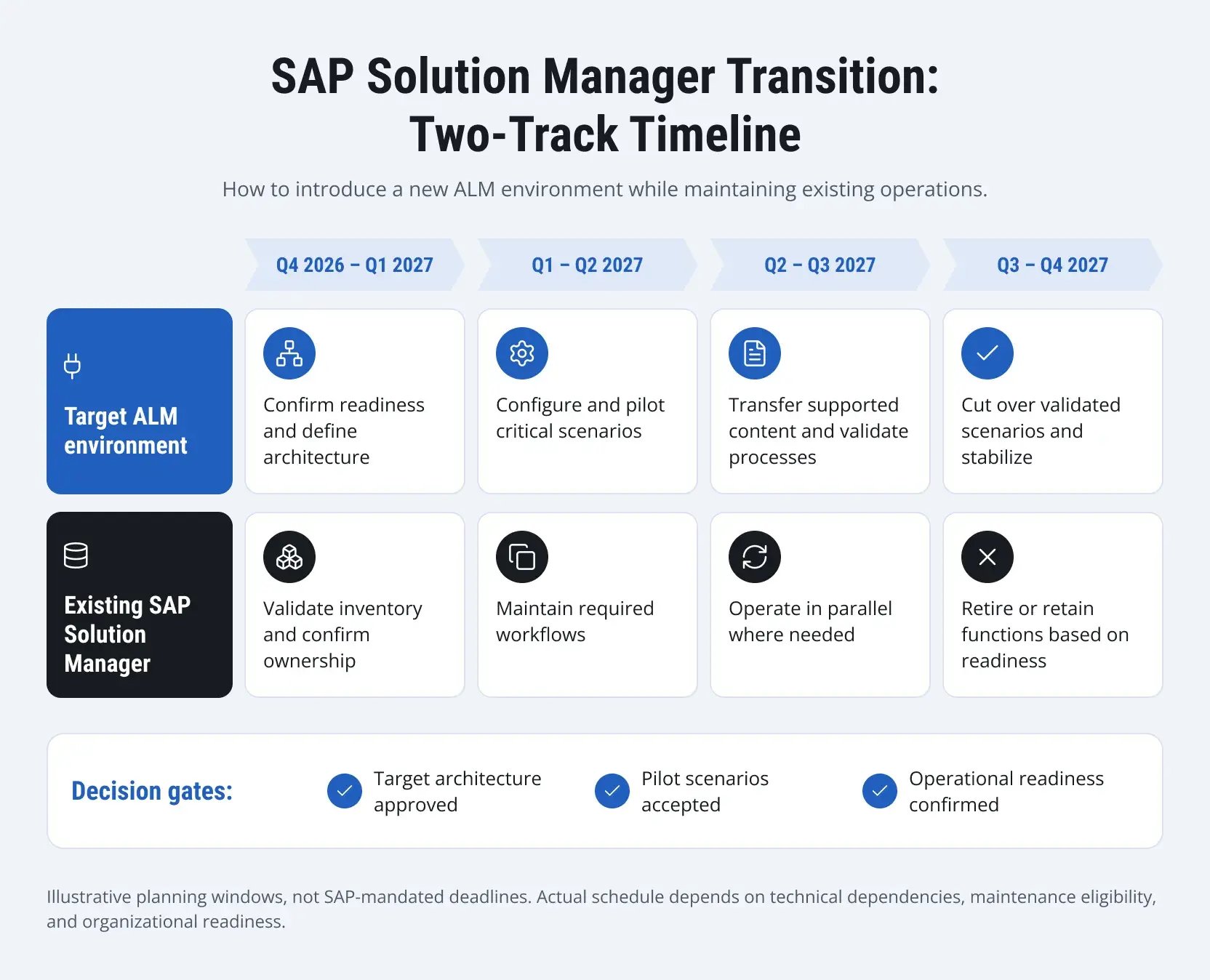
The timeline above presents suggested planning windows rather than SAP-mandated deadlines. Organizations should adjust the schedule based on their technical dependencies, transition scope, and operational readiness, taking into account the practical considerations of migrating from SAP Solution Manager to SAP Cloud ALM.
What If You Cannot Complete the Transition by the End of 2027?
Not every organization will be ready to retire SAP Solution Manager by the end of 2027. The practical question is which activities can continue under an interim operating model without leaving critical ALM processes unmanaged.
If extended maintenance is available
Eligible organizations can use the additional period to transition selected functions in stages rather than change their ALM setup during a major ERP program. Coverage still needs to be confirmed for each function, and deferred changes should have an agreed owner and target date.
If essential functions are not covered
Continued use may be possible under customer-specific maintenance, but additional safeguards may be necessary. These could include manual monitoring checks, defined escalation procedures, and dedicated support responsibilities for custom components. Where existing arrangements cannot adequately support a critical process, complementary tools may be needed.
If an SAP S/4HANA migration is underway
Replacing Solution Manager during major testing or deployment activities can introduce unnecessary coordination challenges. Organizations should align ALM changes with ERP milestones and retain only the dependencies still required for the migration.
Temporary Solution Manager retention should be a documented decision with clear responsibilities, operating controls, and an agreed exit plan rather than an open-ended arrangement.
How LeverX Helps Plan the Transition from SAP Solution Manager
LeverX helps organizations prepare for SAP Solution Manager's maintenance changes without disrupting established ALM processes. Our specialists combine SAP Basis, application management, and integration expertise to develop transition strategies that reflect each company's technical environment and operational priorities.
Assess existing ALM dependencies
Our team examines how Solution Manager supports critical workflows, identifies custom configurations and integrations, and evaluates requirements that may not be covered by standard SAP Cloud ALM capabilities. This assessment helps distinguish functions that can be replaced from those requiring additional solutions or temporary retention.
Design and implement the target ALM architecture
LeverX supports the selection and configuration of SAP Cloud ALM and complementary tools based on the organization's requirements. Our specialists also address integration dependencies, configure monitoring and management capabilities, and verify that the target environment works with existing SAP and non-SAP systems.
Maintain operational continuity
During the transition, the LeverX team helps coordinate parallel operations, validate critical processes, and prepare application management teams to take responsibility for the new environment. Support can continue after cutover to address configuration issues and evolving operational needs.
Our experience includes an SAP landscape transformation project for a leading IT provider in the Nordic and Baltic regions. LeverX performed SAP Basis activities, used SAP Solution Manager for system monitoring, configured monitoring through SAP Cloud ALM, and optimized SAP Focused Build.
Conclusion
The end of mainstream maintenance does not require organizations to stop using SAP Solution Manager 7.2 immediately. However, choosing the right path forward depends on existing ALM processes, available maintenance coverage, and the capabilities of potential replacement solutions.
Organizations should use their dependency assessment to establish priorities and align the transition with broader SAP initiatives. A realistic plan, supported by clear operational requirements, will help avoid unnecessary disruption.