The first weeks after SAP go-live can bring problems that were difficult to reproduce during testing. This guide covers production monitoring, incident handling, business-cycle checks, and the transition to ongoing support during the first 90 days.
A successful SAP go-live doesn't guarantee a trouble-free first week. Users might discover that their new roles prevent them from posting transactions they need every day. An interface that handled test orders without problems may struggle with actual volumes.
Short answer: SAP hypercare is a period of intensive support immediately after go-live, focused on resolving production issues and stabilizing critical business processes. The broader 90-day stabilization plan includes monitoring critical transactions and integrations, investigating recurring problems during business cycles, and preparing the transition to Application Management Services (AMS). The handover covers documentation, unresolved tickets, and operational responsibilities. Hypercare can end before day 90 once critical issues are resolved or controlled, the AMS team is ready to manage the remaining work, and the agreed exit criteria are met.
What Is SAP Hypercare, and How Long Does It Last?
SAP hypercare covers intensive support immediately after go-live, when implementation specialists investigate production defects, help users complete critical transactions, and monitor the processes affected by the deployment. Key users explain the business impact of reported problems, while functional or technical specialists investigate the cause. Depending on the issue, SAP Basis or integration specialists may also need to get involved.
SAP Activate includes hypercare and sustainment activities in the Deploy phase, with ongoing operations covered in Run. A two-to-eight-week hypercare window can serve as an initial planning estimate. SAP does not prescribe a fixed duration for every implementation; the actual period depends on rollout scope, business cycles, and agreed exit criteria. The 90-day framework in this guide also covers activities that may continue after intensive hypercare ends.
Set specialist coverage around the work employees will perform after cutover. A finance team may need help during its first period-end close, which could arrive several weeks after go-live. A distribution company might require extra coverage during night shifts, when large batches of orders are processed. Interfaces, custom code, and overlapping rollout waves add complications, particularly when several sites depend on the same consultants. If the rollout spans countries, work out how unresolved incidents will pass between time zones and whether specialists assigned to the next wave will still be needed by the previous one.
Hypercare readiness checklist
Before go-live, confirm the following with your SAP implementation partner and designated support owners:
- Support owners: Named hypercare lead, functional and technical contacts, and backups.
- Coverage hours: Support availability by location and time zone, including regional handovers.
- Incident channel: A single reporting channel and shared incident log.
- Escalation procedures: Priority rules, escalation contacts, and decision-makers for critical incidents.
- Monitoring: Assigned owners and access for checking critical jobs, interfaces, and business transactions.
- Initial exit criteria: Agreed measures for incident backlog, process stability, and readiness for ongoing support.
What Should You Monitor in the First 90 Days After SAP Go-Live?
During the first 90 days after SAP go-live, monitor critical jobs and interfaces, authorization failures, unfinished business transactions, recurring incidents, and key business-process KPIs. The focus changes as the team moves from detecting immediate production issues to reviewing business cycles and collecting evidence for the support handover. These activities may overlap, depending on the project's actual business calendar.
Days 1-14: production issues you need to catch early
Make sure employees know where to report errors and whom to contact when a critical process stops. Set up a shared incident log, identify the hypercare lead, and schedule daily triage meetings for the first days. Ask users to include the transaction, time of failure, error message, and effect on their work. This saves the support team from having to reconstruct every problem over a series of calls. For global operations, assign someone to hand over unresolved tickets when the next region takes over.
In supported SAP S/4HANA ABAP environments, SM37 helps investigate failed or late background jobs. For delayed exchanges with banks, carriers, or EDI partners, WE02 can show IDoc statuses, while BD87 supports investigation and reprocessing. Our guide to SAP integration covers the broader architecture and dependencies between connected systems.
Authorization problems can be less obvious. An employee may be able to open an application but lack permission to complete the transaction. SU53 helps analyze failed authorization checks, and STAUTHTRACE provides more detailed information in supported ABAP environments. At the same time, watch for deliveries awaiting billing, goods receipts awaiting invoice processing, and backlogs that delay the next shift. A job that reports success but finishes after its processing deadline still deserves investigation.
These transaction codes require the relevant access and apply to supported SAP S/4HANA on-premises and SAP S/4HANA Cloud Private Edition environments. SAP S/4HANA Cloud Public Edition provides different tools, including the Application Jobs and Display Authorization Trace Fiori applications.
Where SAP Cloud ALM for Operations is configured for the relevant systems and services, hypercare teams can also monitor issues across connected applications and end-to-end processes. Business Process Monitoring tracks process KPIs and alerts; Integration & Exception Monitoring helps trace message flows and identify exceptions; and Job & Automation Monitoring checks the status of background jobs and automated activities. For example, when orders from an external sales channel stop reaching SAP, the team can investigate integration failures alongside their effect on order processing.
Weeks 3-6: recurring defects and the first business cycles
By now, you may have dozens of closed tickets and still be dealing with the same problem. Imagine several employees reporting authorization failures on different days. Each request gets resolved separately, but the failures return because the role configuration remains unchanged. Group related incidents and look for their common cause before deciding whether the team needs to change a configuration, correct data, or explain a process to users.
"Before recommending the end of hypercare, I look for two things: business owners can confirm that critical operations are stable, and the support team is ready to take ownership of the remaining issues. If either condition is unmet, I recommend extending hypercare for the affected area and setting a clear date to review the decision."
Dzmitry Shupayeu, Head of Delivery at LeverX
For rollouts that include Finance, the first period-end close can reveal discrepancies that daily postings haven't exposed. After an SAP S/4HANA transition, review the checks appropriate to the migration approach. If the project transferred data, reconcile relevant migrated balances, open items, and inventory quantities with the approved cutover records. Our guide to SAP S/4HANA finance migration errors covers common reconciliation and reporting problems in more detail.
For eligible systems and support agreements, the SAP GoingLive Check includes a verification session approximately four to six weeks after production start. This period also gives you time to revisit temporary fixes from the first days and decide which need a permanent solution.
Days 43-90: checking whether ongoing support can take over
From day 43 onward, collect evidence of how the system performs under actual workloads. For Finance, review the results of the first applicable period-end close and compare days to close against the agreed target. Order-management teams can track order-to-cash cycle time. Historical figures are useful only when the process scope and measurement method are comparable.
Review incident records for incoming and resolved tickets by priority, recurring defects, the age of open high-priority incidents, and the duration of critical disruptions. Track manual interventions and temporary workarounds separately. A shrinking ticket queue offers little reassurance if one interface still requires daily intervention from a project consultant.
Combine these findings with monitoring results for critical jobs, interfaces, and business transactions. Document unresolved exceptions, their business impact, and any gaps in the available evidence. This information will support the formal hypercare exit review.
Managing Incidents and SAP Support Priorities
During hypercare, use a shared incident log and a consistent four-step triage process:
- Log: Record the affected transaction or process, error message, time of failure, and business impact in a single incident channel.
- Classify: Set the priority based on business impact, urgency, and the availability of an acceptable workaround. Distinguish production defects from data issues, training requests, and change requests.
- Route: Assign one accountable owner. The hypercare lead coordinates escalation to functional consultants, developers, SAP Basis specialists, or integration teams. Repeated user questions may require training, but recurring patterns should remain visible in the incident log.
- Resolve and verify: Investigate the cause, apply an approved correction or workaround, and have the responsible business user verify the result before closing the ticket.
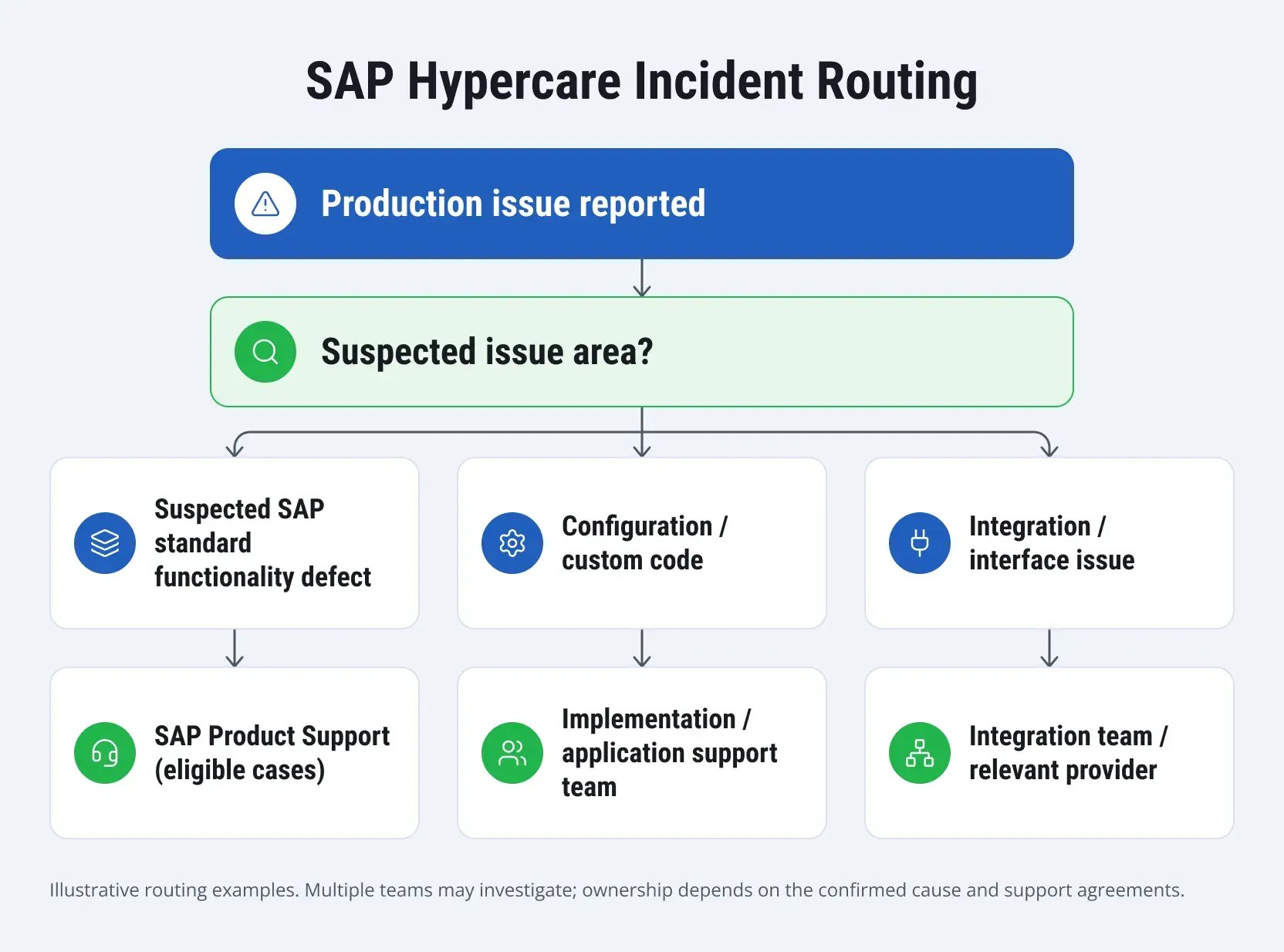
Agree in advance who can approve an emergency change, how it will be tested, and which recovery or rollback procedure applies if it fails. Keep the change record with the incident so the next support team can see what happened.
SAP Note 67739 provides reference definitions for priorities in SAP support cases. The table gives examples of how these priorities might apply during hypercare; the actual classification depends on the specific business consequences.
|
Priority |
Business impact |
Hypercare example |
|
P1 (very high) |
Production unavailable or a critical process severely disrupted, with no acceptable workaround |
Billing fails across all sales operations |
|
P2 (high) |
Important operations seriously affected |
Goods receipt posting blocked at one plant, with an approved temporary workaround |
|
P3 (medium) |
A process affected, with an acceptable alternative available |
An operational report delayed while another approved report remains available |
|
P4 (low) |
Minor business impact |
A formatting error affecting a rarely used form |
Under SAP's Enterprise Support commitments, SAP provides an initial response within one hour for eligible P1 cases and within four hours for P2 cases. For P1, SAP also commits to providing a fix, workaround, or action plan within four hours after its initial response. An action plan can meet that commitment even when full resolution takes longer. These commitments apply to cases submitted to SAP, subject to the applicable support terms and service hours. Agree separately on response targets, coverage hours, and escalation responsibilities with your implementation partner.
Preparing the SAP AMS Handover
Start the handover while the implementation team can still answer questions and work through actual incidents with incoming AMS specialists. Waiting until the final week can reveal missing system access or an interface issue with no clearly assigned owner.
The handover should include:
- Operations runbook: Scheduled jobs, interface monitoring, restart procedures, period-end tasks, and backup and recovery responsibilities assigned to AMS.
- Open-issue register: Unresolved tickets, assigned owners, business impact, accepted workarounds, and target resolution dates.
- Solution documentation: Custom developments, integrations, and important configuration decisions, including the reasons behind them.
- Access and ownership matrix: Required system and monitoring access, support responsibilities, and escalation contacts.
- Knowledge transfer: Practical sessions in which AMS specialists investigate representative tickets and walk through recovery procedures with project consultants.
For managed-cloud environments, the ownership matrix should clarify responsibilities across SAP, the customer, the AMS provider, and third-party vendors. Name someone to coordinate incidents involving several providers. For SAP Cloud ERP Private, SAP's guidance on shared responsibilities can help clarify these arrangements against the actual service agreements.
LeverX helped a forest products manufacturer migrate procurement processes across 15 subsidiaries to a centralized cloud environment as part of an SAP Ariba project. After go-live, LeverX provided operational support, resolved incidents, and gradually transferred knowledge and responsibilities to the customer's internal support team. Its specialists remained available to help with complex issues on demand.
When Should SAP Hypercare End?
Near the planned end date, business owners, the hypercare lead, and the receiving support team should review the stabilization evidence against the exit criteria agreed before go-live. The specific requirements depend on the project's scope, business calendar, and support arrangements.
The exit review should cover:
- Critical incidents: Check whether unresolved incidents still disrupt essential operations. A P1 incident preventing a critical process from running would block sign-off under these criteria. Remaining P2 issues may be transferred with tested workarounds and explicit business acceptance of the residual risk.
- Incident trends: Assess whether incoming incidents, unresolved tickets, and recurring defects can be managed within the receiving team's agreed capacity.
- Critical jobs and interfaces: Confirm that essential jobs and integrations meet agreed reliability requirements, with documented procedures for handling exceptions.
- Business-process acceptance: Obtain confirmation from business owners that critical transactions meet agreed accuracy and performance targets, including the results of any business cycles required for sign-off.
- AMS readiness: Confirm that the receiving team has the necessary access, documentation, escalation procedures, and practical experience handling representative incidents.
- Approved outstanding risks: Record unresolved issues, accepted workarounds, responsible owners, and target resolution dates.
The designated decision-makers should formally approve the transfer, documenting which functions will move to AMS and which responsibilities remain with the implementation team. If an unresolved issue affects only one area, the project can approve a partial handover and extend hypercare for that function. Record when the extension will be reviewed. Decisions beyond the authorized team's remit should go to the SAP S/4HANA steering committee.