

An implementation partner says they follow SAP Activate. What should that mean in practice? We explain how it works and what to expect from the team applying it.
SAP Activate is SAP’s framework for implementing and improving SAP solutions. It helps project teams translate business requirements into a tested solution and prepare the organization to use it. The framework provides standard business processes to evaluate, configuration tools, and a methodology that organizes the work into six phases:
- Discover
- Prepare
- Explore
- Realize
- Deploy
- Run
The tasks within those phases depend on the project. Converting an existing SAP system requires different work from implementing a new cloud solution. SAP therefore provides roadmaps for specific products and implementation scenarios, covering cloud, on-premises, and hybrid environments. These include SAP S/4HANA projects and implementations of other SAP solutions, such as SAP SuccessFactors and SAP Ariba.
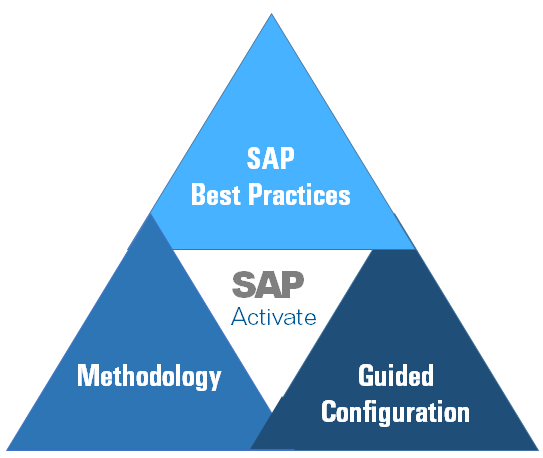
Within SAP Activate, these roadmaps share three core components:
|
Component |
What it contributes to the project |
|
SAP Best Practices |
Predefined business processes and supporting documentation that the team can use to assess how standard SAP functionality meets business needs. |
|
Configuration tools |
Tools that help consultants configure the selected processes. The tools and available settings depend on the SAP solution and deployment model. |
|
SAP Activate methodology |
A sequence of activities, deliverables, and checkpoints for planning, building, testing, and operating the solution. |
These components provide a foundation that the team must adapt to the company’s requirements: how processes will work, what data and integrations they need, who can access the system, and how employees’ daily tasks will change.
How Does SAP Activate Differ from ASAP?
SAP Activate succeeded the earlier ASAP and SAP Launch methodologies. One significant change concerns solution design. In ASAP, the business blueprint was a central design document. Activate uses fit-to-standard workshops to evaluate requirements against working SAP processes and record the additional requirements in a project backlog.
This gives business users something concrete to review before the team starts building the solution.
The Six SAP Activate Phases
The table below summarizes the main outputs and gives an example of how the customer and partner share the work. Detailed responsibilities should be agreed upon for the individual project.
|
Phase |
What happens |
Partner’s role |
Customer’s role |
Key deliverables |
|
Discover |
Assess options and define the initial scope. |
Explaining solution options and technical implications. |
Setting business priorities and deciding whether to proceed. |
Initial scope, business case, and recommended implementation approach. |
|
Prepare |
Establish the plan, team, and project environments. |
Planning delivery and coordinating technical setup. |
Assigning internal roles and confirming team availability. |
Project plan, agreed roles and decision-making rules, and ready-to-use project environments. |
|
Explore |
Review SAP processes and agree on required changes. |
Leading workshops and documenting requirements. |
Explaining business needs and approving process decisions. |
Documented process decisions, configuration requirements, and approved and prioritized backlog. |
|
Realize |
Build and test the solution and data migration. |
Configuring, developing, integrating, and testing. |
Validating data and testing business processes. |
Configured solution, completed integrations and developments, test results, and migration rehearsal results. |
|
Deploy |
Switch to production, provide hypercare, and hand over to ongoing support. |
Coordinating cutover, resolving issues during hypercare, and preparing support handover. |
Confirming business readiness, supporting users, and accepting the handover. |
Completed cutover, live production system, completed user training, accepted support handover. |
|
Run (ongoing) |
Operate, maintain, and improve the system. |
Providing services within the agreed support scope. |
Overseeing operations and prioritizing improvements. |
Operational reports, maintained support documentation, prioritized improvement backlog. |
The phases show how the project progresses. Within that structure, the team needs to agree on requirements, review the solution as it develops, and check that the work is ready for the next stage. SAP Activate supports these tasks through three practices:
- Fit-to-standard workshops in Explore: Consultants demonstrate the relevant SAP processes, and business users assess whether they meet their needs. Together, they agree on configuration requirements and identify gaps that need additional work. The team records and prioritizes this work in the backlog, which guides development in Realize.
- Agile delivery in Realize: The team configures, builds, and tests the solution in short cycles. Business users review completed work and check whether it supports their daily tasks. Their feedback helps the team address issues before they affect further development. These reviews are followed by broader testing of connected processes and user acceptance testing.
- Quality gates between project phases: The team checks the required deliverables against agreed acceptance criteria before moving forward. For example, the review at the end of Explore checks whether requirements and process decisions are clear enough to begin building. Any unresolved issues need an owner, a resolution date, and an assessment of whether they prevent the next phase from starting.
Deploy also includes hypercare, a period of intensive support after go-live when the project team helps users and resolves issues in the live system. Once agreed handover conditions are met, ongoing support takes over. In Run, support teams monitor operations while business owners help prioritize fixes and improvements.
Which Tools Support the Work?
To follow an SAP Activate roadmap, the team needs to find the relevant guidance, assign the work, and configure the solution. Different tools support these tasks:
SAP Activate roadmap viewer in SAP for Me
Provides the roadmap for the selected project scenario, including deliverables, task instructions, templates, and guides. The team uses this content to understand what work to include in its plan.
SAP Cloud ALM (Application Lifecycle Management)
Helps turn that guidance into project tasks. Managers assign responsibilities, and team members record progress so that outstanding work can be reviewed before the next phase.
SAP Central Business Configuration
Supports business configuration activities for SAP S/4HANA Cloud Public Edition. Its integration with SAP Cloud ALM helps connect configuration work with the project’s tasks.
Agree where the team will record requirements, decisions, test results, and approvals when setting up these tools. Reviewers can then find the supporting information when they need to accept completed work.
How the Approach Changes Across Deployment Scenarios
The six phases provide a common structure, while the work within them depends on the target environment and the transition approach.
SAP Cloud ERP (new implementation)
The team starts with standard SAP processes and checks how they meet business requirements. Workshop decisions guide configuration and identify where extensions or changes to working practices are needed.
The project also needs to cover:
- Data preparation: select, clean, and validate the records moving into the new system.
- Integrations: connect other applications and test the processes that cross system boundaries.
- User readiness: prepare employees for the agreed processes and verify that they can complete their daily tasks.
SAP Cloud ERP Private
Here, the transition approach determines how the team handles the existing environment:
- New implementation: configure a new system around the agreed processes, then migrate the required data and set up integrations.
- System conversion: assess the existing SAP ERP system, identify mandatory changes, adapt affected custom code and interfaces, and rehearse the conversion.
- Selective data transition: decide which configuration and data to retain, define transfer rules, and check that the selected data remains consistent in the target system.
These differences affect the SAP Activate roadmap, the skills required, and the scope of testing before go-live.
SAP S/4HANA on-premise
The same three transition approaches are available. The project must also account for the infrastructure on which the system will run and the team that will operate it.
Alongside process and data work, the plan should cover:
- Environment readiness: size and prepare the development, test, and production environments.
- Operational preparation: establish monitoring, backups, recovery procedures, and technical maintenance responsibilities.
- Support handover: confirm who will manage the application, database, and infrastructure, including any external providers.
These activities need to be coordinated with the implementation schedule so that environments are ready for testing and operational arrangements are in place before go-live.
What does RISE with SAP add?
For a transition through RISE with SAP, the project also follows the RISE with SAP Methodology. This uses SAP Activate as its implementation framework and adds an integrated toolchain and expert guidance, including clean core assessments to help teams identify issues that could affect future upgrades and changes.
These assessments are managed through SAP Cloud ALM and receive feedback from SAP. The project plan therefore needs to assign responsibility for completing them, reviewing the findings, and following up on recommended actions.
For large transformation projects, SAP recognizes selected implementation partners as RISE with SAP Validated Partners. This status tells you that SAP has assessed the firm’s experience with complex cloud ERP projects, relevant skills, and use of the RISE with SAP methodology. It gives you a basis for shortlisting a partner. However, you still need to check who will work on your project and whether that team has experience with a similar scope and technical environment as you need.
What To Check in Your Partner’s Delivery Plan
A plan may follow all six SAP Activate phases and still leave you unable to estimate your team’s workload or understand what the quoted scope covers. Before approving it, ask your partner to make four things explicit.
#1 What exactly are we approving?
Ask the partner to walk you through one business requirement from workshop discussion to acceptance. For a purchase order approval process, that means showing where the approval rules will be recorded, how they will be tested, and who will confirm that they work.
Use this example to agree on the evidence needed for acceptance. A milestone labeled “configuration complete” gives you little basis for approval without defined tests and results.
#2 How much time do our people need to reserve?
Request a resource plan by role and phase, including workshops, data preparation, testing, and training. It should distinguish between people who provide information and those authorized to approve decisions.
Compare that plan with actual availability. If finance specialists are required for testing during month-end close, resolve the conflict before accepting the schedule.
#3 What happens when a review identifies a missing requirement?
Ask the partner to explain how review feedback becomes a decision and, where necessary, additional work. Who determines whether an issue is a defect, an agreed requirement that has not been delivered, or a new request? Who assesses the effect on cost and timing?
For example, if testing reveals that an agreed approval limit was configured incorrectly, the team needs to distinguish that correction from a newly requested approval step. Agree on the review and decision process before either situation occurs.
#4 Who helps users after go-live, and when does that support end?
Request a go-live support plan naming support contacts, coverage hours, escalation routes, and handover conditions. Confirm who prepares training materials, delivers training, and maintains user guidance.
Test the plan against a simple scenario: a warehouse employee cannot complete a goods receipt on the first working day. Who receives the issue, who investigates it, and who keeps the employee informed? The plan should make those responsibilities clear, including how unresolved issues will transfer to ongoing support.
How LeverX Turns the Project Plan Into Delivery
An SAP S/4HANA project needs a plan that reflects the systems already in place, the processes the business wants to keep, and the changes its teams can manage. LeverX’s work with Eurasia Group and Enable Injections shows how these factors shape preparation and rollout.
Eurasia Group: preparing the existing landscape for conversion

Eurasia Group needed to move from SAP ECC to SAP S/4HANA while retaining its business processes and restoring the ability to update its system. The work began with consolidating and harmonizing the existing ECC systems so the team could proceed with conversion.
LeverX used SAP Activate to structure the project. During preparation, the team defined the scope, developed the conversion plan, assigned responsibilities, and established communication between stakeholders. Delivery involved 13 LeverX experts and 25 customer specialists, with the project completed in 8.5 months, from April to December 2022.
The customer transferred its business processes to SAP S/4HANA and restored system upgradeability. Preparing the existing landscape and involving customer specialists were central parts of the delivery approach.
Enable Injections: introducing functionality as the business needed it

Enable Injections was growing while relying on manual processes and disconnected ways of working across departments. The company needed an integrated ERP environment that could support expansion, but it did not need every module at the initial launch.
The implementation was organized into four rollout waves, beginning with finance and adding capabilities for materials management, sales, production, HR, product lifecycle management, and other functions. LeverX’s contribution included SAP implementation, product lifecycle management, and integration with engineering tools.
LeverX also helped improve document and approval processes. Previously, approvals involved paper, email, and SharePoint. The implemented workflow gave employees a central place to handle approval requests and track their progress.
Build a Plan Around the Work Your Business Needs
LeverX brings experience in SAP implementation, conversion, process design, and integration to the decisions that shape a project: what to retain, what to change, how to prepare the data and systems, and when to introduce each capability.
If you are preparing an SAP S/4HANA project, contact LeverX about your current landscape and business priorities. Our team can help define the transition approach, delivery scope, and responsibilities needed to turn those priorities into an implementation plan.



.webp)