Explore how data scope, system complexity, and decommissioning decisions shape SAP S/4HANA migration outcomes and long-term data architecture.
SAP S/4HANA transformation is often described as a system upgrade. That description doesn’t hold up in practice.
What actually happens is a redesign of how data is structured, stored, and accessed across the enterprise. And even when the new system goes live, one question usually remains unresolved:
What happens to everything that was left behind?
In many programs, the system is live, the data is migrated, and the processes technically work. But legacy systems are still running in parallel — not because they were forgotten, but because something still depends on them. Historical reporting, audit access, unresolved integrations — it’s rarely just one reason.
This is where migration shifts into a different phase: architectural cleanup instead of merely a technical execution.
The Hidden Complexity of Legacy Landscapes
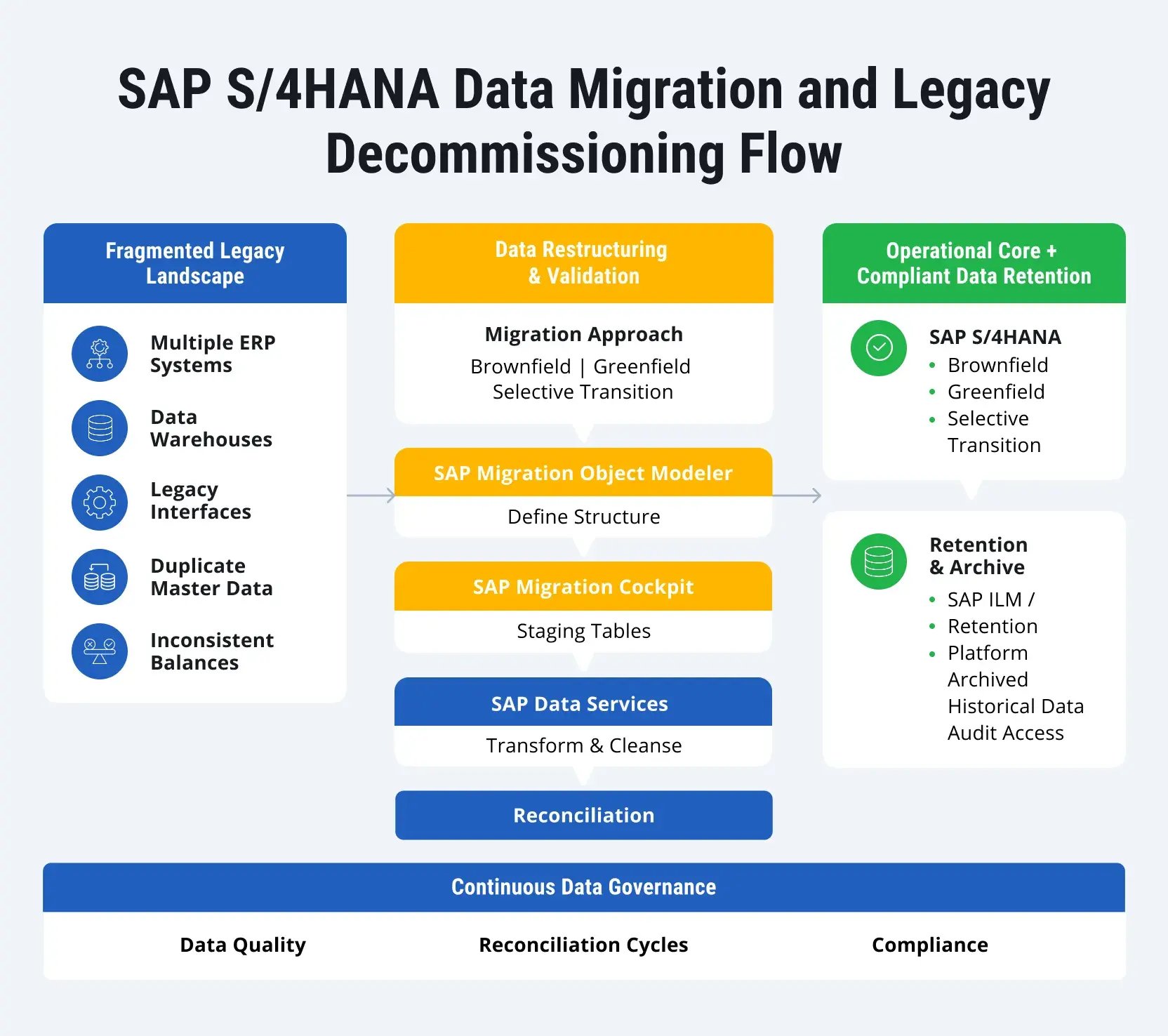
Before any migration begins, companies face a reality they often underestimate: their landscape is not one system; it’s an ecosystem that encompasses numerous instances and connections between them.
In this case, typical legacy landscape characteristics include the following:
- Multiple ERP instances (regional, business unit-specific)
- Parallel reporting systems and data warehouses
- Inconsistent master data models
- Undocumented integrations with non-SAP systems
- Overlapping ownership across departments
In practice, it might lead to several potential bottlenecks.
|
Area |
Typical issues |
Impact on migration |
|
Master data |
Duplicated vendors/customers |
Reconciliation failures |
|
Finance |
Inconsistent balances across systems |
Reporting breaks |
|
Integration |
Inflexible, hard-coded interfaces |
Post-go-live failures |
|
Ownership |
No clear data accountability |
Slow decision-making |
You might notice that this is an enterprise architecture problem disguised as a migration task, rather than a data-volume issue.
Migration Approach and Its Impact on Data Strategy
Migration approach is often reduced to a simple choice between Brownfield, Greenfield, or Selective Data Transition (Bluefield). In practice, that distinction is only on the surface. What actually matters is how the chosen approach shapes three core decisions:
- What data is migrated?
- How is that data structured in the new system?
- Where is historical data stored and accessed?
Answering these three questions defines the future data landscape far more than the technical migration path itself.
Depending on the chosen approach, you might observe changes in several areas.
|
Decision area |
Brownfield |
Greenfield |
Selective Data Transition |
|
Data scope |
Most data retained |
Strict selection |
Controlled selection |
|
Data structure |
Preserved |
Redesigned |
Partially redesigned |
|
Historical data |
Fully embedded |
Mostly externalized |
Hybrid |
|
Reporting continuity |
High |
Rebuilt |
Mixed |
|
Legacy dependency |
High |
Eliminated |
Transitional |
As you can see, the migration approach defines how much of the past you bring into SAP S/4HANA and how much complexity you leave behind.
For a detailed analysis of migration planning, refer to our SAP ECC to SAP S/4HANA preparation guide.
Choosing the data scope
Deciding what moves and what stays is where the migration becomes real. At this stage, teams have to choose which datasets support operations and which can stay behind. Grouping different types of data together usually leads to a mess later on because each category behaves differently.
The master data chaos
Master data is rarely clean. The same supplier or customer usually has different IDs or attributes across various legacy systems. You must reconcile these differences before the move begins. This means aligning business partner structures and hunting down duplicates. If you rush this, the inconsistencies will just pop up again in SAP S/4HANA as mismatched reporting dimensions or double entries for the same partner.
Handling open transactions
Open items like receivables, payables, and sales orders must be moved with their financial integrity intact. The challenge is often dealing with partial document chains, like an order that has no delivery record. Since this data is tied to daily work, even tiny errors will show up the moment the new system goes live. These inconsistencies are impossible to hide once people start trying to get their work done.
History and reporting needs
People always argue about how many years of history to move, but the real question is how you plan to use it. You have to decide if your reports need to run directly in the new system or if an external repository is enough. Most companies migrate just a few recent years and archive the rest. This keeps the move manageable, but it only works if the audit and reporting teams agree on the plan early.
Reconciling closed fiscal years
Closed years are more of a reconciliation headache than an operational one. You have to decide if your old financial statements need to be reproducible within SAP S/4HANA itself. If they do, your workload just tripled. Often, a project stalls because finance expects full reporting in the new system while IT assumes an archive is enough. This gap usually turns into a crisis late in the project when you have no time left to change course.
Configuration decisions
Configuration is not just technical data. It is a record of past business decisions. Reusing everything might seem expedient, but it carries forward years of unnecessary complexity and old workarounds. Redesigning everything from scratch is better for the system, but it requires a massive amount of time from the business. You have to find a balance between speed and a clean setup.
The scope vs. complexity trade-off
A bigger scope might feel easier in the short term because you don’t have to make hard choices about what to cut. However, it also increases your data volume and reconciliation effort. A smaller scope requires more upfront arguments and alignment, but it leads to a much more controlled environment. The goal is not just to move data, but to align your decisions with what the business actually needs to function.
Data Quality as a Blocking Factor, Not a Cleanup Activity
Data quality is often planned as a parallel stream during migration preparation. In practice, it tends to define how far the project can progress at each stage.
Certain issues consistently act as blockers. These include inconsistencies in master data across systems, unresolved Customer-Vendor Integration (CVI), and differences between subledger and general ledger balances. These issues are considered typical in landscapes with multiple source systems.
The difficulty lies in when the blockers are discovered. They usually surface during integration or reconciliation testing, when data has already been transformed and loaded. At that point, fixing the blockers requires revisiting earlier steps, which increases both effort and risk.

The Reality of Legacy System Decommissioning
Old systems don’t just vanish when a new one goes live. They usually linger as essential reference points for audits, historical reporting, and operational checks. Shutting them down is rarely a single event and almost always requires a slow, phased process.
Read-only access as a safety net
Keeping the legacy system in a read-only state is a common first step. It lets people look up what they need without the risk of someone accidentally adding new data or changing old records. This provides a stable environment for compliance while the team focuses on the new platform.
Separating data early
Dividing active records from historical ones at the start of the program makes the final transition much smoother. If you wait until the last minute to decide what is current and what is archive material, the migration itself becomes a massive bottleneck. Identifying these splits early saves months of cleanup later.
Using dedicated retention platforms
Shifting legacy data into specific retention platforms, such as SAP Information Lifecycle Management, is the best way to reduce the load on your IT landscape. It cuts the cost of maintaining legacy systems while ensuring that the data stays reachable for legal needs. At the same time, SAP Information Lifecycle Management supports GDPR requirements like the “right to be forgotten” and aligns with the SAP Clean Core approach by moving inactive data out of the operational system without losing control over compliance.
Every one of these paths involves a trade-off. Keeping an entire system online makes access easy, but keeps your maintenance costs high. Moving everything to an external platform drops your overhead but requires a bulletproof plan for retrieval. Success is not measured by how fast you pull the plug. It depends on whether you can still find the data you need two years down the road.
Projects that handle this well usually start with a deep dive into data profiling. Finding and fixing inconsistencies early stops them from ballooning into bigger problems once the migration cycles begin.
Tools and Automation: Where They Actually Fit
In most projects, tools are introduced early, but their role only becomes clear once data issues start surfacing. They expose whether earlier decisions hold up under real data.
SAP Migration Cockpit: strict structure, limited tolerance
SAP Migration Cockpit is typically the point where prepared data finally enters SAP S/4HANA. It enforces predefined object structures and expects data to match them closely.
This works predictably when:
- Business partner data already complies with CVI requirements
- Material and financial structures align with SAP S/4HANA standards
- Relationships between objects are consistent
Where it starts to struggle is when data comes from multiple systems with overlapping or conflicting definitions. It rejects or fragments these conflicts instead of resolving them.
In practice, teams often end up reshaping data outside the tool just to make it acceptable for loading. That’s why it tends to function as a checkpoint, not a transformation layer.
SAP Data Services: where discrepancies become visible
SAP Data Services helps bring data from different systems together and transform it into a single structure. It’s effective at joining datasets from multiple sources, applying consistent transformation logic at scale, and identifying obvious data issues during processing.
What it doesn’t do is reconcile meaning. If two systems use different keys, hierarchies, or definitions for the same object, the tool can align formats but not resolve the contradiction.
This is often where teams first see the extent of inconsistencies across systems. The tool makes the problem visible.
Transformation templates: useful until they aren’t
Templates help standardize mapping logic across migration cycles. They’re practical when dealing with repeatable patterns, especially in iterative test loads. The templates tend to work well when source systems follow similar structures and mappings remain stable across cycles.
However, they become harder to maintain when data structures differ between systems and exceptions accumulate over time. In those cases, templates start to expand with conditional logic, and maintaining them can take as much effort as writing transformations from scratch.
Reconciliation automation: fast detection, slow resolution
Reconciliation tools compare source and target data to identify mismatches. They are essential when dealing with financial data, where even small differences need to be explained.
They help answer questions like:
- Do totals match between systems?
- Are records missing or duplicated?
- Where do discrepancies start to appear?
What they don’t do is explain why differences exist. Once a mismatch is detected, it still has to be traced back, often across multiple systems and transformation steps. In larger programs, this phase can stretch longer than expected, especially when inconsistencies were not addressed earlier.
In most current implementations, particularly those aiming for a Clean Core, the toolchain has a specific structure. The process generally flows through these stages:
- Object definition in SAP MOM: SAP Migration Object Modeler is where you define or extend your target objects, including the addition of custom fields. It is the step that sets the actual structure for your future system.
- Staging environment setup: SAP Migration Cockpit then generates your staging environment. It builds this layer directly from the object definitions you created in the first step.
- Extraction and transformation: SAP Data Services pulls data from legacy systems, transforms and cleans it up, and removes duplicates before pushing it into the staging layer.
- Prompt validation: Reconciliation and validation happen the moment the data hits the staging area. This allows the team to confirm data consistency within the new structure before the final move.
Each step depends on the previous one. When issues are not resolved early, they move forward and become harder to fix.
Risk Areas
Most migration risks start as quiet assumptions during the design phase. They only become visible once you hit testing or go live. These issues usually involve how data was managed long before the move ever started.
Historical balance inconsistencies
In complex landscapes, financial data is rarely aligned across every system. Timing gaps, local adjustments, or sloppy reconciliation create small differences that stay hidden for years. You only find them when you try to consolidate and validate that data in SAP S/4HANA. These show up as:
- Mismatches in opening balances
- Gaps between subledger and general ledger totals
- Holes in historical reports
Fixing these requires a deep dive into source systems to find the origin of the error. If you don’t find these discrepancies early, they will eat up massive amounts of time during the final cutover.
Hidden dependencies in legacy structures
Legacy interfaces often lean on system-specific logic or custom table structures that no person on the current team has documented. You realize there is a problem only when interfaces start looking for fields that no longer exist. You might also find that data formats simply don’t match what downstream systems expect. Even if your data moves perfectly, these integration failures can still break your invoicing or order processing overnight.
Data divergence during parallel runs
When the old and new systems run at the same time, keeping data in sync is difficult to control. Discrepancies start to pile up as soon as synchronization rules get fuzzy. You might see:
- Transactions that hit one system but miss the other
- Lag time in data replication, which creates conflicting reports
- Master data that gets updated in one place but doesn’t change in the other
These gaps mess with both operations and reporting, especially when users are trying to work out of both systems at once.
The reality of the reconciliation effort
People often treat reconciliation as a final checkbox, but it is actually a constant, repetitive cycle. The real challenge comes from trying to validate millions of rows of data across multiple dimensions. You have to reconcile at the document level and the balance level while trying to figure out which transformation step caused a specific error. Underestimating this workload is a fast way to affect your timeline. These risks usually have nothing to do with the migration tools themselves. They are the result of gaps in how data relationships were defined from the start.
LeverX Data Migration for SAP S/4HANA
Large-scale SAP S/4HANA programs involve several massive challenges hitting at once. These projects require consolidating systems, limiting data scope, and handling legacy dependencies while under heavy regulatory pressure. In these environments, a single choice in one area will inevitably impact the others.
Merging multiple systems
Consolidation is almost always the first hurdle. Different ERP instances usually have overlapping master data and mismatched structures. The goal here is more than just moving files. Teams have to decide which records will serve as the future reference and then force those records into a single, unified model.
Selective data movement
Full migration is not always the best path. Often, only specific datasets move to the new system while the rest of the landscape stays active. This creates a temporary period where systems must coexist. Keeping data consistent across these boundaries requires very specific synchronization rules to prevent the two environments from drifting apart.
Phased system shutdown
Old ERP systems don’t vanish the day a new one starts working. Audit and reporting rules mean they stay online for years. Most organizations handle this by keeping the old systems in read-only mode or moving data into retention platforms. This lets the company minimize its IT footprint without losing the ability to pull historical records for a tax or legal audit.
Cross-border harmonization
Global programs add another layer of trouble. Financial structures and tax data must be aligned across different countries without breaking local laws. This adds extra transformation steps to ensure that a global standard does not violate a specific local compliance rule.
Structured governance and reconciliation
Reconciliation is treated as a continuous process rather than a final task. A clear governance framework defines who owns the data, what gets validated, and how to resolve discrepancies when they arise. Following this routine across every migration cycle is the only way to ensure the final numbers are accurate.
Post-go-live stabilization
The work does not end at launch. Hidden reporting gaps or integration errors often only show up once the system is under a real load. Fixing these requires the technical and business teams to stay in close contact during the first few months of operation.
LeverX treats these steps as part of the total system architecture. Consolidation, transformation, and decommissioning are handled as a single, interconnected strategy rather than a series of independent IT tasks.
The Real Impact of Data Migration Choices
The true results of your data migration strategy usually stay hidden until after go-live. It is only when people start running daily operations and month-end reports that the quality of those early decisions finally shows up.
Routine maintenance and system performance
Managing your data scope early can change how the system feels for the end user. If you cut out legacy dependencies, the new environment is less likely to be clogged with overlapping records or old, redundant objects. This often makes master data maintenance a lot simpler. It also tends to reduce the number of unexpected exceptions that usually force people into manual workarounds.
Trusting the reports
Reporting is where a solid migration pays off the most. If you harmonize data before moving it, your financial and operational reports will not need as much manual reconciliation. You might still see some variances, but they are much easier to track down when the data follows a consistent structure from a single source. It stops the guessing game of where a specific number came from.
Clearer data ownership
A structured move usually forces the company to define who actually owns the data. If those roles are set during the migration, keeping data clean after go-live becomes much easier. This usually leads to faster fixes when something goes wrong with a master data update or a financial adjustment. People know exactly who to call instead of passing the buck.
Future-proofing the system
How well the system can grow depends on what you leave behind. By ditching old configurations and data that no one uses, you can implement new reporting needs or process changes without fighting against historical technical debt. It gives the organization more room to move later on.
Strategy over software
These benefits are not a given just because you are using SAP S/4HANA. They depend entirely on how you choose to select and govern your data during the transition. If those choices are messy or incomplete, you will probably just end up with the same old problems in a new, more expensive system. Success is more about the preparation than the technology itself.