Discover why growing manufacturers and distributors migrate from Epicor ERP to SAP S/4HANA, and learn how to navigate data migration, integration challenges, and enterprise-scale transformation.
Few companies replace Epicor because production planning stopped working or because inventory transactions became impossible to process. The pressure usually comes from somewhere else.
Some reasons may be: a manufacturer acquires another company; finance starts consolidating results from several legal entities; different plants follow different processes; reporting takes longer than it should.
The ERP system is still doing its job, but the business has become much harder to manage than it was five years ago.
This is a familiar situation for growing manufacturers and distributors. Systems that worked well for a regional operation often struggle to support a larger organizational structure. The issue is not a missing feature. More often, it is the amount of effort required to keep data, processes, and reporting aligned across the business. As manufacturers continue to invest in ERP modernization and cloud operating models, many are reviewing their existing platforms to assess whether they can support the next stage of growth.
This is one reason why SAP S/4HANA often appears on the list of potential solutions when organizations begin evaluating their next ERP platform.
The move from Epicor to SAP is rarely a like-for-like replacement. Companies use it as an opportunity to simplify processes, clean up years of accumulated data issues, and establish common standards across business units.
Below, we examine the architectural differences between Epicor ERP and SAP S/4HANA, why Greenfield implementation is usually the preferred approach, and the challenges that tend to shape projects of this scale.
Epicor ERP vs. SAP S/4HANA: Understanding the Architectural Difference
The operational gap between Epicor and SAP S/4HANA is rarely visible during standard, day-to-day business. Instead, it surfaces at critical inflection points, specifically when financial reporting grows complex, the organization adds new entities, or leadership requires a single, consolidated view of performance. It is at this stage that the design of the underlying database architecture becomes a defining factor in scalability.
How Epicor supports mid-market manufacturing operations
Epicor Kinetic and Epicor E10 have become a common choice for manufacturers that need strong operational capabilities without the complexity of a large enterprise ERP system. Production planning, procurement, inventory management, and finance all sit within the same environment, which works well for organizations with a relatively straightforward operating structure.
Built around manufacturing processes
Many companies adopt Epicor because it supports the processes they rely on every day, including:
- Production planning and scheduling
- Procurement and supplier management
- Inventory and warehouse operations
- Financial management and reporting
- Shop floor execution
The platform is particularly well-suited to manufacturers operating a limited number of facilities, business units, or legal entities.
Customization without rebuilding the system
One of Epicor's advantages is its flexibility. Using the Epicor ICE Framework, organizations can automate workflows, create dashboards, modify business processes, and integrate third-party applications. Over time, many companies adapt the system to their own working methods, rather than forcing teams to follow a standard process.
Traditional data architecture
Most Epicor environments run on Microsoft SQL Server and follow a traditional relational database model. Financial, procurement, manufacturing, and operational data are maintained in separate structures and brought together when reporting or analysis is required.
For many manufacturers, this is not a problem. As the business grows, however, the amount of data that needs to be consolidated often increases.
Challenges typically become more noticeable when organizations:
- Operate across multiple legal entities
- Add production facilities through expansion or acquisition
- Standardize processes across business units
- Consolidate financial reporting
- Manage larger supplier and distribution networks
In these situations, reporting often depends on information collected from multiple modules, integrations, and reporting layers. Finance teams may also spend more time reconciling data before they can produce a consolidated view of the business.
How SAP S/4HANA creates a unified enterprise core
SAP S/4HANA takes a different approach. Instead of maintaining separate structures for financial and operational information, SAP brings core business processes together within a common data model running on SAP HANA. The most significant change is the SAP Universal Journal (ACDOCA).
In traditional ERP environments, financial data is often distributed across multiple ledgers, sub-ledgers, and controlling structures. Producing a consolidated view typically requires reconciliation across those records. SAP S/4HANA uses the Universal Journal to bring financial and management accounting data together in a single structure, significantly reducing reconciliation effort.
This becomes particularly important for organizations operating multiple companies, production sites, and geographic regions. Procurement, finance, manufacturing, and supply chain processes operate within a common digital core and integrated data model.
The database architecture is different as well. Traditional SQL Server environments often depend on indexes, aggregations, and separate reporting layers before information can be analyzed. SAP HANA stores and processes data in memory, allowing transactional and analytical workloads to operate on the same dataset. Reporting can be performed on current operational data rather than information copied into separate reporting systems.
Structural comparison matrix: fragmented sub-ledgers vs. the unified ledger
|
Capability |
Epicor ERP |
SAP S/4HANA |
|
Architecture style |
Modular mid-market ERP built on relational structures |
Unified global digital core |
|
Database engine |
Microsoft SQL Server with indexing-based query optimization |
SAP HANA with live in-memory processing |
|
Financial data model |
Separate financial structures and sub-ledgers that require reconciliation |
SAP Universal Journal (ACDOCA) serves as a single source of truth for financial and management accounting |
|
Multi-entity financial consolidation |
Consolidation typically requires additional reconciliation and reporting activities |
Real-time visibility across legal entities and business units |
|
Global supply chain depth |
Well-suited for regional manufacturing and distribution operations |
Designed for complex global supplier, manufacturing, logistics, and distribution networks |
|
Analytics |
Reporting often relies on data aggregation and separate reporting processes |
Embedded analytics using live transactional data |
|
Master data governance |
Governance varies across deployments and customizations |
Centralized governance across the enterprise |
For organizations evaluating an Epicor-to-SAP migration, the most important takeaway is not the feature comparison. It is the architectural shift.
Epicor is designed to help manufacturers run their operations effectively. SAP S/4HANA is designed to provide a common operational and financial foundation for enterprises managing growth, acquisitions, international expansion, and increasingly complex supply chains.
-min-Jul-12-2022-09-46-40-14-AM.jpg)
Why Growing Manufacturers Move From Epicor ERP to SAP S/4HANA
Most companies do not start looking at SAP because Epicor suddenly stops working. The discussion usually begins after a period of growth. A new facility has been added. Another company is acquired. Operations expand into new regions. What was once a fairly straightforward ERP environment now has to support a much larger and more diverse organization.
At this stage, the task is no longer limited to transaction processing. It involves ensuring the alignment of actions between finance, operations, procurement, and management departments based on the same data and processes.
Financial complexity outgrows mid-market ERP models
Finance is often where the pressure shows up first. Managing a single company is one thing. Managing several legal entities is another. Every new acquisition, subsidiary, or international deal buries your finance team under more reporting and reconciliation work. Before long, you have too many stakeholders waiting on numbers and a team that spends all its time pulling reports rather than actually analyzing them.
Common pain points include:
- Intercompany transactions between business units
- Consolidation across multiple legal entities
- Automated intercompany eliminations
- Local and corporate reporting requirements
- Different accounting processes across regions
As these demands increase, month-end close cycles often become harder to manage.
Supply chain networks become more complex
Growth rarely happens in a single department. New facilities bring new suppliers. New product lines introduce new planning requirements. Acquisitions add separate inventories, procurement processes, and manufacturing operations. What once worked for a regional operation can become difficult to coordinate across a larger network.
Manufacturers often begin struggling with:
- Inventory visibility across locations
- Coordination between production sites
- Supplier collaboration and performance tracking
- Material shortages and demand fluctuations
- Planning across multiple facilities
This is where more advanced planning capabilities become increasingly important. Advanced material requirements planning (aMRP) helps manufacturers respond more effectively to changes in demand, supply constraints, and production capacity — particularly when operations span multiple facilities and suppliers.
Growing operations often require a more structured approach to planning and supply chain coordination. Solutions such as SAP Supply Chain Management (SAP SCM) help manufacturers improve planning, inventory visibility, procurement, and logistics coordination across multiple locations.
Data governance becomes a strategic priority
Data issues rarely appear overnight. They accumulate over time. Different business units create their own naming conventions, customer records are duplicated, and product information evolves differently across locations. After a few acquisitions, it becomes difficult to determine which version of the data is actually correct. The consequences extend well beyond IT.
Organizations may encounter:
- Duplicate customer and vendor records
- Inconsistent product and material data
- Conflicting reports across departments
- Delays in decision-making
- Reduced confidence in analytics
As a result, data governance becomes a business issue rather than a technical one.
Many organizations use the migration to bring order to data that has evolved differently across business units over time. SAP Master Data Governance (SAP MDG) helps maintain consistent customer, supplier, and product information across the enterprise.
Why Greenfield Implementation Is the Recommended Migration Approach
The most critical question at the start of an Epicor-to-SAP migration is whether to replicate existing legacy systems or completely rebuild them around SAP's framework.
In practice, Epicor and SAP S/4HANA are too different for a straightforward conversion. Years of custom workflows, integrations, and data structures built around Epicor rarely fit neatly into SAP.
For most Epicor-to-SAP projects, Greenfield is often the preferred approach. Instead of carrying the old environment forward, companies use the migration to build a system that reflects how the business operates today, not how it operated ten years ago.
Limitations of direct system conversion
Many companies quickly discover that moving Epicor into SAP is not as simple as moving data from one system to another.
Over the years, Epicor environments tend to accumulate custom workflows, reports, integrations, and business rules that reflect how the company operates. Some are built around the Epicor ICE Framework. Others support processes that have evolved over time and may not even be fully documented.
Data presents a similar challenge. Information stored in custom fields, Part Advisor tables, or native Epicor architectures doesn't align well with SAP S/4HANA platforms. While the underlying business metrics may be identical, the database logic that determines how this data is stored and used requires a complete overhaul.
Common obstacles include:
- Custom BPM logic tied to Epicor-specific workflows
- Proprietary ICE Framework customizations
- Part Advisor and manufacturing data structures
- Custom integrations built around Epicor APIs
- Different approaches to master data and transaction management
For these reasons, direct database-level migration approaches rarely produce predictable results. Attempting to recreate Epicor inside SAP often increases project complexity while limiting the long-term value of the new platform.
Benefits of a Greenfield SAP S/4HANA deployment
Greenfield implementation shifts the focus from the limitations of legacy systems to future business requirements. Instead of migrating decades of custom code to a new environment, organizations can use this transition to evaluate which workflows are still valuable, which require standardization, and where SAP best practices should be adopted.
This approach creates opportunities to:
- Simplify complex business processes
- Remove obsolete customizations
- Reduce technical debt
- Establish consistent operating models across business units
- Improve data quality before migration
- Align processes with future business requirements
Many organizations also use the project to support broader SAP Clean Core objectives by limiting unnecessary custom development and keeping the ERP landscape easier to maintain over time.
When executed properly, a Greenfield deployment does more than replace an ERP system. It provides a cleaner operational foundation for future growth.
LeverX advice
Trying to move Epicor into SAP at the database level often means carrying old problems into a new system. Custom tables, outdated processes, duplicate records, and years of workarounds do not disappear during the migration. They simply show up in a different environment.
A structured ETL approach gives teams the chance to review what should actually be moved. Data can be cleaned up, standardized, and mapped to SAP requirements before go-live, reducing rework later and making the new system easier to manage from day one.
Organizations planning this type of transition typically begin with a detailed assessment of business processes, data quality, integrations, and future-state requirements. LeverX's SAP implementation services help manufacturers define that roadmap and execute large-scale ERP transformation projects with minimal disruption to business operations.

Critical Data Migration Challenges and How To Address Them
Getting data out of Epicor is only one part of the job. The harder task is preparing years of product, customer, supplier, and financial data for a completely different ERP environment.
Transforming Epicor master data for SAP
Master data typically requires the most preparation before migration. Product records may have been created using different naming conventions. Bills of materials can contain obsolete components. Customer and supplier databases often include duplicate or incomplete records. These issues rarely affect day-to-day operations until a company tries to consolidate data across multiple entities, facilities, or business units.
Migration teams usually focus on four key data domains:
- Material masters
- Bills of materials (BOM)
- Routing data
- Customer and supplier records
Data cleanup is rarely a side task during an ERP migration. For many companies, it becomes one of the main objectives. Migrating to SAP provides the opportunity to standardize product, customer, and supplier information before migrating it to the new environment. SAP MDG can then help manage this data as the business grows.
Building reliable ETL data pipelines
Once source data has been assessed, it must be prepared for migration.
A structured extract-transform-load (ETL) process helps ensure that information is moved accurately and consistently from Epicor into SAP S/4HANA.
|
ETL stage |
Objective |
Typical activities |
|
Data Profiling |
Assess data quality and identify issues |
Detect duplicates, missing values, outdated records, and inconsistencies |
|
Data Cleansing |
Improve data accuracy |
Standardize formats, correct errors, and remove obsolete or redundant records |
|
Data Transformation |
Prepare data for SAP structures |
Map Epicor fields and business objects to SAP equivalents |
|
Validation |
Confirm migration readiness |
Verify records against SAP business rules and business requirements |
|
Reconciliation |
Ensure migration accuracy |
Compare record counts, inventory balances, and financial totals between systems |
Skipping or rushing these steps can create problems that persist long after go-live. Data quality issues that exist in Epicor rarely disappear during migration. More often, they are carried into the new environment unless they are identified and addressed early.
As data volumes increase, migration becomes more difficult to manage with standard tools alone. SAP Data Management and Landscape Transformation (SAP DMLT) is often used to handle large-scale data extraction, transformation, and validation activities.
Preserving historical financial integrity
Finance teams can tolerate many things during a migration. Unexplained differences in account balances are not among them.
Getting financial data into SAP is only half the task. Finance teams also need confidence that historical transactions, opening balances, and audit records can be traced and retrieved whenever they're needed.
Key considerations include:
- Maintaining a complete audit trail
- Mapping historical transactions to SAP structures
- Validating opening balances before go-live
- Reconciling financial records between source and target systems
- Supporting compliance and reporting requirements
More data doesn't automatically mean greater value. In many migration cases, historical records are archived rather than uploaded to SAP, allowing teams to retain access to past transactions without migrating years of legacy data to the new environment.
Managing Integrations During the Migration
Most Epicor environments have accumulated a long list of integrations over the years. Some support critical business processes. Others run quietly in the background until a migration project brings them to light.
Some integrations are obvious. Others have been working behind the scenes for years, moving inventory updates, production data, shipment information, or customer records between systems. The problem is that each of these connections needs to be tested before the migration begins.
Identifying Epicor-dependent integrations
Most companies discover at least a few surprises during this phase. A warehouse management system may rely on Epicor inventory data. A manufacturing execution system (MES) may send production updates directly into the ERP. Transportation platforms, customer portals, E-commerce applications, and reporting tools often depend on Epicor as well.
Common integration points include:
- Warehouse management systems (WMS)
- Manufacturing execution systems (MES)
- Transportation management platforms
- E-commerce platforms
- Customer and supplier portals
- Reporting and analytics tools
Before any migration work starts, teams need a clear picture of how information moves through the business. Some integrations can be rebuilt. Others can be simplified. In many cases, organizations find connections that are no longer needed at all.
Simplifying a complex integration landscape
When companies start mapping their Epicor integrations, they often find a mix of technologies built over many years. Some connections were implemented as part of major projects. Others were created to solve immediate business needs and gradually became permanent.
As a result, maintaining integrated systems can become a complex task. A change in one system may require updates in several others. Documentation is often incomplete, and responsibility for old integrations may no longer be clear.
A migration to SAP provides an opportunity to simplify that environment. Rather than rebuilding every connection exactly as it exists today, many organizations use the project to reduce unnecessary complexity, replace aging interfaces, and adopt more consistent integration standards.
Many organizations use SAP Integration Suite to replace a growing collection of one-off integrations with a more consistent approach to connecting SAP and third-party systems.
Many organizations also use SAP Business Technology Platform (SAP BTP) to support long-term strategies for integration, extension, and enterprise-wide application development.

Compliance, Auditability, and Risk Management for US Enterprises
An ERP migration changes systems, data flows, user roles, and approval paths, but it cannot interrupt the controls the business depends on. For US manufacturers, especially publicly traded companies or organizations operating in regulated industries, migration risk is not limited to downtime. It also includes unexplained financial variances, incomplete approvals, missing audit evidence, and weak cutover governance.
Maintaining financial controls during the transition
During an Epicor-to-SAP migration, hundreds of project decisions can affect financial controls. User roles may change. Approval workflows may be redesigned. Master data may be corrected or consolidated. And financial processes may be mapped to a new SAP structure.
Each of these changes needs a clear record: what changed, who approved it, when it was applied, and how it was tested. Without that discipline, teams may struggle to prove that internal controls remained intact throughout the project.
Areas that typically receive close attention include:
- Change management controls
- User access and segregation of duties
- Financial traceability
- Approval workflows
- Cutover authorization procedures
Preserving reporting integrity after go-live
Once the new system is live, the finance team must prove that the new SAP reports actually match the legacy numbers. This gets messy quickly if you're balancing multiple legal entities, plants, cost centers, and different reporting structures. You need to tie those two worlds together immediately to ensure nothing gets lost in transit.
Small differences in opening balances, account mappings, inventory values, or intercompany records can create major issues during close, audit preparation, or management reporting. For that reason, reporting validation should be treated as a core migration workstream, not a final check before launch.
Organizations typically focus on:
- Financial consistency between source and target systems
- Validation of balances and reporting structures
- Reconciliation of key financial records
- Accuracy of management and statutory reporting
Documenting data migration and validation activities
Questions about migrated data don't end after the system launch. Months later, auditors or finance departments may still need to understand the origin of a particular balance, how a transaction was converted, or what validation rules were applied before the data was entered into SAP.
A complete migration audit trail gives teams that evidence. It documents how data was extracted, transformed, validated, approved, and loaded into SAP. It also shows that migration controls were followed and that results were reviewed before production cutover.
A strong audit trail typically includes:
- Data lineage documentation
- Validation and reconciliation results
- Approval records
- Testing evidence
- Cutover governance documentation
This keeps the section focused on migration risk rather than compliance theory. The goal is not to explain SOX or generally accepted accounting principles (GAAP) in detail, but to show how financial controls, reporting integrity, and auditability should be protected during an Epicor-to-SAP transition.
Reducing Migration Risk and Optimizing Total Cost of Ownership
By the time the migration is complete, the focus shifts from planning to execution. The data is prepared, processes are developed, and integrations are tested. Now the focus is on two practical issues: how to migrate the business to SAP with minimal disruption and how to avoid unnecessary infrastructure costs after the system is launched.
Planning the production cutover
When migrating to an ERP system in the manufacturing sector, ensuring the continuity of production processes is paramount. Since unexpected downtime immediately threatens production schedules, supply chain integrity, and delivery times, transition planning cannot be an afterthought — it requires developing a clear action plan several months before implementation.
Key areas of focus include:
- Minimizing downtime during go-live
- Maintaining production continuity
- Preparing inventory for the transition period
- Establishing supply chain buffers for critical materials
- Defining contingency plans if issues arise
Many organizations schedule go-live during periods of lower operational activity, while others build additional inventory before the migration to reduce pressure on production and distribution teams.
The goal is simple: keep the business running while the ERP system changes underneath it.
Managing SAP HANA memory consumption
Infrastructure planning is especially important when migrating to SAP HANA. Unlike traditional databases, which rely heavily on disk storage, SAP HANA stores operational data in memory. This provides significant performance improvements, but also makes data volume a significant cost factor.
One of the most common mistakes during migration is treating every historical record as equally valuable.
In reality, much of the data generated by manufacturing operations may never be used again for day-to-day business activities. Production logs, completed work orders, historical transactions, and legacy reporting data often need to be retained for compliance or reference purposes, but not necessarily stored in live operational memory.
Common optimization strategies include:
- Archiving inactive historical data before migration
- Separating frequently used and infrequently used records
- Defining hot and cold data tiers
- Establishing long-term retention policies
- Sizing infrastructure based on actual business requirements
Organizations often combine SAP HANA Services with SAP Data Archiving Services to reduce infrastructure costs while preserving access to historical information.
LeverX advice
One of the easiest ways to increase SAP HANA costs is to migrate all historical records to a new environment without assessing whether they are still needed. Many manufacturers find that access to production data, production logs, and completed operational records for many years is virtually impossible after they are created.
Before migration, identify which data must remain available for daily operations and which can be archived for compliance or reference purposes. Moving inactive records into lower-cost storage tiers can significantly reduce memory requirements and help avoid unnecessary infrastructure spending from day one.
A well-planned cutover and disciplined data retention strategy can have a lasting impact on both project risk and long-term operating costs.
What a Successful Epicor-to-SAP Migration Looks Like
Go-live marks an important milestone. The heavy architectural changes — redefining processes, preparing data, rebuilding integrations, and testing the environment — happen long before the system is switched over.
While every migration follows its own timeline, successful Epicor to SAP migration projects typically follow the same key steps.
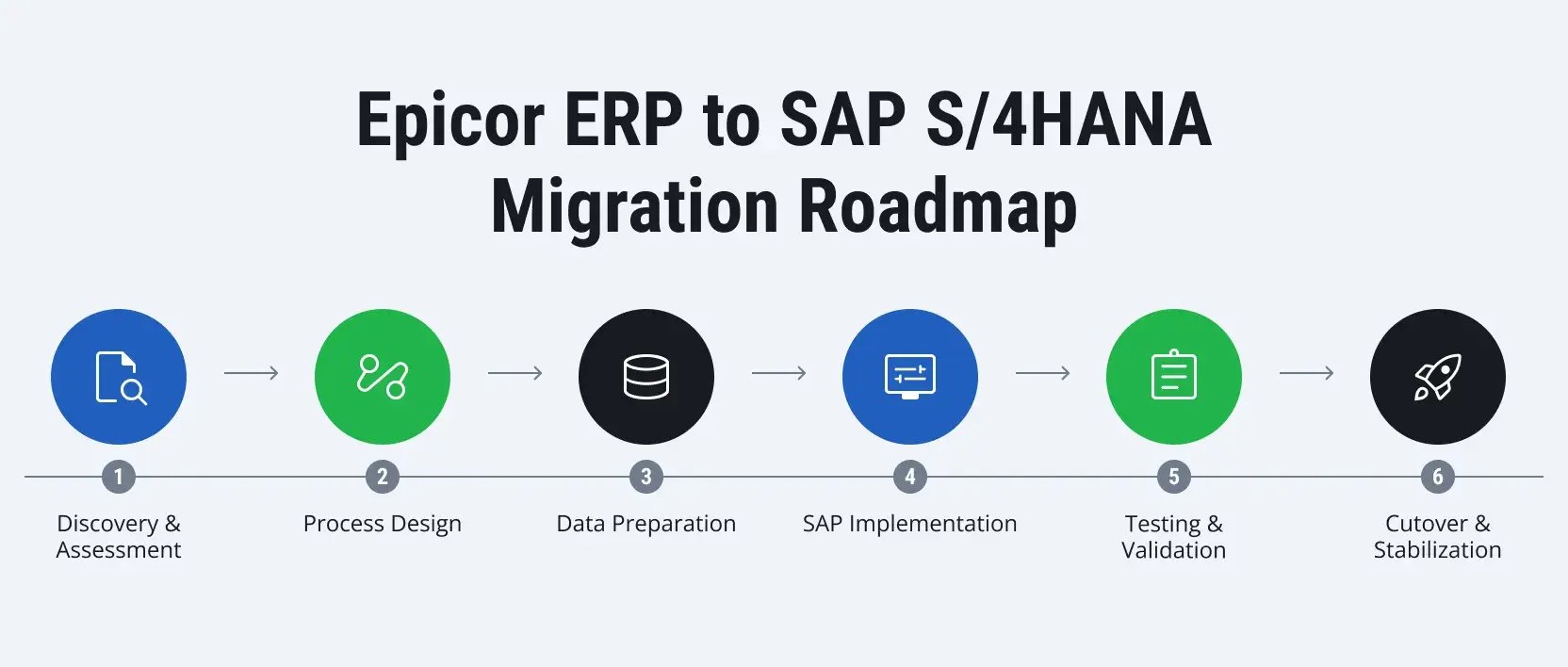
Discovery and assessment
A successful migration starts with understanding how the business actually works today. Teams examine existing processes, integrations, reporting requirements, and data quality to uncover challenges that could affect the project later.
Process design
True modernization requires shifting from process replication to process reinvention. An SAP implementation allows leadership to establish a forward-looking operating framework — one that prioritizes operational efficiency, structural standardization, and real-time visibility to support the next phase of business growth.
Data preparation
Data work usually begins early and continues throughout much of the project. Teams identify duplicate records, resolve inconsistencies, validate business-critical information, and prepare data for migration into SAP. The objective is straightforward: start the new system with reliable data.
SAP implementation
This is where the future environment begins to take shape. SAP S/4HANA is configured, integrations are developed, security roles are established, and reporting requirements are implemented based on the design decisions made earlier in the project.
Testing and validation
Go-live readiness depends on an exhaustive, multi-disciplinary validation phase. Business users must verify daily transactional workflows, the finance team must audit reporting accuracy and ledger balances, and technical specialists must stress-test integrations, system performance, and security frameworks. All identified variances are systematically remediated prior to production cutover.
Cutover and stabilization
The final phase focuses on the business's transition to SAP. After the new system's launch, project teams continue to monitor performance, provide user support, and resolve any issues that arise during the first weeks of operation. Stabilization activities help ensure the organization is confidently operating in the new environment, while simultaneously reaping the benefits of the migration.
Conclusion
A migration from Epicor to SAP S/4HANA usually means a company has outgrown its foundation. Managing global supply chains, multiple business units, and consolidated reporting eventually requires a more scalable platform. However, the technology only works if the execution is right. Keeping the project on track requires a strict Greenfield strategy, thorough data scrubbing, and a deployment roadmap focused entirely on your future operating model rather than your legacy constraints.
A successful migration relies on accurate prep work before budgets or timelines are set. Let our architects evaluate your Epicor infrastructure through an SAP readiness assessment to identify integration risks and build a workable transition plan. Contact LeverX to schedule an assessment.