Why standard WMS solutions fall short in manufacturing – and which systems actually support production, WIP tracking, and shop floor realities.
Trends That Will Transform the Industrial Landscape in 2025
A Warehouse Management System (WMS) does more than track inventory and coordinate shipments. In manufacturing, it must also support production supply, work-in-process (WIP), material traceability, replenishment, and the movement of goods between warehouse and shop floor.
These requirements make selecting a WMS different from choosing a system for a conventional distribution center. Materials may be reserved for production orders, staged for specific work centers, returned after partial consumption, or placed on hold following a quality inspection. If warehouse and production systems do not exchange information reliably, inventory discrepancies and supply delays can quickly affect manufacturing operations.
For U.S. manufacturers, the decision may also involve multiple production sites, regional distribution centers, different ERP platforms, and industry-specific traceability or quality requirements.
The best WMS is therefore not necessarily the platform with the longest feature list. It is the solution that fits the manufacturer's operational processes, existing technology landscape, automation plans, and growth strategy.
This guide compares leading WMS options for U.S. manufacturers and explains how to evaluate their suitability for your production and warehouse environment.
Key Takeaways
- SAP Extended Warehouse Management (SAP EWM) is worth evaluating for manufacturers that need close integration between SAP ERP, warehouse execution, production supply, and logistics.
- Oracle, Manhattan Associates, Blue Yonder, and Infor offer warehouse management capabilities for complex, high-volume, or multi-site operations.
- Microsoft Dynamics 365 Supply Chain Management and Epicor Kinetic may be suitable for manufacturers whose ERP strategy already centers on those platforms.
- NetSuite WMS, Fishbowl, and Odoo Inventory can be relevant for smaller or less complex operations, depending on their warehouse and production requirements.
- Manufacturing fit matters more than company size alone. Production integration, traceability, automation, ERP compatibility, and data quality should drive the decision.
- Implementation quality is critical. A well-chosen WMS still needs suitable process design, integration, testing, and user adoption to deliver value.
What Makes a WMS Suitable for Manufacturing?
A manufacturing WMS must coordinate warehouse activities with production requirements. Inventory is not simply stored and shipped; it changes status and location as materials move through receiving, quality inspection, staging, production, and finished goods handling.
The most important capabilities to evaluate are production integration, inventory traceability, replenishment, WIP visibility, and exception handling.
|
Requirement |
What the WMS should support |
|
Production supply |
Staging and replenishment based on production demand, work orders, or defined material requirements |
|
Inventory accuracy |
Location-level stock visibility, scanning, cycle counting, and controlled inventory movements |
|
Traceability |
Lot, batch, serial number, and material-status tracking where required |
|
Quality processes |
Controlled handling of blocked, inspected, rejected, and released inventory, with the appropriate system integrations |
|
WIP visibility |
Visibility into materials moving between warehouse and production locations |
|
Warehouse automation |
Integration with suitable conveyors, automated storage and retrieval systems, robots, and material-handling equipment |
|
Multi-site operations |
Consistent processes and reporting across warehouses and manufacturing facilities |
|
ERP and shop-floor integration |
Reliable exchange of orders, inventory updates, production requirements, and confirmations |
For U.S. manufacturers in regulated industries, traceability and quality requirements may be particularly important. For example, pharmaceutical and food manufacturers may need processes aligned with applicable FDA requirements, while other sectors may be governed by different customer, industry, or regulatory standards. A WMS can support these processes, but software alone does not guarantee compliance.
Best WMS Software for U.S. Manufacturers: Comparing the Options
There is no universal ranking that works for every manufacturer. The following platforms serve different operational needs, ERP landscapes, and levels of warehouse complexity.
|
WMS platform |
Potential fit |
Main consideration |
|
SAP Extended Warehouse Management (EWM) |
Manufacturers with SAP-centric operations and complex warehouse processes |
Strong fit where warehouse execution must connect closely with SAP ERP and production processes |
|
Oracle Fusion Cloud Warehouse Management |
Organizations using Oracle's cloud supply chain applications or seeking a cloud-based WMS |
Evaluate integration with the existing ERP, manufacturing, and reporting landscape |
|
Manhattan Active Warehouse Management |
High-volume warehouses requiring advanced execution, labor, and automation orchestration |
Assess the platform's fit with the wider enterprise architecture and required integration model |
|
Blue Yonder Warehouse Management |
Complex supply chains that need warehouse execution coordinated with broader planning and logistics |
Validate the required planning, execution, and integration capabilities |
|
Infor WMS |
Manufacturers and distributors with complex warehouse operations |
Evaluate fit with the organization's ERP, production, and automation systems |
|
Microsoft Dynamics 365 Supply Chain Management |
Manufacturers using the Microsoft business application ecosystem |
Can connect warehouse processes with inventory, manufacturing, and related supply chain functions |
|
NetSuite WMS |
Smaller and mid-sized businesses using NetSuite ERP |
Consider whether its warehouse capabilities match the required production complexity |
|
Epicor Kinetic WMS |
Manufacturers using Epicor Kinetic ERP |
Attractive when warehouse execution must work closely with job and production processes |
|
Fishbowl Manufacturing |
Small and mid-sized manufacturers with inventory and work-order requirements |
Evaluate whether its functionality is sufficient for the warehouse's scale and complexity |
|
Odoo Inventory |
Smaller businesses seeking integrated inventory and manufacturing workflows |
May suit simpler operations but requires a careful assessment of advanced WMS needs |
This shortlist is a starting point, not a vendor ranking. Product capabilities, deployment options, licensing, and integration requirements vary by edition and configuration. Each candidate should be assessed against the organization's actual processes.
Leading WMS Platforms for Enterprise Manufacturing
Warehouse Management Systems for manufacturing are not interchangeable. Their suitability depends on several factors, including production complexity, regulatory requirements, and system landscape. Company size remains the most decisive factor.
For this reason, let’s distinguish solutions for large enterprise manufacturers and mid-sized manufacturers.
1. SAP Extended Warehouse Management
SAP Extended Warehouse Management is a warehouse management system designed for complex logistics environments. It is part of the SAP supply chain portfolio and integrates natively with SAP S/4HANA.
SAP EWM manages warehouse operations at a granular level. It controls inbound, internal, and outbound processes. It supports high transaction volumes and complex process logic. The system is typically deployed in manufacturing enterprises with integrated production and logistics landscapes.
Core capabilities
SAP EWM provides detailed control over warehouse execution. Key capabilities include:
- Management of inbound deliveries, staging areas, and goods receipt posting
- Storage bin management with fixed, dynamic, and mixed storage strategies
- Handling unit management for pallets, containers, and production-specific packaging
- Warehouse task creation and confirmation for picking, putaway, and internal movements
- Integration with labor management and warehouse automation equipment
These capabilities allow warehouse processes to follow defined rules rather than manual decisions.
Manufacturing focus
SAP EWM is designed to operate as part of an integrated manufacturing environment. It connects directly with SAP Digital Manufacturing and SAP Quality Management.
This integration supports production staging based on production orders. Raw materials can be staged directly to production supply areas. The system tracks material consumption against specific orders. Work-in-process inventory is recorded with status and location.
Quality processes are embedded in warehouse flows. Inspection lots can be triggered at goods receipt or during internal movements. Stock can be blocked, released, or scrapped based on inspection results. These actions are reflected immediately in both warehouse and production systems.
The result is a shared view of inventory across warehouse and production. Materials are tracked through their full lifecycle, from receipt to consumption and finished goods storage.
Features for a 2026 manufacturing strategy
SAP EWM continues to expand its support for production-driven warehousing. The following features are particularly relevant for manufacturers planning system stability and process control beyond short-term upgrades.
- Advanced Production Integration (API): API uses Production Material Requests to trigger warehouse tasks based on actual production demand. This allows staging, replenishment, and consumption posting to follow the shop floor schedule instead of fixed warehouse rules.
- Material Flow System (MFS): MFS enables SAP EWM to control conveyors, cranes, and automated storage systems directly, without any middleware. Warehouse movements are executed without external middleware, which reduces integration points and simplifies error handling in automated environments.
- Warehouse robotics integration: SAP EWM supports direct integration with autonomous mobile robots and automated picking systems through standard interfaces. Robots can be assigned warehouse tasks such as pallet transport, line-side replenishment, and goods movement. Task status is updated in real time, allowing coordinated execution between human workers and automation equipment.
- Embedded analytics: SAP EWM includes real-time monitoring tools for warehouse execution. The Warehouse Management Monitor highlights dock congestion, delayed staging, and raw material shortages that can affect production orders.
SAP EWM deployment options: Basic and Advanced
SAP EWM is available in two functional scopes: Basic and Advanced. The distinction affects both functionality and licensing.
- SAP EWM Basic is included with SAP S/4HANA. It covers standard warehouse processes, such as inbound and outbound handling, storage control, and basic picking and putaway. It is typically used in manufacturing sites with moderate warehouse complexity and limited automation.
- SAP EWM Advanced is licensed separately. It extends the Basic scope with advanced features. These include labor management, yard management, slotting and rearrangement, wave management, and advanced automation integration. It is commonly used in large manufacturing plants with high throughput, multiple production supply areas, and automated warehouse equipment.
The choice between Basic and Advanced depends on process complexity rather than company ambition. Read a detailed comparison in our article.
 SAP EWM Interface. Source: SAP
2. Oracle Warehouse Management Cloud (Oracle WMS Cloud)
Oracle Fusion Cloud Warehouse Management is a cloud-native warehouse management system delivered as part of Oracle Fusion Cloud Supply Chain & Manufacturing. It is designed for large enterprises that require standardized warehouse execution across multiple sites.
The system runs as a software-as-a-service platform. Oracle manages infrastructure, updates, and security. Customers configure warehouse processes within defined system parameters. Oracle WMS Cloud is commonly used in manufacturing environments with distributed warehouses and centralized IT governance.
Core capabilities
Oracle WMS Cloud controls warehouse execution through configurable process flows. Its core capabilities include:
- Inbound receipt processing with ASN validation and appointment scheduling
- Directed putaway based on item attributes, storage constraints, and warehouse zones
- Task-based picking, packing, and shipping with priority and rule management
- Inventory status management for available, reserved, damaged, and quality-hold stock
- Lot and serial tracking to support regulated manufacturing environments
These functions are executed through radio frequency (RF) devices and web-based user interfaces. All transactions are recorded in real time.
Selected platform features
Oracle WMS Cloud includes features designed for large-scale operations:
- Built-in task interleaving to reduce travel time between warehouse activities
- Labor standards and performance tracking based on measured task completion
- Support for cross-docking and flow-through processing
- API-based integration framework for ERP, transportation, and manufacturing systems
The system follows a quarterly release cycle. New functionality is delivered through scheduled updates rather than custom code.
Manufacturing focus
Oracle WMS Cloud supports manufacturing logistics through integration with Oracle Manufacturing and Oracle Inventory Management. The system exchanges data on production orders, material requirements, and inventory balances.
Material staging can be aligned with production schedules. Components can be issued to work orders from defined staging locations. Inventory movements are reflected at both warehouse and production levels. This supports visibility into raw materials and work-in-process inventory.
Quality controls are applied through inventory status and lot management. Materials can be placed on hold based on inspection results or process rules. This status is enforced during picking and staging, which prevents unapproved materials from reaching production lines.
Oracle WMS Cloud fits manufacturing enterprises that prioritize standardized processes, centralized control, and cloud-based deployment. It supports warehouse execution as part of a broader Oracle manufacturing and supply chain environment rather than as a standalone system.
3. Manhattan Active® Warehouse Management
Manhattan Active Warehouse Management is a cloud-native warehouse management system developed by Manhattan Associates. It is designed for large enterprises that operate high-volume and process-intensive warehouses.
The solution is delivered as a single-tenant cloud service. Manhattan Associates controls system updates and platform maintenance. Customers configure workflows within the system’s process framework. Manhattan Active WMS is commonly deployed in manufacturing environments with complex distribution and production supply requirements.
Core capabilities
Manhattan Active WMS provides detailed control over warehouse execution. Core capabilities include:
- Inbound receipt processing with rule-based validation and directed putaway
- Inventory management at location, container, lot, and serial levels
- Task-based picking, replenishment, and internal movements
- Wave and waveless order release to manage throughput and labor capacity
- Native support for warehouse automation and material handling equipment
These capabilities allow warehouses to operate with defined execution logic rather than manual task assignment.
Manufacturing focus
Manhattan Active WMS supports manufacturing logistics through integration with ERP and manufacturing execution systems. The platform manages material flows that support both production supply and finished goods distribution.
The system supports line-side replenishment and production staging. Materials can be issued to production locations based on demand signals and inventory thresholds. Inventory status controls prevent restricted or nonconforming materials from being released to production.
Lot and serial tracking support traceability requirements. This is relevant for manufacturers operating under regulatory or customer audit constraints. Inventory movements are recorded with time, location, and transaction context.
Manhattan Active WMS is typically selected by manufacturing enterprises that operate complex warehouses and require strong execution control, automation integration, and standardized processes across sites.

4. Blue Yonder Warehouse Management
Blue Yonder Warehouse Management is an enterprise warehouse management system developed by Blue Yonder, formerly JDA Software. It is part of the Blue Yonder Luminate platform for supply chain execution and planning.
The system is available as a cloud-based solution and as an on-premises deployment, depending on the version and customer requirements. Blue Yonder WMS is commonly used by large manufacturers with complex supply chains and a focus on coordinated planning and execution.
Core capabilities
Blue Yonder WMS manages warehouse operations through configurable process rules. Core capabilities include:
- Inbound receiving with appointment scheduling and quality checks
- Directed putaway and replenishment based on inventory attributes and demand
- Order picking and packing with task optimization
- Inventory tracking by location, lot, serial number, and status
- Support for cross-docking and flow-through operations
These features support controlled execution across high-volume warehouse environments.
Manufacturing focus
Blue Yonder WMS supports manufacturing operations by connecting warehouse execution with production planning and demand signals. It integrates with manufacturing and ERP systems to align material availability with production schedules.
The system supports material staging and replenishment for production areas. Inventory can be allocated to work orders or production demand. Work-in-process inventory can be tracked as it moves between warehouse and production locations.
Quality controls are enforced through inventory status management. Materials that fail inspection or await approval can be restricted from use. These restrictions apply consistently across warehouse and production supply processes.
Blue Yonder WMS is typically used by manufacturing enterprises that require coordination between warehouse execution, production planning, and supply chain visibility at scale.

5. Infor WMS
Infor WMS is a software for complex, high-volume operations. It is part of the Infor Supply Chain suite and is commonly deployed in manufacturing, distribution, and third-party logistics environments. The solution supports both cloud and on-premises deployment models.
Infor WMS is often used by manufacturers that require configurable workflows without deep custom development.
Core capabilities
Infor WMS provides detailed control over warehouse execution:
- Inbound and outbound processing with task-based execution
- Inventory tracking by lot, serial number, and container
- Wave, waveless, and order-based picking strategies
- Labor standards and performance measurement
- Dock scheduling and yard visibility
Warehouse activities are driven by configurable rules, which allows consistent execution across shifts and sites.
Manufacturing-oriented capabilities
Infor WMS supports production-driven warehouse processes through integration with Infor ERP and manufacturing modules.
Key manufacturing functions include:
- Material staging to production orders and work centers
- Component issue and return processing
- Handling of Work-in-Process inventory within warehouse-managed areas
- Lot and serial traceability from raw materials through finished goods
These functions help maintain inventory accuracy during production changes, rework, and partial consumption.
Platform characteristics
Infor WMS includes an embedded configuration layer that allows process changes through parameter settings rather than code changes. This approach is commonly used to adapt staging rules, picking logic, or labor standards when production layouts change.
The system also provides role-based dashboards for supervisors to monitor workload, labor utilization, and pending warehouse tasks.
6. Körber WMS (formerly HighJump)
Körber WMS, previously known as HighJump WMS, is a configurable warehouse management system designed for complex and variable warehouse operations. It is used by manufacturers that require flexible process design and frequent workflow adjustments. The solution supports cloud and private deployment models.
Körber WMS is often selected in environments where warehouse processes evolve alongside production models.
Core capabilities
Körber WMS supports detailed warehouse execution with an emphasis on adaptability:
- Inbound, outbound, and internal movement control
- Inventory management by lot, serial, and license plate
- Task management for picking, putaway, and replenishment
- Support for automation and material handling equipment
- Labor tracking and productivity reporting
Processes are executed through configurable workflows rather than fixed transaction paths.
Manufacturing-oriented capabilities
Körber WMS supports manufacturing supply processes through ERP integration and event-driven workflows.
Manufacturing-related functions include:
- Production order–based material staging
- Just-in-time replenishment to production areas
- Handling of returns, rework, and component substitutions
- Tracking of materials across raw, WIP, and finished states
These capabilities help warehouse teams respond to production changes without manual re-planning.
Configuration and extension model
Körber WMS uses a configuration-first approach that allows business users to adjust workflows, data fields, and task logic. This reduces reliance on custom code when production layouts or staging strategies change.
The platform also supports extensions through APIs, which are commonly used to connect shop floor systems, automation controllers, and reporting tools.
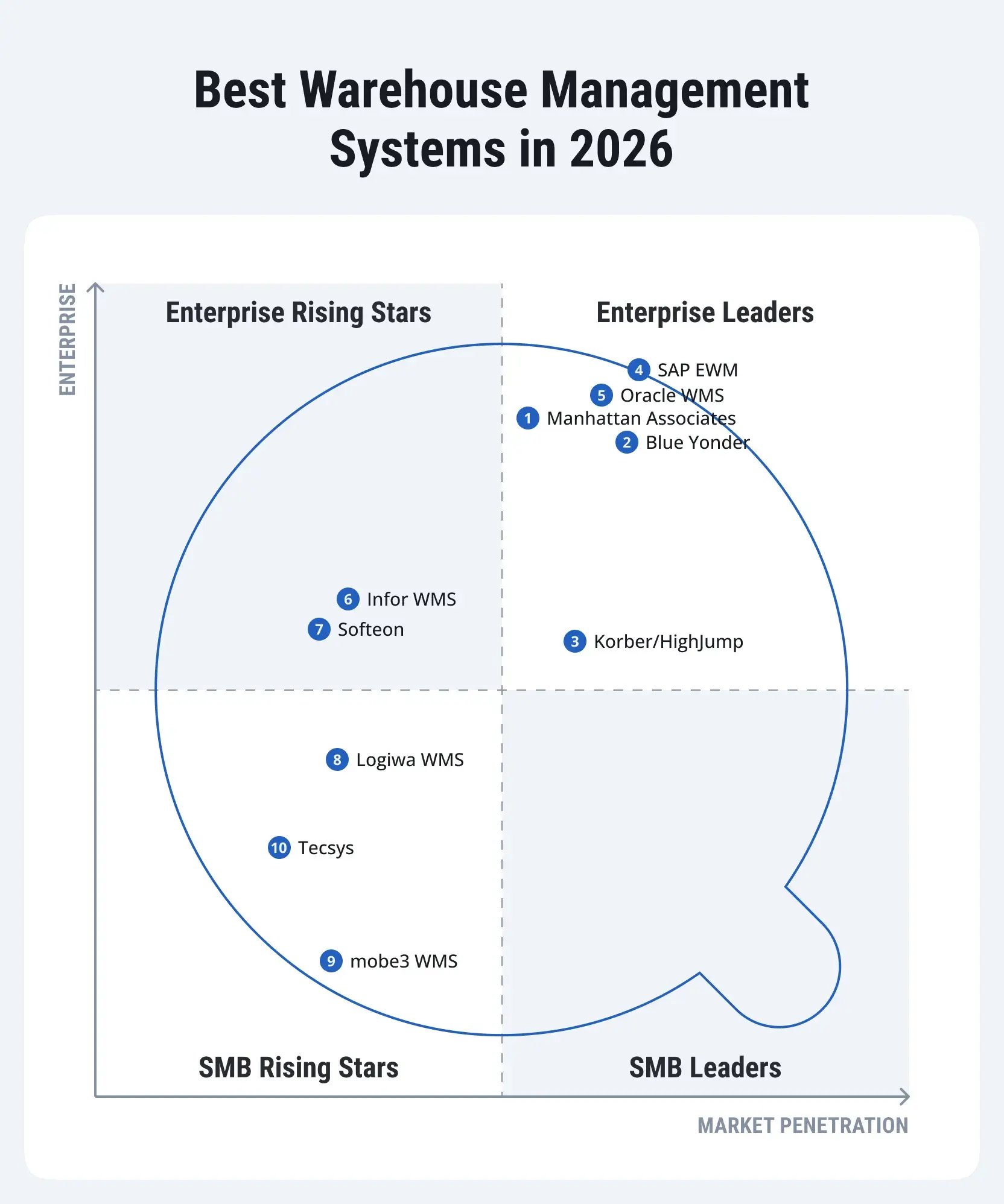
WMS Platforms for Mid-Size Manufacturing Companies
Not all manufacturing operations require enterprise-scale warehouse systems. Medium-sized manufacturers often face a different balance of process complexity, IT resources, and budget constraints.
This makes it important to evaluate WMS platforms that support production-driven warehousing without the overhead of large enterprise deployments.
Microsoft Dynamics 365 Supply Chain Management (SCM)
Microsoft Dynamics 365 Supply Chain Management provides warehouse management capabilities for mid-sized and upper mid-market manufacturers. The system is delivered as a cloud service, and it also integrates tightly with Dynamics 365 Finance and manufacturing modules.
Key capabilities
Dynamics 365 SCM supports structured warehouse operations with a focus on process consistency:
- Advanced warehouse management with license plate tracking
- Wave and batch picking for outbound and internal movements
- Mobile warehouse execution using handheld devices
- Integration with demand planning and production orders
- Built-in support for quality orders and quarantine inventory
The system also supports advanced features such as warehouse work templates and location directives to control task creation and execution.
Manufacturing focus
Dynamics 365 SCM connects warehouse activities directly to production orders. Materials can be staged to production locations based on bill of materials requirements and scheduled order quantities. Consumption and returns are posted against production orders, which keeps inventory levels aligned with shop floor activity.
The system supports quality checks during inbound and production-related movements. It also allows manufacturers to manage Work-in-Process inventory within warehouse-controlled locations, which improves visibility during multi-step production.
NetSuite Warehouse Management System
NetSuite WMS is a WMS module within Oracle NetSuite ERP. It is delivered as a cloud-based solution and designed for mid-sized companies with centralized warehouse operations.
The system extends NetSuite inventory management with task-based warehouse execution. It is commonly used by manufacturers seeking a unified ERP and warehouse platform without separate infrastructure.
Key capabilities
NetSuite WMS provides warehouse control through features including:
- Bin-level inventory management and directed putaway
- Mobile RF workflows for picking, packing, and replenishment
- Inventory tracking by lot and serial number
- Cycle counting and inventory adjustments
- Advanced capabilities such as wave picking and order prioritization
These features support structured warehouse processes while remaining lighter than enterprise-grade WMS platforms.
Manufacturing focus
NetSuite WMS supports manufacturing operations through native integration with NetSuite manufacturing and work order management. Materials can be allocated and issued to work orders directly from warehouse locations.
The system tracks inventory movements related to production consumption and finished goods completion. This provides visibility into material usage without separate reconciliation.
Lot tracking supports traceability requirements for regulated or customer-driven manufacturing. Inventory status controls help prevent the release of restricted materials to production or shipment.
Epicor Kinetic (WMS)
Epicor Kinetic is a warehouse management module integrated into the Epicor Kinetic ERP platform. It is a cloud-enabled or on-premises solution designed for mid-sized manufacturers with moderately complex warehouses.
The system emphasizes real-time inventory visibility and integration with production operations, reducing manual tracking and paperwork.
Key capabilities
Epicor Kinetic WMS provides warehouse execution and inventory management features, including:
- Directed putaway and picking with zone and location control
- Mobile device support for RF scanning, counting, and order processing
- Lot, serial, and expiration date tracking
- Task-based replenishment and work order fulfillment
- Advanced functionality such as wave picking, cross-docking, and demand-driven replenishment
These capabilities allow warehouses to coordinate stock movements closely with production and shipping requirements.
Manufacturing focus
Epicor Kinetic WMS is tightly connected to job-based manufacturing processes. Materials are issued directly to jobs, which allows inventory consumption to follow actual production progress. Returns, scrap, and substitutions are recorded against the same job records.
The system supports tracking of Work-in-Process through production operations rather than separate warehouse tasks. This approach fits manufacturers that need clear job costing and material traceability without managing highly automated warehouses.
Aptean WMS
Aptean WMS is a warehouse management system for mid-market manufacturers and distributors. It is offered as part of Aptean’s industry-focused ERP and supply chain solutions. The system supports both cloud and on-premises deployments, depending on the selected Aptean platform.
Key capabilities
Aptean WMS provides structured warehouse operations with a focus on operational control:
- Inbound and outbound warehouse processing
- Inventory tracking by lot, serial number, and location
- Task-based picking, putaway, and replenishment
- Barcode scanning and mobile execution
- Basic labor tracking and performance visibility
The system emphasizes configurable workflows that align with industry-specific requirements.
Manufacturing focus
Aptean WMS supports manufacturing supply processes through work order integration. Materials are staged and issued based on production requirements defined in the ERP. Finished goods and by-products are received back into inventory with traceability preserved.
The system handles rework and returns within standard warehouse processes. This makes it suitable for manufacturers with stable production flows that still require control over lot tracking and material status changes.
Warehouse Management Systems for Small and Growing Manufacturers
Smaller manufacturers face a different starting point. Many of them often manage warehouse and production processes manually or with spreadsheets. At this stage, WMS requirements focus on simplicity, visibility, and operational control without unnecessary complexity.
The following tools are commonly selected by SMB manufacturers.
Odoo Inventory
Odoo Inventory is part of the Odoo ERP suite and targets small manufacturers that want basic warehouse control within a single system. It supports barcode-based receiving, internal transfers, and picking through a web and mobile interface. The module integrates directly with Odoo Manufacturing and Odoo Accounting, which allows stock movements to update work orders and financial records without manual reconciliation.
Fishbowl Inventory
Fishbowl Manufacturing is a standalone inventory and warehouse system commonly used by small manufacturers. It supports bin-level tracking, order management, and production work order processing. Also, Fishbowl offers mobile-friendly interfaces for shop floor staff to manage picking, receiving, and cycle counts. The solution is commonly adopted by manufacturers who need structured inventory control without the complexity of enterprise platforms.
Katana MRP
Katana MRP is a cloud-based production and inventory system designed for small manufacturers with simple production flows. It provides real-time inventory visibility tied to production orders and sales orders. Katana integrates with accounting platforms such as QuickBooks and Xero, which allows inventory consumption and finished goods to be reflected in financial reports with minimal setup.
Is it Really Worth it? Comparing Standard and Manufacturing WMS
Manufacturing-focused WMS platforms are often seen as heavier choices. They require tighter system integration, longer implementation timelines, and higher upfront effort. These concerns are valid and are usually visible early in the project.
Generic WMS tools reduce initial setup effort, but they shift complexity into daily operations. In manufacturing, those trade-offs appear as manual corrections, delayed production supply, and limited visibility once materials leave standard storage.
The following grey zones explain where standard logistics-oriented WMS solutions typically fall short in factory environments.
Inventory focus
Standard WMS platforms treat inventory as static stock stored in locations. Manufacturing requires inventory to change state as it moves through production. Raw material, WIP, and finished goods carry different rules, and a system must track these changes without manual reclassification.
Replenishment
In a generic WMS, replenishment is driven by warehouse thresholds or outbound demand. In manufacturing, replenishment must follow production schedules, order priorities, and line-side consumption rates. When this link is missing, warehouse teams rely on manual signals from the shop floor.
Traceability
Manufacturing traceability goes beyond inbound and outbound movements. It requires tracking which batch or serial was consumed by which production order. Standard WMS often record inventory history, but they do not link material usage to production execution in a usable way.
Work-in-process visibility
Many logistics-focused WMS tools lose visibility once materials are issued to production. Manufacturing environments need to know where WIP is, what operation it belongs to, and what quantity remains. Without this, production planning relies on estimates rather than confirmed data.
Production staging
Production staging is not the same as outbound picking. Materials must arrive in the right sequence, at the right location, and at the right time. Standard WMS solutions usually support staging as a warehouse task, not as a production-driven process.
Exception handling
Production changes are common. Orders are split, components are substituted, and rework is introduced. Manufacturing WMS platforms are built to record these changes within standard processes. Generic systems often handle them as manual adjustments.
Data ownership between systems
In manufacturing, warehouses and production share responsibility for the same materials. A manufacturing WMS defines clear system ownership for quantity, status, and consumption. Without this clarity, mismatches appear between ERP, WMS, and shop floor systems.
|
Aspect |
Standard WMS |
Manufacturing WMS |
|
Inventory perspective |
Treats inventory as stock stored in locations |
Tracks inventory as it changes state from raw material to WIP to finished goods |
|
Replenishment logic |
Triggered by warehouse min/max levels or outbound orders |
Triggered by production orders, schedules, and line-side demand |
|
Traceability |
Records movement history within the warehouse |
Links batches and serials directly to production orders and consumption |
|
Work-in-process visibility |
Limited or lost after material issue |
Tracks WIP by order, operation, and quantity |
|
Production staging |
Handles staging as a warehouse task |
Executes staging based on production sequence and timing |
|
Exception handling |
Requires manual adjustments for changes |
Records substitutions, rework, and splits within standard flows |
|
System responsibility |
Warehouse and production data often diverge |
Defines clear ownership of quantity and status across systems |
How to Choose the Right WMS for Your Manufacturing Operations
The selection process should start with the operational requirements, not a list of vendor features.
1. Map Material Flows
Document how raw materials arrive, where they are stored, how they are issued to production, how unused components are returned, and how finished goods enter inventory.
Include less common but important scenarios such as partial receipts, rejected materials, substitutions, rework, scrap, and emergency replenishment. These are often the processes that expose gaps during implementation.
2. Define Traceability and Quality Requirements
Determine what needs to be tracked by lot, batch, serial number, location, and status. Establish whether traceability must connect supplier materials to production orders and finished products.
Requirements should reflect the organization's industry, customer contracts, and applicable regulatory obligations. The target system must also preserve the records and evidence required by quality and compliance teams.
3. Assess ERP and Production Integration
Review how the proposed WMS will exchange information with the ERP, MES, quality systems, transportation platforms, and automation equipment.
The assessment should establish which system owns inventory quantity and status, how production demand triggers warehouse tasks, how exceptions are reported, and how transactions are reconciled.
This is particularly important for manufacturers with multiple sites or a mixture of SAP and non-SAP applications.
4. Evaluate Automation and Scalability
If the warehouse uses conveyors, automated storage and retrieval systems, autonomous mobile robots, or other material-handling equipment, confirm compatibility with the proposed WMS and the required control architecture.
Also assess transaction volumes, peak workloads, warehouse expansion plans, labor management, and the ability to replicate a standard process across new facilities.
5. Test the Solution Against Real Scenarios
Vendor demonstrations should use representative production and warehouse scenarios rather than generic receiving and shipping workflows alone.
Ask the vendor or implementation partner to demonstrate production staging, partial consumption, returns, quality holds, inventory adjustments, and exception handling. Include representative data and integration requirements where possible.
This helps identify whether the proposed solution supports the real operation or depends on manual workarounds.
6. Consider Total Cost of Ownership
Implementation costs extend beyond software licensing. The business case should account for configuration, data migration, integration, warehouse devices, automation, testing, training, downtime planning, and ongoing support.
A system with a lower initial cost may require additional integration or process work. Conversely, a more capable platform may introduce unnecessary complexity if the operation does not need its advanced functions.
Select the solution that offers the best fit for current requirements and the expected future operating model.
Why the WMS Implementation Partner Matters
A WMS is part of a wider operational system. Its success depends on how warehouse processes interact with production, quality, planning, and enterprise applications.
An implementation partner should understand the physical material flows as well as the software architecture. It should be able to map current operations, identify process gaps, design integrations, configure the solution, plan migration and testing, and prepare warehouse employees for the transition.
When evaluating an implementation partner, ask:
- Has the team implemented WMS solutions in manufacturing environments comparable to yours?
- Can it explain the integration between warehouse execution and production processes?
- How will it address data quality, traceability, inventory accuracy, and exception handling?
- What experience does it have with automation and third-party applications?
- How will it test high-volume, end-to-end scenarios before go-live?
- What support will be provided during stabilization and after the initial launch?
The proposed team matters as much as the partner's overall capabilities. Confirm who will be responsible for architecture, warehouse process design, integrations, testing, cutover, and support.
How LeverX Supports SAP EWM for Manufacturing
LeverX helps manufacturers assess warehouse operations, design SAP EWM solutions, integrate warehouse execution with enterprise systems, and support implementation and optimization.
Our SAP EWM services cover consulting, implementation, integration, migration, customization, and ongoing support. The scope depends on the organization's existing SAP landscape, production and logistics requirements, automation plans, and target architecture.
Want to understand whether SAP EWM fits your production and warehouse operations? Contact LeverX to discuss your processes, integrations, and implementation priorities.

Contact LeverX to discuss your processes, integrations, and implementation priorities.
Conclusion
Choosing WMS software for manufacturing requires more than comparing warehouse functions. The system must support material flows, production supply, inventory status, traceability, and the integration of warehouse operations with the wider enterprise.
SAP EWM may be particularly suitable for SAP-centric manufacturers with complex warehouse processes. Oracle, Manhattan Active, Blue Yonder, and Infor provide other options for large or complex operations. Microsoft Dynamics 365, NetSuite, Epicor, Fishbowl, and Odoo may be relevant depending on the organization's ERP platform, scale, and operational needs.
The right choice depends on how well the WMS fits the production model, integration landscape, traceability requirements, automation strategy, and long-term business plans.
A structured assessment, representative scenario testing, and an experienced implementation partner can help reduce delivery risk and create a warehouse environment that supports production rather than operating as a disconnected logistics system.
Frequently Asked Questions
What is the best WMS software for manufacturers in the U.S.?
There is no universal best option. SAP EWM can be a strong candidate for SAP-centric manufacturing environments, while Oracle, Manhattan Active, Blue Yonder, Infor, and other solutions may fit different ERP landscapes and warehouse requirements. The choice should be based on process fit, integration, traceability, automation, and total cost of ownership.
How is a manufacturing WMS different from a standard WMS?
A manufacturing-focused WMS must coordinate warehouse activity with production requirements. This can include material staging, line-side replenishment, work-in-process visibility, component returns, and traceability between materials and production orders. The exact division of responsibilities depends on the ERP, WMS, MES, and quality systems in use.
Is SAP EWM suitable for manufacturing?
SAP EWM supports warehouse execution and production-related material flows, including staging materials for production and receiving materials back from production. Its suitability depends on the complexity of the warehouse, the SAP landscape, the required integrations, and the functional scope selected.
Can a WMS integrate with an MES?
Yes. A WMS may integrate with a Manufacturing Execution System (MES) to exchange production demand, material availability, staging information, consumption, and status updates. The required integration depends on which system owns each process and data object.
What should U.S. manufacturers consider when evaluating WMS compliance capabilities?
Manufacturers should map the relevant quality, traceability, recordkeeping, and operational requirements for their industry and customers. FDA-related requirements may apply to certain sectors, but software selection alone does not guarantee regulatory compliance. The solution must be configured, validated, and operated according to the applicable requirements.
How much does WMS software cost?
Costs vary by platform, warehouse count, transaction volume, automation, integration, licensing, and implementation scope. A meaningful estimate should include software, configuration, data, integrations, devices, testing, training, and ongoing support rather than licensing alone.
Why use a WMS implementation partner?
A capable partner can help map material flows, select the right functionality, design ERP and production integrations, test real operational scenarios, and prepare users for go-live. These activities help reduce the risk of inventory inaccuracies, process disruption, and manual workarounds after deployment.
Disclaimer: This article is for general informational purposes only and does not constitute legal, regulatory, financial, or professional advice. WMS capabilities, licensing, deployment options, and integrations vary by vendor, product edition, and configuration. U.S. manufacturing and regulatory requirements should be assessed for the specific industry and operation before selecting or implementing a solution.