

Learn how to automate SAP approval workflows with SAP Build Process Automation, when to use it instead of Flexible Workflow, and what to consider before implementation.
Changing an approval process in SAP can involve more work than the business initially expects, especially when the workflow depends on custom ERP developments. SAP Business Technology Platform (SAP BTP) offers another option: low-code approval workflows that connect to SAP S/4HANA through supported interfaces. SAP Build Process Automation brings workflow management, decision logic, and automation capabilities together on SAP BTP.
Quick answer: SAP Build Process Automation allows you to create approval workflows on SAP BTP without writing custom ABAP for the workflow logic. You can configure forms, routing conditions, and approval tasks, and trigger workflows through API calls or events from SAP S/4HANA. To update records in SAP S/4HANA after an approval decision, the workflow uses appropriate APIs or integration actions. However, if you need to approve a document already supported by SAP S/4HANA Flexible Workflow, check its standard configuration options first. A separate workflow may be unnecessary.
What Does SAP Build Process Automation Replace, and Why Does Keeping the Core Clean Matter?
SAP Build Process Automation succeeds SAP Workflow Management and combines workflow capabilities with decision management, process visibility, and robotic process automation (RPA).
If you've been using SAP Workflow Management, you might wonder whether you'll need to rebuild everything. According to SAP's transition guidance, existing workflow definitions and instances can remain available when SAP Build Process Automation is used in the same consumer account. SAP recommends developing new processes in its process builder, while existing implementations may require adjustments depending on their deployment and integration setup.
Another familiar option is a classic ABAP-based workflow, which runs within the ERP. It can still serve business needs, but custom developments may require additional maintenance and testing during upgrades.
This brings us to SAP's Clean Core approach. The idea is to minimize unnecessary modifications to the ERP core and use supported extension mechanisms instead. For example, applications running on SAP BTP can communicate with SAP S/4HANA through released APIs and events without placing custom orchestration logic inside ERP.
Consider a company that introduces an additional compliance review after reorganizing its purchasing department. The workflow team can update the routing logic and test the revised process without redesigning the underlying ERP transactions. Existing integrations still need to be checked when the approval steps change.
Is S/4HANA Flexible Workflow Enough?
Before building an approval process on SAP BTP, check whether the SAP application responsible for the business process already provides the required workflow capabilities. SAP S/4HANA Flexible Workflow supports configurable approvals for certain business objects, including supported purchase order scenarios. Configuration experts can define conditions, recipients, and approval steps using applications such as Manage Workflows for Purchase Orders.
Suppose a purchase order needs additional approval when its value exceeds a certain threshold. If your SAP S/4HANA edition and release support the required conditions and recipients, Flexible Workflow may be all you need.
However, SAP S/4HANA Flexible Workflow is not the only standard approval mechanism to consider. Other SAP solutions provide workflows for specific business processes:
- SAP S/4HANA Flexible Workflow: Consider it when the approval concerns a supported SAP S/4HANA business object and standard configuration covers the required conditions, recipients, and steps.
- SAP Master Data Governance (SAP MDG): Provides change request workflows for reviewing, approving, and activating governed master data, including supplier and business partner records.
- SAP Ariba Supplier Lifecycle and Performance: Supports supplier requests, registration questionnaires, approval tasks, and other supplier lifecycle processes.
- SAP Build Process Automation: Can coordinate processes that extend beyond the supported workflows of the applications involved, particularly when additional forms, approvals, or cross-system activities are necessary.
Consider supplier onboarding. A company may need to collect supplier information, review compliance documents, approve registration, and create supplier master records. SAP Ariba Supplier Lifecycle and Performance can handle supplier registration and its associated approvals, while SAP MDG can govern changes to supplier master data. Using both solutions does not automatically justify a separate workflow on SAP BTP.
SAP Build Process Automation may add value when onboarding requires an additional process that the existing solutions cannot adequately coordinate. For example, an external compliance application may need to perform a review before onboarding can proceed, with the outcome determining subsequent activities across SAP Ariba, SAP MDG, and another system.
Even then, check the available standard integration and workflow capabilities first. If a separate process is necessary, define which application owns each approval, where its status is maintained, and how approved changes are applied through supported APIs or integration actions. This helps avoid duplicate approvals and conflicting process states.
Can approvers manage tasks from different SAP systems in one inbox?
SAP S/4HANA Flexible Workflow tasks can be processed in the SAP S/4HANA My Inbox application. SAP Build Process Automation has its own My Inbox for tasks generated by its processes. These are separate task environments, so approvers should not assume that tasks from both systems automatically appear in the same inbox.
The choice of workflow engine still depends on the capabilities of the applications that own the business processes. A separate SAP Build Process Automation workflow is justified when it addresses requirements that existing workflows and supported integrations cannot adequately cover, rather than reproducing approvals already available in SAP S/4HANA, SAP MDG, or SAP Ariba.
How Do You Build an Approval Workflow in SAP Build, Step by Step?
Consider a supplier onboarding process that starts in a procurement portal and requires approval before supplier data is transferred to SAP S/4HANA or SAP Master Data Governance (SAP MDG). In this example, SAP Build Process Automation coordinates the additional approval steps, while the target SAP system remains responsible for creating or governing supplier master data.
The following seven steps show how to configure the process and handle approval decisions, backend updates, and execution results.
Step 1. Define the process and required data
Start by identifying the information that the procurement portal must provide. For a supplier onboarding request, this might include the supplier's legal name, country, tax identification number, contact details, purchasing organization, requester's identity, and supporting document references.
Define a unique request ID so the portal, workflow, and backend system can refer to the same onboarding request. Determine which fields are needed for approval decisions and which must eventually be passed to SAP S/4HANA or SAP MDG.
Also, establish whether an existing SAP application already handles the required approvals. The example assumes that SAP Build Process Automation is needed to coordinate additional steps beyond the available standard workflows.
Step 2. Configure the process trigger
Create a business process in SAP Build Process Automation and configure an API trigger. When an employee submits the onboarding request, the procurement portal sends an authenticated API call containing the required process input data. Map the incoming fields to process variables so subsequent tasks and decisions can access them.
For example, the request ID, supplier country, purchasing organization, and compliance-related attributes can be used to determine routing. Supporting documents can remain in an appropriate document repository, with references passed to the process.
Validate the incoming data before creating approval tasks. Missing mandatory information should be handled according to the agreed submission rules rather than passed to approvers as an incomplete request.
Step 3. Create the procurement manager's approval
Add an approval form and assign it to the appropriate procurement manager. The task should display the supplier information needed for the decision, together with relevant document references. The manager reviews the request and selects Approve or Reject.
Configure the process to evaluate the decision:
- Approved: Continue to the compliance-routing decision.
- Rejected: Stop further approval routing, record the rejection decision and reason where required, and notify the requester.
A rejected request should not proceed to supplier creation. If the procurement portal maintains the request record, update its status through a supported interface.
Step 4. Add a conditional compliance review
Configure a decision step that determines whether the request requires additional compliance review. For example, the organization may require a separate review when the supplier belongs to a defined risk category, operates in a jurisdiction subject to additional checks, or meets another documented compliance criterion.
If the condition is met, create a task for the designated compliance reviewer. Otherwise, continue to the backend integration step. The compliance reviewer examines the relevant information and approves or rejects the request. A rejection follows the configured rejection path. Only requests that have passed every required approval proceed to backend processing.
Step 5. Send approved data to SAP S/4HANA or SAP MDG
Once all required approvals are complete, configure an action or integration step that sends the approved data to the appropriate backend application. For direct supplier master data creation in SAP S/4HANA, the integration may use a supported Business Partner API, provided the required operations and data structures are available.
If SAP MDG governs supplier master data, the integration should use an appropriate supported interface to initiate the relevant master data governance process or change request. Approval in SAP Build Process Automation should not bypass the validation and approval requirements configured in SAP MDG. Map the approved process data to the required API fields, including supplier identification, organizational information, and other mandatory attributes. Use the appropriate integration, authentication, and authorization configuration. Do not assume that every supplier-related API supports the same create or update operations.
Step 6. Handle the backend response and record the request status
After executing the backend action, evaluate its technical response and business result.
For a synchronous operation, the integration can inspect the returned response, including relevant identifiers and error details. A successful request may return the identifier of the created business object or change request.
If the backend operation fails, route the process through a defined exception path. Record the error information, determine whether the operation can be retried safely, and notify the responsible support team when intervention is required.
Some operations may be asynchronous. For example, successfully creating an SAP MDG change request does not mean that supplier master data has already been approved and activated. The process should distinguish successful submission to SAP MDG from completion of the subsequent governance process.
Define the request status according to the confirmed outcome:
- Rejected: A required approver rejected the request, and no supplier creation action is executed.
- Pending backend processing: All required approvals are complete, but the backend operation has not yet been confirmed.
- Pending master data approval: SAP MDG accepted the change request, but its governance process remains in progress.
- Completed: The intended backend operation has finished successfully and its result has been confirmed.
- Failed: Backend processing could not be completed and requires investigation or corrective action.
Store the relevant request ID, approval outcomes, backend reference, and error details in the appropriate process or application records. If the procurement portal displays onboarding status, update it through a supported API or integration action and notify the requester of the relevant outcome.
A completed approval task must not be treated as confirmation that the supplier was successfully created or activated.
Step 7. Release, deploy, and test the workflow
Once the process configuration is complete, release the project in SAP Build Process Automation. Releasing creates a versioned snapshot of the process definition. The released version must then be deployed to make it available for execution.
Start by deploying the released version to an appropriate test environment with the required destinations, credentials, permissions, and backend connections configured. Verify that the process trigger is available and that test users can access their assigned tasks.
Run end-to-end tests using representative supplier onboarding requests. Cover the complete sequence, from submitting data through the procurement portal to confirming the final backend outcome.
At a minimum, test the following scenarios:
- Standard approval: The procurement manager approves a request that does not require additional compliance review.
- Conditional approval: The request meets the compliance criteria and proceeds through both approval stages.
- Rejection: An approver rejects the request, preventing subsequent approval or supplier creation steps.
- Backend success: The approved data is submitted through the supported API, and the expected backend result is confirmed.
- Backend failure: An API error or unsuccessful operation follows the configured exception-handling path.
- Asynchronous processing: An SAP MDG change request is accepted, but the onboarding request remains pending until the required governance outcome is confirmed.
Verify that the procurement portal displays the correct request status, notifications reach the intended recipients, and process monitoring provides sufficient information to investigate failures. Check that retries do not create duplicate supplier records or requests.
After the tests pass and the responsible stakeholders approve the results, release the approved project version and deploy it to the production environment according to the organization's deployment procedures. Confirm production destinations, authorizations, triggers, and monitoring settings before enabling live submissions.
Finally, execute an agreed production smoke test or other suitable post-deployment verification to confirm that the process is accessible and its critical connections work as expected.
What Should You Check Before Putting the Approval Process Into Production?
A workflow might work perfectly during a demonstration and still cause problems once employees begin using it. What happens if the ERP service is unavailable when an approved request reaches the final step? What if someone submits the same supplier twice or forgets to fill in a required field? And who takes care of an approval that has remained pending for several days?
These situations should be tested before going live. Your team needs to detect failed API calls, identify the affected requests, and establish recovery procedures that don't create duplicate records or inconsistent statuses. Don't limit acceptance testing to the approval form. In our example, the real business outcome might be supplier creation, another validation activity, or a handoff to the master data team. The process is ready only when the agreed-upon steps work together, and users know how to handle exceptions.
You'll also need someone to monitor process instances, manage recipient groups, resolve failed actions, and maintain approval rules as requirements change.
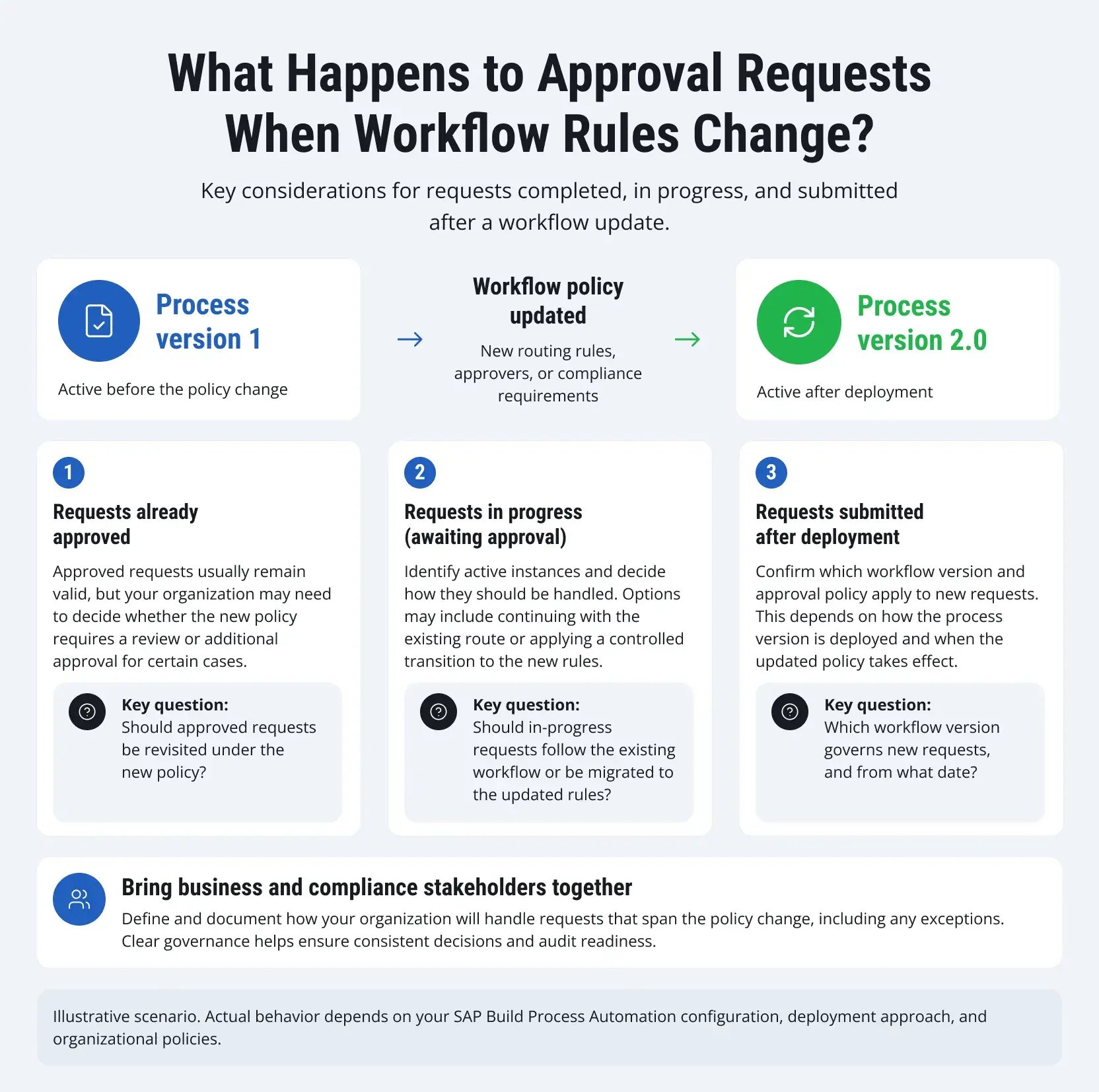
When approval rules change, your team also needs to decide how completed, in-progress, and newly submitted requests should be handled.

SAP Build Apps vs. Build Process Automation: Which One Do You Need?
SAP Build Apps and SAP Build Process Automation address different development needs. SAP Build Apps has traditionally been used to create web and mobile application interfaces through visual development tools, while SAP Build Process Automation focuses on workflow orchestration, approval tasks, business rules, and process automation.
However, SAP's product offering has changed. As of March 23, 2026, SAP Build Apps has been deprecated as a standalone product and placed in maintenance mode. Existing customers can continue using it under their current contracts, with SAP honoring the applicable support and maintenance commitments. For new projects, organizations should evaluate application development and process automation within the unified SAP Build offering.
The functional distinction remains useful when planning a solution:
|
Requirement |
Application Development |
Process Automation |
|
Primary purpose |
Build user-facing applications and interfaces |
Coordinate business processes and approval workflows |
|
Typical functionality |
Forms, application screens, navigation, and data interactions |
Approval tasks, routing conditions, decisions, and automated actions |
|
Example |
A procurement portal where employees submit supplier onboarding requests |
A workflow that routes submitted requests to procurement and compliance reviewers |
|
Backend integration |
Retrieve or submit data through supported interfaces |
Trigger backend operations through supported APIs and integration actions |
|
Main design question |
What application experience do users need? |
What steps, decisions, and system actions must the process coordinate? |
Consider a supplier onboarding scenario. Employees may need an application to enter supplier details, attach supporting documents, and check request status. The application development capabilities within SAP Build can support the user-facing experience.
SAP Build Process Automation can handle the approval process behind that interface, including routing tasks to procurement managers, requesting conditional compliance reviews, and triggering supported backend operations after approval.
The two capabilities can therefore complement each other. For a new project, the decision should focus on the required application and automation capabilities within SAP Build, along with the available entitlements and supported development tools. Organizations already using SAP Build Apps should also review SAP's current maintenance commitments and transition guidance before extending existing applications.
How Is SAP Build Process Automation Licensed?
SAP Build Process Automation licensing depends on whether your organization uses the standalone service or accesses process automation capabilities through the broader SAP Build offering. These options have different user categories and entitlements, so check your existing SAP BTP agreement before estimating costs.
For the standalone SAP Build Process Automation service, SAP lists the following licensing options:
- Standard User: For employees who start processes, participate in workflows, approve tasks, or track process instances.
- Advanced User: For users who design, configure, monitor, and administer processes and automations.
- Attended Automation: For robotic process automation (RPA) bots that operate with user involvement.
- Unattended Automation: For RPA bots that execute tasks without direct user intervention.
The broader SAP Build offering uses a different licensing structure, including base user, premium user, and developer plans. Base users can access applications and participate in approval workflows, while premium users receive additional process monitoring and content management capabilities. The developer plan supports creating and deploying workflows, applications, and extensions. These categories should not be treated as interchangeable with SAP Build Process Automation's standalone licenses. The available capabilities, usage allowances, and commercial terms depend on the offering and customer agreement.
For current options, consult SAP Build Plans and Pricing and SAP Build Process Automation Pricing.
When budgeting an approval workflow, consider how many employees will submit requests and approve tasks, who will design and maintain the process, and whether additional API calls, storage, or integration services are required. RPA licensing becomes relevant if the solution uses attended or unattended bots; a workflow based on human approvals and API integrations does not automatically require them. Use the applicable SAP pricing information and your contractual entitlements to estimate the total cost rather than relying on the number of workflows alone.
What Changes When Approvals Leave Email and Paper?
Email is convenient for sending a request, but it becomes less convenient when that request passes through several people. Someone needs to collect the information, forward the message, follow up with reviewers, and figure out where the approval is currently stuck. A structured workflow can make these activities easier to manage. Requests follow defined steps, participants receive assigned tasks, and the process records decisions for subsequent review.
Here's an example from LeverX's experience. In a project for JBS, we used our IPS and BMAX solutions to streamline material requests and creation. According to the published case study, the customer reduced processing time from up to two days to less than 30 minutes, achieving reported time savings of up to 90%.
The project didn't use SAP Build Process Automation, so its results shouldn't be treated as a performance benchmark for that product. It does, however, illustrate what companies can achieve when they replace fragmented requests with a structured process and clear approval responsibilities.
If you're considering SAP Build Process Automation, start by checking whether your approval requirements justify a separate workflow. Then make sure the solution can communicate with the relevant applications and that your team will be able to maintain it after deployment.
LeverX can help you assess these requirements, select an appropriate SAP workflow approach, and implement the solution through our SAP BTP Process Automation services.
