Explore SAP Cloud ERP capabilities, costs, limitations, and implementation requirements to determine whether it fits your business.
SAP Cloud ERP offers integrated business capabilities through a standardized, subscription-based cloud service. For companies evaluating the solution, the central question is whether its supported processes, configuration options, and integration capabilities can accommodate their business requirements.
As companies expand into new markets, acquire businesses, or add legal entities, existing ERP environments can become harder to manage. Reporting requirements grow, integrations accumulate, and IT teams spend more time maintaining legacy processes. SAP Cloud ERP offers one way to support growth without continuously expanding ERP infrastructure and administration efforts.
This guide examines SAP Cloud ERP functionality, costs, implementation, data migration, and extensibility. It also provides a framework for assessing requirements that could influence the choice of ERP deployment model.
Short answer: SAP Cloud ERP is a multi-tenant SaaS ERP solution designed for organizations prepared to adopt standardized business processes. It is worth considering when critical requirements can be met through standard functionality, supported configuration, and available extensions. Companies with specialized processes or complex legacy dependencies should validate functional fit, integration feasibility, and total cost before choosing this deployment model.
What Is SAP Cloud ERP?
SAP Cloud ERP, also known by its technical product name SAP S/4HANA Cloud Public Edition, is SAP's multi-tenant software-as-a-service (SaaS) ERP solution. It combines standardized business processes with the SAP HANA database, SAP Fiori user experience, embedded analytics, and supported extensibility options.
SAP manages the underlying infrastructure and core software upgrades. Customers configure their business processes, manage access and integrations, and use supported extensibility mechanisms where standard functionality does not cover a requirement. Unrestricted modifications to SAP's standard application code are not supported.
How does the public cloud operating model work?
Implementation teams use SAP Best Practices and fit-to-standard workshops to compare available business scenarios with operational requirements. They configure supported processes and identify requirements that may call for extensions, complementary applications, or changes to existing procedures.
Available functionality depends on the product release, country or region, activated scope, and contractual entitlements. These differences should be checked against the company's target processes rather than inferred from a general product description.
SAP Cloud ERP Features and Functional Capabilities
SAP Cloud ERP supports core enterprise processes across finance, procurement, sales, manufacturing, and other business functions. More specialized scenarios may require complementary SAP applications. SAP provides a functional overview of SAP S/4HANA Cloud Public Edition covering its main business areas.
Finance and accounting
SAP Cloud ERP supports general ledger accounting, accounts payable and receivable, asset accounting, bank accounting, financial closing, cost analysis, and embedded reporting. Integration with purchasing and sales transactions helps finance teams trace accounting entries to their operational origins.
Multinational organizations should validate statutory accounting, tax, electronic invoicing, and reporting requirements for each relevant jurisdiction. For a more detailed look at SAP's finance functionality, see LeverX's SAP S/4HANA finance overview.
Procurement and supplier management
Procurement capabilities cover purchase requisitions, purchase orders, purchasing contracts, goods receipts, supplier master data, and invoice processing. Connected transactions help purchasing teams track commitments, deliveries, and invoice discrepancies. Advanced sourcing, supplier collaboration, and broader spend management may require complementary solutions such as SAP Ariba.
Sales and order management
SAP Cloud ERP supports sales quotations, sales orders, pricing, availability checks, deliveries, billing, and customer returns. These processes connect order fulfillment with inventory and financial accounting. Companies with complex contracts, specialized pricing, or industry-specific order scenarios should validate the supported scope before implementation.
Manufacturing and production planning
Manufacturing capabilities include bills of materials, material requirements planning, production orders, supported scheduling processes, material consumption, and production costing. Requirements involving complex production constraints, specialized manufacturing methods, or extensive shop-floor integration warrant separate assessment. Additional planning or manufacturing applications may be necessary.
Quality management
SAP Cloud ERP supports quality inspection planning, inspection execution, results recording, and defect management across supported procurement and manufacturing processes. Inspection results can inform decisions about accepting or rejecting inspected materials.
Quality notifications and nonconformance management capabilities help organizations document defects, investigate quality issues, and coordinate corrective actions. The available scope should be validated against industry-specific quality requirements.
Inventory and supply chain management
SAP Cloud ERP supports core inventory transactions, goods movements, material availability, and delivery-related processes. Organizations with advanced warehouse automation, complex picking strategies, or specialized distribution requirements should examine the available warehouse management capabilities and any need for additional applications.
Asset management and maintenance
Supported asset management capabilities include equipment-related information, maintenance planning, maintenance orders, and associated material and cost transactions. Advanced maintenance scheduling, mobile execution, and industry-specific asset requirements may extend beyond the available standard scope.
Professional services and project management
SAP Cloud ERP connects supported project structures and service activities with financial transactions, costs, and billing. Project-based companies should validate their requirements for time recording, resource management, commercial arrangements, and integration with existing project applications.
Service management
Service-related capabilities support selected service processing scenarios, including relevant commercial transactions, materials, and billing. Complex field service scheduling, mobile execution, and specialized service contracts may require complementary applications.
Embedded analytics and AI
SAP Cloud ERP provides embedded analytics and AI-assisted capabilities that help users analyze business information, identify exceptions, and work with supported ERP processes. SAP's AI portfolio also includes Joule, which is evolving from a conversational assistant into an engagement layer for business workflows and AI agents.
SAP's Autonomous Enterprise strategy brings together Joule, AI assistants and agents, SAP Autonomous Suite, and SAP Business AI Platform to support increasingly automated business processes. These capabilities are being introduced across SAP's application portfolio, with availability and functionality varying by product, release, and entitlement.
Organizations evaluating these capabilities should distinguish functionality available in their SAP Cloud ERP subscription from innovations delivered through complementary SAP solutions or planned for future releases. Availability, licensing, integration requirements, and data readiness should be verified for each intended use case.
What Are the Benefits of SAP Cloud ERP?
SAP Cloud ERP can reduce infrastructure administration because SAP manages the underlying ERP environment and core software upgrades. Internal teams remain responsible for application governance, integrations, user support, and business improvements.
A common ERP environment gives organizations an opportunity to standardize purchasing, accounting, reporting, and other processes across business units. This can reduce unnecessary variations while preserving differences required by local regulations or operational needs.
SAP-managed upgrades also make core software maintenance more predictable, although customers still need to assess release changes and test affected business scenarios. For organizations planning multiple deployments, approved configuration decisions, data definitions, and integration patterns can be reused across subsidiaries.
What Are the Limitations of SAP Cloud ERP?
The public cloud operating model introduces constraints that can influence solution design and deployment decisions.
Restrictions on core modifications
SAP Cloud ERP does not support unrestricted modifications to standard SAP application code. Requirements that cannot be addressed through configuration must be evaluated against available extension mechanisms or alternative solutions.
Functional and industry-specific gaps
Some specialized manufacturing, warehouse, and industry-specific processes may require capabilities beyond the available SAP Cloud ERP scope. Organizations should establish whether these requirements can be supported through complementary applications and whether the resulting architecture remains practical to operate.
Integration constraints
SAP Cloud ERP supports integration through released APIs and predefined integration scenarios. However, the availability of an API does not guarantee that it covers every data field, operation, or process requirement of a particular integration.
Before approving the integration architecture, teams should verify the available API capabilities, supported communication scenarios, authentication requirements, and any applicable usage restrictions. SAP's Public Interfaces for Scope Items documentation provides a starting point for assessing available interfaces.
SAP Cloud ERP vs. SAP Cloud ERP Private
SAP Cloud ERP and SAP Cloud ERP Private differ in their degree of standardization, customization options, and software lifecycle management.
|
Evaluation area |
SAP Cloud ERP |
SAP Cloud ERP Private |
|
Technical product |
SAP S/4HANA Cloud Public Edition |
SAP S/4HANA Cloud Private Edition |
|
Deployment |
Multi-tenant SaaS |
Dedicated private cloud environment |
|
Process approach |
Standardized, fit-to-standard |
Greater flexibility for complex processes |
|
Configuration |
Defined configuration scope |
Broader configuration options |
|
Custom development |
Supported key user, developer, and side-by-side extensibility |
Broader customization and extension options |
|
Clean Core |
Central architectural principle |
Also recommended to reduce technical dependencies |
|
Upgrades |
SAP-managed major upgrades on a defined schedule |
Customer-planned lifecycle activities within applicable service and maintenance requirements |
|
SAP ECC transition |
New implementation with data migration |
New implementation, system conversion, or supported selective transition scenarios, subject to assessment |
|
Infrastructure |
SAP-managed SaaS infrastructure |
Managed private cloud infrastructure |
|
Main consideration |
Ability to work within supported standard processes |
Need to accommodate complex existing requirements |
SAP Cloud ERP is worth evaluating when an organization can adopt supported standard processes without extensive workarounds. SAP Cloud ERP Private may better accommodate complex existing SAP requirements and migration approaches that preserve more of the current environment, including eligible system conversions from SAP ECC. Company size alone does not determine the appropriate model. The decision should be based on functional fit, migration requirements, technical dependencies, and total cost of ownership.

How Much Does SAP Cloud ERP Cost?
SAP Cloud ERP costs depend on the contracted capabilities, implementation scope, and services required to support business operations. The software subscription is one component of the overall investment.
What should you check in an SAP Cloud ERP subscription?
Before comparing proposals, confirm which business applications, access entitlements, and services are included in the proposed subscription.
SAP also offers different adoption and transformation programs. SAP GROW is designed primarily for new SAP customers seeking a scalable entry point to cloud ERP and related business applications. RISE with SAP supports existing SAP customers in modernizing their ERP environments and moving to the cloud. The available solutions, services, and transformation paths depend on the customer's starting point and commercial agreement.
The assessment should also account for expected user growth, additional SAP applications, SAP BTP services, integration-related charges, and any separately licensed AI capabilities. Contract duration and renewal terms may affect the financial model.
For current packages and licensing considerations, consult SAP's Cloud ERP packages and pricing and confirm the applicable entitlements against your proposed agreement. Generic per-user estimates rarely reflect the full scope of an enterprise implementation.
SAP Cloud ERP Pricing: Base and Premium Packages
SAP publishes indicative US pricing for selected SAP Cloud ERP packages. As of October 2026, the published rates for Finance and Supply Chain Base and Premium packages are:
|
SAP package |
Published starting point |
Main capabilities |
|
SAP Finance Base |
$295 per user/month |
Core finance, accounting, reporting, procurement, and sales processes |
|
SAP Finance Premium |
$403 per user/month |
Finance Base plus additional entitlements for subscription management, expenses, procurement, and project management |
|
SAP Supply Chain Base |
$295 per user/month |
Core product development, manufacturing, logistics, and maintenance processes |
|
SAP Supply Chain Premium |
$403 per user/month |
Supply Chain Base plus additional sustainability, product compliance, and EHS-related capabilities |
Source: SAP's Finance packages and pricing and Supply Chain packages and pricing. Published US rates are based on the specified user bands, including pricing for 25–39 users. A minimum of 15 users applies to the listed Base packages. Actual pricing varies by user count, contractual terms, and applicable packages.
For example, at the published rate of $295 per user per month, 30 SAP Finance Base users would represent an indicative subscription cost of $8,850 per month, or $106,200 annually. This simplified calculation assumes the same package for all 30 users and excludes implementation, additional applications, and other contractual charges. A real subscription estimate should account for the required mix of user types, bundled entitlements, and any complementary solutions. SAP's published rates should be treated as a starting point for budgeting rather than a final project quotation.
SAP also offers other user types, including limited-access users, and package combinations. The appropriate license mix depends on the activities each user needs to perform. Additional entitlements may have separate usage limits or commercial metrics.
Published subscription rates exclude the broader project costs associated with implementation, data migration, custom integration, change management, and ongoing application services.
Implementation costs
Implementation costs depend on the scope of business processes, legal entities, integrations, extensions, and data migration. Typical activities include solution design, fit-to-standard workshops, configuration, testing, training, cutover, and post-go-live support.
Complex source data and extensive system dependencies can increase both implementation effort and the internal resources required.
Integration, extension, and operating costs
Additional applications and extensions introduce development, licensing, security, monitoring, and maintenance expenses. These should be estimated over the expected life of the solution rather than limited to initial implementation.
Organizations also need to account for internal project resources. Business process owners and key users must participate in decisions, data validation, testing, and training. After go-live, application support, integration monitoring, authorization management, and release preparation remain ongoing responsibilities.
How to calculate the total cost of ownership
A five-year TCO estimate should distinguish one-time project costs from recurring expenses and apply the same calculation period to all cost categories.
Five-year TCO = One-time implementation and transition costs + Total recurring costs over five years.
One-time costs include implementation services, initial data migration, integration development, training, and internal project resources. Recurring costs include ERP subscriptions, additional software and platform services, application support, integration monitoring, and ongoing maintenance of extensions.
Each expense should appear only once in the calculation. For example, if implementation costs already include internal project resources, those resources should not be added separately. Similarly, subscription fees and maintenance charges included in recurring operating costs should not be counted again under additional software expenses.
When comparing deployment models, use consistent assumptions about business scope, users, transaction volumes, integrations, and expected growth. Account for changes in subscription costs, planned enhancements, and recurring expenses over the full five-year period.
How Does SAP Cloud ERP Implementation Work?
The SAP Activate methodology organizes implementation into six phases. During Discover, the organization assesses business objectives and solution fit. Prepare establishes project governance, resources, and responsibilities. In Explore, business representatives conduct fit-to-standard workshops and document requirements that need further attention.
Realize covers configuration, integrations, data migration preparation, and testing. Business users should participate in process validation and training preparation throughout implementation. Deploy includes final migration, cutover, user enablement, and go-live. During Run, the organization manages support, monitors operations, and evaluates improvements.
If AI-assisted or agent-driven processes are part of the transformation objectives, teams should identify potential use cases during Discover and Explore, then assess their data, integration, security, and human-approval requirements before committing to the implementation scope.
For a detailed breakdown of the methodology, activities, and deliverables, see LeverX's SAP Activate implementation guide.
How Do You Migrate Data to SAP Cloud ERP?
Moving from SAP ECC or another ERP system to SAP Cloud ERP generally involves a new implementation with selected business data transferred to the target environment. Data migration requires decisions about which information the new system needs, how source records will be transformed, and how historical information will remain accessible.
Define the migration scope
The scope may include business partner and material master data, financial balances, open items, fixed assets, inventory, and other supported migration objects. Historical transactions may remain in the legacy system or an archive, subject to business and retention requirements. The company should establish how authorized users will access those records after go-live.
Clean and map source data
Data preparation should address duplicates, obsolete records, missing attributes, and inconsistent definitions. For example, several subsidiaries may have different supplier records for the same legal entity. Business owners must resolve these differences and approve the mapping rules before migration.
Which tools support data migration?
SAP Cloud ERP provides the SAP S/4HANA Migration Cockpit for transferring supported business data. The tool offers two approaches: migration using staging tables and direct transfer from eligible SAP ERP source systems.
Direct transfer supports specific SAP ERP systems, starting with SAP ERP 6.0 (SAP NetWeaver 7.0), subject to technical prerequisites. SAP S/4HANA, SAP S/4HANA Cloud Private Edition, and SAP S/4HANA Cloud Public Edition cannot serve as source systems for this approach. Direct transfer also requires a three-system landscape in the target SAP Cloud ERP environment, the relevant communication arrangement, and the required DMIS add-on in the source system.
Staging-table migration provides an alternative for transferring supported data from other source environments. The available migration objects and technical requirements depend on the selected approach and target release.
The Migration Cockpit supports data transfer and mapping activities, while business teams remain responsible for source data quality, reconciliation, and acceptance of the migrated records.
How Can SAP Cloud ERP Be Extended and Integrated?
SAP Cloud ERP supports three main extensibility approaches. Key user extensibility allows supported enhancements through built-in tools, including certain custom fields, forms, and logic. Developer extensibility uses ABAP Cloud and released SAP objects and is available only in a three-system landscape. Side-by-side extensibility runs additional applications on SAP BTP and connects them to ERP through supported APIs or events.
For system integration, SAP Cloud ERP provides predefined integration scenarios and released APIs for connecting supported SAP and third-party applications. Communication arrangements configure the relevant inbound and outbound services, communication partners, and authentication settings. Where more complex integration is required, SAP Integration Suite can support message routing, data transformation, integration flows, and API management across cloud and on-premises systems.
Before selecting an approach, verify whether the standard configuration meets the requirements and whether the relevant extension points and business operations are available. Development and maintenance costs should be assessed alongside the expected business value.
For more information about architectural principles, see LeverX's SAP Clean Core guide. Organizations evaluating broader platform capabilities can also refer to SAP BTP in Practice.
SAP Cloud ERP System Landscape and Configuration Management
SAP Cloud ERP supports two-system and three-system landscapes, depending on the customer's setup. A two-system landscape consists of quality and production systems, with configuration and testing performed in the quality system. A three-system landscape separates development, testing, and production, allowing teams to develop and validate changes before deployment.
The system landscape also determines which configuration and change management tools are available. In a three-system landscape, SAP Central Business Configuration (SAP CBC) is used for configuration, while a two-system landscape may use SAP CBC or Manage Your Solution, depending on the existing setup. Developer extensibility using ABAP Cloud is available only in a three-system landscape.
SAP Cloud ALM supports implementation and application lifecycle management, including project tracking, testing, and operational monitoring. Before planning configuration, custom development, or transport activities, organizations should confirm their landscape setup and the supported lifecycle management procedures.
Security, Compliance, and Release Management
The SaaS model changes the distribution of technical responsibilities, but organizations still need controls for their business data, users, integrations, and regulatory obligations.
Security and shared responsibilities
SAP manages security responsibilities associated with the underlying cloud service and infrastructure. Customers remain responsible for business authorizations, segregation-of-duties controls, user access governance, data handling, and the security of integrations and custom applications. The exact allocation of responsibilities should be confirmed against applicable service agreements and security documentation.
Country-specific compliance
Organizations operating internationally must validate the availability of statutory accounting, tax, electronic invoicing, and reporting capabilities for each relevant jurisdiction. SAP provides localization functionality for supported countries and scenarios, but certain obligations may require complementary applications or integrations.
How are software updates managed?
According to SAP's upgrade timeline, the product receives two major upgrades annually, generally in February and August, with smaller feature deliveries between releases.
SAP manages core software deployment, while customers review relevant changes, activate applicable functionality where required, and validate affected business processes.
Release testing should focus on critical transactions, integrations, extensions, authorizations, and regulatory processes affected by the update. Changes to released APIs and extension objects also require review where existing developments depend on them.
Where Does SAP Cloud ERP Deliver Business Value?
The following scenarios illustrate where organizations may benefit from adopting SAP Cloud ERP.
Replacing disconnected business applications
Growing companies may use separate systems for accounting, procurement, and inventory, creating additional reconciliation work. SAP Cloud ERP provides an opportunity to connect these processes within a common environment, provided existing data and application dependencies are addressed.
International subsidiary rollouts
Organizations expanding into new markets can reuse approved ERP configurations, master data definitions, and integration patterns across subsidiaries. Local legal and operational requirements still need to be validated for each entity.
Two-tier ERP
Large enterprises may retain a complex ERP environment at headquarters while introducing SAP Cloud ERP to subsidiaries with more standardized requirements. This approach requires coordination of intercompany transactions, master data, reporting, and consolidation.
Business acquisitions
Following an acquisition, SAP Cloud ERP may provide a common ERP environment for integrating the acquired business. Suitability depends on the company's operating processes, legal requirements, source data, and existing system dependencies.
How to Assess Your Company's Readiness for SAP Cloud ERP
A readiness assessment should establish whether SAP Cloud ERP can support critical business requirements and identify any decisions that remain unresolved.
The following table shows the evidence needed to support that evaluation.
|
Assessment area |
Questions to answer |
Expected evidence |
|
Business processes |
Which processes fit SAP's supported scenarios? |
Process-to-scope mapping |
|
AI readiness |
Which business processes could benefit from AI-assisted or agent-driven execution, and what data and controls would they require? |
Prioritized use cases, data readiness findings, and AI governance requirements |
|
Critical gaps |
Which requirements cannot be standardized? |
Gap register and business justification |
|
Localization |
Are the required country-specific functions available? |
Localization assessment |
|
Integrations |
Can existing systems connect through supported interfaces? |
Interface inventory and feasibility review |
|
Data |
Is the source data suitable for migration? |
Data profiling and migration scope |
|
Extensibility |
Are the required extension mechanisms available? |
Extension inventory and architecture decisions |
|
Security |
Can access and control requirements be implemented? |
Authorization and control design |
|
Organization |
Are business owners available for decisions and testing? |
Resource plan and governance model |
|
Change readiness |
Are business leaders prepared to approve process standardization and support employee adoption? |
Change impact assessment, executive sponsorship, and adoption plan |
|
Financial case |
Are implementation and operating costs realistic? |
Multi-year TCO and business case |
Distinguish critical requirements from business preferences
Requirements should be classified according to their business purpose and impact.
A preferred report layout may be addressed through supported analytics or process changes. By contrast, a statutory obligation without an adequate technical solution could prevent the proposed implementation from meeting essential business requirements.
For each significant exception, document its justification, available resolution options, implementation impact, and expected operating costs. This helps distinguish necessary deviations from preferences inherited from legacy systems.
"An assessment may show that most business processes fit SAP Cloud ERP, while one critical requirement remains unresolved. Before finalizing the business case, I would establish whether that requirement can be addressed through a supported extension or calls for a different deployment approach. The assessment should also consider how the proposed architecture, data, and governance model could support future AI-assisted and agent-driven scenarios. Addressing these questions early helps organizations make informed decisions about project scope, cost, timelines, and long-term flexibility."
Dzmitry Shupayeu, Head of Delivery at LeverX
Make the deployment decision
The assessment should lead to one of three outcomes.
Proceed with SAP Cloud ERP. Critical requirements are supported, and the business case is viable.
Proceed conditionally. Specific functional, regulatory, technical, or data requirements still need validation.
Evaluate another deployment model. Essential requirements remain unsupported, or the proposed workarounds introduce disproportionate complexity and cost.
The decision should be documented together with the approved solution scope, unresolved exceptions, and their owners.
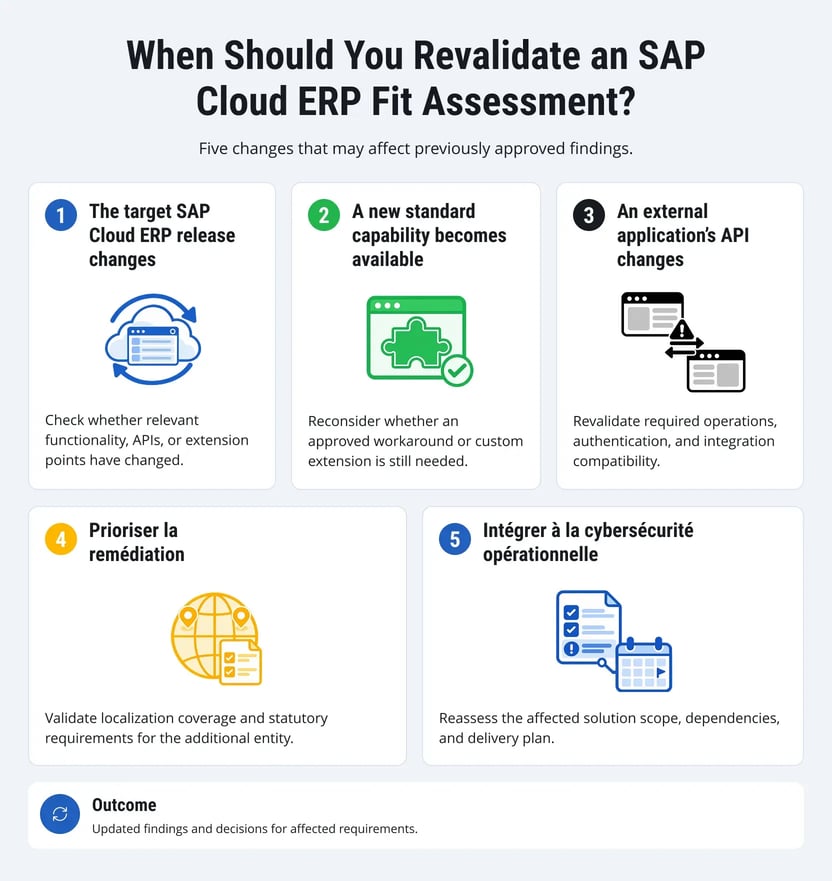
An ERP assessment reflects the business requirements, solution scope, and technical conditions known at the time. Changes before deployment may affect specific findings without requiring a complete reassessment. The following infographic highlights situations in which previously approved conclusions may need to be revisited.
Common SAP Cloud ERP Implementation Risks
Two project management risks deserve particular attention once the deployment model and solution scope have been assessed.
Allowing unresolved business decisions to accumulate
Configuration may progress while important decisions about accounting treatment, approval responsibilities, or exception handling remain unresolved. These issues often surface during integrated testing, when changes become more disruptive. Critical decisions should have assigned owners, deadlines, and documented resolutions before the affected processes are approved for deployment.
Measuring success only by go-live
A successful production launch confirms that the ERP environment is operational, but it does not establish whether the transformation has achieved its business objectives. Organizations should define measurable baselines before implementation and compare them with post-go-live results. Relevant indicators may include financial close duration, invoice exception rates, inventory accuracy, manual reconciliation effort, or purchasing cycle times.
How LeverX Can Help With SAP Cloud ERP
LeverX helps organizations evaluate, implement, and support SAP Cloud ERP solutions. Our work can begin before a deployment model has been selected, with an assessment of business requirements, existing system dependencies, and alternatives that may offer a better fit. Our services cover the principal assessment and delivery activities involved in ERP transformation.
SAP ERP strategy and readiness assessment: Evaluate the existing application landscape, business requirements, and deployment options.
Fit-to-Standard and solution design: Validate functional fit, identify gaps, and establish an agreed solution scope.
SAP Cloud ERP implementation: Configure supported processes, coordinate testing, and prepare the organization for deployment.
Data migration and integration: Transfer business data, reconcile migration results, and connect ERP with external applications.
SAP BTP and Clean Core extensions: Develop supported enhancements and integrations while managing technical dependencies.
Application support and optimization: Support operations, prepare for releases, and improve business processes after go-live.