In this article, you will learn why SAP WM no longer meets modern warehouse requirements, how a six-step EWM migration works, and which risks to address before the project starts.
In this article, you will learn why SAP WM is no longer the strategic warehouse-management option for many SAP S/4HANA customers, how a WM to EWM migration works, which target architectures are available, and which technical and operational risks to address before the project starts.
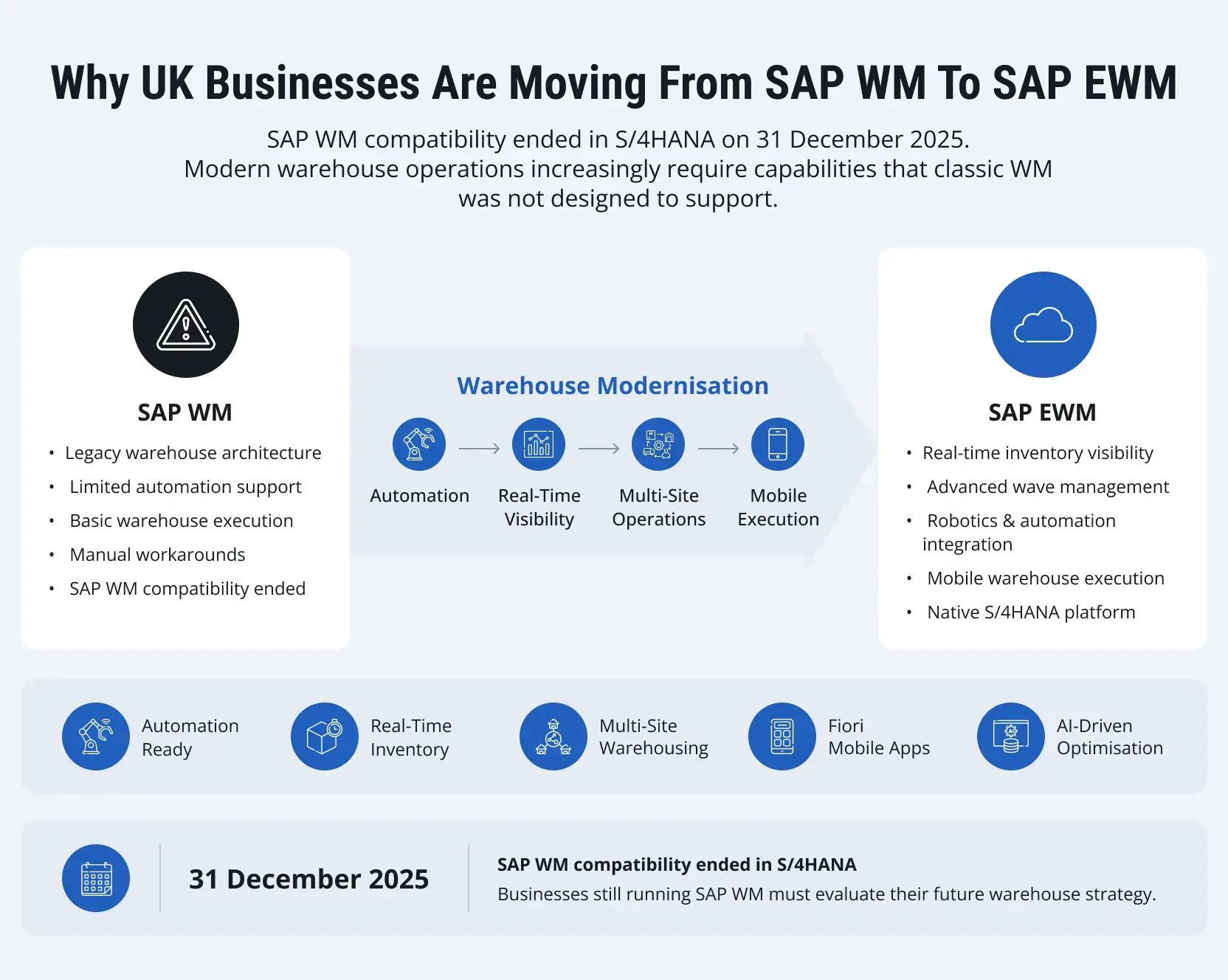
SAP's transition away from classic Warehouse Management (WM) in SAP S/4HANA has now moved into 2026. SAP initially communicated the end of Compatibility Pack usage rights for classic WM at the end of 2025, and subsequently announced a final transition period extending the deadline for affected Compatibility Packs to 31 May 2026. SAP positions Stock Room Management as the continuation path for simpler warehouse scenarios, while SAP EWM is the strategic option for more advanced warehouse execution.
For UK businesses, this makes warehouse strategy a current architecture decision rather than a future planning exercise.
The issue is not simply that an old SAP component is reaching the end of a transition period. It is whether the existing warehouse operating model can support today's order volumes, automation, fulfilment requirements, inventory visibility, and integration landscape.
Many warehouse environments built around SAP WM were designed for a simpler operating model. Today, businesses may be managing regional distribution networks, shorter delivery windows, e-commerce fulfilment, automated material handling, complex inventory structures, and multiple logistics partners. SAP EWM was designed for a broader warehouse-execution model, with capabilities that extend beyond the core functions inherited from classic WM.
This guide explains why SAP WM to EWM migration matters, when EWM is the appropriate target, how the migration typically works, what data can be migrated, what must be redesigned, how the target architecture should be selected, and how UK businesses can reduce operational risk during the transition.
In short: Classic SAP WM's Compatibility Pack usage rights end on 31 May 2026. Simple warehouses can move to Stock Room Management; warehouses with advanced picking, automation, or complex processes should plan a migration to SAP EWM (embedded or decentralised). A typical UK migration takes 4–24+ months and costs £150,000–£3m+ depending on complexity, automation, and number of sites.
Why Are Businesses Moving from SAP WM to EWM?
SAP WM remains familiar to many organisations, but its architecture and functional scope were designed around a different generation of warehouse operations.
For simple warehouses, Stock Room Management can provide a path for continuing core warehouse-management processes within SAP S/4HANA. SAP describes Stock Room Management as a solution for simpler warehouse operations and identifies a number of advanced capabilities that are not part of that scope, making the choice between Stock Room Management and EWM a business and architecture decision rather than an automatic technology upgrade.
For businesses that need more sophisticated warehouse execution, SAP EWM is the more relevant target.
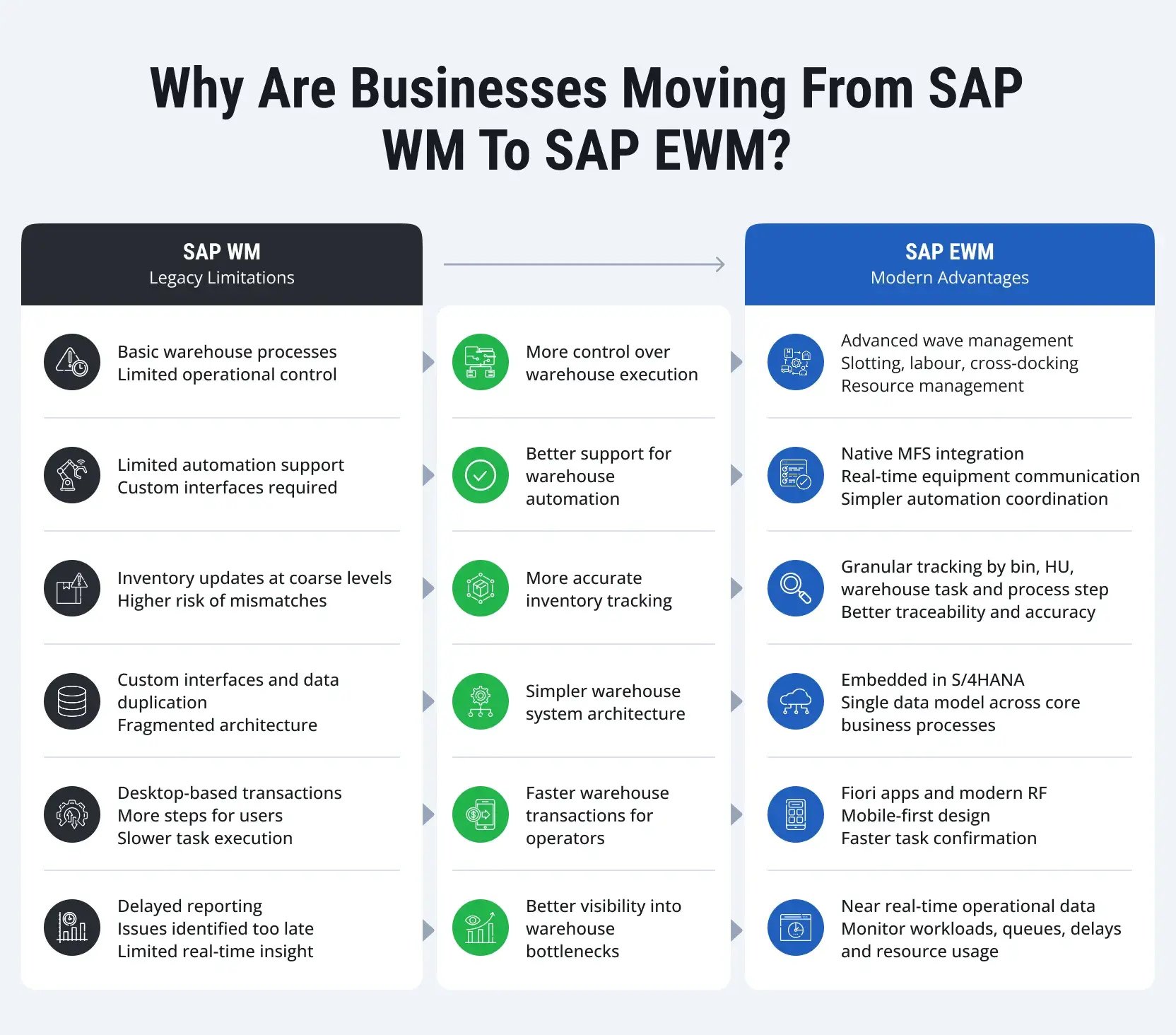
More control over warehouse execution
Classic WM handles standard warehouse processes well. SAP EWM adds more detailed operational control, including wave management, slotting, rearrangement, labour management, cross-docking, and warehouse resource management.
These functions matter when warehouses process large delivery volumes across multiple zones, carriers, or fulfilment channels. For example, wave management allows warehouse teams to group outbound deliveries by route, shipping priority, or loading window before picking begins. This can reduce unnecessary warehouse movement and help avoid staging bottlenecks near dispatch areas.
Better support for warehouse automation
Many warehouse automation projects expose practical limitations in legacy WM environments. Conveyor systems, AS/RS equipment, autonomous mobile robots, and automated guided vehicles may require custom interfaces or external coordination layers.
SAP EWM supports warehouse automation scenarios, including Material Flow System (MFS), which can be used to coordinate warehouse tasks with material-flow and automation environments. The exact architecture depends on the equipment, control system, warehouse process model, and integration requirements, but the important point is that automation should be designed as part of the EWM target architecture rather than added after implementation.
More accurate inventory tracking
Inventory problems rarely start with missing stock. They often start with timing differences between physical warehouse activity and system updates.
A pallet is moved before confirmation. A handling unit is staged in the wrong zone. Picking starts while stock status still shows available. These small mismatches can create larger fulfilment and reconciliation problems.
SAP EWM tracks warehouse activity at a more granular level, including warehouse tasks, storage bins, handling units, and process steps. This can provide better operational traceability across receiving, storage, picking, packing, staging, and shipping.
Simpler or more controlled warehouse architecture
Many ECC warehouse environments rely on custom interfaces, duplicated warehouse master data, and separate reporting structures built over years of system changes.
Embedded EWM in SAP S/4HANA can consolidate warehouse execution more closely with the ERP environment. For some businesses, that can simplify system integration and reduce architectural fragmentation. For others, particularly complex multi-system landscapes, decentralised EWM may provide a better separation of warehouse execution and enterprise-management processes.
More modern RF and operator experience
Warehouse performance often depends on small operational details. How many screens does a picker open during one task? How quickly can a forklift operator confirm a movement? How long does it take to correct an exception on a handheld device?
SAP EWM supports RF-based warehouse execution and provides options for modernising RF screens and workflows. SAP documentation also provides specific enhancement capabilities for RF screens, showing that RF design remains an important part of EWM process configuration. The objective should not simply be to reproduce every existing WM transaction. RF processes should be redesigned around actual operator workflows.
Better visibility into warehouse bottlenecks
Warehouse managers often identify operational problems too late. Reporting data arrives after the shift has ended or after outbound delays have already affected deliveries.
SAP EWM provides warehouse-monitoring capabilities that can be used to analyse warehouse activity, queues, resources, workload, and execution status. The value is greatest when the information is tied to defined operational actions rather than treated simply as another reporting dashboard.
SAP WM vs. SAP EWM: What Is the Difference?
The difference between SAP WM and SAP EWM is not simply the number of features each system provides. SAP WM focuses on core warehouse processes, while SAP EWM provides a broader execution layer for planning, controlling, and optimising warehouse activities.
| Capability | SAP WM | SAP EWM | Example | Business Benefit of EWM |
| Warehouse management | Core warehouse processes | Advanced warehouse execution | Managing inbound, picking, staging, and outbound activities across multiple warehouse zones | Better control over complex warehouse operations |
| Warehouse tasks | Basic transfer orders | Detailed warehouse tasks and task management | Assigning a picker specific warehouse tasks based on priority and location | More efficient task allocation and execution |
| Wave management | Limited | Advanced wave planning | Grouping orders by carrier, delivery window, or shipping priority before picking | Better coordination of picking and dispatch |
| Labour management | Limited | Dedicated labour management capabilities | Monitoring picker workload and allocating resources during peak periods | Improved workforce planning and productivity |
| Slotting | Limited | Advanced slotting capabilities | Moving high-volume SKUs closer to picking and dispatch areas | Reduced travel time and better use of warehouse space |
| Handling units | Supported | Advanced handling unit management | Tracking a pallet from goods receipt through storage, picking, packing, and shipping | Better stock traceability and handling efficiency |
| Warehouse automation | Often requires additional integration or customisation | Supports warehouse automation integration, including MFS | Coordinating conveyor movements or automated storage equipment with warehouse tasks | More direct coordination between SAP and automated equipment |
| RF execution | Classic RF transactions | Modern RF framework and mobile execution options | A forklift operator confirming a putaway task directly from a handheld device | Faster transactions and simpler operator workflows |
| Cross-docking | Limited | Advanced cross-docking scenarios | Moving inbound goods directly to an outbound staging area without long-term storage | Faster throughput and reduced storage requirements |
| Warehouse monitoring | Basic operational visibility | Detailed warehouse monitoring and analytics | Identifying a growing picking queue while the shift is still in progress | Earlier identification and resolution of bottlenecks |
| S/4HANA deployment | Legacy WM compatibility considerations | Embedded or decentralised EWM options | Running EWM embedded in S/4HANA or separately for a high-volume warehouse | Greater architectural flexibility and scalability |
| TOTAL | Core warehouse management | Advanced warehouse execution | From basic stock movements to coordinated, real-time warehouse execution | Greater scalability, visibility, automation readiness, and operational control |
For UK businesses evaluating a migration, the key question is not whether SAP EWM can reproduce existing WM processes. It is whether the warehouse should continue operating around a legacy process model or use the transition to redesign warehouse execution around current operational requirements.
This distinction is particularly important for businesses planning warehouse automation, managing multiple fulfilment sites, or dealing with increasing order volumes and more complex warehouse processes.
Do You Really Need SAP EWM?
Not every SAP WM customer needs to move to Advanced EWM. The end of the classic WM transition period does not mean every organisation must automatically adopt it.
SAP's own positioning distinguishes simpler warehouse scenarios from more advanced warehouse execution. Stock Room Management can be appropriate where core warehouse processes remain relatively straightforward, while EWM is designed for broader and more complex execution requirements. SAP also states that moving from LE-WM to Stock Room Management does not require the same technical migration path as moving from LE-WM to EWM. Embedded EWM can be used within SAP S/4HANA, and decentralised EWM remains an option for specific architectures - SAP's latest documentation should always be checked against the customer's exact release and commercial model.
A practical decision framework is:
| Current Warehouse Environment | Typical Requirement | Potential Target |
|---|---|---|
| Simple manual warehouse | Basic bin-level stock and goods movement | Stock Room Management |
| Growing process complexity | More detailed warehouse execution | Embedded EWM |
| High-volume or complex operation | Advanced planning, resources, task management | EWM |
| Automated warehouse | WCS / MFS / robotics integration | EWM with automation architecture |
| Multiple ERP systems | More independent warehouse execution | Decentralised EWM |
| S/4HANA transformation | ERP and warehouse redesign together | EWM aligned with S/4HANA architecture |
A simple decision tree:
- Do you have a relatively simple warehouse with standard receiving, storage, picking, and shipping processes? → Consider Stock Room Management.
- Do you need advanced warehouse execution — waves, complex task management, resource management, or sophisticated exception handling? → Consider SAP EWM.
- Do you need deep warehouse automation integration? → Evaluate EWM and the automation architecture.
- Do you need warehouse execution to remain more separated from ERP or integrate with multiple enterprise-management systems? → Evaluate decentralised EWM.
The important question is therefore not "Do we have SAP WM?" - it is "What warehouse capabilities and architecture will the business need over the next 5–10 years?" The right target should be based on warehouse complexity, transaction volumes, automation, integration, and long-term business requirements.
What Are the SAP WM Options in 2026?
The end of the classic WM transition period does not mean every organisation must automatically adopt Advanced EWM.
SAP's current warehouse-management positioning distinguishes between several scenarios. Stock Room Management is intended to support simpler warehouse operations, while SAP EWM provides the advanced warehouse-management path. Embedded EWM can be used within SAP S/4HANA, and decentralised EWM remains an option for specific architectures. SAP's latest documentation should always be checked against the customer's exact release and commercial model.
A practical decision framework is:
| Current environment | Typical requirement | Potential target |
| Simple manual warehouse | Basic bin-level stock and goods movement | Stock Room Management |
| Growing operational complexity | More detailed warehouse execution | Embedded EWM |
| High-volume or complex operation | Advanced processes and resource management | EWM |
| Automated warehouse | WCS / MFS / robotics integration | EWM with automation architecture |
| Multiple ERP / complex separation requirements | Independent warehouse execution | Decentralised EWM |
| S/4HANA transformation | ERP and warehouse redesign together | EWM aligned with S/4HANA target architecture |
The right target should be based on warehouse complexity, transaction volumes, automation, integration, and long-term business requirements.
Embedded EWM vs. Decentralised EWM
One of the most important architecture decisions is whether EWM should be embedded in SAP S/4HANA or run as a separate system.
Embedded EWM operates within the SAP S/4HANA environment. SAP documents both embedded and non-embedded EWM integration scenarios, including integration between EWM and production processes. It can be attractive when:
- warehouse and ERP processes are closely integrated;
- the business wants a more consolidated architecture;
- the warehouse does not require the separation of systems;
- the wider S/4HANA strategy favours embedded functionality.
Decentralised EWM separates warehouse execution from the ERP system. It can be considered where the business needs:
- high warehouse availability;
- high warehouse transaction volumes;
- independent warehouse operations;
- connectivity to multiple ERP systems;
- separation between warehouse execution and ERP maintenance;
- complex warehouse automation.
Decentralised architecture adds system and integration complexity, so it should be selected for a clear operational or architectural reason.
| Decision Factor | Embedded EWM | Decentralised EWM |
|---|---|---|
| ERP integration | Very close | Separate system integration |
| Architecture | More consolidated | More distributed |
| Warehouse separation | Lower | Higher |
| Multiple ERP sources | Less natural fit | Stronger use case |
| Technical overhead | Typically lower | Typically higher |
| Warehouse autonomy | More closely tied to ERP | Greater separation |
| Long-term fit | S/4HANA-centric environments | Complex or separated landscapes |
The question should therefore be: which architecture best supports the warehouse operating model and wider SAP landscape, rather than which option is technically available?
Which Businesses Gain the Most from SAP EWM?
Not every warehouse needs SAP EWM. Some operations remain stable for years with relatively simple inbound and outbound flows. The business case for migration usually appears when warehouse processes become more difficult to coordinate, scale, or automate inside SAP WM.
In most projects, the decision is driven by operational complexity rather than warehouse size alone. A mid-sized warehouse with high order variability may require EWM earlier than a larger operation with stable pallet movements and predictable shipping patterns.
The following business scenarios usually create the strongest case for SAP EWM migration in the UK.
Businesses managing high order volumes
Order volume changes warehouse behaviour. Processes that work with 500 orders per day can become difficult to control at 15,000.
This is especially visible in e-commerce, wholesale distribution, spare parts logistics, and consumer goods operations. Warehouse teams must manage more frequent picking waves, shorter dispatch windows, returns processing, and higher inventory movement across storage areas.
SAP EWM provides more detailed warehouse task management for these environments, including wave planning, queue management, labour tracking, and handling unit management.
Companies operating multiple warehouses across the UK
Many businesses now manage regional fulfilment centres designed to shorten delivery times and reduce transport costs.
This creates additional coordination challenges between warehouses, transport planning, inventory allocation, and replenishment processes.
SAP EWM supports more complex warehouse network structures within S/4HANA. Businesses can standardise warehouse processes across locations while still configuring site-specific rules for picking, staging, replenishment, and shipping.
Typical examples include:
- Retail distribution networks with regional fulfilment centres
- Manufacturing businesses operating production and spare-parts warehouses
- Third-party logistics providers managing customer-specific warehouse processes
- Wholesale distributors supplying multiple channels from separate warehouse sites
Businesses planning warehouse automation
Automation projects often become the point where SAP WM reaches its practical limits. Conveyor systems, automated storage systems, sorters, robotics, and warehouse control systems require continuous communication between physical equipment and warehouse execution processes.
In many ECC environments, this integration depends heavily on custom developments and external middleware layers.
SAP EWM was designed with automation scenarios in mind. The platform supports integration with warehouse control systems and automated equipment through standard EWM components, including Material Flow System (MFS).
Businesses running complex warehouse processes
Some warehouses manage more than storage and dispatch. They also support manufacturing supply, kitting, quality inspections, hazardous materials handling, or temperature-controlled inventory.
These operations require more detailed process tracking and exception handling. Standard WM functionality can become heavily customised in these environments over time.
SAP EWM provides more flexibility for modelling complex warehouse activities through process-oriented storage control, layout-oriented storage control, handling unit management, serial number tracking, and integrated quality inspection processes.
Choosing the Right WMS Strategy for UK Businesses
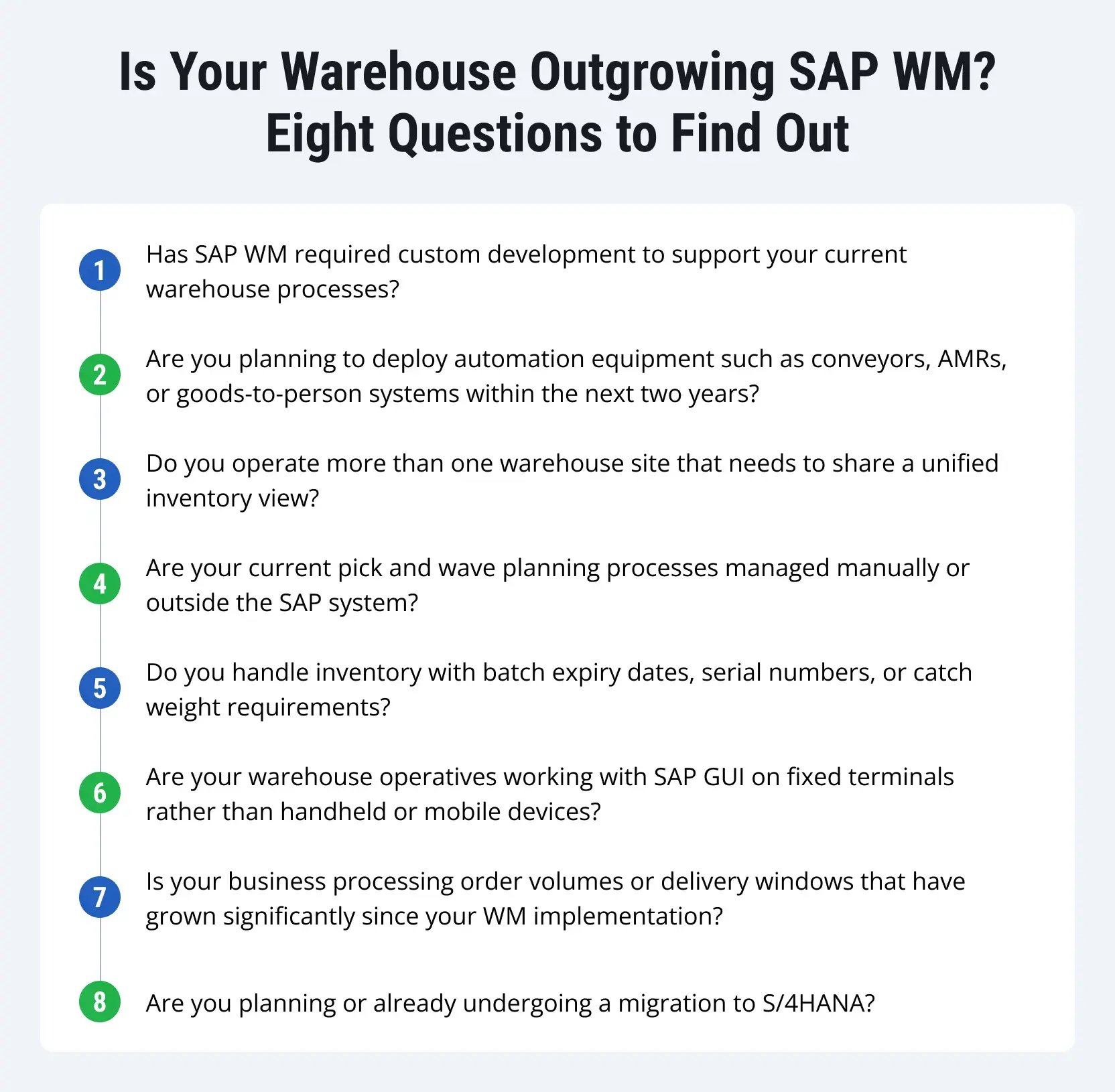
SAP EWM can be a strong foundation for organisations looking to modernise warehouse operations as part of a broader SAP S/4HANA transformation. The right approach, however, depends on the company's warehouse processes, technology landscape, automation roadmap, and long-term business requirements. For organisations already investing in SAP S/4HANA, EWM can provide close integration with core business processes and a scalable platform for increasingly complex warehouse operations.
When evaluating the target warehouse architecture, businesses should consider:
- SAP S/4HANA strategy. Organisations with SAP S/4HANA as their strategic ERP platform can benefit from aligning warehouse execution closely with the broader SAP landscape.
- Warehouse complexity. Advanced picking, wave management, slotting, handling units, labour management, and complex warehouse processes may require a more sophisticated WMS architecture.
- Automation roadmap. Businesses planning conveyors, AS/RS, robotics, or other warehouse automation should assess the integration capabilities of the target WMS.
- Integration requirements. The number and complexity of connections with ERP, TMS, manufacturing, carriers, warehouse control systems, and other platforms should be considered during architecture planning.
- Existing WMS investments. Organisations with established warehouse platforms should evaluate their current capabilities, technical roadmap, and total cost of ownership before deciding on a replacement.
- Scalability and future growth. The selected architecture should support expected changes in warehouse volumes, sites, fulfilment models, and automation requirements.
- Total cost of ownership. Licensing, implementation, integration, infrastructure, customisation, support, and future upgrades should all be considered when evaluating the business case.
Key Questions to Ask Before Selecting a WMS
| Decision area | Key question |
| ERP strategy | How closely should warehouse execution be integrated with SAP S/4HANA? |
| Warehouse operations | Which processes require advanced execution capabilities? |
| Automation | What automation technologies are planned over the next 3–5 years? |
| Integration | Which systems need to exchange data with the WMS? |
| Existing investment | Which current WMS capabilities and integrations should be retained? |
| Scalability | How will warehouse volumes and locations change over time? |
| Total cost of ownership | What are the expected implementation and long-term operating costs? |
For many SAP-centric organisations, SAP EWM provides a natural path from legacy WM to a modern warehouse execution platform. The important step is to assess the current landscape and future requirements first, then select the architecture that provides the best operational and long-term business fit - ensuring the migration is driven by business value and future warehouse requirements rather than simply the need to replace a legacy system.
What Migrates from SAP WM to EWM?
A WM to EWM migration is not a simple technical copy of the existing SAP WM environment.
SAP provides dedicated migration functions for specific LE-WM data and structures. Current SAP documentation identifies migration capabilities covering warehouse product data, storage bins, stock, physical inventory completeness, and certain mapping activities. SAP's migration FAQ also identifies additional objects such as warehouse-layout settings, strategies, queues, and movement types, depending on the scenario and tooling used.
A practical way to think about the migration scope is:
| Area | Typical Treatment |
|---|---|
| Warehouse product data | Migrate / validate |
| Storage bins | Migrate / validate |
| Stock | Migrate / reconcile |
| Physical inventory completeness | Migrate where applicable |
| Packaging / unit-of-measure mappings | Map / validate |
| Warehouse layout settings | Map / recreate as required |
| Strategies | Review and recreate in EWM |
| Queues | Review and recreate as required |
| Movement types | Map and validate |
| Customizing | Not a simple automatic transfer |
| Users and authorisations | Recreate / redesign |
| RF transactions | Redesign / reconfigure |
| Customer-specific developments | Assess and redesign |
| Legacy reports | Assess and replace where appropriate |
The exact migration scope depends on the source and target systems and the SAP-supported migration scenario.
What Does Not Migrate Automatically?
This is one of the most important differences between a migration and a system conversion.
SAP's documented LE-WM to EWM migration scope does not mean that the entire WM environment is copied into EWM. SAP's migration FAQ explicitly identifies areas such as transactional-data migration, system users and authorisation roles/profiles, Customizing, and customer-specific objects and enhancements as out of scope for that migration scenario.
In practice, this means:
Data can be migrated.
Processes must be mapped.
Customising must be established.
Custom developments must be assessed.
RF must be redesigned where required.
Security and roles must be recreated.
This is why a WM to EWM programme should be treated as a process and architecture transformation, not a simple data transfer exercise.
SAP WM to EWM Migration Tools
The toolset depends on the source system, target EWM architecture, SAP release, and migration scenario.
SAP currently documents migration capabilities including:
- warehouse product migration;
- storage-bin migration;
- stock migration;
- physical inventory completeness migration;
- mapping of storage-unit types to packaging materials;
- migration of warehouse layout settings;
- migration through SAP Migration Cockpit for supported objects.
SAP also documents specific migration functions for storage bins and prerequisites such as the RFC connection between systems in the relevant scenario.
Supporting project tooling may include:
- data-quality tools;
- extraction and transformation utilities;
- integration monitoring;
- automated testing;
- reconciliation tools;
- custom staging and validation processes.
The migration toolset should therefore be defined during the assessment rather than assumed before the target architecture is known.
How Warehouse Processes Change from WM to EWM
The most successful migrations do not simply recreate every existing WM process - the process model should be reassessed around the capabilities of EWM.
| Existing WM Approach | EWM Target Approach |
|---|---|
| Transfer-order-driven execution | Warehouse-task and warehouse-order-driven execution |
| Basic picking flows | More granular picking and task control |
| Simple wave logic | Configurable wave management |
| Legacy RF transactions | EWM RF framework and redesigned operator flows |
| Manual workload allocation | Queue/resource-driven execution |
| Custom automation interfaces | Structured EWM automation integration |
| Legacy reports | EWM monitoring and analytics |
| Custom process logic | Standard EWM processes where possible |
For example, a business may discover that an existing custom WM picking process can be replaced by standard EWM task management rather than recreated through custom development. This is one of the strongest opportunities created by the migration - do not migrate a warehouse process simply because it already exists in WM.
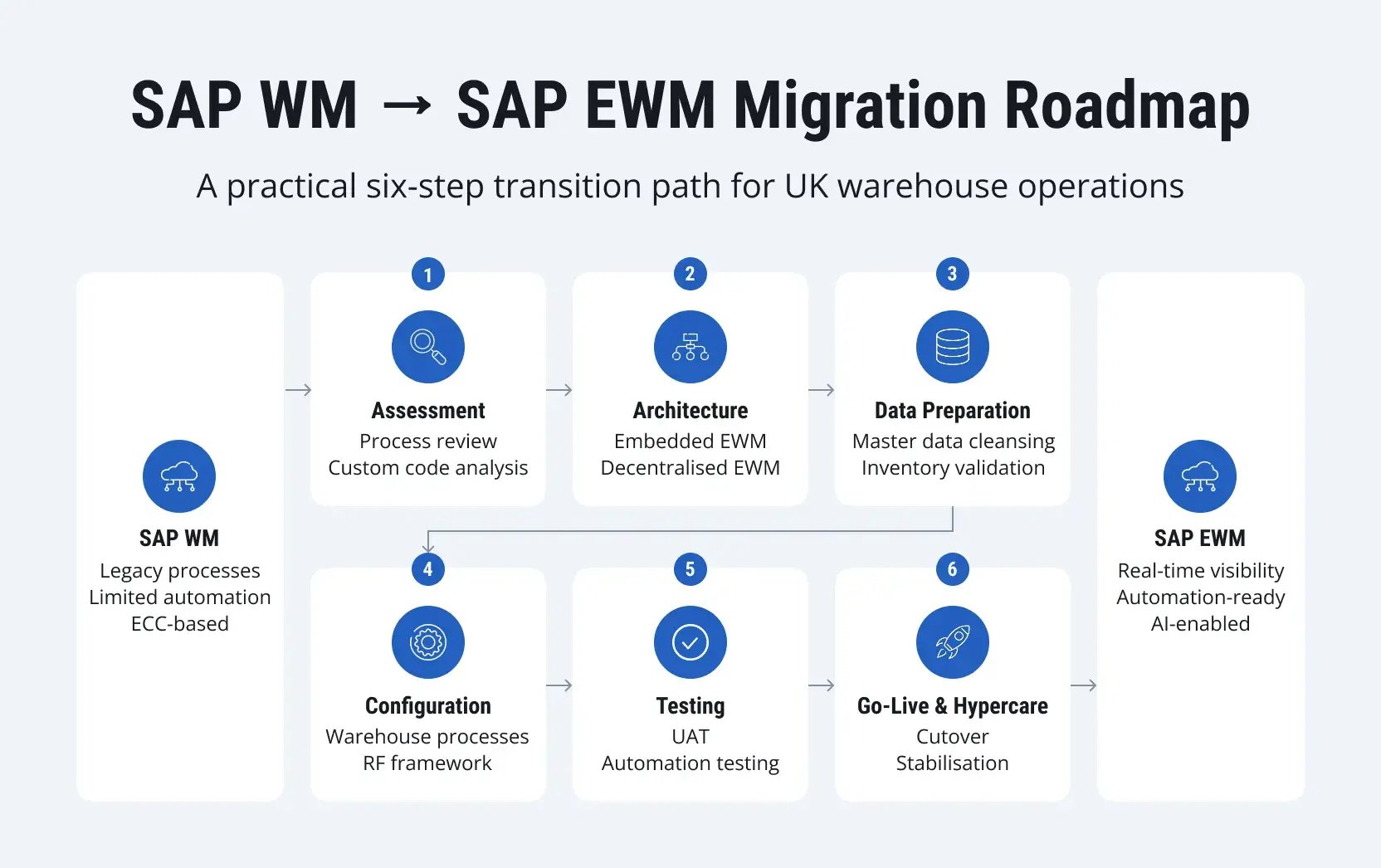
How a SAP WM to EWM Transition Typically Works: A Six-Step Roadmap
A WM to EWM migration is a structured implementation project. Each phase produces outputs that inform the next, so skipping steps can simply move risk into later and more expensive stages.
The roadmap below reflects how these projects are typically structured in practice.
Step 1: Analyse Current Warehouse Processes
Many SAP WM environments contain years of process changes, custom developments, and manual workarounds. The first phase focuses on understanding the current warehouse landscape in detail.
This includes warehouse structure, RF transactions, custom reports, interfaces, storage strategies, printing processes, and integration points with external systems.
Typical assessment activities include:
- Reviewing custom WM developments and user exits
- Analysing inbound, outbound, and internal warehouse flows
- Mapping RF device usage and warehouse operator activities
- Identifying integrations with MES, TMS, WCS, or automation systems
- Reviewing warehouse KPIs, bottlenecks, and exception handling processes
Step 2: Define the EWM Architecture
The architecture decision affects system performance, integration complexity, and long-term support. Most projects choose between embedded EWM inside S/4HANA and decentralised EWM running as a separate system.
Embedded EWM can simplify system architecture and reduce integration overhead between ERP and warehouse management. Decentralised EWM is generally considered for large warehouse operations with high transaction volumes, multiple ERP systems, or a need for greater separation between warehouse operations and ERP maintenance.
Integration architecture normally covers:
- ERP process integration
- Transportation Management (TM)
- Manufacturing integration
- Warehouse Control Systems (WCS)
- Automation equipment
- Carrier and shipping platforms
Many organisations also use SAP Integration Suite and SAP BTP to orchestrate data flows between EWM, automation platforms, carrier systems, analytics tools, and external applications.
Step 3: Prepare and Clean Warehouse Data
Data migration problems often appear late because warehouse master data contains inconsistencies accumulated over several years.
Storage bins may no longer exist physically. Material master records may use outdated storage indicators. Handling unit structures may differ between warehouses. Open transfer orders and stock differences can also complicate migration planning.
Most projects follow a staged preparation cycle:
- Clean incorrect or obsolete warehouse data
- Stabilise operational processes before migration
- Migrate validated master and transactional data into EWM
This phase normally includes warehouse master data validation, stock reconciliation, handling unit consistency checks, and planning for open warehouse documents during cutover.
Step 4: Configure EWM Processes and Limit Custom Development
SAP EWM provides significantly broader standard functionality than classic WM. Many processes that previously required custom ABAP development can now be configured through standard EWM logic.
Instead of recreating every existing WM process, project teams should redesign warehouse execution around standard EWM functionality first.
Core configuration activities include warehouse process types, storage type control, activity areas, wave templates, RF frameworks, labour management rules, and exception handling.
Custom development may still be required, but the objective should be to avoid unnecessary custom logic. SAP standard enhancement frameworks such as BAdIs and enhancement spots are normally preferred where project-specific logic cannot be avoided.
Step 5: Test Warehouse Scenarios with Real Users
Warehouse testing should reflect real operational activity rather than simply validating SAP transactions.
Testing should include peak order volumes, RF device usage, exception handling, packaging processes, and automation coordination.
Typical testing phases include:
- Unit testing
- Integration testing
- Performance testing
- User Acceptance Testing (UAT)
User involvement is particularly important during RF testing. Small usability issues in mobile warehouse processes can significantly affect picking speed and operator error rates after go-live.
Many projects also perform full cutover simulations to validate migration timing, stock reconciliation procedures, and fallback planning.
Step 6: Execute Cutover and Stabilise Operations
The final migration phase is primarily operational. The warehouse must continue shipping orders while inventory, open tasks, and warehouse execution processes move into the new environment.
Most projects establish a temporary freeze window before cutover. The cutover itself normally includes final stock reconciliation, migration of open warehouse documents, interface activation, RF device validation, label printing checks, and operational verification.
Go-live is followed by a hypercare period during which project teams monitor transaction queues, warehouse errors, performance issues, and user support requests under real operating conditions.
SAP WM to EWM Cutover: What Happens on Go-Live Weekend?
Cutover should be designed early in the project rather than treated as a final checklist. A typical high-level sequence is:
T-14 to T-7 Days
- finalise master-data readiness;
- freeze non-critical changes;
- validate integrations;
- confirm warehouse devices;
- confirm cutover responsibilities.
T-1 Day
- complete planned warehouse processing;
- resolve known exceptions;
- prepare final data extraction;
- confirm business sign-off.
Migration Window
- extract final stock and relevant data;
- reconcile source values;
- load target data;
- activate required interfaces;
- validate configuration;
- verify RF and printing.
Go-Live
- test inbound;
- test picking;
- test packing;
- test goods issue;
- validate critical interfaces;
- confirm operational readiness.
Hypercare
- monitor errors;
- reconcile inventory;
- resolve critical issues;
- monitor automation and interface queues;
- review operational KPIs.
Go / No-Go Criteria
Before go-live, the organisation should be able to answer “yes” to questions such as:
- Is stock reconciled?
- Are critical interfaces available?
- Are RF devices operational?
- Are labels and printers validated?
- Are warehouse users trained?
- Are key exception scenarios tested?
- Is the fallback strategy approved?
- Are business owners ready to sign off?
SAP WM to EWM Migration Readiness Checklist
A useful assessment should cover more than SAP configuration.
| Area | Ready When |
|---|---|
| SAP landscape | Source and target architecture defined |
| WM configuration | Relevant processes inventoried |
| Custom code | Major developments identified and assessed |
| Warehouse data | Bins, products, stock and relevant inventory data validated |
| RF | Current RF flows mapped to target processes |
| Integration | ERP, TM, WCS, automation and external interfaces identified |
| Automation | Equipment dependencies documented |
| Testing | End-to-end scenarios approved |
| Cutover | Migration sequence and downtime window defined |
| Users | Roles, authorisations and training planned |
| Business | Go/no-go criteria agreed |
| Support | Hypercare ownership and escalation defined |
A migration estimate based only on the number of warehouses is usually insufficient. Transaction volumes, customisation, integrations, automation, data quality, testing, and operational downtime can have an equally significant impact on the programme.
Should You Rebuild WM Processes 1:1?
A direct technical recreation of WM processes in EWM is often the easiest approach to explain but not necessarily the best long-term architecture.
Three approaches are common:
| Approach | Description | Advantage | Risk |
|---|---|---|---|
| Like-for-like | Reproduce existing warehouse processes | Lower initial business change | Can preserve legacy complexity |
| Selective redesign | Redesign high-value or problematic processes | Balanced transformation | Requires prioritisation |
| Full optimisation | Redesign warehouse execution around EWM capabilities | Greater transformation potential | Higher change effort |
The right model depends on business priorities.
For many projects, selective redesign is a practical middle ground: preserve stable processes where they still work, but redesign processes that currently depend on custom code, manual workarounds, or inefficient warehouse execution.
SAP WM to EWM Migration Costs and Timeline in the UK
The cost and duration of an SAP WM to EWM migration depend heavily on warehouse complexity, the number of sites, integration requirements, data quality, and the chosen EWM deployment model. For UK businesses, the following figures can be used as high-level planning ranges rather than fixed project estimates.
| Project scope | Typical UK project cost* | Indicative timeline | Example |
| Small / low-complexity warehouse | £150,000–£300,000 | 4–6 months | Single site, limited customisation, standard inbound/outbound processes, few integrations |
| Mid-sized warehouse | £300,000–£700,000 | 6–10 months | One or two sites, moderate customisation, RF, carrier and ERP integrations |
| Complex enterprise migration | £700,000–£1.5m+ | 10–18+ months | Multiple warehouses, high transaction volumes, extensive interfaces, complex warehouse processes |
| Large automated warehouse transformation | £1.5m–£3m+ | 12–24+ months | EWM combined with MFS, WCS, conveyors, AS/RS, robotics, or other automation |
*Indicative implementation ranges for planning purposes. Actual costs vary significantly depending on SAP licensing, infrastructure, implementation partner scope, warehouse size, number of users, integrations, automation equipment, data migration requirements, and change management.
What drives SAP EWM migration costs?
The largest cost drivers are usually not the EWM software itself, but the complexity surrounding the warehouse environment.
-
Warehouse complexity. A warehouse with straightforward pallet storage and standard picking requires considerably less design and testing than an operation with wave management, cross-docking, kitting, multiple picking methods, or complex handling-unit processes.
-
Number of sites. A single-site migration is typically simpler than a multi-warehouse rollout. Additional sites increase configuration, testing, training, data migration, and cutover requirements.
-
Legacy customisations. Years of WM enhancements, Z-code, custom RF transactions, reports, and interfaces can significantly increase assessment and redesign effort. Reusing legacy logic without reviewing whether it is still required can also increase the long-term cost of the EWM solution.
-
Automation and external integrations. Integration with WCS, conveyors, sorters, AS/RS, AMRs, AGVs, carrier platforms, and third-party logistics systems can become one of the largest parts of the project scope.
-
Data quality. Inconsistent storage bins, material master data, handling units, and stock records increase cleansing and migration effort and can extend the cutover timeline.
-
Deployment model. Embedded EWM and decentralised EWM have different architecture, infrastructure, and integration requirements. The appropriate model should be selected based on transaction volumes, warehouse requirements, and the wider S/4HANA landscape rather than project cost alone.
How long does SAP WM to EWM migration take?
A realistic project timeline typically includes several phases:
| Phase | Indicative duration | Main activities |
| Discovery and assessment | 4–8 weeks | WM analysis, custom code review, process mapping, architecture assessment |
| Solution design | 4–8 weeks | EWM architecture, process design, integration and migration strategy |
| Configuration and development | 8–20+ weeks | EWM configuration, integrations, RF, forms, reports and required extensions |
| Data migration and testing | 8–16 weeks | Data cleansing, migration cycles, integration testing, performance testing and UAT |
| Cutover preparation | 2–6 weeks | Cutover rehearsals, stock reconciliation, user training and go-live preparation |
| Go-live and hypercare | 4–8 weeks | Production deployment, issue resolution, monitoring and operational stabilisation |
These phases often overlap, so their durations should not simply be added together. A relatively straightforward single-warehouse migration may therefore take around 4–6 months, while a complex enterprise or highly automated environment can require 12–24 months or more.
A practical example
A UK distributor operating one warehouse with moderate transaction volumes, existing RF processes, several SAP integrations, and limited automation might plan for approximately £300,000–£600,000 and 6–9 months.
A multi-site operation with extensive legacy customisation, complex warehouse processes, and automation integration could require £1 million or more and 12–18+ months.
The most reliable way to establish a project budget is to complete a warehouse and SAP landscape assessment before committing to a migration scope.
Real-World Case Study: SAP WM to EWM Migration for a UK Warehouse Operation
A UK-based manufacturing and distribution organisation was operating SAP Warehouse Management (WM) within its existing SAP landscape. As warehouse operations became more complex, the existing solution started creating operational limitations and reducing the organisation’s ability to scale.
The business needed a modern warehouse management platform that could improve operational visibility, support automation initiatives, and align with its SAP S/4HANA transformation roadmap.
The Challenge: Overcoming the Limitations of SAP WM
The organisation faced several challenges:
- Limited real-time visibility into warehouse activities
- Increasing manual intervention across warehouse processes
- Growing inventory management complexity
- Difficulties supporting advanced warehouse automation scenarios
- Higher maintenance effort caused by legacy customisations
- Reduced flexibility for future SAP S/4HANA transformation initiatives
The Migration Approach: Transitioning from SAP WM to SAP EWM
The organisation launched an SAP WM to EWM migration programme focused on modernising warehouse operations while minimising operational disruption.
The migration strategy included:
- Assessment of existing WM processes and custom developments
- Definition of the future SAP EWM warehouse model
- Data migration planning and validation
- Process redesign based on SAP EWM best practices
- Integration testing with surrounding SAP and business systems
- Structured cutover and post-go-live support
Rather than performing a direct technical replacement, the project focused on simplifying warehouse processes and creating a scalable foundation for future growth.
The Solution: SAP EWM Capabilities for Modern Warehouse Operations
| Area | Business Improvement |
| Warehouse execution | More flexible picking, putaway, and stock movement processes |
| Inventory management | Improved stock accuracy and traceability |
| Operational monitoring | Greater visibility into warehouse performance |
| System integration | Stronger connectivity with SAP S/4HANA and external logistics systems |
| Future scalability | Readiness for warehouse automation and digital logistics initiatives |
SAP EWM enabled the organisation to move from a traditional warehouse management model towards a more proactive and data-driven logistics operation.
Business Outcomes
The migration delivered improvements across warehouse performance and operational control:
| Area | Outcome |
| Warehouse efficiency | Reduced manual activities and improved process consistency |
| Inventory accuracy | Better visibility and control over stock movements |
| Operational resilience | More reliable warehouse processes and monitoring |
| Future readiness | Stronger foundation for automation and SAP S/4HANA evolution |
| Long-term maintenance | Reduced dependency on legacy WM customisations |
Key Lessons from the SAP WM to EWM Migration
The project demonstrated several important considerations:
- SAP WM replacement is not only a technical migration. The greatest value comes from redesigning warehouse processes and removing unnecessary complexity.
- Data preparation is critical. Material master data, warehouse structures, storage locations, and inventory records must be reviewed before migration.
- Migration creates an opportunity for optimisation. Successful SAP EWM programmes use the transition to improve warehouse efficiency, prepare for automation, and establish a more sustainable SAP architecture.
What Can Go Wrong During Migration and What Changes After Go-Live?
Every EWM migration carries risk. Most of it is manageable when identified early. The risks that cause the most disruption are often those that were not identified until testing or cutover.
Common Risks During SAP WM to EWM Migration
Many warehouse environments contain custom RF transactions, manual workarounds, modified print logic, or process-specific ABAP developments created several years ago. The original business reasoning may no longer be documented, while the logic still affects daily warehouse execution.
Data inconsistencies can also become more visible during migration. A warehouse may appear operationally stable while containing incorrect storage bin structures, outdated stock assignments, duplicate handling units, or unresolved differences between SAP and physical inventory.
The most common issues include:
- Undocumented WM custom developments and user exits
- Inconsistent warehouse master data and stock discrepancies
- Incorrect handling unit or storage bin structures
- Weak integration testing with automation equipment or external systems
- RF process gaps identified too late during UAT
- Underestimated cutover timing for open warehouse documents and stock reconciliation
SAP WM to EWM Migration Risks That Commonly Surface Late in the Project
| Hidden risk area | How the problem usually appears | Recommended mitigation |
| Legacy WM custom logic | RF transactions or print processes stop working correctly during testing | Perform custom code assessment during discovery and map each development to a business process owner |
| Warehouse master data inconsistencies | Storage bins, handling units, or stock assignments fail validation | Clean warehouse data before cutover planning and validate against physical warehouse data |
| Automation communication delays | Conveyor, AMR, or WCS queues process tasks out of sequence under load | Include performance and queue testing with realistic automation scenarios |
| RF usability gaps | Operators require excessive clicks or manual corrections | Conduct UAT with real warehouse users on production-like RF devices |
| Underestimated cutover scope | Open tasks, deliveries, or stock differences extend the migration window | Execute full cutover simulations including reconciliation and rollback procedures |
| Over-customisation in EWM | The new environment becomes difficult to support | Prioritise standard EWM functionality and supported enhancement frameworks |
What UK Businesses Typically Gain After Moving to EWM
The functional difference between WM and EWM is substantial. Businesses that complete the migration gain access to more advanced warehouse execution capabilities.
Warehouse Process Control and Task Management
EWM gives planners greater control over how warehouse work is structured, sequenced, and distributed. Wave templates can separate order streams by priority, carrier, delivery window, or product type. Task interleaving can combine inbound and outbound movements into a single operative journey, reducing unproductive travel.
Support for Automation and Robotics Integration
EWM's Material Flow System provides an interface layer between warehouse management and automation equipment. This supports the integration of conveyors, sorters, AMRs, and goods-to-person systems with warehouse execution processes.
Inventory Accuracy and Real-Time Stock Visibility
EWM records stock movements at a granular level throughout warehouse processes. Task confirmations update inventory positions as warehouse activity occurs, providing operations managers and supply chain planners with a more current view of stock.
Compliance and Regulated Inventory Management
For businesses operating under UK pharmaceutical, food safety, or aerospace quality requirements, EWM supports scenarios such as batch management, FEFO picking, serial number tracking, and handling unit management with traceability.
Scalability Across Sites and Operational Models
EWM supports multiple warehouse sites within an SAP landscape. Businesses expanding their UK warehouse network can standardise core processes while maintaining site-specific rules for picking, staging, replenishment, and shipping.
AI-Assisted Warehouse Operations
EWM's integration with the S/4HANA environment provides a data foundation for applying AI and machine learning to warehouse operations. AI in SAP EWM can support use cases such as demand-based slotting, workload planning, and operational analysis.
For UK operations managing seasonal peaks or promotional order surges, these capabilities can reduce manual planning effort and support more responsive warehouse execution.
How to Build a Business Case for SAP WM to EWM Migration
The business case should not be based solely on the cost of avoiding an outdated warehouse solution.
It should consider the full value of the target warehouse operating model.
Cost Avoidance
- legacy customisation maintenance;
- ageing interfaces;
- unsupported or transitional functionality;
- duplicated reporting;
- manual warehouse processes.
Operational Value
- faster warehouse execution;
- improved inventory accuracy;
- better resource utilisation;
- fewer warehouse-system disruptions;
- improved automation readiness.
Strategic Value
- alignment with S/4HANA;
- scalable warehouse architecture;
- simplified future upgrades;
- ability to support new fulfilment models.
A useful business case structure is:
Current Cost + Operational Inefficiency + Risk
versus:
Migration Investment + Future Operating Model
The assessment should establish the organisation's own baseline rather than assuming a fixed percentage improvement.
Why Does the Implementation Partner Matter in an SAP EWM Migration?
Choosing an implementation partner matters as much as choosing to migrate. The technical scope is significant, the operational risk is real, and decisions around architecture, data, and process design can affect the warehouse for years.
The right partner should understand SAP EWM, UK warehouse operations, and the S/4HANA logistics roadmap in practice. The engagement should begin with assessment and advisory work before configuration and implementation.
LeverX works with UK businesses to evaluate the Embedded vs. Decentralised EWM approach based on transaction volumes, infrastructure, and operational requirements.
Where automation equipment is involved, LeverX supports integration with EWM's Material Flow System, including interface design and performance testing. Legacy WM customisations are assessed individually, with standard EWM configuration or supported enhancement frameworks preferred wherever possible.
After go-live, LeverX provides structured hypercare covering issue resolution, interface monitoring, and operational support while the warehouse stabilises.
If you want a clear picture of what an EWM migration would involve for your specific operation, book a free consultation with LeverX's SAP EWM specialists. We can assess your current WM environment and outline a realistic path forward.
Conclusion: Planning Your SAP WM to EWM Migration
For UK businesses, moving from SAP WM to EWM is more than a technical system replacement. It is an opportunity to modernise warehouse execution, simplify legacy processes, improve operational visibility, and create a stronger foundation for automation and future SAP S/4HANA transformation.
The most successful migrations start with a clear understanding of the existing warehouse environment. Before configuration begins, organisations should assess their WM customisations, warehouse data, integrations, automation requirements, and target operating model.
The migration roadmap should then combine process redesign, data preparation, integration testing, user validation, and a carefully rehearsed cutover. Establishing realistic cost and timeline expectations early can also help minimise disruption and improve project planning.
For organisations already running SAP S/4HANA, SAP EWM can provide the advanced warehouse execution capabilities needed to support increasingly complex and automated operations. The right architecture, however, should always be determined by the organisation's specific operational requirements and long-term strategy.
Frequently Asked Questions About SAP WM to EWM Migration
Is SAP WM still supported after 2025?
Classic SAP WM in SAP S/4HANA was available under Compatibility Pack usage rights, with most affected Compatibility Packs originally scheduled to expire on 31 December 2025. SAP subsequently announced a final transition period extending the expiration date for those Compatibility Packs to 31 May 2026.
For organisations still running affected WM functionality, 2026 is therefore an important decision point. Stock Room Management can support simpler warehouse operations, while SAP EWM is the more appropriate target where advanced warehouse execution, automation, or complex processes are required.
How long does an SAP WM to EWM migration take?
A straightforward single-warehouse migration may take around 4–6 months. Mid-sized projects commonly require 6–10 months, while complex multi-site or highly automated environments can take 12–24 months or more.
The actual timeline depends on warehouse complexity, integrations, data quality, customisation, testing requirements, automation, and the selected EWM architecture.
How much does SAP WM to EWM migration cost in the UK?
As a high-level planning range, a smaller migration may cost approximately £150,000–£300,000, while mid-sized implementations can range from £300,000–£700,000. Complex enterprise projects may require £700,000–£1.5 million or more, with highly automated warehouse transformations potentially exceeding £1.5 million.
These figures are indicative planning ranges only. Actual costs depend on the warehouse footprint, SAP landscape, integrations, automation, custom development, migration scope, internal resources, and partner responsibilities.
Should we choose embedded or decentralised SAP EWM?
The choice depends on transaction volumes, warehouse complexity, the SAP landscape, integration requirements, availability requirements, and the organisation's long-term operating model.
Embedded EWM can be appropriate when close integration with SAP S/4HANA and a more consolidated architecture are priorities. Decentralised EWM can be considered for high-volume or complex warehouse environments that require greater separation from the ERP system or need to connect warehouse operations with multiple enterprise systems.
SAP supports both embedded and non-embedded EWM integration scenarios, including integration with production and inventory processes.
Can SAP EWM integrate with warehouse automation?
Yes. SAP EWM can form part of a warehouse automation architecture and integrate with warehouse-control and material-flow environments. Depending on the design, this can involve Material Flow System (MFS), WCS, conveyors, automated storage and retrieval systems, and other automation technologies.
The exact architecture depends on the equipment, control layer, warehouse processes, and integration requirements.
What happens to existing SAP WM customisations?
Existing customisations should be assessed individually rather than automatically migrated.
Some requirements may now be covered by standard EWM functionality. Others may require remediation, supported enhancement approaches, or redesigned integrations.
This assessment is important because recreating unnecessary legacy logic can increase both implementation effort and long-term maintenance costs.
A useful approach is:
Retain → Remediate → Replace → Remove
Is SAP EWM suitable for multiple UK warehouses?
Yes. SAP EWM can support complex warehouse networks, with the specific architecture depending on the number of sites, transaction volumes, business processes, ERP landscape, and integration requirements.
For multi-site programmes, organisations should also decide which processes should be standardised across warehouses and where site-specific configuration is genuinely required.
Do we need to migrate all warehouse data from SAP WM to EWM?
Not necessarily. The migration strategy should distinguish between data that is required for ongoing operations and historical information that can remain in the existing system or be handled through an appropriate archival strategy.
Master data, stock balances, handling units, and relevant open warehouse documents typically require careful preparation and reconciliation before cutover.
Can SAP EWM support RF devices?
Yes. SAP EWM supports RF-based warehouse execution for processes such as putaway, picking, replenishment, inventory movements, and other warehouse activities.
RF should be treated as part of the business-process design rather than simply a technical interface. User Acceptance Testing should involve actual warehouse operators and production-like devices.
What are the biggest risks in an SAP WM to EWM migration?
Common risks include:
- undocumented WM customisations;
- poor warehouse master-data quality;
- stock discrepancies;
- integration failures;
- insufficient RF testing;
- automation and performance issues;
- underestimated cutover requirements;
- reproducing unnecessary legacy processes in EWM.
Early discovery, data cleansing, end-to-end testing, realistic automation scenarios, and multiple cutover rehearsals can significantly reduce these risks.
What is the biggest mistake in a WM to EWM migration?
Treating the project as a technical replacement rather than a warehouse-transformation programme.
Migrating data while preserving every inefficient process and customisation can reproduce the problems the migration was supposed to solve.
Do we need to migrate all historical warehouse data?
No. The migration strategy should distinguish between data needed for ongoing operations and historical information that can remain in legacy systems or be handled through an appropriate archival strategy.
What should be tested before SAP EWM go-live?
At minimum, organisations should test inbound, outbound, internal movements, inventory, RF, handling units, integrations, exceptions, performance, automation where applicable, and cutover procedures.
How do I know whether my warehouse is ready for EWM migration?
The organisation should have clear ownership and readiness across SAP architecture, WM processes, custom code, data, RF, integrations, automation, testing, cutover, training, and support.
A readiness checklist should be completed before the project scope and budget are finalised.
Can SAP EWM support multiple UK warehouses?
Yes. EWM can support complex warehouse networks, with the appropriate architecture depending on the number of sites, business processes, transaction volumes, ERP landscape, and integrations.
Why should I use a SAP EWM implementation partner?
A specialist partner can help combine EWM configuration with warehouse-process design, data migration, integration, RF, automation, testing, cutover, and post-go-live support.
The strongest partners can also identify where standard EWM should replace legacy customisation rather than simply reproducing it.
Disclaimer: The timelines, costs, SAP product capabilities, support dates, and implementation approaches described in this article are indicative and may vary depending on the SAP landscape, warehouse complexity, number of sites, integrations, automation requirements, data quality, and project scope. SAP product roadmaps, support policies, and capabilities may change. Organisations should verify the latest SAP documentation and conduct a detailed assessment of their specific environment before planning an SAP WM to EWM migration.