A practical guide to integrating SAP EWM with non-SAP systems, covering APIs, middleware, automation, WMS, TMS, and integration best practices.
Modern warehouses rarely operate as standalone SAP environments. Large logistics organisations increasingly combine SAP Extended Warehouse Management (SAP EWM) with warehouse control systems, robotics, automation platforms, transportation systems, customer portals, e-commerce platforms, legacy applications, and third-party logistics systems.
As a result, the success of an SAP EWM implementation often depends as much on the integration architecture as on the warehouse management system itself.
A typical enterprise environment connects SAP S/4HANA with EWM, which coordinates warehouse operations and exchanges data with warehouse execution or control systems. At the same time, the warehouse may need to communicate with transportation management systems (TMS), carriers, customers, third-party logistics providers (3PLs), and external applications.
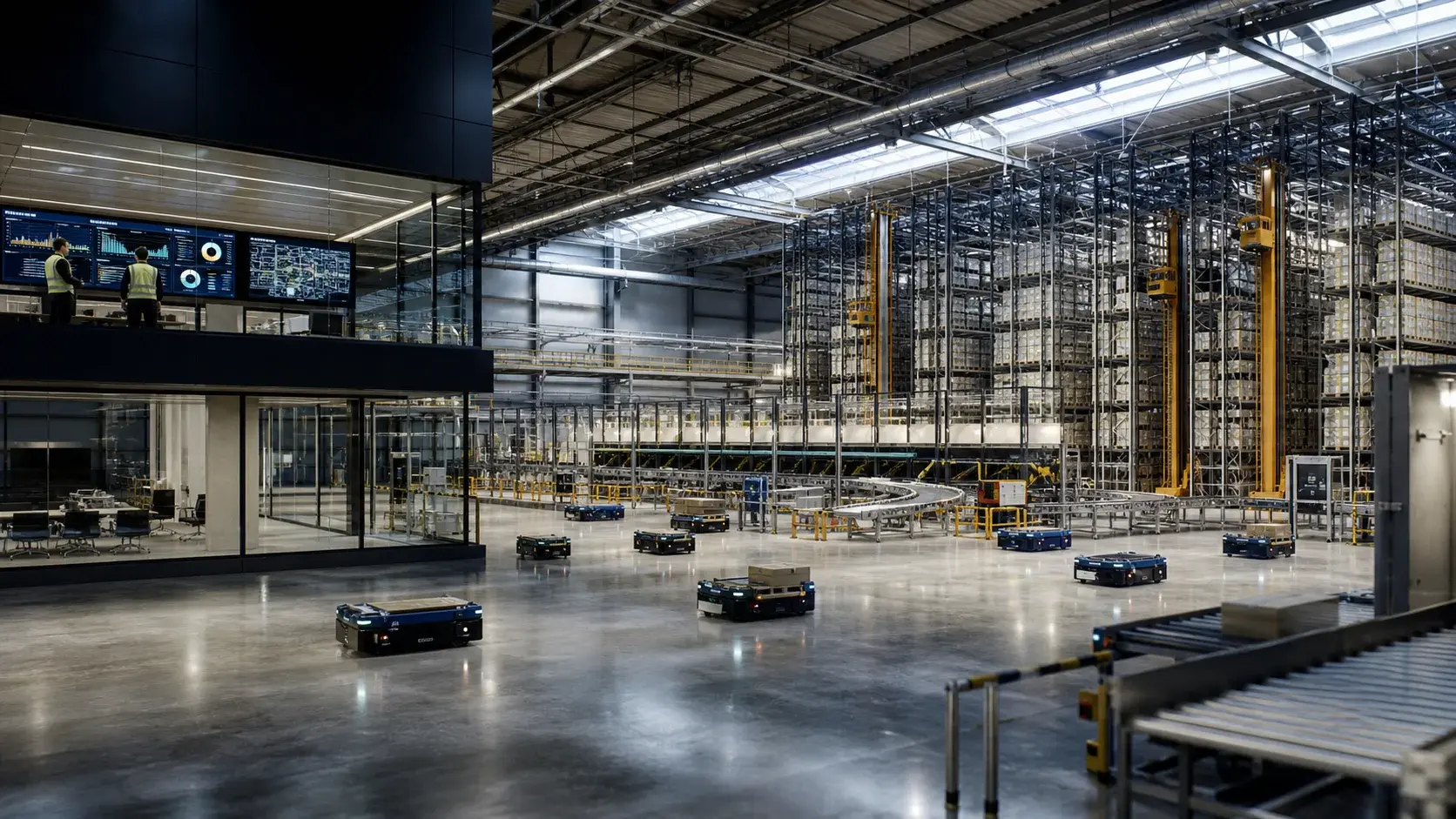
SAP supports several integration mechanisms, including APIs, IDocs, RFC-based communication, EWM-specific interfaces, and SAP Integration Suite. The most suitable approach depends on the business process, the expected transaction volume, latency requirements, system ownership, and operational risks.
The challenge for a large logistics organisation is therefore not simply whether SAP EWM can integrate with its existing systems. It is how to connect the current and future technology landscape without creating unnecessary point-to-point interfaces, operational bottlenecks, or long-term technical debt.
This guide explains the main SAP EWM integration approaches, the role of APIs, IDocs, RFC-based communication and SAP Integration Suite, and the architectural decisions involved in connecting EWM with warehouse automation, WES/WCS, TMS, carriers, customer platforms, and legacy applications.
For a broader introduction to the warehouse management platform itself, see our guide to What Is SAP EWM?.
SAP EWM Integration at a Glance
The integration approach depends on the systems involved and the purpose of the connection. SAP ERP and S/4HANA processes may use standard integration mechanisms, APIs, IDocs, or RFC. Modern cloud applications often rely on APIs and integration platforms, while established legacy environments may still require EDI, SFTP, IDocs, or other supported interfaces.
Warehouse automation introduces additional requirements. Depending on the architecture, SAP EWM may connect with programmable logic controllers (PLCs) through its Material Flow System (MFS), communicate with a warehouse control unit (WCU), or exchange information with a separate warehouse execution system (WES) or warehouse control system (WCS). TMS, carriers, 3PLs, customer applications, and analytics platforms introduce their own data and connectivity requirements.
The following table summarises common integration scenarios.
|
Integration area |
Typical technologies |
|
SAP ERP / S/4HANA |
Standard integration, APIs, IDocs, RFC |
|
Modern cloud applications |
APIs, SAP Integration Suite |
|
Legacy systems |
IDocs, RFC, EDI, SFTP |
|
Multiple SAP and non-SAP systems |
SAP Integration Suite / middleware |
|
Warehouse automation |
EWM MFS, EWM-WCU, WES/WCS depending on architecture |
|
TMS and carriers |
APIs, IDocs, integration platform, EDI |
|
3PL and customer systems |
APIs, EDI, middleware |
|
Event notifications |
Event-driven integration |
|
Analytics and data platforms |
APIs, events, integration platform |
A scalable architecture rarely relies on one technology for everything. Instead, it combines suitable integration patterns according to business criticality, latency, transaction volume, resilience, and the expected lifecycle of each connected system.
SAP EWM Integration Architecture: Key Systems and Data Flows
SAP EWM exchanges operational and business information with the applications involved in warehouse and supply chain processes. Depending on the operating model, these may include SAP S/4HANA, non-SAP ERP systems, SAP Transportation Management, third-party TMS and WMS platforms, e-commerce and order management systems (OMS), warehouse automation, robotics platforms, carrier systems, customer portals, 3PL applications, and analytics platforms.
The information exchanged is not limited to warehouse orders. Integration may cover material and product data, business partners, inbound deliveries, outbound delivery orders, warehouse tasks, inventory balances, handling units, picking confirmations, goods movements, shipment status, and warehouse exceptions.
These flows often connect several business processes. An outbound customer order, for example, may originate in an OMS, pass to EWM for fulfilment, trigger warehouse tasks and automation commands, and then generate shipment information for the TMS, carrier, and customer-facing tracking platform.
The appropriate interface model depends on which system owns the data, how quickly information must be exchanged, how many transactions are expected, and what happens if a connected system becomes unavailable. These questions should be addressed before individual interfaces are designed.
Why Non-SAP Integration Matters
An SAP EWM implementation can be technically successful and still fail to deliver the expected business value if surrounding systems remain disconnected.
Consider a highly automated distribution centre. SAP S/4HANA connects to EWM, which exchanges commands with a WCS that coordinates conveyors, automated storage and retrieval systems (AS/RS), or robots. The same warehouse may depend on an OMS for order information, a TMS for transportation planning, carriers for shipment updates, and a customer portal for delivery visibility.
If these connections are unreliable, the consequences are operational rather than merely technical. Orders may be delayed, inventory records can diverge, warehouse tasks may fail, and teams may have to reconcile information manually. Shipment visibility may also become inaccurate, affecting customer service and fulfilment performance.
The challenge grows when a logistics organisation expands through acquisition or operates warehouses in multiple countries. One facility may use SAP EWM, another a specialist WMS, and a third a legacy ERP platform. The group may also have several carrier connections and different automation technologies.
In such environments, integration architecture becomes a strategic part of the enterprise landscape because it determines how easily systems, customers, and facilities can be added without rebuilding existing connections.
The Most Important Design Principle: Define Responsibilities First
One of the most common integration mistakes is choosing an interface technology before establishing which system owns each business process.
For each major object or process, organisations should establish:
- Who creates it?
- Who owns it?
- Who updates it?
- Who consumes it?
- Who confirms completion?
For example:
|
Business object / process |
Typical owner |
|
Enterprise material master |
ERP / master-data platform |
|
Warehouse inventory |
SAP EWM or defined inventory owner |
|
Warehouse task |
SAP EWM |
|
Material-flow optimisation |
WES/WCS or EWM MFS, depending on architecture |
|
Equipment control |
WCS / PLC / automation layer |
|
Transportation execution |
TMS |
|
Customer shipment visibility |
Agreed visibility platform |
|
Financial posting |
ERP |
The exact model varies by organisation. What matters is avoiding competing systems of record.
If EWM and a legacy WMS both believe they own inventory, for example, no integration technology can resolve the underlying business problem. Both systems may process transactions successfully while producing different stock balances.
Integration is an architecture problem before it is a technology problem. Clear data ownership and process boundaries provide the foundation for reliable interfaces, reconciliation, monitoring, and future change.
SAP EWM Integration Architecture
There is no single integration architecture that fits every warehouse.
A relatively simple SAP-centric environment may connect SAP S/4HANA directly with EWM and the warehouse operations it manages. A more complex distribution centre may add a WES, WCS, or MFS layer for material-flow control, with separate connections to SAP TM, e-commerce applications, carriers, 3PL platforms, customers, and analytics systems.
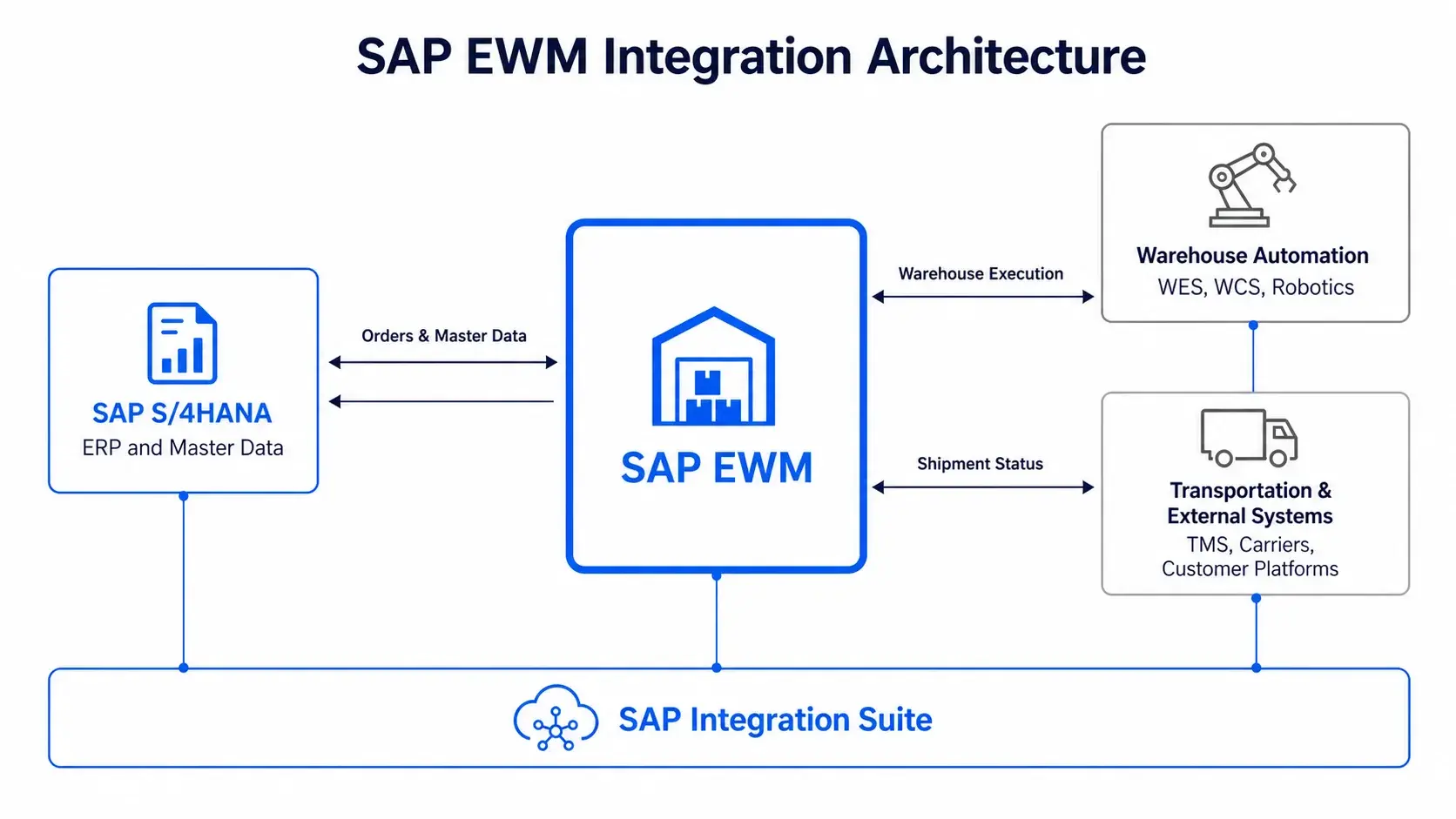
For hybrid environments, an integration platform such as SAP Integration Suite can provide a governed layer between SAP and non-SAP applications. Depending on the design, it can help route messages, transform data, manage APIs, support security, centralise monitoring, and reduce unnecessary dependencies between applications.
These capabilities are particularly useful when multiple systems share integration patterns or when the landscape combines cloud and on-premises applications. However, middleware introduces its own configuration, monitoring, operational dependencies, and potential latency.
For some high-throughput warehouse automation scenarios, a direct or native EWM integration approach may be more appropriate. The target architecture should use middleware where it solves a genuine business or technical problem, rather than treating it as a mandatory component of every interface.
Not Every EWM Integration Needs Middleware
Middleware can be valuable when an organisation needs to connect many systems, transform information between different formats, decouple applications, centralise monitoring, manage APIs, or apply consistent security and governance across a hybrid landscape.
However, inserting middleware between every system can create additional complexity and operational dependencies. The right decision depends on the purpose of the integration, the supported interfaces, and the performance and resilience requirements of the business process.
For example, LeverX provides SAP EWM MFS Integration for warehouse automation scenarios where direct communication between SAP EWM and connected equipment is appropriate.
The important question is not whether middleware should always be used. It is where middleware creates architectural value and where it simply adds another layer.
SAP EWM Integration with Non-SAP Systems: Main Approaches
The main integration mechanisms include APIs and web services, IDocs, RFC-based communication, SAP Integration Suite, event-driven integration, EDI and file-based exchange, EWM-WCU interfaces, and EWM Material Flow System.
Each serves a different purpose. The choice should reflect the business process, required latency, transaction volume, reliability, ownership, security, and lifecycle rather than technology preference alone.
APIs and Web Services
APIs are increasingly important for integrating EWM-related processes with modern applications.
They can be appropriate for:
- customer-facing applications;
- e-commerce;
- portals;
- external logistics platforms;
- cloud services;
- mobile applications;
- selected real-time business processes.
SAP provides APIs for EWM-related processes and distinguishes between released interfaces and more technical interfaces with different lifecycle and compatibility considerations.
APIs and Web Services
APIs are increasingly important when EWM needs to exchange information with modern applications such as e-commerce platforms, customer portals, mobile applications, cloud services, and external logistics systems. They can also support selected business processes that require prompt data exchange.
When designing API integrations, organisations should prefer released interfaces where they are available and suitable for the use case. They should also define ownership, authentication and authorisation, versioning, monitoring, error handling, rate management, and the business meaning of each exchanged data element.
An interface may work technically today but create problems during an upgrade if it relies heavily on internal application structures or undocumented behaviour. The lifecycle and compatibility of an API therefore matter alongside its immediate functionality.
IDocs
IDocs remain relevant in many SAP integration scenarios, particularly for asynchronous business messaging and established transaction flows. They can be appropriate for high-volume exchanges, legacy environments, and supported EWM-related integration scenarios, including certain communications involving warehouse-control units.
The important question is not whether IDocs are old or new. It is whether the interface is supported, reliable, observable, and appropriate for the target architecture. Existing IDoc integrations should be assessed against those requirements before being retained, redesigned, or replaced.
RFC-Based Communication
SAP EWM also supports RFC-based communication for specific integration scenarios. For example, the EWM-WCU interface uses transactional RFC (tRFC), which buffers data before transmission and decouples application processing from communication.
This can be relevant when dependable transactional exchange is required between EWM and warehouse-control systems. In newer cloud-oriented architectures, organisations should also assess whether APIs, events, or an integration platform provide a more suitable long-term approach.
The decision should be based on the supported interface and actual business requirements rather than a general preference for one technology.
SAP Integration Suite
For complex hybrid environments, SAP Integration Suite can provide a common integration layer across SAP and non-SAP applications. Depending on the design, it can support routing, message transformation, connectivity, security, API management, monitoring, error handling, and integration governance.
Instead of maintaining separate bespoke connections between EWM and every carrier or customer, an organisation may use reusable integration flows and common patterns. This does not eliminate integration complexity, but it can make the landscape easier to govern and extend.
LeverX supports SAP integration initiatives across SAP and non-SAP environments. For organisations also reviewing their legacy middleware roadmap, our guide to SAP PI/PO End of Support 2027: What UK Businesses Need to Do explains how the transition to SAP Integration Suite can form part of a broader integration modernisation strategy.
Event-Driven Integration
Event-driven architecture can be valuable when an operational event needs to trigger another process promptly. A shipment confirmation, for example, might trigger a TMS update, a customer notification, and an analytics update without waiting for a scheduled batch exchange.
For this approach to work reliably, the architecture needs clearly defined events and ownership, as well as rules for retries, ordering, idempotency, monitoring, and failure handling. Not every EWM integration benefits from event-driven processing; it should be used when timely event propagation genuinely improves the business process.
EDI and File-Based Integration
Some suppliers, carriers, customers, and legacy applications still rely on EDI, XML, CSV, SFTP, or scheduled file exchange. These mechanisms may remain practical where external partners cannot support APIs or where the data exchange is relatively infrequent.
Such integrations still need appropriate security, monitoring, documentation, reconciliation, and error handling. Organisations should also understand the effort required to change the format or replace the connection if the external application or business process evolves.
SAP EWM Integration with Warehouse Automation
Warehouse automation is one of the most technically demanding SAP EWM integration scenarios. Modern facilities may use conveyors, sorters, automated storage and retrieval systems, automated mobile robots (AMRs), automated guided vehicles (AGVs), robotic picking, automated packing, scanners, and dimensioning equipment.
The key architectural question is not simply how to connect EWM to the equipment. It is which system should make warehouse-management decisions and which system should execute the physical movement.
SAP EWM manages warehouse tasks and operational processes, while connected systems may handle material-flow optimisation, equipment control, or robotics execution. A typical architecture may connect SAP S/4HANA to EWM, then link EWM to MFS, WES, or WCS before commands reach automation. The exact arrangement depends on the warehouse's performance requirements, equipment landscape, and division of control responsibilities.
SAP EWM MFS vs WES/WCS
SAP EWM Material Flow System (MFS) can provide direct integration between EWM and warehouse automation in supported scenarios. This can reduce the need for a separate middleware or warehouse-control layer for the material-flow use cases that MFS supports.
A WES or WCS may still be appropriate where the warehouse needs additional capabilities, such as coordinating multiple automation systems, optimising physical flows across different technologies, managing robotics fleets, or applying equipment-level control.
Organisations should not introduce a separate execution layer simply because it appears in common architecture diagrams. Equally, they should not force all material-flow logic into EWM where an additional layer is operationally justified.
LeverX supports SAP EWM MFS integration for automated warehouse environments involving PLC-controlled equipment, conveyors, sorters, shuttles, and automated storage systems.
The following comparison provides a practical way to frame the architectural decision.
|
Capability |
EWM MFS |
WES/WCS |
|
Warehouse task management |
Works with EWM warehouse tasks |
Usually relies on EWM or another WMS |
|
Direct automation integration |
Strong fit in supported scenarios |
Strong fit |
|
Material-flow control |
Supported within the MFS scope |
Depends on the WES/WCS design |
|
Equipment-level control |
Communicates through supported interfaces |
Often a primary responsibility |
|
Multi-system orchestration |
Depends on the architecture |
Often a key use case |
|
Robotics fleet management |
Scenario-dependent |
Often supported by specialised platforms |
|
Separate control layer |
Not necessarily required for supported MFS scenarios |
Normally part of the architecture |
|
Typical use case |
SAP-centric automated warehouses |
Heterogeneous or extensively orchestrated automation |
This comparison is architectural rather than absolute. The appropriate design depends on the capabilities of the chosen products, the automation equipment, performance requirements, and the operational responsibilities assigned to each system.
SAP EWM Integration with External WMS
Large logistics organisations may operate several warehouse platforms, particularly following acquisitions or regional expansion. SAP EWM may need to exchange information with a legacy WMS, a specialist warehouse application, a customer-owned platform, or regional systems that cannot be replaced immediately.
Before designing these interfaces, the organisation should agree which system owns inventory, which system creates and confirms warehouse tasks, where master data originates, how exceptions are handled, and which platform provides customer-facing visibility.
A common failure scenario occurs when two systems act as the source of truth for the same operational object. EWM may report 500 available units while a legacy WMS reports 470. The discrepancy may originate from unclear ownership or inconsistent transaction processing rather than a failed interface.
A robust integration design establishes ownership and reconciliation procedures before implementation. It also defines how the organisation will investigate and resolve mismatches when they occur.
SAP EWM Integration with TMS and Carriers
Warehouse execution is tightly connected to transportation. An outbound order may progress from delivery creation and warehouse planning through picking, packing, staging, and loading before being handed over to transportation execution. The TMS then coordinates the shipment, carrier, and delivery milestones, while customers may require tracking and proof-of-delivery information.
When EWM integrates with SAP Transportation Management, warehouse readiness can be connected with transport planning and execution. External carrier integrations may also need to exchange shipment instructions, bookings, labels, status updates, tracking information, proof of delivery, and exception notifications.
The integration should therefore be designed around the complete warehouse-to-transport journey, rather than as an isolated EWM-to-TMS interface. This helps teams understand which system owns each milestone and how information should be reconciled if warehouse execution or transportation deviates from plan.
SAP EWM Integration with 3PL and Customer Systems
Third-party logistics providers often need to exchange warehouse information with several customers, each of whom may have a different ERP, OMS, e-commerce platform, inventory system, carrier network, and billing application.
If every new customer requires a bespoke integration, onboarding becomes expensive and difficult to scale. A more sustainable design uses standardised business messages and reusable integration patterns, while handling customer-specific transformations at the integration layer where appropriate.
This does not mean all customer requirements can be made identical. It means that common processes, message structures, error handling, and monitoring can be standardised wherever practical, reducing the amount of custom work needed for each new customer.
For a large 3PL, the ability to onboard customers consistently can become a commercial advantage as well as a technical one.
SAP EWM Integration with E-Commerce and OMS
E-commerce environments introduce high-volume, time-sensitive integration requirements. The OMS sends orders, priorities, and delivery requirements to EWM, while EWM returns inventory information, fulfilment status, and shipment confirmation. Customer-facing applications may then use that information to display tracking updates and communicate exceptions.
The integration must also account for cancellations, partial fulfilment, backorders, stock discrepancies, returns, and failed deliveries. In high-volume environments, asynchronous processing, retry mechanisms, and idempotency can help prevent duplicate transactions and maintain consistency when a message is delayed or delivered more than once.
The architecture should define which system is authoritative for each state change and how downstream systems are updated when an order or shipment changes after the initial message has been processed.
SAP EWM Integration Best Practices
Technology selection is only one part of successful EWM integration. The quality of the result also depends on business-process design, data ownership, error recovery, monitoring, security, and the ability to adapt the architecture as warehouse operations change.
Design the End-to-End Process First
Start by mapping the business process rather than choosing an interface. For an outbound order, this means understanding how the order moves through the warehouse, when transportation planning begins, how carrier information is exchanged, and how the customer receives delivery updates. Only then should the team decide which systems communicate and which integration patterns are required.
Define System Ownership
Every important master-data object and transaction should have a defined owner. Multiple systems may consume or update information, but they should do so under explicit rules. Without clear ownership, inventory balances, shipment status, and task confirmations can diverge even when messages are delivered successfully.
Prefer Standard and Supported Interfaces
Use released APIs and other supported interfaces when they fit the business scenario. Avoid unnecessary dependencies on internal application structures or undocumented behaviour, which can make upgrades and long-term maintenance more difficult. Interface lifecycle and compatibility should form part of the design decision.
Avoid Point-to-Point Sprawl
As the number of warehouses, carriers, customers, and applications grows, individual connections can become difficult to maintain. An integration platform can help standardise routing, transformation, monitoring, security, and reusable message patterns.
However, middleware should be introduced selectively: native EWM capabilities or direct interfaces may remain more suitable for particular automation scenarios.
Design for Errors and Duplicate Messages
Warehouse integrations must handle short picks, unavailable stock, equipment failures, cancelled orders, transport delays, communication outages, and duplicate messages.
For each critical interface, define what happens when a transaction fails, whether it should be retried, how duplicate messages are detected, who owns reconciliation, and when the issue should be escalated. Idempotency is particularly important for asynchronous processing because the receiving system may encounter the same message more than once. It should recognise duplicates where necessary and avoid generating duplicate business transactions.
Monitor Business Outcomes, Not Just Message Delivery
Technical monitoring may show that a message was transmitted successfully, but that does not necessarily mean the warehouse task was completed. Monitoring should therefore combine interface metrics with business indicators, such as failed messages, latency, retry volumes, unprocessed warehouse tasks, inventory discrepancies, shipment-status gaps, and the time taken to resolve exceptions.
Secure the Integration Landscape
Integration design should account for authentication, authorisation, encryption, credential management, network security, auditability, and data minimisation. UK organisations should also align security and data governance with their applicable regulatory obligations and internal policies.
Design for Future Change
An integration architecture should be able to accommodate new warehouses, carriers, customers, automation systems, acquisitions, and cloud applications without requiring a complete redesign. Reducing unnecessary dependencies between systems makes future change more manageable and supports long-term scalability.
How to Choose Between API, IDoc, Middleware, MFS and Direct Integration
There is no universal answer for all EWM scenarios. A modern cloud application may be best connected through an API and an integration platform, while an established asynchronous SAP transaction may be better suited to IDocs. A specific SAP transactional scenario may require an RFC-based or other standard interface.
For warehouse automation, EWM MFS or EWM-WCU may be appropriate where the supported functionality meets the requirement. A warehouse with several automation technologies or complex material-flow orchestration may also need WES/WCS. Legacy carriers may continue to rely on EDI or SFTP, while customer-facing applications often benefit from API-based connectivity.
|
Scenario |
Potential approach |
|
Modern cloud application |
API / integration platform |
|
Established asynchronous SAP process |
IDoc |
|
Specific SAP transactional scenario |
RFC / standard interface |
|
Multiple SAP and non-SAP systems |
Integration platform |
|
Direct warehouse automation scenario |
EWM MFS / EWM-WCU where appropriate |
|
Multi-layer automated warehouse |
EWM + WES/WCS depending on responsibilities |
|
Event notification |
Event-driven integration |
|
Legacy carrier |
EDI / SFTP / integration platform |
|
Customer-facing application |
API |
The selection should consider latency, volume, reliability, ownership, lifecycle, security, and supportability together. Choosing the newest technology does not automatically produce the best architecture; the aim is to select the simplest supported approach that meets the business requirements.
SAP EWM Integration and Clean Core
Integration architecture is increasingly connected with SAP Clean Core, an approach that keeps the SAP ERP core as close to standard functionality as possible while minimising unnecessary custom modifications. Instead of changing core code for every new requirement, organisations use standard SAP capabilities and supported extension mechanisms wherever practical. This helps simplify upgrades, reduce technical debt, and make the system easier to maintain.
In an SAP EWM environment, this means avoiding unnecessary modifications to EWM or SAP S/4HANA when integrating new warehouse automation, logistics platforms, or external applications. Supported APIs, events, and integration patterns can connect these systems while keeping the core more stable.
SAP Business Technology Platform (SAP BTP) can support appropriate side-by-side extensions, application development, and integration between SAP and non-SAP systems. The right approach depends on the business requirement, available extension options, and whether the functionality belongs in core transactional processing or a connected application.
For a deeper explanation of the principles involved, see our guide to SAP Clean Core: What It Is, Why It Matters, and How to Implement It.
A sound Clean Core approach does not mean eliminating all custom development. It means making deliberate decisions about which customisations remain necessary, which can be replaced by standard functionality, and which should be redesigned or implemented through supported extensions and integrations.
Testing SAP EWM Integrations
Integration testing should reflect real warehouse operations rather than checking only whether individual interfaces work. A robust test strategy covers several types of testing:
- Unit testing validates individual components, data mappings, and transformation rules.
- Integration testing checks data exchange and processing between SAP EWM, ERP, WCS/WES, TMS, and other connected systems.
- End-to-end testing validates complete business processes, from order creation through warehouse execution to shipment confirmation and customer notification.
- Regression testing ensures that system updates or interface changes do not break existing processes.
- Performance testing evaluates transaction volumes, peak workloads, response times, and processing capacity.
- Failure and resilience testing simulates network outages, duplicate messages, unavailable systems, and equipment failures to verify recovery procedures.
- User acceptance testing (UAT) confirms that warehouse and operational teams can complete real-world tasks, including exception handling.
- Cutover testing validates deployment steps, interface activation, data synchronisation, and go-live readiness.
Testing should verify not only successful message delivery but also data accuracy, inventory consistency, error recovery, and business-process completion.
SAP EWM Integration Architecture Checklist
Before approving the target design, the organisation should be able to explain its approach across five areas.
|
Area |
Questions to resolve |
|
Ownership |
Which system owns inventory, warehouse tasks, equipment control, transport execution, and customer-facing shipment status? |
|
Interfaces |
Where are APIs, IDocs, RFC, EWM MFS, EWM-WCU, middleware, or event-driven integration appropriate? |
|
Resilience |
What happens when a connected system is unavailable, and how are retries, duplicates, failed transactions, and reconciliation handled? |
|
Operations |
Who monitors interfaces and business exceptions, which KPIs are tracked, and how quickly can critical issues be detected? |
|
Future architecture |
Can the landscape accommodate another warehouse, carrier, customer, or automation system without redesigning the entire integration model? |
If these questions cannot be answered, the integration design is probably not ready for approval.
A Practical SAP EWM Integration Roadmap
A structured approach helps reduce risk and prevents integration decisions from being deferred until late in the implementation.
Step 1: Map the landscape and business processes. Document the systems connected to warehouse operations and identify where information originates, where it is consumed, and which system owns each process.
Step 2: Classify and assess the interfaces. Group connections by master data, transactions, events, automation, analytics, and external collaboration. Identify point-to-point dependencies, legacy interfaces, duplicated data, manual workarounds, unsupported custom interfaces, and unclear ownership.
Step 3: Define the target architecture. Agree on system ownership, integration patterns, the role of SAP Integration Suite, API and event usage, EWM MFS/WES/WCS responsibilities, security, and monitoring.
Step 4: Prioritise business-critical flows. Start with processes such as inbound delivery through goods receipt and inventory update, outbound order through picking and shipping, and warehouse execution through transportation and delivery confirmation.
Step 5: Test, reconcile, and optimise. Validate technical communication alongside business outcomes, test error recovery and reconciliation, and monitor performance after go-live. Use operational data to refine the integration architecture as the warehouse network evolves.
This roadmap should be tailored to the complexity of the warehouse, the number of connected systems, the extent of automation, and the organisation's business priorities.
Common SAP EWM Integration Challenges
The most frequent issues usually arise when interface design is treated as a collection of technical tasks instead of an end-to-end architecture.
|
Challenge |
Why it matters |
|
Too many point-to-point interfaces |
Increases maintenance effort and makes changes more difficult |
|
Unclear data ownership |
Creates conflicting inventory, task, or shipment status |
|
Legacy technology |
May restrict connectivity to file-based or proprietary interfaces |
|
Automation complexity |
Requires coordination across equipment vendors and control models |
|
Unclear EWM vs WES/WCS responsibilities |
Can duplicate orchestration logic and produce unpredictable warehouse behaviour |
|
Inconsistent master data |
Causes errors across multiple connected systems |
|
Insufficient error handling |
Leaves failed transactions without a clear recovery process |
|
Limited monitoring |
Allows operational problems to persist even when message delivery appears successful |
|
Late integration design |
Creates rework after the core solution has already been configured |
Addressing these issues early helps prevent unnecessary technical debt and gives the organisation a clearer operating model for ongoing support.
LeverX Recommendation: Design EWM Integration Around Business-Critical Flows
For large logistics organisations, LeverX recommends starting integration design with the processes that directly affect customer service and warehouse performance. Examples include outbound order fulfilment, inbound delivery and inventory updates, and the connection between warehouse tasks, automation, and confirmations.
For each flow, the project should define the source and destination systems, business owner, data model, integration pattern, latency requirement, error-handling approach, monitoring, and reconciliation process. This turns integration architecture into a business capability rather than a collection of technical interfaces.
If a warehouse environment includes SAP EWM alongside WCS, WES, robotics, TMS, carrier platforms, customer systems, or legacy applications, a structured integration assessment can identify architectural risks before they become operational problems.
Frequently Asked Questions
How does SAP EWM integrate with non-SAP systems?
SAP EWM can integrate with non-SAP systems through APIs, IDocs, RFC-based interfaces, EWM-specific interfaces, integration platforms, event-driven patterns, and file- or EDI-based exchange. The appropriate approach depends on the business process, transaction volume, latency, and target architecture.
Does SAP EWM work with non-SAP WMS systems?
Yes. EWM can coexist and exchange data with non-SAP warehouse environments when the architecture clearly defines process and data ownership. This can be particularly relevant to organisations with multiple warehouses or systems introduced through acquisitions.
Can SAP EWM integrate with warehouse automation?
Yes. SAP EWM can form part of a warehouse automation architecture and integrate with warehouse-control and material-flow environments. Depending on the design, this may involve MFS, WCS, conveyors, automated storage and retrieval systems, and other automation technologies.
Should SAP EWM use APIs or IDocs?
There is no universal answer. APIs can be appropriate for modern application integration, while IDocs remain relevant in established asynchronous SAP integration scenarios. The selection should account for supported interfaces, volume, lifecycle, latency, and the target architecture.
When should a company use SAP Integration Suite?
SAP Integration Suite can be useful when EWM needs to connect multiple SAP and non-SAP systems and the organisation requires integration flows, adapters, API management, security, monitoring, and governance. It is particularly relevant to complex hybrid landscapes.
Does every SAP EWM automation architecture need WES or WCS?
No. In supported scenarios, EWM MFS can provide direct automation integration. WES or WCS may be appropriate where additional material-flow orchestration or equipment-control capabilities are required. The decision depends on the warehouse design and the responsibilities assigned to each system.
How should SAP EWM integrate with WES or WCS?
The architecture should clearly define which platform owns warehouse-task management, orchestration, material-flow optimisation, equipment control, and exception handling. Duplicating decision logic across EWM, WES, and WCS should be avoided unless there is a clearly defined reason.
What are the biggest SAP EWM integration risks?
Common risks include excessive point-to-point integration, unclear system ownership, duplicated orchestration logic, poor master data, insufficient error handling, weak monitoring, legacy interfaces, and leaving integration design too late in the implementation.
How can companies avoid SAP EWM integration technical debt?
Use supported interfaces where appropriate, define clear system ownership, avoid unnecessary point-to-point connections, use middleware selectively, consider EWM MFS where it fits the automation scenario, and design for future warehouses, carriers, customers, and external systems.
How long does SAP EWM integration take?
There is no standard timeline. The duration depends on the number of systems and data flows, warehouse automation, external partners, legacy technologies, testing requirements, and the amount of process redesign required.
Conclusion
SAP EWM integration is not simply a technical exercise in connecting one application to another. For large logistics organisations, it is an architectural decision that affects warehouse execution, automation, transportation, customer service, data quality, operational resilience, and long-term IT complexity.
A modern warehouse landscape may connect SAP S/4HANA, EWM, WES/WCS or MFS, and automation, while also exchanging information with TMS platforms, carriers, customers, 3PLs, and external applications. The strongest architectures do not try to make every system identical. They define clear responsibilities, reliable data flows, appropriate integration patterns, effective monitoring, and controlled boundaries between applications.
For UK logistics organisations, the objective should be to create an integration architecture that remains reliable, scalable, secure, observable, and maintainable as operations change. The critical question is not whether to use APIs, IDocs, middleware, or MFS in isolation, but where each technology belongs, which system owns each decision, and how the complete warehouse process works end to end.
SAP EWM can provide the warehouse-management foundation, while non-SAP applications, automation, integration platforms, and external logistics networks perform specialised roles. For organisations planning an EWM transformation, LeverX supports SAP EWM implementation and integration, EWM MFS and automation integration, and broader SAP integration initiatives.
The goal is not to connect everything to everything. It is to create a controlled digital warehouse ecosystem in which SAP EWM, non-SAP applications, automation, partners, and customers can work together reliably at scale.
Disclaimer: This article is for general informational purposes only. SAP products, integrations, APIs, and capabilities may change over time. The appropriate architecture depends on each organisation's SAP landscape, business processes, automation, integrations, and technical requirements. Always validate recommendations against current SAP documentation and project-specific requirements.